
BenQ ScreenBar Halo 2
4.7Editor score
Precision wireless control dial
Automatic monitor synchronization
Flicker-free professional lighting
Backlight and focused task light
Curved monitor compatible
A curved monitor light bar can make a large display setup feel more comfortable, balanced, and functional while preserving valuable desk space. The best models spread light across a keyboard and work surface, reduce reflections, add ambient backlighting, and adapt to curved screens without looking visually intrusive.
We compared 10 curved monitor light bars based on their stated lighting performance, glare-control designs, color temperature, brightness controls, color rendering, mounting compatibility, RGB features, sensors, remotes, and suitability for work, study, creative tasks, and gaming.
Each review highlights the strongest reasons to consider a particular model while noting practical limitations or compatibility details. The list includes premium, midrange, and value-oriented options, but product availability and configuration details can change, so confirm the latest specifications before buying.
4.7Editor score

4.5Editor score

4.6Editor score
As an Amazon Associate we earn from qualifying purchases.
The following comparison highlights each light bar's main advantages, including curve compatibility, lighting controls, ambient features, mounting design, and intended use. It is a practical way to narrow the field before considering the full reviews.


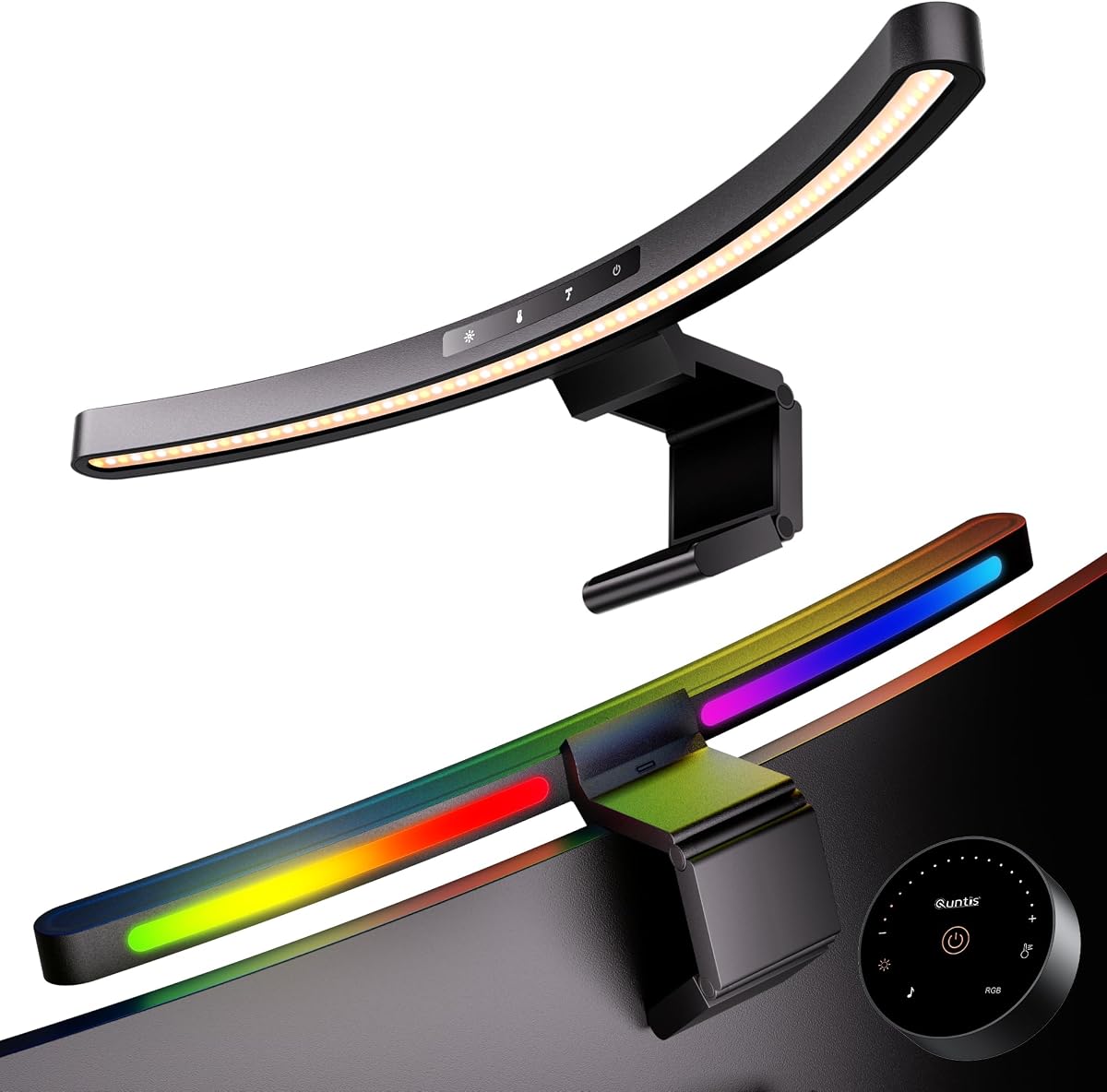


The Quntis 26-inch curved RGB light bar earns the top position because it combines a genuinely curve-aware design with unusually detailed control over both task and ambient lighting. Its 4.7 rating reflects a product aimed at large curved and ultrawide monitors, particularly displays above 34 inches with curvature ranging from 800R to 3000R.
We may earn a commission when you buy through this link, at no additional cost to you.
The most impressive feature is the 26-inch extended arc, which follows a large display rather than forcing a straight beam into the corners of a curved screen. Its foldable dual-light construction can shift between broad desk coverage and concentrated illumination, while the stated center output reaches 1400 lux and the wider area reaches 500 lux. This makes the bar more versatile than a basic decorative backlight.
Color quality is another strength. The listed CRI98 rating and 3000K-to-6500K color temperature range support accurate work with websites, documents, creative applications, and games. The asymmetric optical design directs illumination toward the desk rather than into the screen, and the 15 RGB modes add atmosphere for evening sessions. Automatic brightness adjustment and power-off memory reduce the need for repeated manual changes.
The main compromise is size. This is not the most discreet option for a compact workstation, and its controls and lighting features may be more than a user who simply wants a basic front light needs. Even so, the broad compatibility, strong illumination, adjustable construction, and balance of practical and gaming features make it the most complete choice for a large curved setup.
The extended arc follows 800R-to-3000R displays and avoids the uneven side coverage associated with some straight bars. This is especially valuable on 34-inch-plus monitors where the edges sit noticeably farther from the center.
Independent-looking foldable sections let users redirect the light for detailed work, while 15 backlight modes create a softer ambient glow. The result serves productivity and entertainment without requiring separate lamps.
We may earn a commission when you buy through this link, at no additional cost to you.
The ONWAY curved monitor light bar is built around convenient remote operation, straightforward brightness and color-temperature control, and compatibility with curved or unusually shaped displays. Its 4.5 rating reflects a practical balance of task lighting, ambient effects, and a flexible clamp designed for common home-office setups.
We may earn a commission when you buy through this link, at no additional cost to you.
Its wireless 8-centimeter touch remote is the standout convenience feature. Users can change presets, RGB modes, and dynamic effects without reaching behind the monitor. The main control surface supports stepless brightness adjustment across a 3000K-to-6500K range, while ten RGB modes add atmosphere without requiring a separate lighting accessory.
Optical performance is designed around an 88-LED array and a 45-degree asymmetric layout. That directs light toward the desktop rather than the display, and the stated 275-lumen output is intended to create natural-feeling task illumination with Ra95 color rendering. The flexible clamp accommodates 27-to-34-inch monitors with 1000R or 1800R curvature, including thin and irregular models.
Compared with the largest ultrawide options, ONWAY produces less light and has fewer RGB effects. It also carries a more modest feature set than models with independently pivoting bars or presence detection. For users who prioritize simple remote control, a webcam-friendly design, and uncomplicated everyday comfort, however, those trade-offs are entirely reasonable.
The compact wireless remote provides access to lighting settings from across the desk. This is particularly useful when changing brightness for daytime work, switching to warm light while reading, or selecting an RGB effect during entertainment.
A flexible mounting clamp is useful when the rear housing is not flat or when the display is thinner than conventional desktop monitors. This broadens the practical appeal beyond perfectly standard curved panels.
We may earn a commission when you buy through this link, at no additional cost to you.
The Quntis Dual Pivoting Light Bar stands out for its two independently adjustable curved light sections. Rather than forcing one fixed beam pattern, it can spread outward for broad desk illumination or fold inward for concentrated work on drawing, crafting, modeling, and other detail-oriented tasks.
We may earn a commission when you buy through this link, at no additional cost to you.
Its 26-inch arc is designed specifically for 34-inch-plus ultrawide displays with 800R-to-3000R curvature. The matching shape is important because a straight bar can leave the sides of a deeply curved display outside the useful light path. Here, the curved optical design follows the panel and directs light toward the work surface.
The listed CRI98 performance and 112 LED beads make this a compelling option for users who notice subtle differences in color. An ambient sensor adjusts brightness in real time, one-touch controls simplify common changes, and power-off memory restores earlier settings. The flexible clamps also accommodate flat, curved, and irregular-backed displays up to 3.35 inches thick.
The dual-pivot arrangement can take more time to adjust than a single fixed bar, and users seeking extensive RGB or audio-reactive effects should look elsewhere. For desk layouts, multi-monitor arrangements, and creative work that benefits from independently controlled pools of light, though, this Quntis offers a clear functional advantage.
Independent pivots allow one side to illuminate a notebook while the other focuses on a keyboard or drawing area. That flexibility is more useful than simply choosing between a single bright and single dim setting.
The stated CRI98 rating supports clean color perception for design, media editing, and ordinary reading. It also helps the desktop illumination look more natural than a strongly tinted or low-quality alternative.
We may earn a commission when you buy through this link, at no additional cost to you.
The Quntis Music Sync light bar is the entertainment-focused member of this group, combining 900 lux of front task lighting with 23 RGB effects and a 17.7-inch mounting span. Its 4.6 rating makes it a strong option for gamers, streamers, and anyone who wants a curved monitor to serve as the center of a more animated desk setup.
We may earn a commission when you buy through this link, at no additional cost to you.
The effects system is more varied than most competing models. Thirteen RGB presets include seven solid colors and six dynamic patterns, while ten additional music-sync modes react to sound in real time. This allows the rear glow to follow games, playlists, and movie sessions rather than remaining a repetitive static cycle.
The front light remains practical, with five preset brightness levels, five color-temperature settings, and stepless adjustment from 3000K to 6500K. A wireless remote provides convenience, while touch controls remain available as a backup. The weighted clip fits curved or flat monitors from 17 to 34 inches and doubles as a platform for keeping a webcam centered.
Its main limitation is size. While it supports many common curved monitors, it is not the right tool for a very large 34-inch-plus ultrawide that needs light across the entire arc. Buyers also need to value RGB flexibility rather than prefer a strictly minimal appearance. For compatible displays, it offers one of the most varied ambient experiences in the roundup.
Ten music-responsive modes transform the monitor's rear glow into an entertainment feature. The effect is especially useful for gaming, livestreaming, and listening sessions where a static backlight can feel disconnected from the activity.
The flat top of the weighted clip provides a centered place for a webcam. This reduces the need for a separate base and helps preserve desk space around a curved display.
We may earn a commission when you buy through this link, at no additional cost to you.
The Quntis Focus is a bright, practical monitor light bar for users who need strong desk illumination rather than extensive decorative effects. Its 4.4 rating and professional feature set center on remote adjustment, automatic brightness, glare control, and compatibility with a broad range of curved and flat displays.
We may earn a commission when you buy through this link, at no additional cost to you.
The listed output reaches at least 1200 lux, making it one of the more powerful task lights in the comparison. A 45-degree asymmetric optical design directs that output toward the keyboard and desktop, while a 15-degree pivot allows further refinement. The remote stepless brightness control and 3000K-to-6500K color-temperature range make it easy to adapt to different activities.
The patented triple-fold weighted clamp accommodates monitors from 17 to 32 inches and thicknesses between 0.12 and 3.94 inches. That is a notably broad range, including curved, flat, and irregular housings. An ambient sensor can automatically adjust the output, and a two-hour timer provides a timely reminder to step away from the screen.
The one-section construction cannot spread light across the full width of a very large ultrawide, and the product is less compelling for users whose priority is dynamic RGB ambience. It does, however, focus on a proven productivity formula: bright, directed lighting, broad mounting compatibility, remote convenience, and a well-considered break reminder.
The asymmetric beam and adjustable pivot concentrate light on work materials where it is useful. The stated IEEE 1789 and IEC 62471 compliance adds reassurance for users who are especially sensitive to screen glare and lighting flicker.
The weighted triple-fold mechanism is the model's most practical differentiator. It covers a wide thickness range and can adapt to irregular monitor backs, reducing the chance that a suitable curved display will be incompatible.
We may earn a commission when you buy through this link, at no additional cost to you.
The ELUTENG Curved Monitor Light Bar delivers the essential benefits of a monitor lamp without adding a large collection of premium features. Its 4.6 rating reflects a straightforward and appealing combination of stepless controls, a wireless remote, asymmetric task lighting, and a base-free design for 27-to-34-inch curved monitors.
We may earn a commission when you buy through this link, at no additional cost to you.
Brightness can be adjusted continuously from 10 to 100 percent, and color temperature spans a broad 2900K-to-6500K range. The wireless remote uses two dry batteries as its power source, which is a differentiator from smaller button-cell remotes. A simple touch interface also provides access to the main lighting functions.
The asymmetric surround-lighting design aims light along the screen toward the desktop instead of directly onto the panel. With approximately 167 lumens, the light is sufficient for general desk use but is less intense than the brightest professional models. Its 40-centimeter length and stated curved-monitor focus make it most relevant to conventional curved desktop displays.
There is no RGB rear glow, automatic sensor, or music synchronization, so buyers seeking atmosphere should look elsewhere. Even so, ELUTENG covers the essential needs of most students and office workers without cluttering the desk with a separate base. It is an approachable choice for users who prioritize easy operation, simple design, and practical illumination.
Stepless brightness and color-temperature controls allow fine changes without cycling through rigid presets. The remote makes those adjustments convenient when the light bar is mounted high on a large curved display.
Eliminating the base means the bar occupies only the space directly above the monitor. A right-routed USB cable and compact bracket keep the installation visually tidy on an otherwise open work surface.
We may earn a commission when you buy through this link, at no additional cost to you.
The Geisofu RGB monitor light bar focuses on the essentials of an affordable gaming accent light: seven rear colors, front task illumination, touch controls, and flexible positioning. Its 4.3 rating makes it a practical option for users who want a curved-monitor look without investing in a more elaborate lighting system.
We may earn a commission when you buy through this link, at no additional cost to you.
The rear RGB system supplies seven colors that can give a desk setup more personality and soften the contrast between the display and the surrounding room. On the front, three color-temperature settings and infinite dimming let users adapt the task light for reading, studying, general computer work, or gaming.
Installation uses an anti-weighted clamp with 180-degree movement, while the light strip itself adjusts through a 90-degree range. The four touch-sensitive buttons keep mode changes simple, and a one-hour timer offers a reminder to rest. Power comes through the included USB-C cable, and the brightness memory returns the previous setting after power is restored.
The product description specifically says it is not recommended for flat-panel displays, which limits its appeal for mixed monitor arrangements. It also lacks a remote, automatic sensor, and music-reactive effects. Nevertheless, for a curved gaming monitor in the supported thickness range, it offers a compact and engaging solution with more visual personality than a basic task lamp.
Seven RGB choices and touch-based mode changes are enough to create a coordinated desk atmosphere. The system avoids complicated remotes and synchronized audio modes, keeping setup straightforward.
Independent movement at the clamp and light strip makes it possible to alter the beam after installation. This flexibility is helpful when the monitor position, keyboard, or preferred work area changes.
We may earn a commission when you buy through this link, at no additional cost to you.
The LYMAX Curved Monitor Light Bar is the most highly rated product in this roundup, with a 4.9 customer score. It is designed for 34-inch-plus curved monitors and combines a curve-following optical layout, a 45-degree asymmetric lens, high color rendering, and a PIR sensor that can switch the light according to user presence.
We may earn a commission when you buy through this link, at no additional cost to you.
The presence sensor is the defining feature. It detects when someone sits down and activates the light, then fades it off after the user leaves. This hands-free operation is more proactive than a basic ambient sensor that only changes brightness, and it can reduce unnecessary standby lighting without requiring a manual switch.
Both touch controls and a wireless remote offer stepless brightness and color-temperature adjustment from 2700K to 6500K. The listed CRI97 and RG0 low-blue-light certification make the bar appealing for extended work, while the flicker-free design supports steady viewing. A reinforced clamp accommodates screens up to 50 millimeters thick, and silicone pads help protect the display.
Users who depend on a rear RGB glow may be disappointed because no RGB backlight is listed. The presence sensor may also require careful placement to detect someone reliably at the desk. Even with those caveats, the combination of thoughtful automation, high color quality, clean cable management, and flexible controls makes LYMAX a particularly attractive modern option.
Unlike a standard ambient sensor that only matches room brightness, the PIR detector can turn the entire light on or off. That makes it especially convenient in shared rooms and dedicated home offices.
The 2700K-to-6500K range covers warm evening use through cool daytime focus. CRI97 color rendering and flicker-free operation make the output suitable for extended reading and professional computer work.
We may earn a commission when you buy through this link, at no additional cost to you.
The BenQ ScreenBar Halo 2 is the premium choice in this guide, combining refined controls, professional lighting technology, automatic operation, and a design intended to improve both task visibility and visual comfort. Its 4.7 rating and extensive feature set make it a natural fit for serious computer users, creators, and large curved workstations.
We may earn a commission when you buy through this link, at no additional cost to you.
Its wireless controller is one of the clearest differentiators. The dial-like interface includes a built-in display for precise values, allowing brightness, color temperature, and modes to be adjusted with more feedback than a row of unlabeled touch buttons. The front light uses an 18-degree asymmetric angle to illuminate the desk without creating reflections or shining into the user's eyes.
The Halo 2 also provides adjustable rear ambient lighting, which reduces the stark contrast between a bright screen and a dark room. It can turn on and off with the monitor, adjust brightness according to ambient conditions, and recall the last settings. Color temperature spans 2700K to 6500K, while a CRI above 95 supports accurate color perception and professional calibration work.
Compatibility is narrower than some ultrawide-focused competitors because the stated range covers 1000R-to-1800R curves and monitors up to 2.36 inches thick. The product also occupies the top end of the category. Those considerations matter, but for a compatible professional display, the combination of precise control, dependable automation, ambient balance, and tested longevity is difficult to surpass.
The wireless controller turns frequently used adjustments into a clear, guided process. Its display removes the guesswork involved in estimating brightness or color temperature from a strip of touch controls.
The rear glow softens the contrast between the display and the room while the front beam lights the desk. Together, they support a more even visual environment without asking the user to add a separate bias light.
We may earn a commission when you buy through this link, at no additional cost to you.
The Laliled Curved Monitor Lamp is a simple, space-conscious option for users who want a basic monitor light bar without RGB effects, extensive remotes, or advanced sensors. Its 4.2 rating places it at the lower end of this group, but the supplied features cover the essentials for general desk use.
We may earn a commission when you buy through this link, at no additional cost to you.
The front light provides stepless brightness adjustment and three selectable color temperatures at 2900K, 4100K, and 6200K. Touch controls make the changes direct, and the asymmetric optical design directs illumination onto the desktop rather than allowing visible screen reflections. A one-hour timer offers a simple prompt to rest after prolonged computer use.
Installation is based around a snap-on clip with non-slip silicone padding. The clip adjusts through 180 degrees, the bar itself through 90 degrees, and the product is listed for monitors between 1 and 5 centimeters thick. Because it attaches above the display rather than using a separate base, it leaves the main work surface open.
The stated color rendering index is only over 85, which is lower than the CRI95-to-CRI98 figures claimed by several alternatives. It also lacks a remote, ambient sensor, and RGB backlight. As a straightforward lamp for reading, browsing, studying, and general gaming, it can still provide useful illumination, particularly for buyers who value ease of use over advanced visual features.
Three color temperatures and stepless brightness provide enough control for most tasks while keeping the interface understandable. Touch buttons also avoid the need to keep a small remote nearby.
The anti-weight clip and silicone pad create a stable mount while allowing the beam to be angled. This is a practical arrangement for users who want illumination without a separate lamp taking up desk area.
We may earn a commission when you buy through this link, at no additional cost to you.
The right curved monitor light bar depends on screen size, curvature, desk layout, lighting needs, and preferred controls. Comparing these factors before buying is more useful than focusing on a single specification, because no light bar can optimize every workflow.
A light bar should be wide enough to illuminate the useful area of the desk without directing light into the display. Models designed for 27-to-34-inch curved screens are common, but very large ultrawide displays may require a 26-inch arc or independently pivoting sections. Curvature ratings such as 1000R, 1800R, 3000R, and 800R also indicate how aggressively the panel curves, and a matching bar is less likely to leave the outer edges poorly illuminated.
Asymmetric optical designs direct light toward the keyboard and desktop rather than the screen. This is one of the most important distinctions between a useful monitor light and an ordinary strip that creates reflections. Look for a stated 45-degree or similarly angled optical path, and note that mounting height and desk depth can also affect the final result. A well-positioned light can provide comfortable illumination without washing out dark interface elements.
Brightness controls should offer enough range for both nighttime use and a bright room. Stepless adjustment is more precise than a small collection of fixed levels, while high stated center lux can help on large desks. Lower-output lights may be sufficient for close work, but creative tasks, broad keyboards, and multi-monitor arrangements benefit from stronger and more evenly distributed illumination.
A broad color-temperature range lets users move from warm light for evening relaxation to neutral or cool light for focus. The 3000K-to-6500K range is common, while premium products may extend down to 2700K or 2900K. Color rendering matters for designers, photographers, and editors because a low-CRI source can shift the appearance of materials and screen content.
Touch controls are direct, remotes are convenient, and sensors can reduce manual adjustments. Ambient sensors commonly modify brightness as room light changes, while PIR presence sensors can turn the light on when a user approaches and off when the user leaves. Memory functions are valuable because they restore a preferred configuration after a restart. More features are not automatically better, but they can make a light bar easier to live with daily.
The clamp must accommodate the monitor's thickness, rear shape, and curve. Flexible or weighted clamps are more forgiving of irregular housings, while silicone pads help protect the display from scratches. A base-free design preserves desk space, and a right-angle cable can keep the installation neat. Check the listed thickness range carefully, especially for thin or unusually deep displays.
RGB backlighting is mainly an aesthetic and contrast-reduction feature. Models with solid colors are adequate for a coordinated setup, while dynamic effects and music synchronization suit gaming and entertainment. The number of modes matters less than whether the ambient light is easy to control and whether the bar still offers a practical front task light. Users who want a restrained office appearance should prioritize neutral front lighting over decorative effects.
Useful eye-care features include asymmetric optics, flicker-free output, low-blue-light certification, adjustable color temperature, and scheduled break reminders. Quality claims are most persuasive when accompanied by recognizable standards such as IEC/TR 62778, IEC 62471, IEEE 1789, or RG0 certification. Memory, reliable USB power, and stable mounting also contribute to a better daily experience.
Begin by cleaning the rear housing of the monitor and the upper edge of the display with a soft, dry microfiber cloth. Position the bar so the front light faces the desk rather than the panel, then adjust the clamp and light angle gradually. Avoid forcing the mechanism against a curved or irregular housing, and confirm that the silicone contact points sit securely.
Connect the specified USB power cable, route it behind the monitor, and use the right-angle connector where one is included. Begin at a low brightness level and a neutral color temperature. Add warmer light in the evening, cooler light for focused daytime work, and higher output only when the desk requires broader coverage. If the model includes a sensor, give it time to learn the room's ambient conditions.
For daily care, unplug the bar before adjusting the clamp or repositioning the light. Clean the light diffuser with a dry or lightly damp cloth after allowing the unit to cool, but avoid spraying cleaner directly onto the LEDs. Check the mount periodically, remove dust around the hinge and cable connection, and use the break timer or scheduled power behavior to encourage healthier screen-work intervals.
A properly designed model should direct light toward the desk rather than the display, but mounting angle and desk depth still affect the result. Look for an asymmetric optical design and aim the bar slightly downward toward the work surface. If reflections remain, reduce brightness or make small hinge adjustments until the screen appears clear.
Many clamp-style light bars can physically fit flat displays even when marketed for curved screens. However, some products are designed around a pronounced arc and may not distribute light evenly across a flat panel. Check the stated curvature, screen-size range, and thickness compatibility before using a curved-oriented bar on a flat monitor.
They can help by providing consistent desk illumination, reducing the contrast between a bright screen and a dark room, and avoiding overhead shadows. They cannot correct every cause of eye fatigue, such as poor screen settings, long unbroken focus, or uncorrected vision. Pair a light bar with regular breaks and sensible screen brightness for a more complete approach.
Stepless controls are preferable when matching the light precisely to a changing room or avoiding sudden brightness changes. Presets are simpler and may be sufficient for users with one or two preferred settings. Many of the products reviewed provide both, allowing quick scene selection alongside fine adjustment.
The correct level depends on the size of the desk, the brightness of the room, and the monitor itself. Stronger output is useful for wide desks and detailed work, while lower output suits nighttime use and close-range typing. A bar with broad adjustment and automatic ambient correction is generally more flexible than one with only a bright setting.
RGB can soften the contrast between a large display and a dark wall, which may make some workspaces feel less harsh. Solid, subdued colors can also complement a professional desk. For a formal office, a model with subtle rear lighting and excellent front task output is generally more versatile than one focused primarily on animated effects.
They can, particularly if the clamp has no space for a webcam or the camera is mounted on top of the display. Some models provide a flat upper surface that can serve as a camera base. Otherwise, use a monitor-mounted arm, position the camera beside the screen, and check the available clearance before installation.
Automatic brightness adjustment, power-off memory, a wide color-temperature range, and a reliable break timer are especially helpful. Presence detection can also prevent the light from remaining on after the user leaves. For color-sensitive professionals, high CRI and flicker-free output deserve additional attention.
The Quntis 26-inch curved RGB model offers the strongest all-around combination of wide curve compatibility, strong task illumination, flexible folding light sections, and atmospheric rear lighting. It is particularly well suited to large curved or ultrawide monitors, while the BenQ ScreenBar Halo 2 stands out for professional controls, automatic synchronization, and refined construction.
For buyers seeking a simpler and more economical option, the ELUTENG bar provides the essentials: stepless adjustment, a broad color-temperature range, remote control, and a base-free installation. Before choosing, prioritize screen dimensions, curvature, clamp clearance, glare control, and the kind of illumination your work requires. Decorative RGB should be a secondary consideration for professional setups.
Finally, confirm the current specifications and compatibility details before purchasing. Monitor shapes, included accessories, and product configurations can change, so checking the live listing helps ensure that the selected curved monitor light bar fits your display and supports the daily tasks you have in mind.