
Texas Instruments TI-36X Pro
4.8Editor score
MultiView multi-line display
Textbook-style MathPrint output
Broad scientific function coverage
A scientific calculator for engineering should make complex calculations easier to enter, read, and interpret while remaining dependable across coursework, lab work, and field use. Important considerations include display clarity, mathematical functions, graphing capability, programmability, memory, power options, portability, and any requirements imposed by an exam or workplace.
The ten products in this guide include dedicated scientific models, graphing calculators, and a construction-focused specialist. We compared the listed features, displays, function sets, exam positioning, connectivity options, and practical use cases, while distinguishing general engineering mathematics from design, construction, and classroom requirements.
Each pick below shows why the calculator belongs on the shortlist and where its limitations may matter. Ratings reflect the supplied customer feedback, but product features, bundle contents, availability, and pricing can change, so readers should verify the current listing before making a final purchase decision.
4.8Editor score

4.8Editor score

4.4Editor score
As an Amazon Associate we earn from qualifying purchases.
This side-by-side comparison highlights each calculator's display, function range, graphing abilities, programmability, power, and intended environment, helping engineering students and professionals identify the model that best matches their actual workflow.




The Texas Instruments TI-36X Pro combines a broad scientific function set with a 4.8 customer rating, making it a practical all-purpose choice for engineering students who want more visibility than a basic four-function calculator provides. Its standout feature is the MultiView display, which can show several calculations at once and reduce the need to repeatedly reconstruct expressions from memory.
We may earn a commission when you buy through this link, at no additional cost to you.
MathPrint is particularly useful for courses built around conventional mathematical notation. Fractions, stacked expressions, symbols, and mathematical terms appear in a format that resembles textbook work, reducing interpretation time when checking algebra, trigonometry, statistics, or calculus results. The calculator can also convert among fractions, decimals, and terms including Pi, while degree or radian selection and multiple display modes support common engineering coursework.
The main limitation is that the supplied information does not identify graphing or programming functions. That makes it a strong fit for routine scientific and engineering mathematics, but less suitable when your work requires plotting equations, conducting dynamic visualization, or writing reusable programs. Its feature set also focuses on curriculum use rather than construction-specific estimating and dimensional calculations.
Choose the TI-36X Pro when you need a dependable scientific calculator, textbook-like output, and a broad academic function set without moving into graphing hardware. It is particularly well suited to high school, introductory college, and exam environments where graphing technology may not be permitted, and it earns the Best Budget label for its combination of display quality, versatility, and rating.
MultiView keeps multiple calculations visible, which is useful when checking several values during problem solving. The display helps preserve context while you work through related equations or move between a formula and its result.
MathPrint presents expressions, symbols, and stacked fractions in familiar form. That readability makes the TI-36X Pro especially approachable for students who routinely compare calculator output with handwritten derivations.
We may earn a commission when you buy through this link, at no additional cost to you.
The Casio FX-115ESPLSB-WA-IT is an advanced scientific calculator built around Natural Textbook Display, which shows expressions in a format intended to resemble the way equations appear in textbooks. That approach makes it a strong choice for engineering students who frequently enter long expressions and need to verify the structure of what they entered.
We may earn a commission when you buy through this link, at no additional cost to you.
Its dedicated scientific design concentrates on calculation rather than graphing or computer algebra. For routine work involving algebraic expressions, numeric evaluation, and standard scientific operations, that simplicity can be a major advantage. The display also gives users a clear way to review equation input and results, supporting both quick calculations and more structured problem-solving sessions.
The supplied listing contains less detail than some of the other entries in this guide, so it does not provide a complete function count or a full description of power, connectivity, and programming capabilities. No graphing or programmability is stated. Buyers who require a specific advanced function should verify its presence in the current product documentation before ordering.
This Casio model is most appropriate for users who prioritize readable scientific entry over graphs, touchscreens, or elaborate study software. It is a particularly sensible option for exam-oriented students and classroom workflows where a dedicated scientific calculator is required and a more complex graphing system would add unnecessary bulk or distraction.
Natural Textbook Display keeps the structure of an expression visible as it is entered. This makes long formulas easier to compare with the equation shown in a textbook or assignment.
The model avoids a graphing-first design, helping users concentrate on numeric and symbolic scientific work. It is a practical option when plots, dynamic geometry, and programmable lessons are not central to the task.
We may earn a commission when you buy through this link, at no additional cost to you.
The HP Prime G2 is the most advanced platform in this roundup, combining a multi-touch color screen, graphing, a computer algebra system, dynamic geometry, spreadsheets, RPN, and programmability. Its 4.4 rating is lower than the leading scientific models, but the breadth of the feature set makes it a compelling premium option for engineering students who need more than isolated numeric calculations.
We may earn a commission when you buy through this link, at no additional cost to you.
The 3.5-inch high-resolution display supports pinch-to-zoom, interactive graph manipulation, customizable backgrounds, and finger-based sketching. Dedicated keys allow users to move among symbolic, graphical, and numerical views, which can help connect equations with their visual representations. The CAS is particularly relevant when students need to explore complex mathematics rather than only evaluate a final numerical answer.
This is not a minimal scientific calculator. Its rechargeable battery, 256MB of flash memory, optional wireless connectivity, and mobile-app integration support a larger STEM ecosystem, but they also add complexity for someone who only needs standard trigonometric or statistical calculations. The 4.4 customer rating suggests that satisfaction varies more than it does for the simpler models, so buyers should assess their comfort with a full graphing environment.
Choose the Prime G2 for a college-level environment where graphing, symbolic algebra, programming, and interactive visualization are important. It is also well suited to shared STEM instruction through optional connectivity kits. The included case and cloth make it easier to protect and carry the larger unit between classes, laboratories, or study sessions.
A computer algebra system, dynamic geometry, advanced graphing, spreadsheets, and RPN broaden the model beyond a single calculation mode. Dedicated controls help users compare symbolic, graphical, and numerical approaches without relying entirely on a computer.
Optional wireless kits allow instructors to poll students, share data, and project screens, while the mobile app mirrors calculator functions. These features make the G2 especially relevant to structured classroom environments.
We may earn a commission when you buy through this link, at no additional cost to you.
The TI-30XIIS is a fundamental scientific calculator that combines statistics, advanced scientific operations, fraction handling, conversions, and trigonometric functions in a straightforward two-line format. Its 4.7 rating reflects a well-regarded option for users who want more capability than a basic classroom calculator without stepping into graphing hardware.
We may earn a commission when you buy through this link, at no additional cost to you.
The two-line display is the central practical benefit. Showing the current entry and calculated result together helps users confirm that an expression was entered correctly and provides immediate context for the answer. Fractions, conversions, and basic scientific functions cover many of the calculations encountered across introductory mathematics and science courses.
Dual solar and battery power improves flexibility, and the supplied information confirms approval for the SAT, ACT, and AP exams. However, no graphing, programming, wireless, or computer algebra functions are listed. Users who expect graphing for engineering visualization or repeated custom workflows may need a more advanced model.
The TI-30XIIS is a solid choice for high school and early college work, standardized testing, and anyone who values a two-line scientific display in a simple package. It may also work as a backup calculator. For students moving into courses that emphasize plots or advanced symbolic work, the Prime G2 or Casio Prizm FX-CG50 offers a more relevant feature set.
The two-line screen provides immediate confirmation of both what was entered and what the calculator returned. That makes error checking faster during algebra, statistics, and scientific calculations.
Solar and battery power options reduce the chance that the calculator becomes unavailable during a long session. It also makes the model reassuringly straightforward for exam-oriented users.
We may earn a commission when you buy through this link, at no additional cost to you.
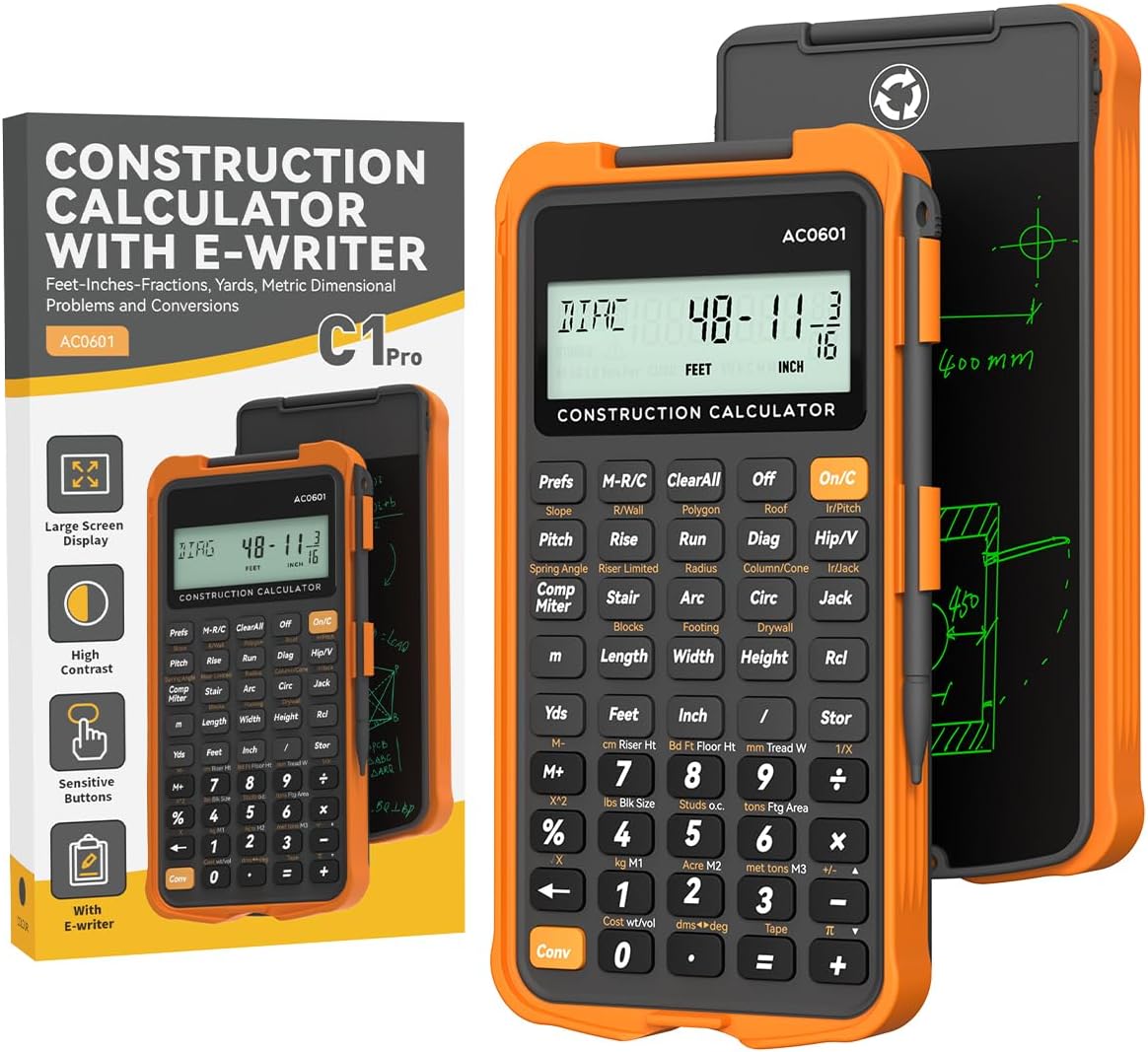
The ROATEE Construction Calculator is designed for practical trade and construction work rather than general academic engineering alone. Its 4.6 rating, large display, integrated writing tablet, and more than 200 specialized functions distinguish it from conventional scientific calculators and make it a valuable option for builders, estimators, contractors, and construction-focused engineering students.
We may earn a commission when you buy through this link, at no additional cost to you.
The function library addresses mixed-dimension calculations and conversions, area and volume, concrete, brick and block, boards, flooring, wall studs, drywall, circles, arcs, compound miters, polygon tiling, roofing, foundations, right angles, rafters, roof pitch, stair layout, and rake walls. Custom parameters and three storage registers allow users to retain selected values, while the flip-page pad provides a convenient place for sketches and notes.
Its 3-inch, 12-digit display is designed for readability, but that digit count may be less useful for demanding numerical analysis or work requiring extensive intermediate precision. The product is also construction-specific, so a student whose primary focus is abstract mathematics, dynamics, or general engineering theory may prefer a broader scientific or graphing platform.
Choose the ROATEE model when field usability, trade-specific calculations, and note-taking matter more than graphing or symbolic algebra. It suits carpenters, roofers, concrete workers, contractors, estimators, architects, renovators, and engineering students who need to move quickly between a dimensioned calculation and a written layout.
Built-in modules cover roofing, rafters, stairs, concrete, board, drywall, and polygon tasks. These specialized routines can reduce repetitive manual setup compared with a general calculator.
The flip-page writing tablet keeps working notes beside the keypad. The thick protective material and phone-like construction are also designed to withstand drops and harsh working environments.
We may earn a commission when you buy through this link, at no additional cost to you.
The CATIGA CS-229 combines scientific calculation, graphing, and more than 360 functions in a compact 7-by-3.3-inch body. Its 4.4 rating places it behind several higher-rated scientific models, yet the combination of plotting, formula display, and specialized functions gives it value for students who want graphing support without moving to a full premium platform.
We may earn a commission when you buy through this link, at no additional cost to you.
The calculator can plot functions, analyze graphs, and solve complex equations while displaying graphs and formulas at the same time. Its multiple measurement, calculation, and display modes support work across algebra, geometry, trigonometry, statistics, and calculus. Additional functions include fractions, complex numbers, linear regression, standard deviation, and variable solving.
The anti-drop body and included protective case help with everyday portability, and the balanced size is intended to fit comfortably in one hand or on a desk. On the other hand, the 4.4 rating suggests that user experiences are less uniformly positive than those of the leading scientific options. The supplied description also does not mention exam approval, computer algebra, Python, or wireless connectivity.
Choose the CS-229 for a budget-conscious blend of conventional scientific functions and graphing. It is a useful fit for high school or college study, exam preparation, and users who want visual equation exploration in a portable format. Buyers needing advanced CAS, 3D graphing, or a clearly documented exam-approved configuration should examine one of the more specialized alternatives.
Simultaneous graph and formula output helps users relate an algebraic expression to its visual behavior. Plotting and graph analysis extend the calculator beyond a standard numeric workflow.
With more than 360 functions across fractions, complex numbers, statistics, regression, and variable solving, the CS-229 is positioned as a versatile academic tool for several levels of mathematics and science.
We may earn a commission when you buy through this link, at no additional cost to you.
The Casio FX-9910CW-W-IT is an advanced ClassWiz scientific calculator with a 4.7 rating and a high-definition, quadruple-graded LCD. Its Natural Textbook Display is designed to simplify equation input and review, making this model appealing to students who want a clear, conventional scientific calculator for technical coursework.
We may earn a commission when you buy through this link, at no additional cost to you.
The graded display is intended to make values easier to distinguish and expressions easier to inspect. Textbook-style presentation reduces the gap between what appears on the screen and what appears in a derivation or assignment, which can be especially useful for algebra, trigonometry, calculus, and other engineering-adjacent subjects.
The supplied information does not list graphing, programming, connectivity, or specific exam approvals, so those capabilities should not be assumed. It is also a less feature-dense choice than the HP Prime G2 or Casio Prizm FX-CG50. However, for users who prefer a dedicated scientific device, a high-definition screen may be more relevant than a large color display or touch interface.
Choose this Casio model for crisp equation visibility and a focused scientific workflow. It is well suited to students working through substantial calculations, exam preparation, and courses where a natural textbook layout reduces transcription errors. Users who need plots or programmable automation should choose a graphing model instead.
The high-definition quadruple-graded LCD gives important values varying levels of visual emphasis. That helps when checking a long calculation where a single undifferentiated line of digits would be difficult to scan.
Natural Textbook Display supports equation entry and review using a presentation that resembles conventional mathematics. Students can compare calculator expressions directly with formulas from course material.
We may earn a commission when you buy through this link, at no additional cost to you.
The Casio fx-991ES Plus 2 is a well-rounded scientific calculator with 417 functions, Natural Display, regression and correlation coefficients, and a strong 4.8 customer rating. It offers enough mathematical breadth for substantial engineering coursework while preserving the portability and simplicity associated with a dedicated scientific model.
We may earn a commission when you buy through this link, at no additional cost to you.
Natural Display enters and shows numeric expressions in a form that resembles textbook notation. The model supports 24 levels of brackets, a valuable detail for users entering deeply nested calculations. Regression and correlation features extend its usefulness for data analysis, while solar and battery power provides flexibility during extended study sessions.
The primary trade-off is that the supplied information does not identify graphing, programmability, or computer algebra functions. That means users who need interactive plots, symbolic solution tools, or custom programs may need a more advanced calculator. Conversely, the focused design avoids unnecessary complexity for users who mostly need reliable scientific functions.
This is an excellent general recommendation for engineering students taking algebra, trigonometry, statistics, calculus, and related classes, as well as professionals who want a dependable calculator for everyday technical work. Its 417-function range, readable display, and 4.8 rating justify the Editor's Choice designation, while its relatively compact form makes it easy to carry between locations.
Twenty-four bracket levels support deeply structured calculations that would be difficult to manage manually. This is a meaningful advantage for advanced coursework and multi-step engineering formulas.
Regression and correlation coefficients expand the calculator beyond basic evaluation and trigonometry. These features make it useful for data-oriented assignments and general technical analysis.
We may earn a commission when you buy through this link, at no additional cost to you.
The Casio Prizm FX-CG50 combines a high-resolution color display, 3D graphing, advanced mathematics, statistics, geometry, and MicroPython programming. With a 4.8 customer rating and approval for AP, SAT, ACT, IB, and other standardized exams, it offers a compelling blend of visualization and programming for students who need more than a standard scientific calculator.
We may earn a commission when you buy through this link, at no additional cost to you.
The large screen can display more than 65,000 colors and support up to three 3D functions, including shapes such as spheres, cylinders, and planes. Polar and rectilinear graphing, simultaneous equations, dynamic graphing, complex numbers, and dedicated statistical and geometry tools broaden the range of applications. Natural Textbook Display keeps expressions and results familiar even on a graphing platform.
MicroPython adds meaningful programmability. Users can write programs directly on the calculator or connect it to a PC to transfer, store, and share those programs. The trade-off is size and complexity: a color graphing model is less pocketable and more involved than a standard scientific calculator, and not every engineering workflow requires programmable graphing.
Choose the FX-CG50 for college-level graphing, 3D visualization, data analysis, or programming projects. It is a strong option for users who want a capable standalone STEM device but do not need the Prime G2's multi-touch interface or computer algebra system. The exam approvals and high rating also make it a reassuring choice for structured academic use.
Support for up to three 3D functions makes the FX-CG50 well suited to exploring spatial relationships and geometric forms. Color output adds visual separation that can make complex plots easier to interpret.
MicroPython supports an on-device programming workflow, while PC connectivity makes it possible to transfer, store, and share programs. This is valuable for repeated calculations and engineering-oriented computational projects.
We may earn a commission when you buy through this link, at no additional cost to you.
The Casio FX-9910CW-PK-W-IT shares the core display proposition of the other ClassWiz model in this roundup: a high-definition, quadruple-graded LCD and Natural Textbook Display in a dedicated scientific calculator. Its 4.6 rating is solid, and the focused format offers a practical option for students who value clarity without a graphing screen.
We may earn a commission when you buy through this link, at no additional cost to you.
The graded LCD is designed to improve the readability of results and the ease of reviewing equation input. Natural Textbook Display presents expressions in a textbook-like arrangement, which can reduce the time required to map calculator output back to a written formula. That makes the model relevant for introductory engineering mathematics and other quantitative courses.
The listing does not provide a detailed function count, exam approval list, power specifications, or evidence of graphing and programming. Those omissions limit direct comparison with the Casio fx-991ES Plus 2, whose 417-function specification and dual power options are clearly documented. Buyers who need assured feature coverage should consult the current manual and product listing.
Choose this model when a compact, readable scientific calculator is the goal and graphing is unnecessary. It is a practical study and exam companion for students who spend time checking formulas in conventional notation. For advanced plotting, 3D visualization, or programming, the Casio Prizm FX-CG50 offers a clearly documented alternative.
The high-definition graded display makes values and expressions easier to scan. For students comparing long calculations, clearer output can reduce transcription mistakes and speed up verification.
The dedicated scientific format keeps the workflow centered on calculation rather than graphing and app integration. It is a straightforward option for classes that permit or require a non-graphing scientific calculator.
We may earn a commission when you buy through this link, at no additional cost to you.
The right scientific calculator for engineering depends on the mathematics you perform, the restrictions imposed by your courses or workplace, and how often you need visualization, programming, or portable note-taking. Use the following factors to narrow the field before comparing individual models.
Begin with the functions your coursework actually uses rather than choosing solely by the number printed on the package. Algebraic entry, trigonometric functions, logarithms, powers, fractions, statistical analysis, and unit-related calculations may be enough for many engineering courses. The TI-36X Pro, Casio FX-115ESPLSB-WA-IT, and the fx-991ES Plus 2 all provide textbook-oriented scientific workflows, but their documented breadth differs. Check the current manual for the exact operations and statistical features required by your program, especially if you use complex numbers, regression, correlation, or variable solving.
Graphing becomes important when relationships, intersections, function behavior, or three-dimensional geometry help explain a problem. The HP Prime G2, CATIGA CS-229, and Casio Prizm FX-CG50 provide graphing, with the Prime and Prizm offering substantially more advanced color visualization. The Prime adds a multi-touch interface, dynamic geometry, spreadsheets, RPN, and a computer algebra system, while the Prizm supports up to three 3D functions and MicroPython. The TI-36X Pro, TI-30XIIS, and the three Casio FX scientific models are better suited to users who primarily need numerical work.
Engineering calculations often contain long expressions, nested brackets, fractions, and symbols, so display design is more important than a superficial color preference. Natural Textbook Display, Natural Display, MathPrint, and MultiView all aim to present information in a recognizable mathematical form. A two-line display, such as the one on the TI-30XIIS, can also help by showing entry and result together. High-resolution graded screens on the ClassWiz models improve visual distinction, while larger color displays on the HP Prime and Casio Prizm provide room for plots and multiple views.
Programmable calculators are valuable when you repeatedly perform similar calculations, customize a workflow, or build tools for a project. The Casio Prizm FX-CG50 includes MicroPython and can connect to a PC for transferring and sharing programs. The HP Prime G2 is also programmable and adds a computer algebra system, dynamic geometry, spreadsheets, and RPN. These advanced tools can save time in specialized workflows, but they also carry a steeper learning curve. If your tasks are primarily standard scientific calculations, the added complexity of a graphing platform may provide little practical benefit.
Before buying, determine whether your school, certification exam, or employer specifies an approved model or forbids graphing devices. The TI-30XIIS is listed as approved for SAT, ACT, and AP exams, while the HP Prime G2 is approved for PSAT/NMSQT, SAT, IB, and select AP exams. The Casio Prizm FX-CG50 is approved for AP, SAT, ACT, IB, and other standardized exams. Because approval lists can change, verify the exact exam and current rules on the official product listing or exam website rather than relying only on a general approval statement.
Consider how far the calculator travels and how often it is exposed to dust, drops, or rough handling. Dedicated scientific models are generally easier to carry between classes, while large color graphing units require more space and protection. The CATIGA CS-229 includes a protective case and uses an anti-drop body, while the HP Prime G2 includes a slide-on cover, case, and cloth. The ROATEE construction model is uniquely suited to demanding job sites, with a thick protective body, 45 rebound keys, and a writing tablet for notes alongside calculations.
Power and storage can influence whether a calculator remains ready during a long project. The TI-30XIIS and fx-991ES Plus 2 offer both solar and battery power, providing a useful fallback when illumination or battery changes are concerns. The HP Prime G2 uses a rechargeable lithium-ion battery and includes 256MB of flash memory for programs, exam configurations, and images. The ROATEE model includes three storage registers for custom parameters, while offering a different kind of value: physical storage for written working beside the numerical result.
General engineering mathematics is not the only form of engineering work. Construction professionals may need dedicated routines for roofing, rafters, stairs, concrete, boards, drywall, circles, and dimensional conversions. The ROATEE Construction Calculator offers more than 200 of these functions and is better aligned with builders, contractors, estimators, and construction-oriented students than a general scientific model. If your work centers on field dimensions rather than higher mathematics, examine task-specific functions and usability in the environment where you will actually use the device.
Begin by reading the quick-start guide and identifying the calculator's modes, angle units, number format, and power controls. Set degrees or radians correctly before beginning trigonometric work, and use fixed or floating display settings that preserve enough precision without creating unnecessary visual clutter. For a model with a reset button, consult the manual before using it, since a reset may remove stored programs, settings, or other saved information.
Develop a consistent calculation method: write down intermediate values when dimensional reasoning matters, use parentheses to make nested expressions unambiguous, and check units before accepting a numerical answer. On graphing models, label functions and windows so plots remain interpretable, and save custom programs or configurations before changing batteries, resetting the device, or transferring files to a computer. Use the dedicated writing surface on the ROATEE model for quick layouts and notes rather than relying on the display for unfinished work.
Protect the device from impact, moisture, dust, and extreme temperatures. Keep scientific calculators in a pouch or case, and use the included protective case or cover with graphing models. Replace batteries promptly when a low-power warning appears, clean the keypad and display with a soft dry cloth, and avoid opening the casing unless the manufacturer provides explicit service instructions. Confirm exam settings and restrictions immediately before a test, and check the current manual for updates or compatibility details.
It depends on your course requirements and the type of engineering work you perform. A scientific calculator is often sufficient for algebra, trigonometry, statistics, and routine numerical calculations, while graphing models become more useful when you must visualize functions, analyze equations graphically, or work with three-dimensional geometry. Always check the approved-device rules for your exams and classes before purchasing.
The TI-36X Pro, TI-30XIIS, fx-991ES Plus 2, and the ClassWiz Casio models all emphasize readable scientific calculation rather than touchscreens and extensive app-based workflows. The TI-36X Pro offers MultiView and MathPrint, the fx-991ES Plus 2 provides 417 documented functions, and the TI-30XIIS uses a simple two-line layout. Your familiarity with textbook notation and the functions your course requires should guide the choice.
A scientific calculator is designed primarily for numeric and symbolic evaluation, functions, fractions, statistics, and trigonometric work. A graphing calculator adds plots, larger displays, graphing tools, memory, and often programming or symbolic algebra. Graphing models are more capable for visual and computational tasks, but they are also larger, more complex, and sometimes prohibited on particular exams.
Allowance depends on the exam and the specific model. The TI-30XIIS is listed for SAT, ACT, and AP use, while the HP Prime G2 and Casio Prizm FX-CG50 have broader listed approvals that include several major exams. Rules and approved configurations can change, so confirm the current official list for your particular test date and exam category.
The ROATEE Construction Calculator is the most directly specialized option in this guide. It provides more than 200 functions for areas, volumes, concrete, boards, flooring, drywall, roofing, rafters, stairs, and related trade tasks, plus an integrated writing tablet. General scientific or graphing models may be better for abstract mathematics, while the ROATEE is strongest for construction workflows.
That depends on the model. The HP Prime G2 is explicitly described as programmable, and the Casio Prizm FX-CG50 supports MicroPython both on-device and through a PC connection. The supplied information does not identify programming capabilities for the other models, so check the manual before assuming custom programs are supported.
No. Ratings can indicate broad customer satisfaction, but suitability also depends on functions, display, graphing, programmability, exam approval, and intended work environment. For example, the CATIGA CS-229 has a more accessible graphing feature set, while the ROATEE model targets construction tasks, but each has a lower rating than some of the leading scientific calculators.
Use a protective case or pouch, keep the device away from moisture and excessive heat, and avoid placing heavy objects on its screen or keypad. A graphing calculator benefits from its included cover or case, while a field construction model should be stored in a dry location after use. Cleaning the display and buttons with a soft dry cloth also helps prevent grime from affecting input or visibility.
The Texas Instruments TI-36X Pro is the strongest general-value choice, combining a 4.8 rating, MultiView visibility, MathPrint notation, and broad curriculum coverage. The Casio fx-991ES Plus 2 stands out for its 417-function set, 24 bracket levels, regression features, and textbook-style display, while the HP Prime G2 offers the most expansive premium environment with CAS, graphing, programmability, memory, and connectivity.
Prioritize the capabilities your work will actually require. Choose a readable scientific model for routine equations and exams, a graphing calculator for visual analysis, a programmable model for custom workflows, and the ROATEE construction calculator for field-oriented trade calculations. Portability, display size, power design, and exam restrictions can be just as important as the advertised function count.
Before ordering, verify the current product page, manual, and exam-policy list. Features, bundle contents, ratings, availability, and pricing can change over time, and the most suitable calculator is ultimately the one that supports your mathematics, fits your working environment, and remains permitted wherever you intend to use it.