
Art Projector for Tracing and Drawing
3.9Editor score
Browser-based image control
Adjustable focus controls
Dual-band Wi-Fi connection
Discover the best pico projector for cookie and cake decorating, with ten options compared for focus, control, portability, and image clarity and ease of use.
A pico projector for cookie and cake decorating places a reference image directly over a work surface, helping bakers translate designs without constant resizing or squinting. The most useful models combine focused projection, simple image controls, stable positioning, and enough brightness to remain visible around a busy kitchen.
The products in this guide were compared using their stated brightness, resolution, focus controls, screen mirroring, stand design, power options, and intended creative uses. The list includes purpose-built art projectors, compact travel models, and larger portable projectors that can trace cakes, cookies, paper projects, or other flat surfaces.
Each review explains where a projector stands out, where its controls or setup may require extra attention, and which decorating tasks it suits best. Product ratings reflect the supplied customer feedback, while features and availability can change; compare current listings and specifications before buying.
3.9Editor score

4.2Editor score

4.2Editor score
This side-by-side overview compares each projector by its creative controls, power source, projection specifications, and practical suitability for tracing cookies, cakes, and other artwork.




The KODAK Pocket Mini Projector has a supplied rating of 4.3, the highest among the ten products in this guide. It is designed as a general-purpose portable movie and presentation projector, but its compact size, 100-inch display capability, and flexible inputs also make it a practical option for projecting reference images onto a worktable.
We may earn a commission when you buy through this link, at no additional cost to you.
Its strongest qualities are portability and setup simplicity. HDMI, USB, and microSD connections let users select among several source devices without depending exclusively on wireless casting. The built-in 1W speaker is primarily useful for ordinary viewing, while the pocket-sized enclosure makes the projector easier to reposition between a wall, a vertical tracing surface, and a kitchen work area.
The main limitation is that it is not presented as a dedicated art projector. It does not include a tracing app, grid, automatic art-focused focus system, or specialized drawing modes. A baker may therefore need to adjust the source image manually and carefully align the projected reference, especially when the target is a small cookie rather than a broad cake surface.
This model suits buyers who want one compact device for decorating, presentations, and entertainment without committing to an art-specific device. It is a strong generalist choice, though the Caydo M1C offers more direct decorating features and the KODAK Luma 75 Kit provides a purpose-built overhead mount for steadier tracing.
HDMI, USB, and microSD inputs provide several ways to load artwork or connect a compatible device. That flexibility is useful when a decorator wants to work from a phone, laptop, or stored image without depending on a particular wireless platform.
The small enclosure is valuable in a decorating kitchen where counter space may be limited. Its 100-inch capability offers plenty of scale for large presentation or tracing work, although smaller cookies will require careful distance and focus adjustments.
We may earn a commission when you buy through this link, at no additional cost to you.
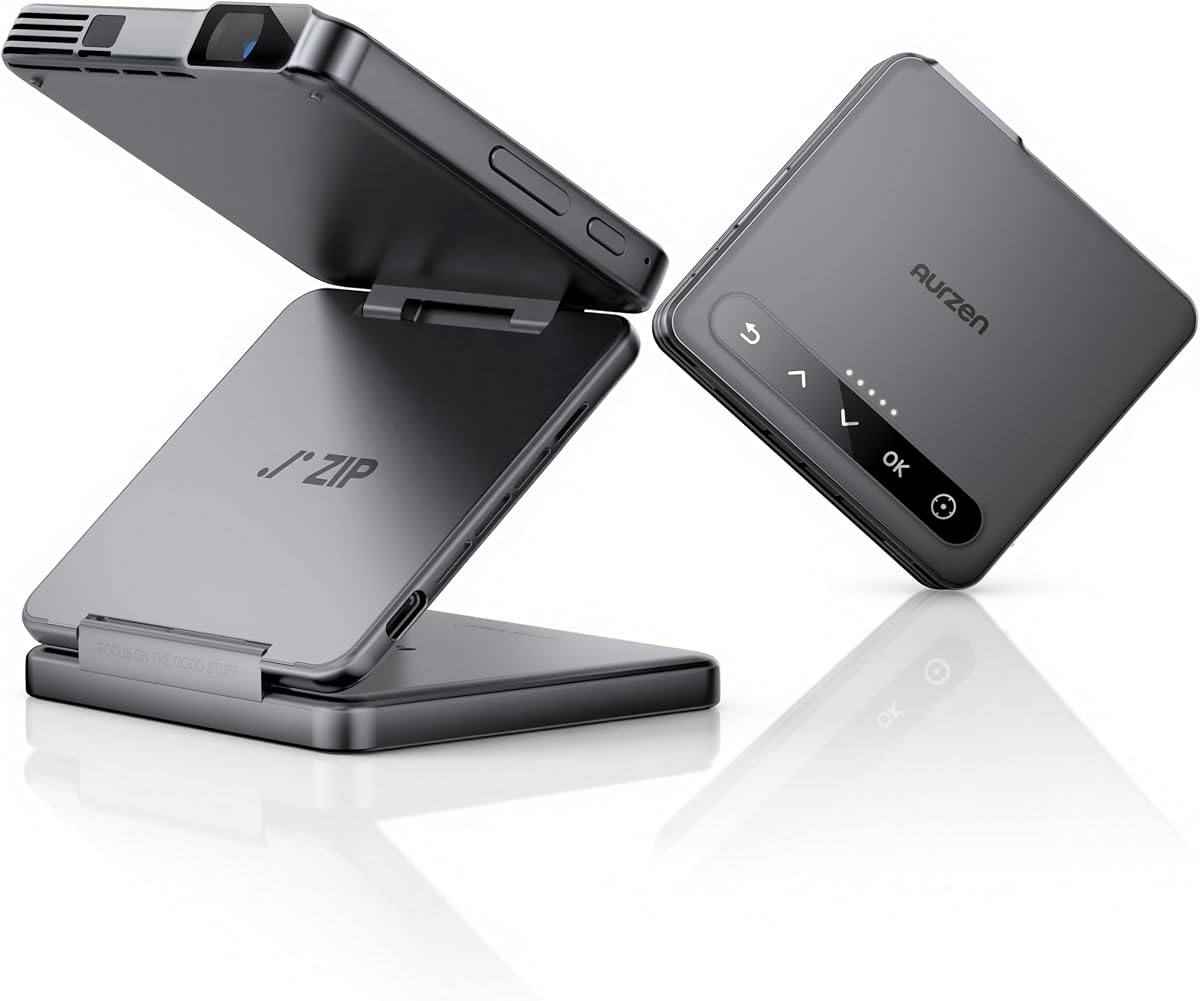
The white Aurzen ZIP Tri-Fold carries a supplied rating of 3.8 and brings a notably compact approach to image projection. It weighs 0.62 pounds, folds into a wallet-like form, includes a built-in Z-shaped stand, and is explicitly marketed for cookie decorating, art tracing, sewing, and other creative tasks.
We may earn a commission when you buy through this link, at no additional cost to you.
Its most important feature for decorating is the ToF focusing system. The projector measures distance 30 times per second to support automatic focus, while keystone correction helps keep the image rectangular. One-click mirroring works with iOS, Android, and Windows devices without requiring a Wi-Fi network, which can be especially useful in kitchens with unreliable internet access.
The trade-offs are substantial. The built-in 5000mAh battery is rated for up to 1.5 hours in eco mode, so long decorating sessions may require a nearby outlet. Its screen mirroring does not directly support DRM-protected content, and Google Cast compatibility is explicitly excluded for Pixel, Motorola, and Chromebook devices.
Despite those limitations, the ZIP is one of the strongest choices for a decorator who values automatic focus, physical compactness, and minimal setup. It is particularly appealing for outlining designs on multiple cookies, where frequent focus changes can otherwise interrupt the workflow.
Automatic ToF focus is a meaningful advantage over many basic pico projectors. It reduces the repeated manual adjustments that can otherwise make tracing small cookies or moving between differently sized cakes frustrating.
The ability to mirror supported devices without a Wi-Fi network removes one common source of setup friction. Users still need compatible source devices and should plan for USB-C power during longer sessions.
We may earn a commission when you buy through this link, at no additional cost to you.
The KODAK Luma 150 Mini Projector has a supplied rating of 4.2 and is one of the few options advertised for images up to 150 inches. Its rechargeable battery, built-in speaker, and support for AirPlay and Miracast give it a practical balance for decorating presentations, group demonstrations, and portable entertainment.
We may earn a commission when you buy through this link, at no additional cost to you.
The projector uses a 60-ANSI-lumen LED lamp with an 854 by 480 native resolution and a stated 1000:1 contrast ratio. It can accept higher-resolution input, including 4K content, but the native image is not 4K. For decorating, these figures suggest a large, visible projection rather than a highly detailed professional tracing system.
Compared with dedicated art projectors, it offers fewer creative tools. There is no mentioned grid overlay, art mode, or automatic tracing focus, and copyrighted streaming applications cannot be mirrored or cast. A decorator would need to prepare and align images through connected devices or media storage.
It is best for users who need a large display, cordless placement, and flexible entertainment functions. For tracing intricate cookie designs, the Caydo M1C's dedicated app and art modes are more purpose-built, while the Aurzen ZIP offers more sophisticated automatic focus.
The stated 150-inch maximum makes this a useful option for workshops, classrooms, or decorating demonstrations where several people need to see the reference. Actual clarity still depends on ambient light, distance, and source resolution.
The rechargeable battery supports up to 2.5 hours of operation, enough for many focused decorating sessions. A power connection is advisable for extended events or when streaming protected content through an external device.
We may earn a commission when you buy through this link, at no additional cost to you.
The Caydo M1C Art Projector has a supplied rating of 4.2 and is explicitly designed for artists, tracing, sketching, and cookie decoration. Unlike general entertainment projectors, its defining feature is a built-in exclusive drawing application with zoom, rotation, background-color, and grid tools.
We may earn a commission when you buy through this link, at no additional cost to you.
Four modes named Gridify, Sketchify, Comicize, and Monochromize can change the appearance of projected references. A 3-by-3 grid is particularly relevant for decorators who need to transfer proportions accurately, while zoom and rotation make it easier to align an image with an uneven cake or a collection of cookies.
The listed 110 ANSI lumens, 4K video playback support, adjustable image sizes from 10 to 100 inches, and 8000mAh battery make it well equipped for repeated creative work. The package includes a tripod, adaptor, HDMI cable, remote, and manual. The manufacturer recommends updating the app to version 1.8 for the best experience.
This is the most explicitly tailored choice for detailed decorating and art tracing. Its larger battery and dedicated software offer advantages over basic projectors, although the ZIP's automatic focus may be more convenient for quick positioning. Protected streaming services remain unavailable through wireless transmission or HDMI, but that limitation has little effect on locally loaded reference images.
Grid, sketch, comic, and monochrome treatments can reduce the complexity of a source image before tracing. These options give decorators a faster way to emphasize outlines, simplify shading, or preserve important proportions.
Images can be transferred by scanning a QR code within the app or through a USB drive. That dual approach makes the projector practical in locations where a consistent internet connection may be unavailable.
We may earn a commission when you buy through this link, at no additional cost to you.
The grey Aurzen ZIP Tri-Fold is a compact DLP projector designed for both entertainment and creative tracing. It folds to a wallet-like size, weighs 0.62 pounds, and includes a built-in Z-shaped stand. The product information specifically identifies cookie decorating, sewing, tufting, and art tracing among its intended uses.
We may earn a commission when you buy through this link, at no additional cost to you.
Its 100-ANSI-lumen output and native 720P resolution provide a more detailed foundation for outline work than many entry-level projectors. ToF technology supports zero-lag automatic focus and keystone correction, while the ability to mirror iOS, Android, and Windows devices without Wi-Fi simplifies source setup.
Like the white ZIP, the battery is rated for up to 1.5 hours in eco mode. It supports USB-C PD fast charging and can operate while plugged in when a compatible 24W-or-higher adapter is used. DRM-protected video requires the separately sold CastPlay Pro dongle and compatible source hardware.
This model is a strong fit for decorators who value an extremely small package and automatic focus. The choice between the grey and white versions is largely aesthetic, so buyers should compare current listings for availability and included accessories. For dedicated drawing filters, the Caydo remains more specialized.
Automatic distance measurement and keystone correction reduce the need to refocus whenever a cookie, cake, or sheet of paper changes position. These features are particularly helpful during multi-item decorating sessions.
The folding body and integrated stand make the ZIP easy to pack into a small bag. Users planning long sessions should bring a suitable USB-C charger or adapter because the internal battery window is comparatively short.
We may earn a commission when you buy through this link, at no additional cost to you.
The generic Art Projector for Tracing and Drawing has a supplied rating of 3.9 and focuses on the practical mechanics of projecting a reference onto a work surface. Its browser-based control panel removes the need to install or register for a mobile application, while the supplied stand provides a stable base for tracing and decorating.
We may earn a commission when you buy through this link, at no additional cost to you.
The projector uses FCC-certified 2.4G and 5G dual-band Wi-Fi to provide a stable connection and reduce latency. Users can scan a QR code to open the control panel, then manage rotation, zoom, and other settings from a browser. The claimed setup process takes less than 30 seconds once the instructions have been followed.
Online and offline direct-connection modes make the projector adaptable to different workspaces. Its adjustable focus button and lightweight stand help maintain image sharpness and consistent placement, but it requires a plugged-in power source. The supplied information does not specify brightness, native resolution, or battery capacity.
This is a sensible value-oriented choice for cookie outlines, architectural sketches, and art education when straightforward browser control is preferred. It offers less specialized styling than the Caydo and no ToF autofocus, yet the simple interface can make it approachable for new users.
Browser-based control is useful for decorators who do not want to manage app permissions, storage, or device-specific installations. The same interface can be opened from a compatible phone, tablet, or laptop after the Wi-Fi connection is established.
A stable direct connection allows creative work to continue when a studio or kitchen has no internet service. The projector still needs a power source, and a careful initial setup remains important.
We may earn a commission when you buy through this link, at no additional cost to you.
The white Art Projector for Tracing and Drawing has a supplied rating of 4.0 and is built around an approachable no-app workflow. After the projector is powered on, the user connects a phone or tablet to the Wi-Fi network it creates and opens a web-based control panel.
We may earn a commission when you buy through this link, at no additional cost to you.
The controls support dragging, zooming, and 360-degree rotation. Those functions are directly relevant to decorating because they allow a reference to be repositioned and enlarged without returning to a separate editing program. A flexible stand can be adjusted to project onto canvas, paper, a desktop, a wall, a cookie, or a cake surface.
Unlike many battery-powered entertainment projectors, this model requires a plugged-in power source. Its listing also does not provide a numerical brightness or resolution figure, so image performance must be judged from the projected result and working environment. A darker room will generally make fine outlines easier to distinguish than a brightly lit kitchen.
This projector is a good match for beginners and mobile-first decorators who want simple tracing controls without a dedicated application. It is less specialized than the Caydo but offers an easier control model, and its white finish also distinguishes it visually from the many black projectors in the category.
Dragging, zooming, and rotation are the essential controls for projecting a reference onto a small target. Making them accessible from a browser reduces the number of steps between opening an image and beginning the outline.
A flexible stand lets the user change the height and angle to match a flat cookie, the top of a cake, or a vertical work surface. Stable positioning remains essential because small movement can distort an otherwise accurate outline.
We may earn a commission when you buy through this link, at no additional cost to you.
The black KODAK Luma 75 Mini Portable Projector has a supplied rating of 3.7 and is primarily a compact DLP projector for movies, presentations, and general visual display. Its stated 1080p HD input, 100-inch maximum image, and two-hour runtime still make it relevant to users who want to project decorative references.
We may earn a commission when you buy through this link, at no additional cost to you.
HDMI, USB, and microSD inputs support several source types, while the built-in 1W speaker and 3.5mm audio jack cover basic audiovisual needs. The pocket-sized body is designed to move easily between rooms or travel locations, and one-touch operation should reduce the learning curve for casual users.
There is no dedicated tracing app, grid system, automatic art focus, or documented artistic filter in the supplied specifications. The stated 3.7 rating is lower than those of several alternatives, and the projector may not provide the same image-control convenience as a purpose-built art model.
It is best suited to a buyer who values portability, familiar inputs, and an integrated speaker over specialized decorating features. The Luma 75 Pocket Projector Kit may be a more practical choice for tracing because it adds an overhead tripod with a vertical mount.
HDMI, USB, and microSD inputs make it easy to connect different media sources. This is helpful for loading a saved design, presenting from a computer, or using a phone with the appropriate adapter.
The compact enclosure and two-hour runtime suit short decorating sessions and mobile use. The built-in speaker can also handle casual audio, while the audio jack offers another connection option.
We may earn a commission when you buy through this link, at no additional cost to you.
The KODAK Luma 75 Pocket Projector Kit has a supplied rating of 3.7 and adds an important accessory for tracing: an overhead tripod with a purpose-built vertical mount. That mount can hold the projector steadily over a work surface, where a loose tabletop projector might easily be bumped or misaligned.
We may earn a commission when you buy through this link, at no additional cost to you.
The kit includes a carrying bag, HDMI cable, and power cord, reducing the need to assemble a separate travel and connection setup. The projector itself weighs 6.35 ounces, while the support system provides the stability needed for consistent outlines on cookies, cakes, and craft projects.
Its maximum image size is 100 inches, and HDMI, USB, and microSD provide flexible source connections. However, the supplied information does not identify a tracing app, grid overlay, or automatic focus. The creative workflow therefore depends on the source image and manual alignment rather than specialized art controls.
This kit is most attractive to decorators who value a complete, stable setup out of the box. It is a better tracing-oriented bundle than the basic Luma 75, though the Aurzen ZIP and Caydo M1C provide more advanced focusing or creative software respectively.
An overhead projector needs a secure mount because even minor movement can shift the projected outline. The purpose-built vertical mount helps keep the image aligned while the decorator works around the surface.
The included bag, cable, and power cord make the kit easier to organize and transport. It is a convenient option for workshops, classes, or decorating sessions away from a permanent workstation.
We may earn a commission when you buy through this link, at no additional cost to you.
The black KODAK Luma 150 Portable Mini Projector has a supplied rating of 4.2 and combines cordless placement with flexible media connections. Its 3800mAh battery allows the projector to operate without a nearby outlet, which is useful when the nearest counter or table is not close to the decorating area.
We may earn a commission when you buy through this link, at no additional cost to you.
Miracast and AirPlay support allow compatible phones and Android devices to mirror images wirelessly. HDMI, USB-A, and microSD inputs provide alternatives for direct connections, while the built-in speaker removes the need for separate audio during simple demonstrations or entertainment.
The projector can display images up to 100 inches and uses an LED rated for up to 30,000 hours. As with other general-purpose models, it does not advertise a dedicated art application, tracing grid, or ToF autofocus. Wireless protection restrictions can also affect streaming services, so locally stored images or a connected media device offer greater flexibility.
This model is a solid general-purpose choice for cordless decorating demonstrations and portable reference display. Buyers seeking specialized outline tools should consider the Caydo M1C, while the Aurzen ZIP is better suited to users who prioritize automatic focus and compact folding.
A rechargeable battery removes the need for a cable running to the nearest outlet. That freedom is useful for temporary tables, decorating demonstrations, or projects in rooms without convenient power access.
AirPlay and Miracast reduce cable clutter, while HDMI, USB-A, and microSD support direct alternatives. The range of options makes it easier to choose a source based on the device and image being displayed.
We may earn a commission when you buy through this link, at no additional cost to you.
The most useful projector is one that can deliver a stable, adjustable image over the intended work area. Brightness, focus, source controls, mounting options, and power requirements should be weighed together according to the size and complexity of your decorating projects.
Choose enough brightness for the lighting conditions where you will work rather than relying on the largest number alone.
Prioritize automatic or easy-to-adjust focus if you will change surfaces frequently, and use sharp source images for small decorations.
Match usable image size to the work area, then check whether the projector can be positioned at a practical distance without excessive enlargement.
Choose dedicated grids, filters, and rotation controls when precision matters; basic display functions are enough for simpler outlines.
Prioritize a rigid stand or vertical mount that can hold the image steady over the entire decorating session.
Match runtime to the length of your session, and favor cordless operation only when the available battery life comfortably covers it.
Use a wired or offline transfer method for dependable creative sessions, and verify that your preferred phone, tablet, or computer is supported.
Balance travel size against art-specific tools, and choose the model that matches how often you will decorate versus use the projector for general entertainment.
Begin by preparing a clean, high-contrast reference image at the resolution the projector can support. Open the image in the required app or browser, then connect the projector using the method recommended for your model. Place the projector on a stable stand, point it directly at the work surface, and power it on before adjusting zoom, rotation, and focus. Dimming unnecessary nearby lights and using a light, matte surface can make fine outlines easier to see.
Calibrate the projection before adding icing. Move the image until its center and scale match the cookie or cake, rotate it as needed, and use a grid or simplified outline mode when available. Make small focus corrections at the actual working distance, then confirm the alignment by stepping to the decorator's normal viewing position. Reposition the device whenever the surface or distance changes, because a focused image can become distorted after even a slight movement.
After the session, switch off the projector and unplug it after the fan and lamp have had appropriate time to shut down. Clean the lens with a soft, dry cloth rather than abrasive material, and wipe the exterior with a lightly dampened cloth while keeping liquid away from openings. Let the unit cool before packing it, protect the lens from scratches, and store cables and adapters together so the projector is ready for the next decorating session.
Yes, a pico projector can cast a reference image over a flat cookie or the top of a cake so a decorator can trace outlines and follow patterns. The image is a guide rather than a finished design, so the baker still applies the icing manually. A stable stand, clear reference image, and accurate focus are essential for a clean result.
A dedicated art projector with zoom, rotation, and grid controls is generally the most convenient for tracing cookies. Automatic focus can also help when cookies are different sizes or the work surface height varies. Basic entertainment projectors can display an image, but they usually require more manual alignment and offer fewer art-specific tools.
A darker workspace generally improves contrast and makes thin lines easier to follow, but some projectors are bright enough for moderate indoor light. The Caydo M1C and Aurzen ZIP have stated ANSI-lumen ratings of 110 and 100, while the Kodak Luma 150 is listed at 60. Actual visibility also depends on the surface color, projection size, and image contrast.
It depends on the projector and phone. The Aurzen ZIP supports one-click mirroring for iOS, Android, and Windows without a Wi-Fi network. Other tracing projectors create their own Wi-Fi connection or require a browser-based link. Wired HDMI remains a broadly useful fallback when wireless compatibility or protected streaming causes problems.
No. The Caydo M1C is centered on its dedicated drawing assistant and should be upgraded to the latest app version for the best experience. The two Art Projector for Tracing and Drawing models use web-based controls without requiring an app. Entertainment-oriented Kodak models and the Aurzen ZIP use different device-connection methods, so check the requirements before choosing a workflow.
Use a rigid stand, tripod, or vertical mount and avoid moving the projector after calibration. The KODAK Luma 75 Kit includes a purpose-built overhead tripod, while the Aurzen ZIP and tracing projectors include their own adjustable supports. If a cake is tall or uneven, support the cake independently and fine-tune the projector angle before outlining.
Not reliably across every model. The Kodak Luma 150 and Caydo M1C listings state that copyrighted services such as Hulu and Netflix cannot be mirrored or cast through the described wireless or HDMI methods. The Aurzen ZIP can expand supported DRM content through a separately sold CastPlay Pro USB-C dongle, subject to device and app compatibility. For decorating, locally stored artwork avoids these restrictions entirely.
Only if its stated runtime comfortably exceeds the planned session. Listed runtimes range from 1.5 hours for the Aurzen ZIP in eco mode to as much as 2.5 hours for the Kodak Luma 150 and Caydo M1C. The browser-controlled tracing models require a plugged-in power source, which may be preferable for a stationary kitchen workstation.
The KODAK Luma 150 Mini Projector is the strongest all-around option in this group because it combines a 4.2 rating, large display capability, built-in audio, wireless options, and cordless placement. The Aurzen ZIP stands out for automatic focus and exceptional portability, while the Caydo M1C is the most purposeful decorating choice thanks to its drawing app, artistic modes, grid, and large battery.
Prioritize the feature that most affects your actual workflow. Choose dedicated art controls for detailed outlines, automatic focus when working at changing heights, a stable overhead mount for long tracing sessions, or a long battery runtime when outlets are inconvenient. A simple browser-controlled projector can be enough for basic cookie outlines, but its unspecified brightness and lack of advanced focus make it more of a simplified creative tool.
Ratings, bundle contents, firmware, app availability, and product details can change, so review the current listing before purchasing. Compare the final specifications, included accessories, and connection requirements rather than relying only on screen size or a headline brightness figure.