
Zalman CUBIX-G
4.4Editor score
Compact 28-liter-style layout
Three pre-installed RGB fans
Modern USB-C front connectivity
Compare 10 cube shaped PC cases for airflow, component compatibility, compact dimensions, connectivity, storage, cooling, and visual appeal.
Cube shaped PC cases combine a broad, symmetrical footprint with the practical benefits of compact and micro-ATX builds. Their defining strengths are often excellent hardware visibility, flexible component placement, efficient airflow, and enough room for modern gaming systems without occupying a full-size tower footprint.
This guide compares ten cube-oriented cases on motherboard support, graphics card clearance, CPU cooler limits, included fans, radiator options, front connectivity, storage capacity, dust filtration, and build flexibility. It covers compact models for small systems, dual-chamber designs for high-end builds, and larger ATX-compatible cubes for users who want exceptional component clearance.
Each selection reveals a different balance of size, cooling, expandability, and appearance, helping readers identify the most suitable option for their hardware and workspace. Product specifications and availability can change, so confirm case dimensions, included accessories, and current component limits before purchasing.
4.4Editor score
4.7Editor score

4.7Editor score
The comparison below highlights the major differences among all ten cases, including their physical design, motherboard class, hardware clearance, cooling provisions, and most useful built-in features.



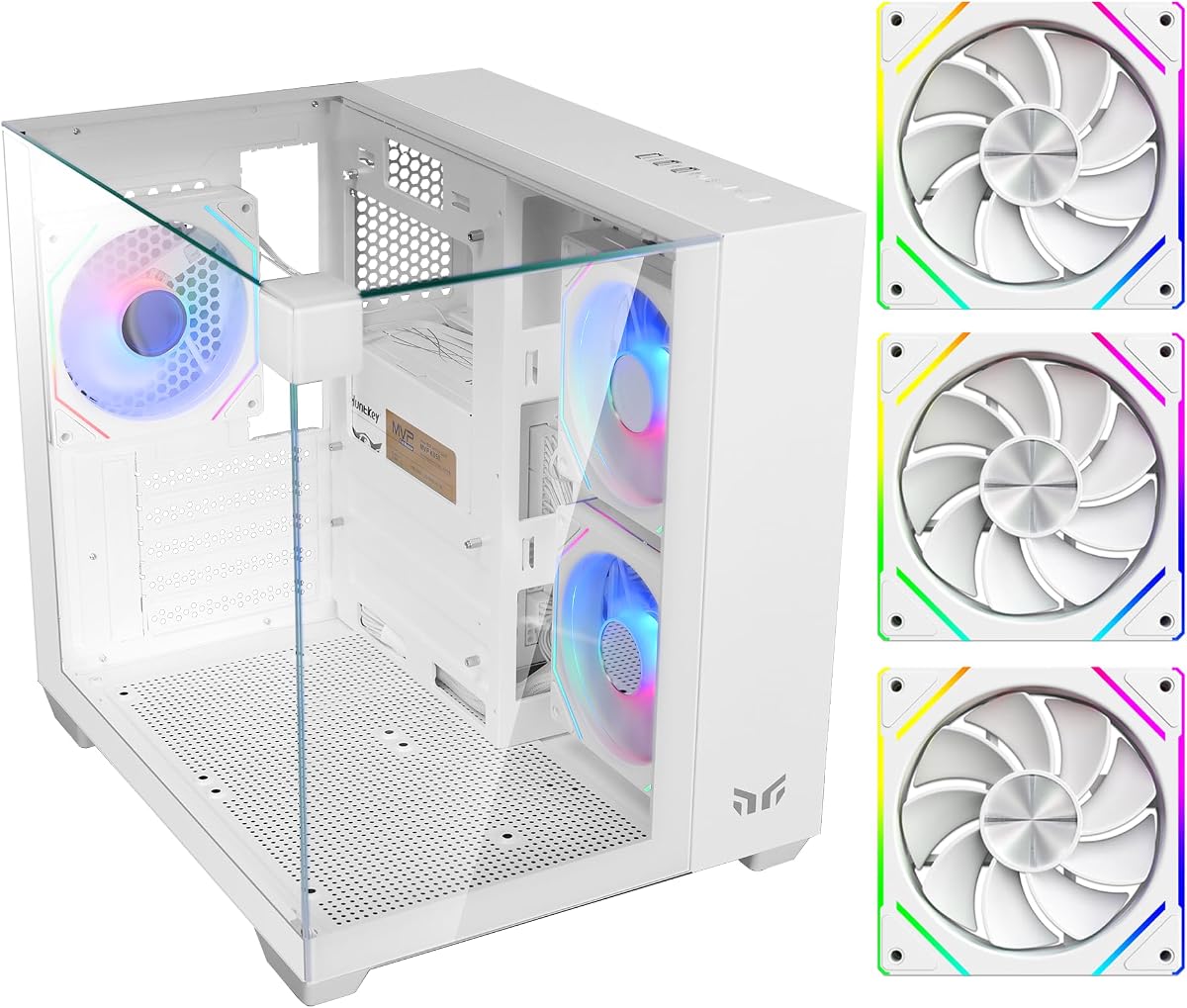
The Yeah Magic Cube earns its place as the most visually dramatic entry in this guide, combining a 28.5-liter cube layout with three tempered glass panels and a pillar-less presentation. It carries a 4.7 rating, and its defining attraction is the 270-degree view of the installed components. The white finish and pre-installed ARGB lighting make it especially appropriate for a display-oriented gaming desktop.
We may earn a commission when you buy through this link, at no additional cost to you.
Its compact proportions do not come at the expense of mainstream gaming hardware. The case accepts Mini-ITX and Micro-ATX motherboards, graphics cards up to 325 millimeters, and CPU air coolers up to 155 millimeters. Three 120mm ARGB fans arrive installed, while the cooling layout can accommodate as many as five 120mm fans and a side-mounted 240mm liquid cooler. That gives builders useful options beyond the basic configuration.
The interior is designed to remain presentable even when densely populated. A dedicated cable-routing design keeps wiring behind the main viewing area, while the PSU shroud conceals excess leads. Construction combines SPCC steel, tempered glass, and ABS components, and the front I/O includes USB 3.0, USB 2.0, and audio connections. The trade-off is motherboard flexibility: full-size ATX and E-ATX boards are outside the supported range.
This is the strongest recommendation for a builder who wants a compact PC that functions as a visual centerpiece. It is particularly suitable for a Micro-ATX gaming system with an RGB-oriented motherboard, graphics card, and coordinated fans. Buyers using a full ATX board or unusually large liquid cooler should choose a larger cube, but for the supported platform, the balance of visibility, cooling, and tidy construction is excellent.
The pillar-less glass design removes visual obstructions from several sides, allowing the graphics card, motherboard, lighting, and cooler to remain visible from multiple angles. The enclosure still maintains a relatively small 28.5-liter footprint, making it suitable where a conventional tower would dominate the desk.
Three included ARGB fans provide immediate airflow and illumination, while support for five 120mm fans and a side-mounted 240mm liquid cooler allows the layout to expand. This is a useful level of headroom for a compact gaming case.
We may earn a commission when you buy through this link, at no additional cost to you.
The Cooler Master QUBE 540 is the most flexible large cube in the group, with a layout that can operate horizontally or vertically. A reversible I/O panel and movable handles make repositioning easier, while the tempered-glass treatment preserves the visual appeal associated with compact showcase cases. Its 4.4 rating reflects a balanced combination of compatibility and practical orientation options.
We may earn a commission when you buy through this link, at no additional cost to you.
Unlike many cubes limited to Mini-ITX or Micro-ATX, this model supports ITX, ATX, and E-ATX motherboards, including boards up to 11 inches wide. Graphics card clearance reaches 415 millimeters without the front fan, allowing unusually long cards to fit. The full front mesh panel supports high airflow, and a pre-installed SickleFlow 120mm fan provides an immediate cooling solution.
Connectivity is another strength, with two USB 3.2 Gen1 ports, a USB 3.2 Gen2 Type-C port, and other front I/O access. The main compromises are physical size and the modest included fan count. This is not the smallest option, and only one fan is supplied, so builders seeking many illuminated fans or a complete premium cooling package should account for additional purchases.
Choose the QUBE 540 when you want the cube aesthetic without giving up motherboard options or graphics card clearance. It is ideal for builders with a long modern graphics card, an ATX or E-ATX motherboard, or a workstation-style system that needs a broad set of expansion dimensions. Its reversible layout is particularly helpful when the case must fit beneath a desk or in a display cabinet.
The reversible I/O panel and movable handles allow the case to be repositioned with less disruption to connected devices. Horizontal placement can suit a low-profile viewing position, while vertical orientation offers a traditional tower-like footprint.
Support for E-ATX motherboards and graphics cards as long as 415 millimeters makes this cube practical for expansive high-performance builds. The width still differs from a standard mid-tower, so checking desk clearance remains important.
We may earn a commission when you buy through this link, at no additional cost to you.
The Apevia Prism-WH offers one of the strongest lighting packages among the compact cubes. Its dual tempered-glass panels reveal a gaming cube-style interior, while five pre-installed 120mm ARGB PWM fans create an immediately illuminated build. The 4.2 rating reflects a case that prioritizes looks, included accessories, and straightforward micro-ATX compatibility.
We may earn a commission when you buy through this link, at no additional cost to you.
The second chamber provides room to conceal and route cables, and a ventilated metal side panel supplements the glass for additional circulation. Graphics cards up to 340 millimeters and CPU coolers up to 155 millimeters are supported, while 240mm liquid-cooling options are available. The top panel includes USB 3.0, two USB 2.0 ports, power and LED buttons, drive and power indicators, and HD audio.
Some assembly details are designed to reduce frustration. Screw-in PCI-E covers avoid the need to punch out unused expansion slots, and the magnetic top dust filter can be removed for cleaning. Storage is more modest, with room for two 3.5-inch hard drives or one 3.5-inch drive plus one 2.5-inch drive. Motherboard-based ARGB synchronization also requires a compatible board and the proper connection.
The Prism-WH is well suited to a colorful Micro-ATX gaming build where the case itself is part of the visual theme. Five fans reduce the need to source a complete cooling and lighting set immediately, though ARGB control can be less flexible than a modern addressable header. It is a compelling choice for users who value a coordinated factory appearance.
Five ARGB PWM fans combine cooling with synchronized illumination, reducing the number of separate accessories required for a complete build. The fans offer 366 lighting modes through the top control button.
Keeping wiring in the rear chamber helps preserve the visible component area. Screw-in expansion-slot covers and a removable top filter further reduce common installation and maintenance tasks.
We may earn a commission when you buy through this link, at no additional cost to you.
The Zalman CUBIX-G is a compact cube-style option aimed at budget gaming and tidy desktop setups. It has a 4.4 rating and includes three pre-installed 120mm fans with fixed RGB illumination. The result is a visually coordinated case that can look complete without requiring a separate set of case fans.
We may earn a commission when you buy through this link, at no additional cost to you.
Hardware support is centered on Micro-ATX systems. The case accommodates graphics cards up to 280 millimeters, ATX power supplies up to 140 millimeters, and CPU air coolers up to 155 millimeters. It can hold up to three 2.5-inch hard drives and one 3.5-inch hard drive, with one listed configuration using two 2.5-inch positions and one combined drive position.
The front I/O includes USB Type-C and USB 3.0, which is a welcome feature in a compact budget enclosure. The main limitation is that the RGB fans use fixed lighting rather than motherboard synchronization. The 280-millimeter graphics card allowance is also narrower than the choices offered by several larger cubes, so oversized modern cards require careful measurement.
The CUBIX-G is a sensible recommendation for a compact Micro-ATX gaming PC where three fans, a modern front connection, and a smaller footprint matter most. It is particularly useful for first-time builders who want a simpler shopping list. Buyers needing ARGB control, extra graphics card length, or extensive storage should move toward a larger dual-chamber design.
The case concentrates on the essentials needed for a Micro-ATX gaming system while reducing overall desk space. Its dimensions make it more practical than a full tower for smaller work areas.
USB Type-C and USB 3.0 are easier to reach than rear connections when a system is positioned close to a wall. The remaining controls and ports follow a conventional top-mounted arrangement.
We may earn a commission when you buy through this link, at no additional cost to you.
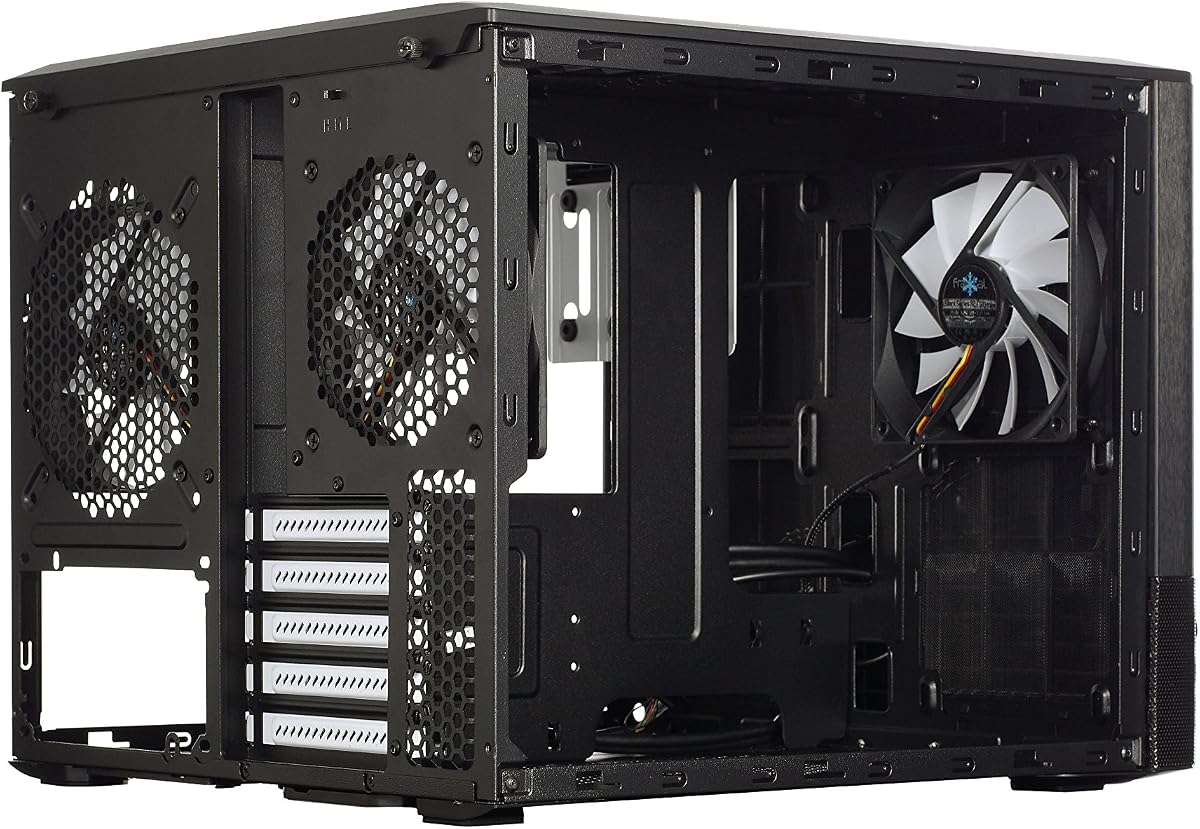
The Fractal Design Node 804 is the premium choice for builders who want a true expandable cube rather than the smallest possible enclosure. It has a 4.7 rating, a minimalist brushed-aluminum front panel, and a window side panel. Its defining feature is the dual-chamber layout, which separates the cooling and storage zones from the main hardware chamber.
We may earn a commission when you buy through this link, at no additional cost to you.
Cooling capacity is exceptional for its category. Three Fractal Design Silent Series R2 120mm fans are included, with room for seven more fans. The case can also support up to four radiators simultaneously, making it suitable for elaborate air or liquid cooling configurations. Removable dust filters at the intakes help maintain cleaner airflow over time.
Storage is another major strength. The unique mounting system supports configurations including eight 3.5-inch drives and four 2.5-inch drives, or as many as ten 3.5-inch and two 2.5-inch drives. The trade-off is the larger physical footprint compared with compact 10- to 30-liter cubes, and the premium case itself does not include a graphics card.
This model is best for a serious enthusiast who values modularity, quiet cooling, storage, and long-term expansion over minimum desk footprint. It can house a powerful Micro-ATX system while preserving a clean, Scandinavian-inspired appearance. Those who need the smallest possible volume may prefer the Mechanic Master C24, but the Node 804 offers much greater component flexibility.
Separating the main component chamber from the cooling and storage area helps keep the visible interior uncluttered. Support for ten fan positions and four radiators provides exceptional freedom for a Micro-ATX system.
The flexible drive cage can accommodate a substantial collection of hard drives and solid-state drives. This makes the Node 804 useful for media systems, workstations, and enthusiast builds that require more storage than a typical gaming chassis.
We may earn a commission when you buy through this link, at no additional cost to you.
The Apevia Prism-Elite-BK combines a cube-style mid-tower layout with an unusually complete cooling package. Seven 120mm PWM ARGB fans are pre-installed, giving the 4.0-rated case immediate airflow and a strong synchronized appearance. Dual tempered-glass panels provide a broad view of the system from the front and side.
We may earn a commission when you buy through this link, at no additional cost to you.
This is also one of the most accommodating models in the guide. It supports graphics cards up to 400 millimeters and CPU coolers up to 165 millimeters. Rear cooling accepts 120mm radiators, while top and side mounting support 240mm, 280mm, and 360mm options. The rear chamber provides space to hide and route cables, and matching interior and exterior paint improves the finished appearance.
The top panel includes USB-C, USB 3.0, USB 2.0, and HD audio connections. Screw-in PCI-E covers facilitate installation, while storage accommodates three 2.5-inch SSDs or one 3.5-inch hard drive with two 2.5-inch SSDs. Its seven fans use a three-pin ARGB connection for motherboard synchronization and a four-pin PWM connector for speed control. Compatibility with an appropriate motherboard is therefore important.
The Prism-Elite-BK is a compelling option for builders who want the most lights and fans included from the factory. Its wide hardware and radiator support makes it appropriate for an ambitious ATX gaming system. The main reason to hesitate is its lower 4.0 rating, which makes it wise to read current customer feedback carefully. Even so, its accessory package remains one of the most comprehensive here.
A seven-fan installation creates immediate cooling headroom and a dramatic RGB display. The included PWM connectors allow motherboard fan control, while ARGB synchronization depends on the board and the proper lighting connection.
Support for graphics cards up to 400 millimeters, CPU coolers up to 165 millimeters, and 360mm radiators gives the case flexibility well beyond a typical compact micro-ATX enclosure.
We may earn a commission when you buy through this link, at no additional cost to you.
The Zalman CUBIX M-ATX is the most space-efficient conventional case in this comparison. Its 17.1-liter total volume preserves the broad proportions of a cube while fitting beneath or beside a monitor more easily than a full tower. It has a 4.5 rating and a 0.8mm steel structure designed to provide durability despite the compact size.
We may earn a commission when you buy through this link, at no additional cost to you.
The enclosure accepts standard ATX power supplies, graphics cards up to 260 millimeters, and CPU air coolers up to 137 millimeters. A perforated front panel and pre-installed 80mm fan promote airflow through the compact interior. Front connectivity consists of one USB 3.0 port, one USB 2.0 port, and a 3.5mm stereo audio connection.
The limitations follow directly from the small dimensions. A 137-millimeter CPU cooler allowance excludes many larger tower coolers, and the 260-millimeter graphics card clearance is less generous than the other models. The included 80mm fan also offers less airflow capacity than the 120mm and larger fans found elsewhere in the list.
This case is best for a modest micro-ATX system where footprint matters more than expansive hardware support or a dramatic lighting package. It works well for an office-focused desktop, compact gaming PC, or portable-looking workstation. Builders with a powerful graphics card, tall air cooler, or extensive cooling plans should choose a roomier cube rather than trying to work around these boundaries.
At 17.1 liters, the CUBIX is considerably smaller than the larger micro-ATX and ATX cubes in the guide. It is a practical enclosure for compact desks where every inch of usable space matters.
The 0.8mm steel frame gives the enclosure a more substantial foundation than its small volume might suggest. A perforated front panel and installed fan provide a basic airflow path for compatible components.
We may earn a commission when you buy through this link, at no additional cost to you.
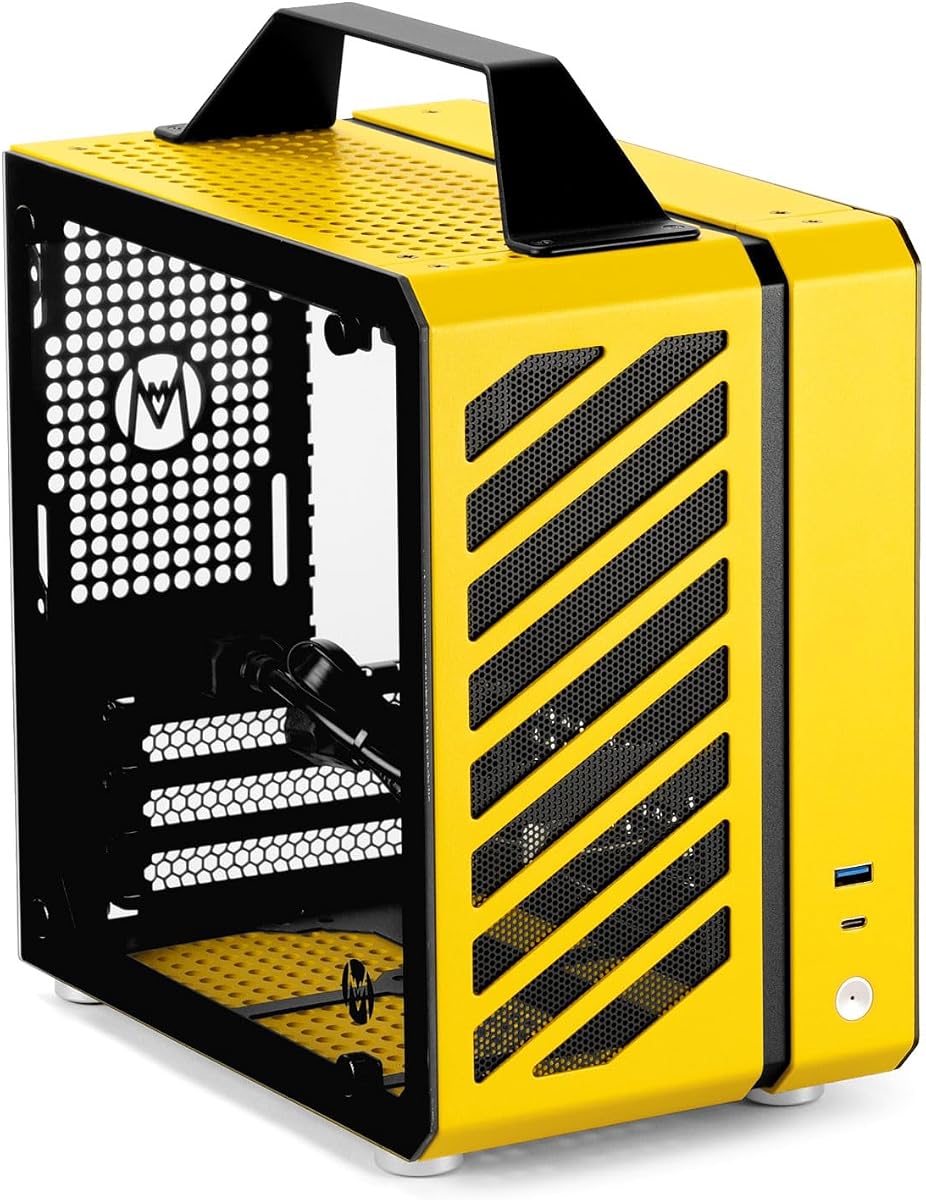
The Mechanic Master C24 takes compact PC design to the smallest volume in the guide. Measuring 9.9 liters, it combines a Mini-ITX build platform with an integrated aluminum handle for portability. Its 4.4 rating reflects a distinctive approach that prioritizes mobility, modular panels, and a very small footprint.
We may earn a commission when you buy through this link, at no additional cost to you.
The case supports ITX and DTX motherboards, SFX power supplies, air coolers up to 135 millimeters, and 120mm liquid-cooling hardware. Graphics cards such as the RTX 3060 and RTX 4060 series are listed as compatible, making it a recognizable option for compact gaming systems. The user must plan around an SFX-class power supply rather than a conventional ATX unit.
Cooling can be configured with two 8cm fans at the top, one 9cm fan at the rear, and one 12cm fan at the bottom. The aluminum-steel hybrid frame, detachable panels, tool-free installation, two 2.5-inch SSD mounts, pre-installed filters, and included screw kit make the enclosure aimed at DIY users who value straightforward assembly.
The C24 is an excellent recommendation for a portable Mini-ITX PC, compact workstation, or space-constrained gaming system where the handle offers genuine practical value. It is not intended for long graphics cards, full-size ATX power supplies, or elaborate radiator arrangements. Buyers should verify their exact graphics card, cooler, and power supply dimensions before committing to the very tight layout.
The 9.9-liter volume and integrated handle make the C24 easier to move between locations than a conventional desktop tower. It is particularly suitable for users who want a compact showcase system that can also be transported.
Detachable panels, tool-free installation, a detailed screw kit, and pre-installed filters simplify assembly and ongoing maintenance. Two dedicated 2.5-inch mounts provide space for portable SSD-based storage.
We may earn a commission when you buy through this link, at no additional cost to you.
The Fractal Design Node 804 No Power Supply listing highlights the same established dual-chamber concept from a more concise product specification. It has a 4.7 rating and combines aluminum and steel construction in a Micro-ATX cube layout. For buyers who value the design of the Node 804, this listing clearly identifies the chassis without including a power supply.
We may earn a commission when you buy through this link, at no additional cost to you.
Motherboard support covers Micro-ATX and Mini-ITX boards, giving builders a flexible foundation for compact performance systems. The internal bay arrangement is exceptionally versatile, supporting eight 3.5-inch and four 2.5-inch drives or as many as ten 3.5-inch and two 2.5-inch drives. That capacity makes the enclosure relevant to media storage, workstation, and multi-drive enthusiast builds.
The dual-chamber structure helps separate components and wiring, while the cube form gives the system a distinctive silhouette. Compared with the C24 and CUBIX M-ATX, this case requires substantially more space. It also differs from the earlier Node 804 listing by being explicitly presented as a no-power-supply product, so shoppers should confirm exactly which accessories and components are included.
This is a strong selection for anyone attracted to the Node 804's combination of modular internal organization, premium materials, and extensive drive support. It is less appropriate for a first small-form-factor build that prioritizes portability or a minimal parts list. A current listing review is still advisable, particularly when comparing the different Node 804 configurations available.
The internal bay system can hold a large number of 3.5-inch and 2.5-inch drives in different combinations. That makes the cube useful for storage-heavy projects as well as conventional gaming systems.
This listing identifies a no-power-supply configuration, allowing buyers to choose compatible PSU support according to their own component plan. Checking the package contents helps prevent duplicate or unnecessary purchases.
We may earn a commission when you buy through this link, at no additional cost to you.
The Cooler Master Qube 540 Moonstone is a compact ATX cube with a distinctive light-colored exterior. It has a 3.8 rating, the lowest in this group, but the underlying Qube 540 platform is aimed at builders who want a compact ATX enclosure rather than a strictly Mini-ITX or Micro-ATX design.
We may earn a commission when you buy through this link, at no additional cost to you.
The supplied information for this specific listing is concise, confirming a compact ATX case and the Moonstone finish. The more fully specified QUBE 540 variant in this guide provides details such as horizontal and vertical positioning, tempered glass, mesh airflow, broad motherboard support, and a USB-C front panel. Those details indicate the design direction, but buyers should verify whether every listed feature applies to the exact Moonstone configuration.
The primary risk is uncertainty created by limited marketplace information. A 3.8 rating can reflect a specific color, bundle, listing, or regional variation rather than a flaw in the broader platform. Checking the current product page, package contents, dimensions, and included accessories is therefore especially important when choosing this version.
The Moonstone Qube 540 is best considered by shoppers who appreciate the Qube 540 shape and want its compact ATX approach in a light finish. It is a reasonable choice for a builder comfortable verifying all specifications directly. Those who need the clearest support, cooling, and connectivity details before purchasing may prefer the more fully documented QUBE 540 ATX Mid-Tower listing instead.
The Moonstone finish provides a softer, brighter alternative to the many black gaming cases in this guide. It can work particularly well with coordinated components in a glass-sided or visible desk setup.
This listing provides fewer detailed specifications than the full QUBE 540 description. Confirming motherboard support, GPU clearance, fan count, front I/O, dimensions, and included accessories helps ensure the selected variant matches the intended build.
We may earn a commission when you buy through this link, at no additional cost to you.
The right cube-shaped PC case depends on motherboard size, graphics card length, cooling strategy, available desk space, and the visual role of the finished system. Measure components first, then compare their requirements with each enclosure's documented limits.
Motherboard support is the first constraint to verify because it determines which processors and feature sets the case can accommodate. The most flexible options here include the Cooler Master QUBE 540, which supports ITX, ATX, and large E-ATX boards. The Apevia Prism-Elite-BK takes the cube concept into the ATX mid-tower class, while several smaller models accept only Mini-ITX or Micro-ATX. The Fractal Design Node 804 supports Micro-ATX and Mini-ITX, making it a practical middle ground for systems that need more expansion than the smallest cubes but less bulk than a full tower.
Modern gaming and workstation graphics cards can be unusually long, so clearance is more useful than a general capacity label. The Cooler Master QUBE 540 leads this list with support for cards up to 415 millimeters, closely followed by the Apevia Prism-Elite-BK at 400 millimeters. The Yeah Magic Cube accepts 325 millimeters, the Prism-WH reaches 340 millimeters, and the Zalman CUBIX-G allows 280 millimeters. The compact Zalman CUBIX M-ATX reaches 260 millimeters, while the Mechanic Master C24 is intended for much shorter cards. Always measure the exact model because cooler height, power connectors, and sag supports can affect the usable envelope.
A cube can provide good airflow because its broad panels offer several possible intake and exhaust directions, but the actual cooling capacity depends on mesh coverage, fan placement, and radiator support. The Fractal Design Node 804 has the broadest expansion, with room for three additional fans beyond the three included units and support for four radiators. The Apevia Prism-Elite-BK and Prism-WH include numerous 120mm ARGB PWM fans, while the Yeah Magic Cube supports up to five 120mm fans and a 240mm side-mounted liquid cooler. Compact cases such as the CUBIX M-ATX and C24 require more deliberate component and fan planning.
Cube cases vary dramatically in practical footprint. The Mechanic Master C24 is only 9.9 liters, the Zalman CUBIX M-ATX uses 17.1 liters, and the Yeah Magic Cube is listed at 28.5 liters. Larger dual-chamber models and the Cooler Master QUBE 540 require more desk space but accommodate wider motherboards, more storage, or more cooling hardware. Users with a compact desk, media center cabinet, or frequently transported system should prioritize volume and carry features. Builders with a broad desk and a permanent display setup can favor glass panels, a larger interior, and more cooling flexibility.
Dual-chamber layouts are valuable because they can separate the visible component area from cables, drives, or a power supply chamber. The Node 804, Prism-WH, and Prism-Elite-BK all use this approach, helping maintain a clean view through the glass. The Yeah Magic Cube also emphasizes dedicated cable routing and a PSU shroud. By contrast, smaller cases may prioritize component access and compactness over elaborate separation. Consider how many drives, cables, and expansion cards need to remain visible and whether you will regularly add or remove components after the initial build.
The front I/O panel determines how conveniently you connect everyday peripherals. USB-C is included on the Cooler Master QUBE 540, Zalman CUBIX-G, and Apevia Prism-Elite-BK, while the Yeah Magic Cube and Prism-WH provide USB 3.0 and USB 2.0 ports but do not list Type-C. Other useful features include audio connections, power and reset controls, drive indicators, and dedicated lighting buttons. The type and number of connectors matter more for convenience than raw speed, so check which devices you connect daily and whether your chosen motherboard has matching headers.
ARGB can create a coordinated appearance, but it also introduces compatibility questions. The Prism-WH and Prism-Elite-BK support motherboard ARGB synchronization and include lighting controls, while the Yeah Magic Cube includes three ARGB fans. The Zalman CUBIX-G uses fixed RGB rather than motherboard-synchronized lighting, which is simpler but less flexible. Ensure the motherboard supports the required three-pin ARGB connection and check whether the case provides a dedicated controller. PWM control is separate from lighting, so check that relevant fans also support four-pin PWM speed control.
Storage requirements can determine which cube is most practical. The Fractal Design Node 804 offers especially flexible drive mounting, while the Prism-WH supports a smaller collection of 3.5-inch and 2.5-inch drives. The Zalman CUBIX-G fits up to three 2.5-inch hard drives and one 3.5-inch drive, and the Mechanic Master C24 includes two 2.5-inch SSD mounts. Removable and washable dust filters, tool-free panels, screw-in expansion covers, and accessible drive cages improve long-term serviceability. Compare the available bays with the drives and adapters you already own rather than paying for unused space.
Before assembling the system, lay out the case panels, hardware, screws, and accessories, then compare every component with the published clearance limits. Install the power supply and storage in the areas recommended by the manual, route cables away from fans and intake paths, and confirm that the motherboard, graphics card, and CPU cooler can be installed in a comfortable sequence. Connect front-panel wires only after identifying each header, especially when a case includes lighting or PWM controls.
After the build is complete, power on the system with the side panels open and verify that every fan spins in the intended direction. Check that ARGB lighting responds to the case controls and, where applicable, motherboard synchronization. Install the dust-filtered panels, confirm that cables do not obstruct intake openings, and use monitoring software to observe CPU and graphics card temperatures during a sustained workload rather than judging cooling by idle readings alone.
For routine care, disconnect the system and power it down before opening the case. Remove the dust filters on a regular schedule, clean them gently, and let them dry fully before reinstallation. Use compressed air to remove loose dust from fans, radiators, and vents while holding fan blades so they do not spin from airflow. Tighten loose fasteners, inspect cable areas for pinch points, and clean the glass with a soft microfiber cloth to preserve the clear view of the components.
A cube is not automatically better for every build. Its broad shape can improve component visibility, provide flexible fan placement, and offer useful clearance in some compact designs. A conventional tower may be easier to access, more familiar, or better suited to a very large motherboard and full-size expansion cards. Choose based on measured compatibility, available space, cooling needs, and preferred appearance.
Some models can, but many cannot. The Cooler Master QUBE 540 supports ITX, ATX, and large E-ATX motherboards, and the Apevia Prism-Elite-BK is designed for ATX hardware. The smaller alternatives in this guide generally support Micro-ATX or Mini-ITX only. Always verify the exact motherboard dimensions and the manufacturer's compatibility notes before ordering.
No. Cooling depends on the airflow path, fan size and quantity, component heat output, filters, and radiator support. A very small case may restrict long graphics cards or tall CPU coolers, while a larger dual-chamber cube can support more fans and radiators. The best cube is one that fits your hardware and gives the cooling system enough intake and exhaust area.
A micro-ATX cube is built around smaller motherboards and generally offers a more compact footprint. An ATX cube accepts full-size ATX boards and may provide more room for graphics cards, cooling, and storage, but it occupies more space. The Node 804 sits between these categories, accepting Micro-ATX and Mini-ITX boards while providing extensive internal expansion.
Not necessarily. ARGB synchronization normally requires a compatible three-pin ARGB header, while fan speed control generally uses a four-pin PWM header. Some cases also provide a dedicated lighting controller. The Prism-WH and Prism-Elite-BK explicitly require compatible ARGB motherboards for synchronization, and the CUBIX-G uses fixed lighting rather than motherboard control.
Leave enough room for the case itself, front intake airflow, cable bends, and convenient access to the front ports. A fabric filter on the floor is a common first step. Users with tight workspaces should also account for glass-panel doors, which may need extra clearance to open, and for the larger 540-style cube, which is not as compact as its name might imply.
Only if the radiator and pump fit the documented mounting positions. The Yeah Magic Cube supports a side-mounted 240mm liquid cooler, the Prism-WH supports 240mm options, and the Node 804 can accommodate as many as four radiators with extensive fan support. The Mechanic Master C24 supports 120mm liquid-cooling hardware. Confirm both radiator size and pump-clearance requirements.
Inspect the filters and intake areas every few months, or more often in dusty environments. Remove the filters, clean away accumulated debris, and let them dry before returning them to the case. Compressed air can also remove dust from fan blades and heatsinks, but fans should be held still to avoid damage.
The Yeah Magic Cube stands out as the most balanced compact showcase option, combining panoramic tempered glass, three ARGB fans, useful hardware clearance, and a 28.5-liter layout. The Zalman CUBIX-G serves budget-conscious builders seeking a smaller Micro-ATX system with three RGB fans and USB-C, while the Fractal Design Node 804 provides the premium path through dual-chamber organization, extensive cooling, and remarkable storage flexibility.
Prioritize motherboard format, graphics card length, CPU cooler height, and radiator placement before appearance. A visually striking case is only useful if it accepts the hardware you already own or plan to buy. Also consider fan control, front connectivity, dust filters, cable management, and the amount of space available for the enclosure and its doors.
Finally, check the current listing and manufacturer specifications before purchasing, since case revisions, bundles, and included accessories can change. Current prices and availability also vary, so compare the full feature set rather than selecting on cost alone. A case that fits every major component while supporting your preferred cooling and appearance is the most worthwhile result.