
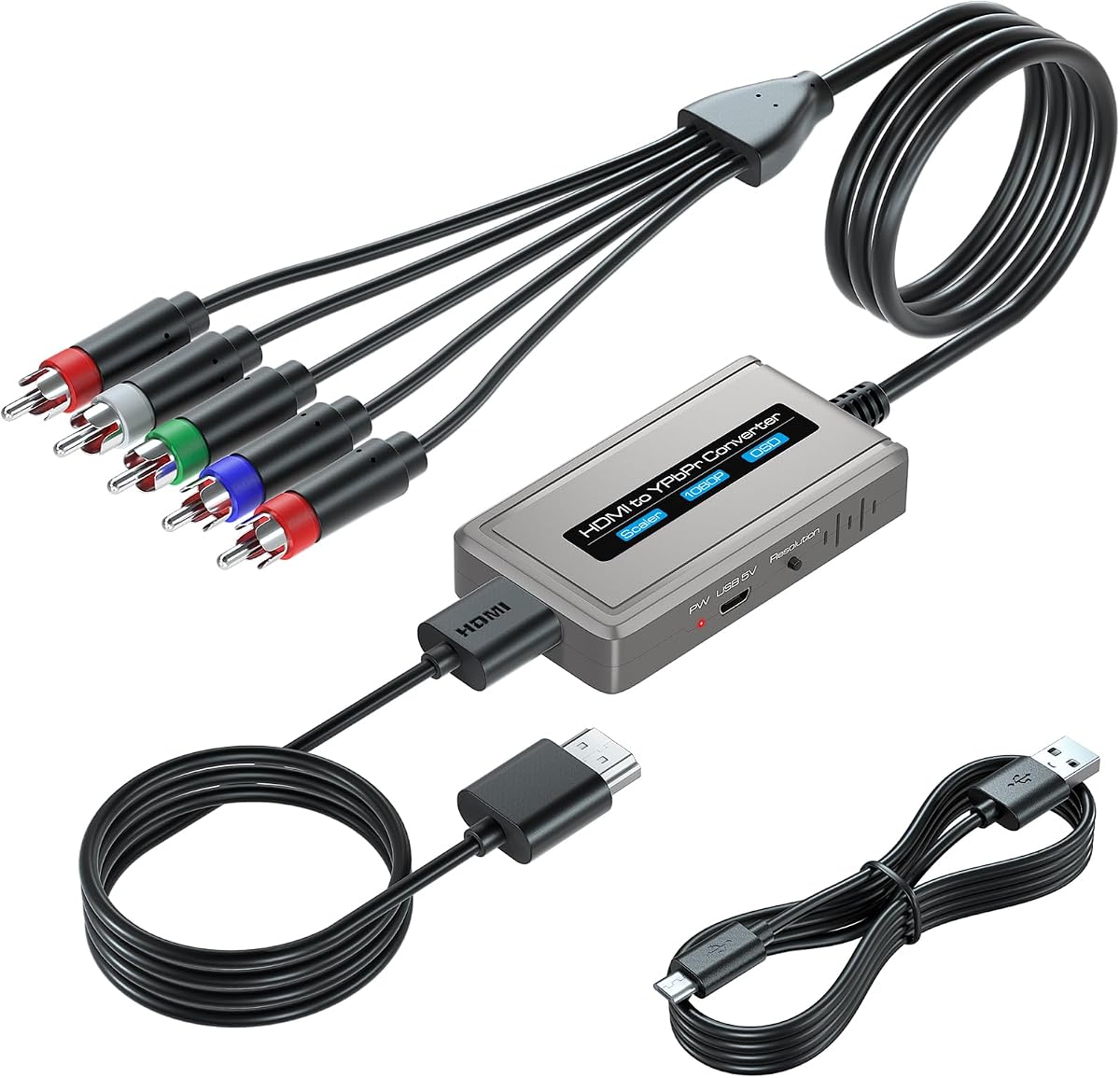
HDMI to Component Scaler Cable
4.2Editor score
Built-in resolution scaler
Includes three required cables
Supports up to 1080p
On-screen status display
This HDMI to Component Converter guide compares 10 adapters for resolution support, scaling, audio, cable bundles, and legacy display compatibility.
An HDMI to Component Converter bridges the gap between modern HDMI source devices and older televisions, projectors, and monitors with YPbPr component inputs. A useful model should provide a stable picture, preserve the source resolution, convert stereo audio, and include the connections needed for a straightforward installation.
We compared the ten available products by examining signal direction, supported input and output formats, resolution selection, scaling capability, audio support, included accessories, and intended source devices. The list includes simple one-way adapters, scaler-equipped converters, bundled-cable designs, and one RCA-to-HDMI model that belongs in the broader legacy-video category.
Each review identifies the product's strongest use case and explains its limitations without assuming that every converter performs the same job. Ratings and product details reflect the supplied listings, while technical capabilities may vary by source and display. Prices change frequently, so check the current listing before ordering.
4.2Editor score

4.3Editor score

4.0Editor score
The comparison below covers signal direction, maximum video format, scaling, audio, and the accessories or connector arrangements that distinguish each converter.




This YPbPr to HDMI Converter has a 4.2 rating and offers a practical way to connect older component-output devices to modern HDMI displays. It accepts analog YPbPr video and right/left audio, then produces an HDMI signal for a television, projector, monitor, or home-theater receiver. It is especially relevant for legacy DVD players, satellite boxes, and game consoles.
We may earn a commission when you buy through this link, at no additional cost to you.
The adapter supports component input at 480i, 480p, 576i, 576p, 720p, and 1080i or 1080p. Its HDMI output is listed for 480p, 576p, 720p at 60Hz, and 1080p at 60Hz. That range makes it a useful option for preserving familiar standard-definition and high-definition formats while moving to an HDMI connection.
The important trade-off is directionality. Despite sometimes being associated with the general term HDMI to Component Converter, this unit specifically converts component to HDMI and cannot be reversed. It also does not advertise scaling, so a source resolution incompatible with the target display may require adjustment at the source device. Its audio path supports analog right and left inputs.
Choose this model if you are preserving a component-equipped classic game system, DVD player, or set-top box and want to connect it to a modern television. It is less appropriate for a newer HDMI source that needs to reach a component-only display. Confirm that the source has a true YPbPr interface rather than ordinary RCA composite output.
A component-equipped console or disc player can remain useful without replacing its display setup. The converter places the legacy analog signal onto a modern HDMI connection, simplifying cable management and broadening display options.
This converter is not a two-way adapter. It accepts YPbPr and R/L audio and outputs HDMI, making it the opposite of the hardware needed for an HDMI source and component display.
We may earn a commission when you buy through this link, at no additional cost to you.
This Portta converter carries a 4.0 rating and converts analog YPbPr video plus right and left audio into HDMI. Its stated compatibility includes the PS2, PS3, PSP, Xbox, Nintendo Switch, DVD players, televisions, projectors, and monitors, making it a broad option for users with mixed legacy and modern equipment.
We may earn a commission when you buy through this link, at no additional cost to you.
It supports 480i, 480p, 576i, 576p, 720p, 1080i, and 1080p. The listing also identifies support for 24-bit, 30-bit, and 36-bit video color formats, uncompressed two-channel LPCM audio, and a bandwidth of 165MHz or 1.65Gbps per channel. These specifications make it suitable for converting standard component signals without adding a separate audio device.
It does not scale the image, however. The output cannot be freely increased or reduced to match a display, so the source and target need compatible resolutions. Users must also understand that the product is for component-to-HDMI conversion only. The included five-year warranty is a notable support benefit, but it does not remove the need to verify connectors and settings.
This is a sensible choice for a classic console or disc player with genuine component output. It also suits a home theater where a long HDMI run is preferable to separate analog video and audio leads. If the primary goal is sending an HDMI source to an old component television, select a reverse-direction converter with scaling instead.
The wide range of accepted component resolutions allows the adapter to work with a broad collection of legacy hardware. It can be particularly useful for consoles whose settings can be adjusted to match the available display.
The stated five-year warranty and after-sales support add reassurance for a relatively simple installation. Product support can be valuable when identifying connector types or troubleshooting a source-device setting.
We may earn a commission when you buy through this link, at no additional cost to you.
This HDMI to Component Converter has a 4.0 rating and directly addresses the need to connect an HDMI source to a television or monitor with YPbPr component input. It outputs analog component video and right/left audio, making it a more direct match for the keyword than the component-to-HDMI models included in this guide.
We may earn a commission when you buy through this link, at no additional cost to you.
The listed HDMI input formats cover 1080p and 1080i at 60Hz, 720p at 60Hz, 576p and 576i at 60Hz, and 480p and 480i at 60Hz. Component output support includes 1080p, 1080i, 720p, 720i, and 480p at 60Hz. An on-screen display helps identify the current input and output resolutions, which is useful during setup.
The main limitation is that it performs conversion without scaling. If the HDMI source sends 1080p and the component display cannot accept it, the source resolution must be lowered. The product does not support 4K, and it cannot be operated in reverse. It also requires the display to have a genuine component input rather than a shared RCA connection.
This is an affordable and straightforward option for a laptop, Blu-ray player, DVD player, game console, or similar device that outputs HDMI and a legacy display that accepts YPbPr. It works best when both sides support a common resolution. For displays that cannot handle the source format, a scaler-equipped converter offers more flexibility.
The adapter keeps the process focused: one HDMI input, component video output, and analog stereo audio. Users comfortable changing resolution settings on the source can get a clean and economical connection.
A shared yellow, red, and white RCA jack is not necessarily a component input. Confirm the green, blue, and red video connectors and separate audio connections before installation.
We may earn a commission when you buy through this link, at no additional cost to you.
This Portta model earns a 4.2 rating and combines a YPbPr-to-HDMI converter with an HDMI cable. It is aimed particularly at owners of the PS2, PS3, and Xbox 360 who want to use component video with a modern television, projector, or monitor while avoiding a separate cable purchase.
We may earn a commission when you buy through this link, at no additional cost to you.
It accepts 480i, 480p, 576i, 576p, 720p, 1080i, and 1080p component video, with R/L audio converted to HDMI. The listing specifies HDMI 1.3, HDCP 1.2 and 1.3, support for 24-, 30-, and 36-bit color, and uncompressed two-channel LPCM audio. The included HDMI lead makes the package more complete than a converter sold alone.
Like the standard Portta component-to-HDMI model, it has no scaling function. The source and display therefore need a matching compatible format, which may mean changing console output settings. It also remains strictly one-way: component input on the converter side, HDMI output on the display side.
This is an attractive option for a game setup where the source has component output and the display has only HDMI. The bundled cable improves convenience, while the five-year warranty provides stated after-sales coverage. It is not the right tool for a modern HDMI-only console feeding an older component television.
Including an HDMI cable reduces the chance of an incomplete setup. Once the source's component video and R/L audio are connected, the converter can feed the supplied lead directly to the television.
A converter cannot automatically reconcile incompatible frame rates or resolutions. Check the console's video-output menu and select a mode the connected display can present cleanly.
We may earn a commission when you buy through this link, at no additional cost to you.
This 1080P Component to HDMI Converter has a 4.3 rating and is designed around a male YPbPr connector. That configuration can simplify connections for a source that presents female component sockets, because the converter may plug directly into the equipment rather than requiring a panel-mount style component lead.
We may earn a commission when you buy through this link, at no additional cost to you.
The product is specifically intended for component-output DVD players, set-top boxes, and similar devices. It converts that legacy video to HDMI for a modern television and retains the source resolution rather than advertising a scaling function. The listing emphasizes accurate color, contrast, and smooth playback as well as a compact, portable enclosure.
Connector compatibility is the central limitation. A device with a male component plug requires an adapter with a female component socket, so this model is not universal despite supporting a common connector arrangement. The one-way design also means it cannot help an HDMI source reach a component-only display. Verify the source's port gender and required cable arrangement before buying.
This adapter is a good match for a specific DVD player or set-top box with female component outputs and for buyers who value a compact, straightforward solution. It is less flexible than a converter supplied with a standard multi-RCA lead. The high rating and plug-and-play approach make it worth shortlisting when the physical connector layout is confirmed.
The male component end can remove one intermediary from the setup. That makes this format attractive where space is limited or the source uses a recessed female component panel.
Connector gender determines compatibility more than the device category. Check whether the source has a protruding male plug or recessed female sockets, and choose the matching cable or adapter arrangement.
We may earn a commission when you buy through this link, at no additional cost to you.
This HDMI to Component scaler converter has a 4.2 rating and is one of the most complete packages in the guide. It converts HDMI into YPbPr component video and analog right/left stereo audio for a component display. A built-in scaler allows the output resolution to be adjusted, addressing a common problem when a modern source sends a format an older television cannot accept.
We may earn a commission when you buy through this link, at no additional cost to you.
The package includes the converter, an integrated 0.8-meter component cable, a one-meter HDMI cable, an 0.8-meter USB power cable, and a user manual. It reaches up to 1920 by 1080 at 60Hz, includes an on-screen display for current input and output resolutions, and requires no software installation.
One specification deserves careful attention: the listing says component output supports 480i and 576i resolutions. The broader product description refers to selectable component output resolutions, but the explicit component-mode note indicates that the analog output may be limited to interlaced formats. Source compatibility and displayed menus should therefore be checked before purchase. USB power is also required during use.
This is an excellent choice for an older television or projector with component input when a modern HDMI source would otherwise be difficult to match. The bundled cables and resolution controls make installation more approachable. It is particularly useful for Blu-ray players, game consoles, streaming devices, PCs, and set-top boxes that output HDMI.
The built-in scaler can up-scale or down-scale the HDMI signal into component formats. This is valuable when a source is set to a higher resolution than the legacy display can accept.
The bundled HDMI, component, and USB power cables reduce separate shopping. The included manual also gives the setup a more guided experience than a converter supplied without essential leads.
We may earn a commission when you buy through this link, at no additional cost to you.
This HDMI to Component Converter has a 4.2 rating and combines a built-in scaler, an on-screen display, and a complete cable bundle. It converts HDMI from a modern source into YPbPr component video and analog stereo audio, allowing equipment such as a Blu-ray player, DVD player, set-top box, game console, streaming device, or PC to use a component display.
We may earn a commission when you buy through this link, at no additional cost to you.
Its scaler engine can up-scale or down-scale the incoming picture into selectable component resolutions. A physical resolution switch gives the user direct control, while the on-screen display identifies the active input and output formats. Maximum input and output support is stated as 1920 by 1080 at 60Hz.
The supplied package contains the converter, a 0.8-meter integrated component cable, a one-meter HDMI cable, an 0.8-meter USB power cable, and a manual. This is convenient for new installations, although the need for external power distinguishes it from a purely passive cable-style solution.
The product is best suited to someone who owns a working component television or projector but wants to connect newer HDMI equipment. It offers more adjustment capability than a basic converter and a clearer setup process. Buyers should still expect the inherent quality limitations of analog component video and verify that their source and display support a common frame rate.
The resolution switch reduces the risk that an HDMI source will send a format the component display cannot use. It is a practical feature for mixed systems assembled over many years.
Both major video leads and a USB power cable are included. The complete package is particularly helpful for a first-time installation where exact cable lengths and connector types are otherwise uncertain.
We may earn a commission when you buy through this link, at no additional cost to you.
The Tengchi RCA to HDMI Adapter has the highest listed rating in this roundup at 4.4, but it serves a different connection need. It accepts analog composite video through yellow, white, and red RCA sockets and outputs HDMI, rather than converting HDMI into YPbPr component output.
We may earn a commission when you buy through this link, at no additional cost to you.
The converter supports PAL, NTSC 3.58, NTSC 4.43, SECAM, PAL/M, and PAL/N input standards. Its HDMI 1.3 output is listed at up to 1080p. It can serve older equipment such as the PS2, PS3, Xbox, Nintendo 64, set-top boxes, VHS units, VCRs, and DVD players when those devices have a standard composite output.
It is powered by an included USB cable connected to a 5-volt, one-amp source, and that power source is not included. It also does not support 3D, 4K, or HDMI-to-AV conversion. Most importantly, its RCA input is composite video, not the three-color YPbPr component signal, so it cannot serve as an HDMI-to-component solution.
Choose it for a genuine composite-only source that must be viewed on an HDMI television. It is a strong budget-oriented option for retro gaming, VHS, or VCR use. It is not appropriate for modern HDMI media players that need to feed a component television; choose one of the scaler-equipped HDMI-to-component models for that task.
The adapter is well suited to classic consoles, VCRs, and other composite-output devices. Broad television-standard support adds flexibility when the source uses an older regional format.
RCA to HDMI is not the same conversion as HDMI to component. A buyer looking to connect a modern media player to an old component display should avoid choosing this model based on its shared connector style.
We may earn a commission when you buy through this link, at no additional cost to you.
This aluminum HDMI to RGB converter carries a 4.3 rating and offers a strong combination of scaling, resolution selection, and diagnostic feedback. It converts HDMI into YPbPr component video and analog right/left stereo audio, making it appropriate for a component-equipped television, projector, or monitor used with a modern source.
We may earn a commission when you buy through this link, at no additional cost to you.
HDMI input is listed at 480p 60Hz, 576p 50Hz, 720p 50 or 60Hz, and 1080i or 1080p 50 or 60Hz. Component output covers 480i, 576i, 480p, 576p, 720p, and 1080i or 1080p at the applicable frame rates. A resolution switch lets the user choose a compatible output, while the on-screen display shows the current input and output.
Its built-in scaler addresses the main weakness of simpler HDMI-to-component adapters: a high-resolution source may be converted into a format the old display can handle. However, conversion to analog component cannot create the detail or noise performance of a native digital connection. The source may still need to be set to a common refresh rate.
This is the most versatile pick for a mixed home-entertainment system. It balances several supported resolutions with a useful status display, and the aluminum housing suits a permanent installation near a television. It is best for users who value control over output matching rather than the smallest possible adapter.
The on-screen display is a practical advantage when a picture is missing, cropped, or unstable. Seeing both input and output modes helps identify whether the source and display need different settings.
The broad input and output lists allow the converter to remain useful as source equipment changes. A hardware resolution switch also makes it more adaptable than a fixed-output converter.
We may earn a commission when you buy through this link, at no additional cost to you.
This aluminum HDMI to YPbPr converter has a 4.0 rating and is designed to connect modern HDMI sources to component displays. Like the other scaler-equipped options, it provides a physical way to adjust the output resolution and an on-screen display that identifies the current signal formats.
We may earn a commission when you buy through this link, at no additional cost to you.
The built-in scaler can up-scale or down-scale the HDMI picture for a component television, projector, or monitor. Its switch-based resolution control is especially relevant when a streaming device, game console, or disc player defaults to a format the legacy screen cannot accept. Plug-and-play operation keeps the physical setup uncomplicated.
The listing positions it as a straightforward converter rather than an audio processor or advanced signal-management device. Its main appeal is dependable format matching in a practical metal enclosure. The underlying limitation remains the quality of component video itself, which is less sharp and more susceptible to interference than a native HDMI connection.
This model makes sense for a permanently installed legacy display that must accept several HDMI source devices. It is less compelling for a basic installation where both source and display already share a supported resolution, because a simpler converter may be sufficient. As with any scaler, check both the source settings and the legacy display's supported component modes before purchase.
The aluminum enclosure is appropriate for a converter that may remain connected behind a television. It provides a more permanent feel than a lightweight all-plastic adapter.
A dedicated output-resolution switch gives the user a direct method for matching the converter to the component display. It is useful when different source devices use different default formats.
We may earn a commission when you buy through this link, at no additional cost to you.
The right converter depends first on signal direction, then on resolution matching, connector layout, audio requirements, and the legacy devices you need to connect.
Choose HDMI to component when a modern player or console must feed a legacy screen. Choose component to HDMI when an older device must connect to a modern television.
Do not confuse shared RCA jacks with component inputs. Verify the manual or television's input labels before buying cables or a converter.
Choose a scaler for mixed-resolution systems. A basic converter is sufficient only when the source can output a format the display already supports.
Compare both resolution and frame rate. A nominally 1080p-compatible converter may still not offer every output mode required by your display.
For standard home theater use, right and left stereo is usually sufficient. Verify LPCM support and the required connector arrangement before purchase.
List every cable you already own. Buy a complete bundle if convenient, but verify that its lengths and connectors match your setup.
Consider the physical source and display connectors first. Choose a compact or metal housing only after the required connection style is confirmed.
Prefer models with visible resolution feedback. It saves time when the initial image is missing or displayed at the wrong size.
Before connecting anything, identify the source's HDMI output and the legacy display's YPbPr component input. Check that the display supports the converter's selected component resolution and refresh rate. If the converter includes a scaler, decide on an output mode that matches the display rather than automatically choosing the source's highest resolution.
Connect the source to the converter, then connect the converter's green, blue, and red video leads to the matching component inputs. Attach the red and right-audio and white and left-audio leads to the corresponding analog audio sockets. If the unit requires USB power, supply the specified five-volt source before powering the source device, and connect the HDMI lead to the display.
Power on the television and source, select the appropriate component input, and set the source to a compatible HDMI resolution. If no picture appears, use the on-screen display when available, change the output switch, and review the source's video menu. Route cables away from power cords, avoid tightly coiling signal leads, and keep the converter ventilated during long sessions.
Usually not. Most converters in this category are one-way devices, and the listings here explicitly warn against reverse use. An HDMI-to-component model accepts HDMI and outputs YPbPr, while a component-to-HDMI model performs the opposite conversion. Always check the signal direction shown in the product listing.
No. RCA describes the physical plug, while component video uses three RCA-style sockets colored green, blue, and red. A yellow RCA socket usually carries composite video. Using a composite converter in place of a component converter can reduce picture quality and may not work with a component-only display.
Only if your HDMI source and component display do not share a compatible resolution or frame rate. A scaler allows the converter to adjust the signal into a supported component mode. If both devices already support a matching format, a simpler non-scaling converter may be sufficient.
The best setting is the highest resolution and frame rate your specific television can accept, but only if the converter supports it as an output. Many legacy sets accept 480i, 576i, or 720p rather than 1080p. Consult the television's manual because similar-looking models can have different limits.
No. The purpose is compatibility, not enhancement. An analog component signal is less precise than native HDMI, and conversion can expose noise or artifacts. Use a short, well-shielded connection and choose the correct output mode to achieve the cleanest available result.
The source may be sending an unsupported resolution, refresh rate, color format, or audio type. Some converters also require USB power and a particular startup order. Test a basic supported mode such as 720p or 1080p in the source's display settings, power the converter correctly, and confirm that the display is set to component input.
The basic HDMI-to-component model in this guide explicitly does not support 4K input. Even converters that accept 1080p generally cannot deliver 4K through analog YPbPr because legacy component connections lack the necessary bandwidth. A 4K source may need to be set to a lower compatible HDMI resolution.
The converter needs a way to carry the source's audio to the component display. Models in this guide output analog right and left audio, usually through separate red and white RCA connections. HDMI carries picture and sound together, so the converter separates them before sending audio to the display's analog input.
The Tengchi aluminum HDMI-to-RGB converter stands out as the most balanced overall choice because it combines scaling, multiple resolution choices, and an on-screen diagnostic display. The HDMI to Component Scaler Cable is a strong premium bundle with all necessary leads, while the Basic HDMI to YPbPr provides a more economical route when the source and display already support matching formats.
Prioritize signal direction first, then verify true component ports, resolution compatibility, and stereo audio output. Choose a scaler when a modern source and old display do not naturally match. If your goal is the reverse, a component-to-HDMI converter is the correct category, and the RCA-to-HDMI adapter is useful only for genuine composite sources.
Product ratings and specifications can change as manufacturers update listings, and current prices fluctuate as well. Review the latest product page, package contents, compatibility notes, and return terms before purchasing to ensure the converter fits the exact devices and connections in your setup.