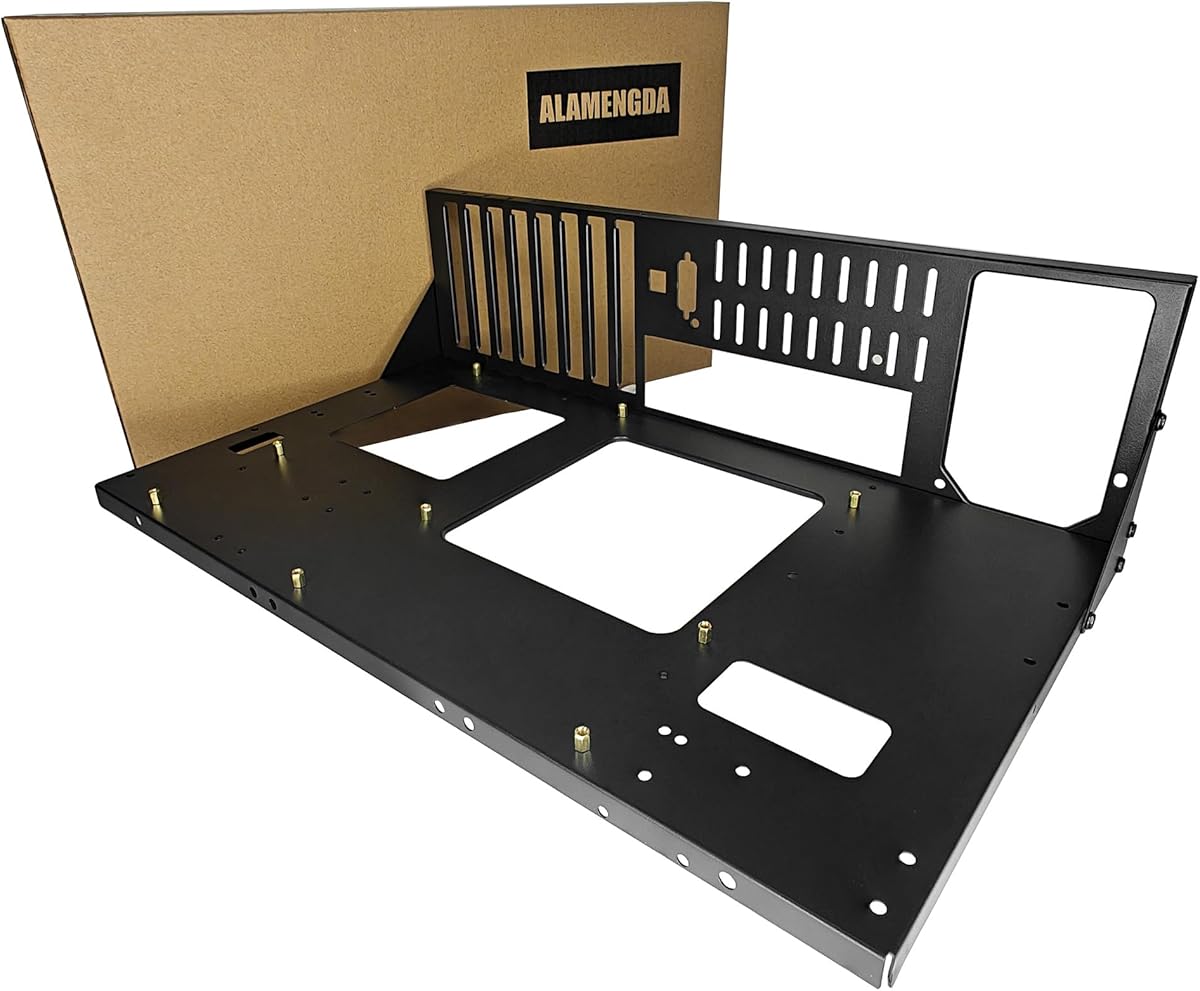
AL01 Open Frame Computer Case
4.4Editor score
Supports three motherboard standards
Unrestricted graphics card length
Open-air passive cooling design
Discover the best Open Frame PC Case options for testing, display, and custom builds, compared for compatibility, cooling, expansion, accessibility, and
An open frame PC case exposes its components while improving access, airflow, and the visual appeal of a custom build. The best models suit hardware testing, system development, display setups, and enthusiasts who want every connection and cable within reach.
We compared ten products based on motherboard support, power supply compatibility, graphics card clearance, cooling provisions, expansion, accessibility, and construction. The list covers practical test benches, portable aluminum frames, display-oriented designs, and premium showcase cases.
Each pick highlights a different reason to choose an open frame, from flexible component support to integrated fans and distinctive styling. Ratings and specifications reflect the supplied product information, while current prices and availability may change.
4.4Editor score

4.5Editor score

4.7Editor score
The comparison below covers ten open frame and open-style cases, emphasizing the differences in motherboard support, power supply options, cooling, graphics clearance, accessibility, and display features.



The AL01 Open Frame Computer Case combines a 4.4 rating with a straightforward test-bench design, making it a practical option for builders who prioritize accessibility and flexible component placement. Its exposed frame reveals every major part of the system and allows airflow to move around the motherboard, processor cooler, and graphics card without a conventional enclosure restricting circulation.
We may earn a commission when you buy through this link, at no additional cost to you.
Construction is a central strength. The frame uses 0.8mm SPCC steel with folded-edge reinforcement and triangular reinforcing plates, while a scratch-resistant black sand-grain finish gives it a purposeful appearance. It supports ATX, Micro ATX, and ITX motherboards within the stated 305 by 245mm mounting area. The wide 440mm layout is also suitable for server cabinet installation, and an extended baseboard is available for E-ATX dual-server configurations.
Graphics card installation is refreshingly flexible because the product does not impose a length or width limit based on the motherboard layout. That makes the frame useful for multi-GPU testing and overclocking work. A standard ATX power supply is supported, and reserved cable routing holes help keep wiring orderly, although the absence of listed SFX or 1U support makes it less versatile than some aluminum competitors.
This is the strongest general recommendation for a new open frame PC case when the goal is straightforward testing, maintenance, or an exposed gaming setup. Buyers should confirm that their processor cooler, power supply, storage arrangement, and motherboard fit the frame, but those constraints are clearly defined by the product data.
Because an open frame supports and displays the entire system, structural rigidity matters. Folded edges, triangular braces, and 0.8mm SPCC steel help the frame remain steady while also making it suitable for server cabinet installation and repeated hardware testing.
Unrestricted graphics card dimensions make the frame practical for unusual GPUs, multi-GPU experiments, and overclocking setups. Buyers should still confirm that their chosen card can be mounted safely without interfering with adjacent components.
We may earn a commission when you buy through this link, at no additional cost to you.
This DIY Aluminium Open Case earns a 4.6 rating and stands out as a flexible platform for builders assembling a custom test bench. It is designed for easy do-it-yourself installation, with an exposed aluminum structure that makes the internal components, connections, and cooling hardware easy to inspect and modify.
We may earn a commission when you buy through this link, at no additional cost to you.
Its strongest selling point is compatibility. The supplied information states that it supports all motherboard models and identifies use for ITX, MATX, ATX, and E-ATX builds. It also accepts standard ATX, SFX, and 1U power supplies, giving users considerably more power-supply freedom than the AL01 frame. This is particularly useful when a bench must accommodate different server and desktop configurations.
The chassis supports both air and water cooling, which is important for modern processors and demanding test configurations. Graphics card length is unrestricted, reducing a common obstacle when installing a long or visually elaborate card. The trade-off is that the product information gives less detail about storage support, fan mounting, and exact physical dimensions than the most thoroughly specified entry in the list.
The frame is well suited to DIY builders, water-cooling experimenters, and technicians who need to change motherboards or power supplies frequently. Confirm the actual mounting pattern and the fit of all cooling hardware before assembly, particularly if the build uses a less conventional motherboard or power supply format.
Support for both air and water cooling makes this frame useful when a builder wants to change thermal configurations without replacing the chassis. It can serve as a stable platform for comparing coolers, testing loop layouts, and monitoring components in an open environment.
ATX, SFX, and 1U compatibility reduces the chance that an unusual bench power supply will dictate the entire build. This is particularly valuable for compact prototypes, server-derived systems, and builders who already own different power supply formats.
We may earn a commission when you buy through this link, at no additional cost to you.
The DIY Open Frame PC Chassis is our Editor's Choice because it combines a 4.5 rating with an unusually balanced set of compatibility features. The aluminum enclosure supports ITX, MATX, ATX, and E-ATX motherboards, while its open structure makes the build a natural fit for custom configurations, component demonstrations, and accessible maintenance.
We may earn a commission when you buy through this link, at no additional cost to you.
Power supply flexibility is one of its most useful attributes. Compatibility with ATX, SFX, and 1U units means builders can reuse a broader collection of hardware than they could with a fixed-format test bench. The frame also supports both air and water cooling, giving users meaningful freedom when choosing a processor cooling solution based on performance, noise, or available space.
Type-C support adds a more contemporary element to an otherwise utilitarian chassis, while unrestricted graphics card length removes another potential compatibility barrier. The specification is less detailed than some alternatives, however, and the supplied information does not clarify the exact Type-C implementation, storage provisions, fan positions, or physical measurements.
Overall, this is the most versatile general-purpose frame in the roundup for a builder who values multiple motherboard standards, power supply formats, and cooling options. It is an especially logical choice for a DIY system that may evolve over time, but exact component dimensions should be checked before purchase.
Supporting ITX through EATX motherboards, along with three power supply formats, gives the chassis a long useful life. Builders can move between compact, workstation, and server-inspired configurations without treating the frame as a single-purpose test fixture.
Air and water cooling support gives the builder freedom to choose the thermal approach that suits the processor and workload. The open frame also exposes the cooling hardware, making installation, inspection, and maintenance more direct.
We may earn a commission when you buy through this link, at no additional cost to you.
The PC Test Bench Open Air Case is built around speed of access. Its 4.1 rating places it outside the leading group, but the supplied description highlights a tool-free design that can make installation, maintenance, and modification more convenient for builders who repeatedly work on a system.
We may earn a commission when you buy through this link, at no additional cost to you.
The frame supports ATX, MATX, and ITX motherboards and can serve two roles: a temporary hardware testing bench or a permanent open-air display case. Dedicated mounting brackets for the motherboard, power supply, and storage devices help organize the build, while the open construction supports airflow and gives every component a visible position.
Its main limitation is that the specification does not list E-ATX support, graphics card clearance, CPU cooler clearance, power supply format, or included accessories. The broad claim of tool-free installation also requires the buyer to determine which operations are genuinely tool-free and whether protective hardware or fasteners are still needed for certain components.
This bench makes sense for a technician or enthusiast who values rapid access over enclosure refinement. It is also a good match for anyone who wants a permanent display build with support for conventional desktop motherboard sizes, provided the buyer checks detailed dimensions and included hardware before committing.
The stated tool-free approach targets builders who install, inspect, and replace components often. Open access reduces the need to route a screwdriver into tightly confined spaces, which can make diagnostics and upgrades more efficient.
The product can transition from a temporary test platform to a permanent display case. That makes it attractive for users who need a system visible in the room without investing in a conventional enclosed chassis.
We may earn a commission when you buy through this link, at no additional cost to you.
The Portable Zinc Coated Test Bench emphasizes durability and portability. Its 4.1 rating reflects a solid but less extensively documented option, and the use of zinc-coated steel gives the open frame a practical construction suited to repeated assembly, disassembly, and movement between work areas.
We may earn a commission when you buy through this link, at no additional cost to you.
The upgraded portable chassis bracket differentiates it from a basic stationary bench. It supports ITX, MATX, and ATX motherboards, covering the most common desktop form factors. A black finish created with baking paint technology allows the frame to blend with a wider range of colored components, although the finish is not described as specifically scratch resistant.
Compared with models that publish storage slots, fan support, and cooler-height allowances, this one offers limited information beyond material, finish, motherboard support, and the portable bracket. Buyers should confirm power supply format, graphics card clearance, CPU cooler height, and the contents of the mounting kit before starting a build.
It is best suited to builders who want a sturdy, movable bench rather than a decorative gaming enclosure. The portable bracket and broad form factor support are meaningful advantages, but the documentation is less complete than that of the more specification-rich choices in this roundup.
The portable chassis bracket is the defining feature for a builder who takes systems between benches, events, or client locations. Paired with zinc-coated steel, it creates a more service-oriented frame than a purely decorative open enclosure.
The baked black finish offers a neutral appearance for workstations and display areas. It can coordinate with cases and components in different colors without the visual emphasis created by lighting or transparent panels.
We may earn a commission when you buy through this link, at no additional cost to you.
The TGDGAMER E-ATX Open Chassis is a broad test bench with a 4.4 rating and a particularly useful storage specification. It supports E-ATX, ATX, M-ATX, and ITX motherboards, giving it more motherboard flexibility than many open frames while maintaining the accessibility expected of a test bench.
We may earn a commission when you buy through this link, at no additional cost to you.
Two SSD and two HDD mounting positions distinguish it from the smaller TGDGAMER option later in the list. That storage allowance is more practical for a system that needs several operating system or data drives, although the listing does not specify connector type, tray construction, or whether the drives mount directly to the frame.
Cooling clearance is another strength. The product has no stated graphics card length limit and no stated CPU cooler height limit, allowing large graphics cards and substantial air coolers to be used. The wide body is intended to aid heat dissipation, but no included fan configuration is identified, so cooling performance will depend on the user's own cooling hardware.
This frame is a strong choice for workstation-class motherboards, multi-drive testing, and builders who prioritize clearance over compactness. Its main constraint is the use of a standard ATX power supply, so SFX or 1U power supplies are not part of the stated support.
Support for two SSDs and two hard drives gives the bench room for a more realistic storage configuration than a minimal one-drive test stand. This is useful when validating operating systems, data arrangements, or a work-focused motherboard.
The absence of stated GPU-length and CPU-cooler-height limits gives builders room to work with oversized cards and air coolers. Actual fit should still be confirmed, particularly where power cables or adjacent components reduce usable space.
We may earn a commission when you buy through this link, at no additional cost to you.
The TGDGAMER Open Chassis is a more compact-oriented counterpart to the E-ATX model, carrying a 4.4 rating and a straightforward set of core compatibility details. It supports ATX, M-ATX, and ITX motherboards, making it suitable for common gaming and development platforms.
We may earn a commission when you buy through this link, at no additional cost to you.
Its principal advantage is unrestricted room for the graphics card and CPU cooler within the limits of the supplied specification. That is valuable for builders working with large modern cards, tall air coolers, or temporary test configurations where the exact physical envelope is less predictable. The open chassis also allows direct access to the motherboard and connections.
Storage is the clear trade-off. One SSD and one HDD position is enough for a basic test system but may be insufficient for a multi-drive workstation or a project involving several storage devices. The product also lists support for a standard ATX power supply only and does not identify included fans, fan headers, or detailed I/O provisions.
Choose this model when a simple, openly mounted gaming or diagnostic system is the goal. It offers useful clearance without the extra motherboard and drive options of the larger TGDGAMER frame, making the two products complementary rather than interchangeable.
Coverage of the three most common motherboard sizes makes this frame easy to match with a typical gaming build. The open format also provides a clear view of the graphics card and processor cooling during operation.
One SSD and one HDD slot is suitable for a basic system but may constrain more involved builds. Users who require several drives should consider the wider TGDGAMER E-ATX model or another frame with greater storage provision.
We may earn a commission when you buy through this link, at no additional cost to you.
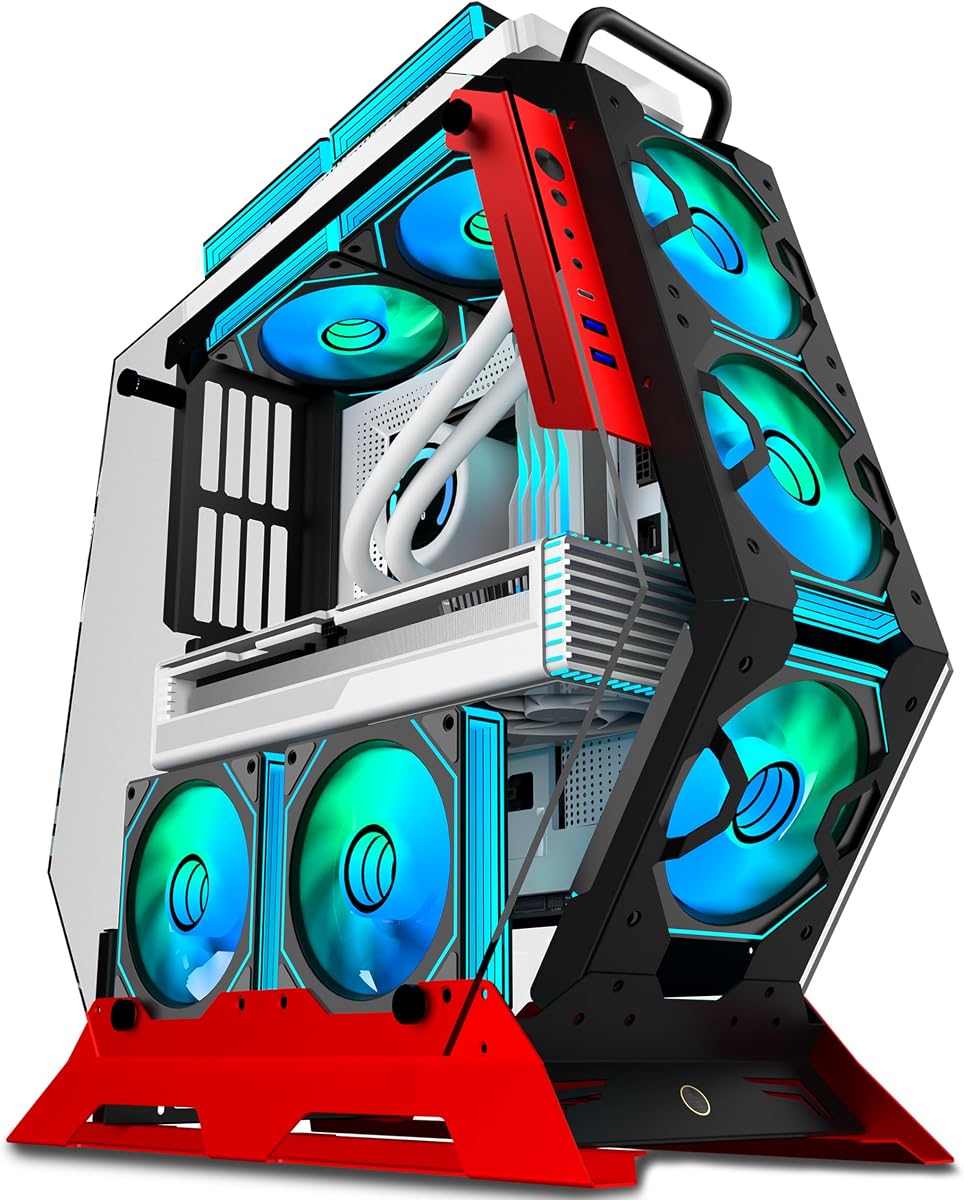
The KEDIERS C570 Open Frame is the most overtly display-focused product in the roundup, combining a 4.5 rating with an irregular red frame, two tempered-glass panels, and seven preinstalled PWM ARGB fans. It is intended for gaming builders who want a dramatic exposed system rather than a purely functional repair bench.
We may earn a commission when you buy through this link, at no additional cost to you.
Cooling is a major selling point. Seven PWM fans provide active airflow around the open layout, while the unusual frame and glass panels showcase the RGB lighting from multiple angles. The fans connect through a simple +5V ARGB motherboard header, and the product information says they can be controlled with computer software without a separate controller.
Motherboard support covers ATX and Micro-ATX, but ITX is not explicitly listed. The front I/O panel includes one Type-C port, two USB 3.0 ports, and one HD audio connection. That is a useful collection for a modern gaming desk setup, although the product information does not clarify the location of the I/O panel or the number of expansion slots.
This case is best for builders who prioritize appearance, integrated lighting, and ready-made fan configuration. It is less suitable for someone seeking a highly flexible technician's bench with numerous storage positions or many alternative power supply formats, but it delivers the strongest visual identity among the affordable open-style cases here.
The preinstalled fan bank gives the system immediate active cooling and a strong visual centerpiece. Because the fans use standard ARGB and PWM connections, they can integrate with a compatible motherboard's lighting and fan-control software.
Two 4mm tempered-glass panels make the open frame suitable for a decorative gaming setup. The irregular red structure and visible lighting create a display piece that feels more like an exhibition chassis than a temporary test stand.
We may earn a commission when you buy through this link, at no additional cost to you.
The CORSAIR 4000D RS ARGB Frame has the highest rating in the roundup at 4.7 and offers the most complete conventional case system among the picks. Although it is a mid-tower rather than a bare test bench, its modular FRAME concept and flexible fan rails make it a strong option for buyers using the keyword in a broad, showcase-oriented sense.
We may earn a commission when you buy through this link, at no additional cost to you.
Three CORSAIR RS ARGB PWM fans are preinstalled at the front. They use daisy-chainable four-pin PWM connections, support Zero RPM behavior at low loads, and connect to the motherboard's +5V ARGB header. The InfiniRail steel mounting system allows fans up to 200mm at the front and up to 140mm at the roof, giving builders meaningful control over intake and exhaust placement.
The FRAME system is the chassis's distinguishing feature. Its modular approach allows components such as the motherboard tray and front I/O panel to be changed as the user's needs evolve. The perforated Y-pattern front panel supports high airflow, while the removable or repositionable side panel near the motherboard tray can serve as a cable cover or create space for additional side-mounted fans.
This is the premium recommendation for a polished, customizable gaming build rather than a repair technician's open bench. Its enclosure provides more conventional protection and a broader structural ecosystem than the bare frames, while retaining a strong sense of visual customization and active cooling.
The InfiniRail system turns fan placement into a configurable decision instead of a fixed arrangement. Builders can create front-to-rear intake paths, roof exhaust, or side-assisted cooling while maintaining the structural strength of a steel multi-point mounting system.
The modular FRAME system allows selected case elements to be upgraded, replaced, or adapted. That approach is especially appealing for builders who expect their motherboard, I/O, or internal layout needs to change over time.
We may earn a commission when you buy through this link, at no additional cost to you.
The Cooler Master MasterFrame 360 is the most specialized open-frame concept in the list. Its 4.0 rating is the lowest among the ten products, yet the case offers a striking mirrored stage, extensive cooling capacity, and an open layout intended for creators, collectors, and themed showcase systems.
We may earn a commission when you buy through this link, at no additional cost to you.
Its defining feature is the front mirrored platform, designed to reflect components and collectibles from all directions. Unlike a conventional transparent side panel, this creates a 360-degree presentation effect. The unrestricted open-frame layout allows hardware, figures, and accessories to be placed throughout the enclosure, making the case as much a display platform as a computer chassis.
Cooling capacity is extensive. The frame supports 120mm through 200mm fans, with room for up to twelve 120mm fans split between the top and bottom, plus radiators up to 360mm. Motherboard support covers Mini-ITX, Micro-ATX, and ATX, including ATX BTF back-connect layouts. Graphics cards up to 430mm and power supplies up to 210mm are also accommodated.
Modern connectivity includes USB 4.0 Gen 2×2 Type-C with up to 20Gbps bandwidth and two USB 3.2 Gen 1 Type-A ports. This is the pick for a collector or creator willing to design around a large statement chassis. It is less appropriate for a compact bench, and the mirrored centerpiece makes careful planning essential to preserve a clean presentation.
The mirrored front stage creates reflections from multiple directions and provides a distinctive focal point. Collectors can arrange figures and accessories around the hardware, turning the system into a decorative installation as well as a functional computer.
Support for twelve 120mm fans and a 360mm radiator gives the frame more cooling capacity than most open cases. The 430mm graphics card allowance and 210mm PSU limit also favor larger performance components and ambitious custom configurations.
We may earn a commission when you buy through this link, at no additional cost to you.
The right open frame PC case depends on whether it will serve as a technician's bench, a permanent gaming display, or a collector's centerpiece. Motherboard size, power supply format, cooling, storage, and accessibility should be checked before purchase.
Begin with the motherboard standard used by your build. Most frames in this roundup support ATX, Micro ATX, and Mini-ITX, while the AL01, TGDGAMER E-ATX, and KEDIERS C570 also address larger E-ATX boards. The DIY Aluminium and DIY Open Frame products make broad compatibility claims, but the buyer should still verify the actual socket pattern, mounting holes, and rear-panel arrangement.
Choose a frame that explicitly supports your board and its intended upgrade path. A wider supported range costs little in an exposed chassis and prevents a simple board-size mismatch.
Most entry-level test benches list standard ATX power supply support, which is ideal for conventional desktop builds. The DIY Aluminium and DIY Open Frame frames go further by supporting ATX, SFX, and 1U formats, giving prototype builders more freedom to reuse server-derived or compact power supplies.
Match the frame to a power supply format you already own or can readily obtain. Also consider connector clearance, cable bend radius, and whether the power supply can be mounted in a conventional position.
The AL01, both DIY aluminum frames, and both TGDGAMER benches have no stated graphics card length restriction. That makes them appealing for oversized cards and experimental multi-GPU work. The Cooler Master MasterFrame provides a defined 430mm maximum, while conventional mid-towers need their own clearance check.
Do not rely on length alone. A long card can still conflict with front fans, cables, radiators, or neighboring hardware, so check the complete installed envelope before building.
An open frame improves natural airflow, but a passive frame does not guarantee low component temperatures. Some products support air and water cooling, the KEDIERS includes seven ARGB fans, and the CORSAIR includes three PWM ARGB fans. Other frames may require the user to provide all cooling hardware.
Consider radiator size, fan thickness, CPU cooler height, and mounting locations together. High airflow also means dust can reach exposed components, so maintenance and filtration deserve attention.
The TGDGAMER E-ATX frame lists two SSD and two HDD positions, while the smaller TGDGAMER model provides one of each. The PC Test Bench Open Air Case includes dedicated storage mounting brackets, and the open DIY frames are appealing when flexible component placement matters more than fixed drive trays.
Match the number and type of storage positions to the system. A test rig with one drive is simple, but a workstation may require several SSDs, and cable routing becomes substantially easier when the frame provides organized mounting points.
Open frames are often chosen because every component is easy to reach. The PC Test Bench Open Air Case specifically advertises a tool-free design for rapid installation and modification, while the other aluminum and steel frames emphasize straightforward DIY assembly. A more elaborate display case may look polished but offer less direct access.
Consider how often components will be replaced. Frequent diagnostics favor open access and visible connections, while a finished gaming or collector system may benefit more from structural support, lighting, and a carefully planned display layout.
The AL01 uses 0.8mm SPCC steel with folded-edge reinforcement and triangular braces. The portable TGDGAMER-style bench uses zinc-coated steel with baked black paint, and the two DIY frames use aluminum. Premium display-oriented cases combine thicker structural framing with glass, lighting, and more refined finishes.
Match the material to the environment. Steel frames can be visually substantial and rigid, aluminum is useful for a lighter portable build, and decorated showcase cases are best treated as a permanent installation rather than a frequently transported bench.
A conventional case needs convenient front connectors, while a bare test bench may place ports directly on components. The KEDIERS includes Type-C, two USB 3.0 ports, and HD audio. The Cooler Master MasterFrame provides USB 4.0 Gen 2×2 Type-C and two USB 3.2 Gen 1 Type-A ports, while the CORSAIR is built around a conventional, customizable mid-tower system.
For a desk-based gaming system, prioritize the front I/O that you actually use. For a display piece, consider glass orientation, lighting control, cable visibility, and whether the reflective or transparent surfaces complement the surrounding room.
Before installing components, inventory every part and compare it with the frame's stated motherboard, power supply, graphics card, cooler, and storage support. Assemble the structure on a level surface, install the power supply and storage first, and confirm that cables can reach their destinations without being sharply bent or stretched.
Install the processor, memory, motherboard, graphics card, and cooling hardware according to their individual instructions. Use appropriate anti-static precautions, tighten fasteners evenly where required, and avoid leaving the power supply unsupported. Connect fan and lighting headers only when their voltage and connector specifications match the motherboard or controller.
An open frame needs regular care because exposed components can collect dust more quickly than hardware inside a filtered enclosure. Keep the area around the frame clean, inspect fans for buildup, and use gentle compressed air or a soft brush. Check cable connections periodically, particularly after moving the system or adding components.
Yes. An open frame can make a powerful gaming system visually prominent while providing direct airflow around exposed components. The KEDIERS C570 and CORSAIR 4000D RS are more display-oriented, while the AL01 and TGDGAMER models lean toward the exposed test-bench aesthetic. Proper cooling and cable management remain important in any high-performance build.
An open frame generally offers fewer physical barriers than a conventional case, so air can circulate around components more freely. Actual temperatures still depend on the processor, cooler, fan placement, room temperature, and dust control. An open frame with no installed fans may need more active cooling than an enclosed but well-ventilated system.
Most models in this roundup support standard ATX power supplies, including the AL01, both TGDGAMER benches, and the DIY frames. The DIY Aluminium and DIY Open Frame products additionally list SFX and 1U support. Confirm the frame's mounting and cable space because connector format alone does not guarantee a clean installation.
They are often easier to assemble than conventional cases because the components remain exposed and the frame has fewer panels to work around. However, users still need to plan cable routes, secure the power supply, align standoffs correctly, and manage airflow. The PC Test Bench Open Air Case specifically emphasizes tool-free installation for quicker access.
Choose the exact motherboard standard your build uses. ATX, Micro ATX, and ITX are the most common supported formats, while some models also accommodate E-ATX. Check not only the size label but also the socket, rear I/O shape, and mounting-hole pattern before purchasing a frame.
The DIY Aluminium Open Case and DIY Open Frame PC Chassis explicitly support both water and air cooling. Other models may also accommodate radiators, but that depends on their frame dimensions and fan mounting locations. Confirm radiator size, mounting pattern, tubing space, and pump placement before ordering a custom loop.
Potentially, because there is no fully sealed enclosure filtering incoming air. Regular cleaning, controlled room dust, and sensible fan placement can reduce buildup. Exposed graphics cards, power supplies, and storage may also benefit from occasional visual inspection, particularly in dusty environments.
Yes, if the goal is a polished showcase system rather than a literal test bench. The CORSAIR 4000D RS ARGB Frame and Cooler Master MasterFrame 360 combine open visual elements with more conventional case protection, organized front connectivity, and greater cooling provisions. They suit display-oriented gaming and creator builds.
The AL01 stands out as the best overall option for buyers who want a reinforced, accessible test bench with broad motherboard support and unrestricted graphics card dimensions. The DIY Open Frame PC Chassis is the most versatile Editor's Choice, while the CORSAIR 4000D RS ARGB Frame leads the premium conventional-case group with modular construction, included fans, and flexible fan placement.
Prioritize exact motherboard fit, power supply format, graphics clearance, CPU cooler height, and storage needs before considering appearance. For literal test-bench use, the TGDGAMER and DIY aluminum frames are particularly relevant. For a permanent gaming display, the KEDIERS C570 provides integrated lighting and seven fans, while the Cooler Master MasterFrame 360 offers a dramatic collector-oriented design.
Check current prices and availability before buying, because offers can change and the final cost may influence which specialized frame fits your budget. Reconfirm the seller's latest dimensions, included accessories, connector details, and compatibility information to ensure that the selected open frame PC case is suitable for the exact hardware you plan to install.