
OREI 4K@60Hz HDMI Over Cat6 Balun 165ft One-Way IR Loop Out EDID HDR 18Gbps
4.2Editor score
18Gbps HDMI bandwidth
4K60 RGB 4:4:4
HDR and IR passthrough
Our HDMI over Ethernet guide compares 10 extenders for 4K support, distance, PoC, EDID, IR control, loop-out, audio, and installation needs for modern AV use.
HDMI over Ethernet extenders move an HDMI source to a distant television, projector, or monitor through a network cable. The right model can preserve 4K quality, carry power and control signals, and simplify installations where conventional HDMI cabling would be impractical.
We compared all ten products by resolution, supported distance, PoC design, EDID handling, IR control, loop-out functionality, audio support, and installation complexity. The guide covers point-to-point extenders, a one-to-four distribution system, and a feature-rich HDBaseT model.
Each pick highlights a different practical reason to choose it, from value-focused Full HD transmission to high-bandwidth 4K60 options. Ratings and specifications reflect the supplied product information, while prices and availability can change, so check the current listing before purchasing.
4.2Editor score

4.6Editor score

4.4Editor score
This side-by-side comparison highlights the major differences in resolution, transmission distance, power delivery, control features, and distribution capability across the ten HDMI over Ethernet extenders.



This OREI extender is a balanced choice for users who need more than basic Full HD extension without requiring the bandwidth of a 4K60 model. Its 4.6 rating reflects a strong combination of useful features, including HDMI loop-out, IR control, EDID support, and power over cable. The supplied specifications also place it among the more complete point-to-point options in this guide.
We may earn a commission when you buy through this link, at no additional cost to you.
Video can be extended over Cat5e, Cat6, or Cat7 wiring, with listed distances of up to 230 feet for 1080p and shorter reach for 4K. The transmitter's loop-out provides a convenient way to monitor the source locally while sending the same signal to a remote television or monitor. PoC powers the receiver through the network cable, and the included IR cables support remote control of a source device from the receiving location.
The important limitation is the maximum 4K refresh rate. This unit supports 4K at 30Hz rather than 4K at 60Hz, so it is better suited to cinematic displays, presentations, surveillance, and standard viewing than to demanding high-frame-rate gaming. Its stated performance also depends on cable quality, installation, and the source and display equipment. It is not designed for HDMI ARC or IP-based streaming and network functions.
This is a particularly good match for a home theater, conference room, classroom, or office where 4K30 is sufficient and clean wiring matters. Buyers wanting smoother 4K60 gaming or advanced high-bandwidth color formats should compare it with the OREI 4K60 extenders later in the guide. For most mixed AV installations, however, its combination of reach and convenience features is difficult to overlook.
The HDMI loop-out lets a nearby operator view the same source on a local screen while the primary display is positioned elsewhere. That makes the model useful for monitoring, teaching, digital signage, and installations where operators need immediate visual feedback.
Power over cable and IR pass-through reduce the number of separate services that must reach the remote end. The result is a tidier installation around wall-mounted displays, projectors, and cabinets where maintaining access to power and source controls would otherwise be inconvenient.
We may earn a commission when you buy through this link, at no additional cost to you.
The HT202P is a straightforward Full HD extender for relocating an HDMI source without installing a long HDMI cable. Its 4.4 rating and 1080p60 support make it most appropriate for conventional televisions, monitors, classrooms, offices, and presentation setups where high-resolution 4K operation is unnecessary. It keeps the core point-to-point design uncomplicated.
We may earn a commission when you buy through this link, at no additional cost to you.
The unit can carry Full HD video and audio as far as 164 feet over Cat5e, Cat6, or Cat7 cable. PoC means the included adapter powers the transmitter and sends power to the receiver through the same network cable, eliminating the need for a second outlet at the remote display. EDID copy helps the source negotiate a compatible resolution with the connected display.
The obvious trade-off is resolution. This model is centered on 1080p at 60Hz and 3D rather than 4K, so it will not satisfy an installation that requires a 4K60 signal. It also does not list IR pass-through, HDMI loop-out, or advanced audio extraction. Its strength is instead a focused feature set for straightforward Full HD point-to-point extension.
Choose the HT202P when the remote display, source, and intended use are all Full HD and a simple, reliable installation is the priority. It is especially suitable for a wall-mounted television, a classroom projector, or an office display where a single network cable and one power adapter are desirable. For 4K sources, choose a model explicitly listed with 4K30 or 4K60 support.
PoC sends power to the receiving unit through the Ethernet run, so installers do not need a convenient outlet beside the remote television or projector. The included adapter and uncomplicated transmitter-receiver arrangement also keep the setup approachable for first-time users.
Rather than spending bandwidth on features the installation may not need, the model concentrates on stable 1080p60 video and audio. It is a sensible option for business displays and conventional home viewing where native 4K is not a requirement.
We may earn a commission when you buy through this link, at no additional cost to you.
This OREI model stands out for combining 4K60 support with a listed 230-foot range over a single Cat6, 6A, or 7 run. Its 4.6 rating places it among the strongest options here, while features such as 18Gbps bandwidth, HDR10+, Dolby Digital, and uncompressed point-to-point transmission make it relevant to serious home and professional AV installations.
We may earn a commission when you buy through this link, at no additional cost to you.
The specified format support includes UHD 4K at 60Hz with YUV 4:4:4, HDMI 2.0a, and HDCP 2.2. That makes it more appropriate than 4K30 alternatives for high-end televisions, projectors, gaming displays, and demanding source devices. PoC means only the transmitter needs its own power adapter, and the included one-way IR path allows control from the receiver side.
There are still trade-offs. The listed maximum reach of 230 feet is especially relevant to 4K performance, and actual results can depend on the cable, source, display, and installation. The unit does not list an HDMI loop-out, analog audio output, or two-way IR, and the provided information does not describe a KVM function. It remains a dedicated signal extension kit rather than a full distribution or control system.
This extender is a strong recommendation for a dedicated theater, gaming room, or professional installation that needs 4K60 and high-bandwidth color over structured cabling. Buyers seeking a simpler 4K30 setup may find a less advanced model sufficient, but those prioritizing image format support and long reach get a more capable package. It is our most balanced high-performance pick.
Supporting 4K60 YUV 4:4:4 allows the extender to carry the high-resolution, high-refresh output expected by modern displays and capable source equipment. This is more meaningful for modern home theaters than a 4K30 alternative, particularly when PC gaming, sports, or high-motion content is involved.
The compact metal housing is designed to protect the internal components and assist with heat dissipation. A rugged enclosure and straightforward plug-and-play arrangement are useful for installations in media cabinets, conference rooms, commercial displays, and other long-term AV environments.
We may earn a commission when you buy through this link, at no additional cost to you.
The OREI 1×4 is the guide's dedicated distribution solution, sending one HDMI source to four remote displays while also offering a local HDMI output at the transmitter. Its 4.6 rating is supported by a broad package that includes four receivers, IR components, and a single power adapter. It is built for locations that need the same content across several screens.
We may earn a commission when you buy through this link, at no additional cost to you.
Four Cat6 or 6A network outputs on the transmitter allow the signal to be routed independently to as many as four receiver locations. The listed 230-foot reach applies to 4K30 operation, while the supplied specifications also identify 1920 by 1080 at 60Hz support. A loop-out on the transmitter supports local monitoring, and one-way IR forwarding allows a source such as a DVD player to be controlled from a remote location.
The trade-off is complexity relative to a simple two-box extender. Four cable runs, four receivers, and a shared one-source design are necessary to achieve the multi-display arrangement. The 4K60 limitation also matters for high-refresh gaming or demanding color workflows. Users should confirm that the topology matches their needs rather than paying for unnecessary distribution hardware for a single screen.
This model is well suited to exhibition areas, meeting rooms, bars, digital signage, and monitoring environments where identical content must appear in several places. Its single-adapter PoC design keeps remote power requirements manageable, while local loop-out and IR support improve control. It is a strong choice for multi-display distribution rather than a basic one-screen extension.
The one-to-four architecture makes the same source available across separate rooms, display zones, or presentation areas. This avoids the need for multiple source devices when every destination should show the same content, while a separate network run to each receiver provides installation flexibility.
One-way IR pass-back allows operators to control compatible source equipment from the receiving side. The transmitter's local HDMI output also provides a convenient monitoring point, useful when personnel need to verify the source while the main displays serve an audience.
We may earn a commission when you buy through this link, at no additional cost to you.
The OREI UHD-EX165H-K is a premium-oriented extender for buyers who want high-bandwidth 4K60, extensive color depth, and a broad collection of AV formats. Its 4.2 rating does not lead the list, but the specification set is among the most ambitious, including 18Gbps bandwidth, HDR, HDMI 2.1, HDCP 2.2, and 12-bit 4:4:4 color.
We may earn a commission when you buy through this link, at no additional cost to you.
The model sends uncompressed 4K60 RGB or YCbCr 4:4:4 video and audio through one Cat6 or Cat7 cable for up to 165 feet. Loop-out permits a local display to remain connected at the source, while built-in EDID management assists with resolution negotiation. One-way IR pass-through allows a streaming device, media player, or cable box to be operated from the receiving end.
Audio support is another differentiator, with LPCM, Dolby Digital, Dolby TrueHD, DTS-HD, and DSD listed. That broad format coverage suits dedicated theaters and professional AV installations. On the other hand, the 165-foot maximum is shorter than some alternatives, and the unit requires a direct cable connection rather than a router or network switch. It is designed to extend HDMI, not to operate as a networked streaming device.
Choose this model for a high-end theater, gaming room, digital signage installation, or conference environment where picture quality, HDR, and high-bandwidth audio are priorities. The specification-heavy package makes it more specialized than a basic extender, but that is appropriate when every feature has a clear role. Buyers should use high-speed Cat6 and confirm their display and source can take advantage of 4K60.
The 18Gbps bandwidth and support for 12-bit 4:4:4 color give the extender room for detailed 4K60 presentation. Combined with HDR support, this makes it a stronger fit for color-conscious home cinema and professional monitoring than models limited to 4K30.
Support for major surround and lossless formats allows compatible audio to travel with the extended video signal. The capability is particularly useful in dedicated theaters where preserving the source's intended surround-sound presentation is as important as image quality.
We may earn a commission when you buy through this link, at no additional cost to you.
The HT275 is a well-rounded 4K extender for installations that value reach, local monitoring, and remote source control. Its 4.4 rating reflects a capable package, and the listed distance distinguishes between 4K30 at 131 feet and 1080p60 at up to 230 feet over Cat6 or Cat7 cable. That makes it flexible for both nearby high-resolution and more distant Full HD displays.
We may earn a commission when you buy through this link, at no additional cost to you.
PoC sends receiver power through the network cable, so only the transmitter needs the included external adapter. The transmitter's HDMI loop-out supports a local display, and the included IR transmitter and receiver cables permit control of compatible source devices from the remote viewing position. EDID management helps the source recognize the connected display and select a compatible resolution.
The main limitation is that 4K is restricted to 30Hz. The model also requires a direct Cat6 or Cat7 run rather than an Ethernet network. Although the listed source compatibility is broad, covering PCs, consoles, media players, cable boxes, AV receivers, and digital signage players, actual output remains limited to the device's stated resolution and refresh-rate support.
This is a sensible choice for home theaters, churches, classrooms, conference rooms, and security systems where 4K30 is sufficient but long reach and cleaner cabling are important. It offers more convenience than a bare point-to-point kit because of loop-out, IR, and PoC. Gamers needing 4K60 should move to a higher-bandwidth model rather than expect this unit to negotiate a faster 4K mode.
The extender is specified for 131 feet at 4K30 and 230 feet at 1080p60. This distinction reflects the greater bandwidth demands of high-resolution video and gives installers a realistic way to match cable length to the signal that the installation actually requires.
IR pass-through makes it possible to operate a source device in another room without exposing it or stretching its control cable. This is especially useful when the source sits inside a cabinet and the television or projector is mounted in a less accessible location.
We may earn a commission when you buy through this link, at no additional cost to you.
The OREI KVM extender differentiates itself by extending a 4K60 signal while also carrying USB keyboard and mouse control to the receiver. Its 4.2 rating and extensive format support make it a compelling option for a PC installed in a remote cabinet, office, studio, or media room where users need direct control rather than a network-based remote-management system.
We may earn a commission when you buy through this link, at no additional cost to you.
Using high-quality Cat6 or Cat7 cable, the kit can extend video up to 230 feet while preserving 4K60 and standard HDMI resolutions. The USB KVM extension allows a user at the receiver to operate the remote computer. EDID copy pass-through supports resolution compatibility, and the transmitter includes HDMI loop-out for a nearby display. A 3.5mm stereo output at the receiver provides a separate analog-audio option.
HDR10, HDR10+, Dolby Vision, and HLG are among the listed video formats, while PCM, LPCM, DTS-HD, and DTS support broad audio use. Despite the KVM label, the description presents a point-to-point extender rather than a multi-computer switcher. Users should not expect to alternate among several hosts unless another switching mechanism is present. PoC reduces the receiver's power requirements, but the cable run still needs to be suitable for the intended signal.
This model is recommended for remote computer workstations, gaming rooms, studios, and professional control setups where keyboard and mouse access must travel with the video. It is also valuable when analog speakers or headphones are needed at the remote end. Those needs distinguish it from standard extenders, while buyers seeking only 4K60 video can choose a simpler option with fewer control functions.
The KVM function allows keyboard and mouse input at the receiver to control a source computer over the extender link. It removes the need to keep a full-size control station beside the computer, which is valuable in concealed racks and dedicated remote-work installations.
The 3.5mm stereo output provides a practical option for local speakers or headphones at the remote location. It is useful when the television is not the final audio destination or when the user wants a more personal listening setup.
We may earn a commission when you buy through this link, at no additional cost to you.
The KVZOO model offers an accommodating mix of distance, installation features, and source-device flexibility. Its 4.3 rating reflects a versatile package aimed at home theaters, offices, churches, classrooms, outdoor screens, and event spaces. It supports 4K30 and 1080p60 over Cat5e through Cat7 wiring, making it useful where the available structured cable is not necessarily the newest category.
We may earn a commission when you buy through this link, at no additional cost to you.
The stated distance depends on both resolution and cable type: 4K30 extends up to 130 feet, while Cat6 and Cat7 can support 1080p60 up to 164 feet and 230 feet respectively under the listed conditions. PoC powers both ends through the Ethernet cable, IR supports source control, and the transmitter's loop-out enables local monitoring. EDID cloning is included to help source and display negotiate a suitable mode.
The specification also notes that the HDMI 1.4 protocol does not provide native HDR, which is a protocol limitation rather than a defect. That caveat is important for buyers who equate 4K support with all modern 4K features. The device is limited to 4K30, and effective long-range performance depends on high-quality cable. Its mounting-hole design is a practical touch for fixed installations, although the enclosure still needs suitable placement.
This extender is a good option when installation convenience matters alongside 4K30 and long Full HD reach. It gives users several ways to manage a remote display through IR, PoC, loop-out, and compatible display modes. For HDR, 4K60, or 10-bit and 12-bit workflows, a higher-bandwidth 4K60 model would be the more appropriate choice.
Support for Cat5e, Cat6, Cat6A, and Cat7 expands the range of existing wiring that can be reused. That is particularly useful in offices, schools, churches, and renovated homes where pulling a brand-new cable type may be difficult or unnecessarily disruptive.
Mounting holes make it easier to secure the units behind displays, inside cabinets, or near projectors. Combined with PoC, this reduces visible power leads and helps produce a cleaner permanent installation.
We may earn a commission when you buy through this link, at no additional cost to you.
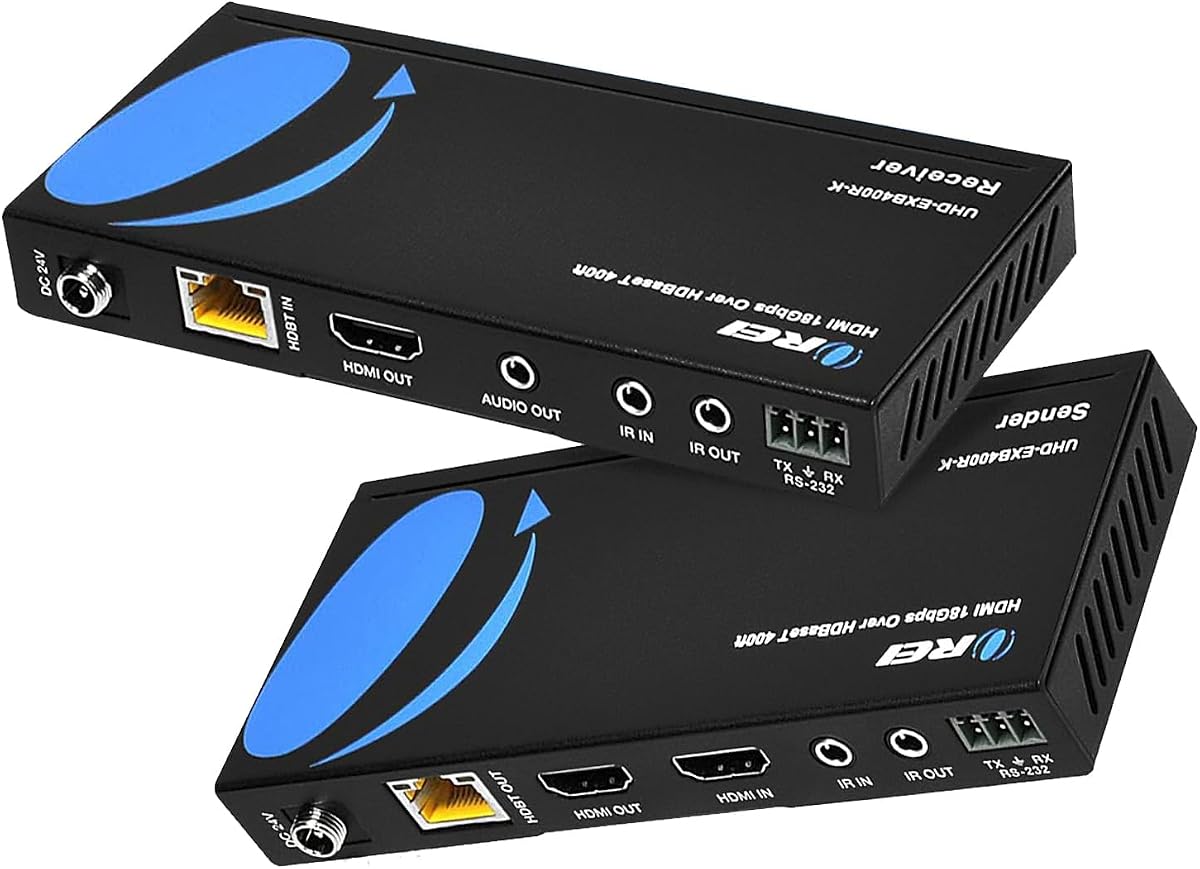
The OREI HDBaseT model is designed for long professional or semi-professional runs, with a listed maximum of 400 feet over Cat5e, Cat6, or Cat7 cable. Its 4.2 rating is backed by a feature set that includes 4K60 YUV 4:4:4, 18Gbps bandwidth, HDR, bidirectional IR, CEC, RS-232, loop-out, and PoC. It is the longest-distance option presented in this guide.
We may earn a commission when you buy through this link, at no additional cost to you.
HDBaseT technology is intended to provide lossless, low-latency video transfer over structured networking cable. The unit supports HDMI 2.0a, HDCP 2.2, HDR10+, Dolby Vision, DTS-HD, Dolby TrueHD, and 7.1-channel digital audio. Two-way IR allows remote commands to travel in either direction, while the RS-232 port adds a professional control option. PoC can power the paired units from either end.
Compatibility is the main concern. The supplied instructions state that these HDBaseT models work only with their own matching transmitter and receiver and are not interchangeable with other OREI HDBaseT models or devices from other brands because of chipset differences. That restriction reduces flexibility, but it also emphasizes that the kit should be treated as a matched system rather than a generic network device.
This is the most compelling option for large venues, campuses, commercial buildings, or homes with exceptionally long cable paths. It is best suited to installers who value reach, control, and professional AV features more than simple plug-and-play universality. Users should confirm their planned cable run, pair the included components, and test the desired source and display combination before finalizing a permanent installation.
Two-way IR and RS-232 make the system adaptable to installations where control needs to move in both directions or where a control system is already present. These features distinguish it from basic extenders intended only to carry an image and sound.
The 400-foot capability makes the model useful across large properties, educational buildings, and venues where conventional HDMI cabling would be impractical. Zero-latency point-to-point transfer also makes it more practical for live viewing, presentations, and monitoring than an IP-conversion workflow.
We may earn a commission when you buy through this link, at no additional cost to you.
The PWAY HT275 combines a 4.6 rating with a practical set of features for extending HDMI over structured Ethernet cable. It supports up to 4K30 and 1080p, carries video and audio, and provides a 4K30 range of 130 feet or a 1080p range of 230 feet over Cat6. That makes it a versatile middle ground for residential and commercial installations.
We may earn a commission when you buy through this link, at no additional cost to you.
The included IR cable allows source control from the receiver side, while the transmitter's loop-out provides a local preview or monitoring display. PoC powers the receiver through the Ethernet run, reducing the need for a separate power connection at the remote end. Mounting holes are included to help secure the housings in permanent setups, and both mirrored and extended display modes are listed.
Its main limitation is 4K30 rather than 4K60, which may rule it out for high-refresh gaming and advanced high-bandwidth color workflows. The supplied product information also does not explicitly identify an EDID copy function, so users who need automatic resolution matching should verify compatibility carefully. The transmission distance is tied to the resolution and the quality of the network cable.
This extender is a good option for a home theater, meeting room, live-streaming setup, or secondary display where 4K30 and 1080p are sufficient. Its combination of PoC, IR, loop-out, and mounting provisions covers the most common installation needs without introducing a complex distribution system. For demanding 4K60 applications, consider one of the 18Gbps models instead.
Support for mirrored and extended display modes gives users a choice between duplicating content for a viewer and an operator, or expanding a desktop across multiple screens. That flexibility is useful for live monitoring, presentations, gaming, and productivity setups.
PoC reduces the number of power cables at the remote display, while mounting holes support tidier placement. These details are modest individually but meaningful when the equipment must remain permanently installed behind a television, inside a cabinet, or beneath a projector.
We may earn a commission when you buy through this link, at no additional cost to you.
The right extender depends on your source resolution, cable route, control requirements, and how the remote display will be used. Compare the specifications carefully because maximum distances commonly change with resolution and cable category.
Start with the output your source and remote display actually use. Some extenders in this guide are designed for 1080p60, others for 4K at 30Hz, and the most advanced models for 4K at 60Hz. Refresh rate is especially important for fast-moving games, sports, and high-motion computer content. Color formats also matter: 4K60 YUV 4:4:4 preserves more fine detail than chroma-subsampled modes, while HDR, HDR10+, Dolby Vision, and HLG require compatible hardware and higher-bandwidth support.
Choose the lowest specification that fully meets your needs. A 1080p60 model may be ideal for an office monitor, while a native 4K60 extender is more appropriate for a modern home theater or gaming display.
Advertised reach is not a single universal number. Distance can vary according to resolution, refresh rate, cable category, installation quality, and the capabilities of the source and display. The listed maximum of 230 feet is generally associated with 1080p in this group, while 4K models commonly specify shorter ranges such as 130 or 165 feet. The HDBaseT model reaches up to 400 feet under its stated conditions.
Measure the complete cable path rather than only the straight-line distance between devices. Include bends, connectors, patch panels, and allowances for routing through walls or ceilings.
The extender and cable must work together. Basic Full HD extenders may accept Cat5e, while long 4K runs benefit from high-quality Cat6, Cat6A, or Cat7. Some products claim compatibility with several categories, but performance at the maximum distance may be achieved only with the better cable. Poorly terminated cable, untested wall wiring, and mixed cable grades can undermine otherwise reliable transmission.
For a new installation, use solid, correctly terminated high-quality network cable. For an existing run, test continuity and avoid reusing questionable patch leads when dependable operation matters.
PoC sends receiver power through the same Ethernet cable used for video and control. It reduces cable clutter and makes it easier to install a television or projector where a nearby power outlet would be inconvenient. Most PoC systems require power at the transmitter, while the featured HDBaseT model can be powered from either side. A single-adapter arrangement is particularly attractive for wall-mounted or concealed displays.
Confirm that PoC operates through the entire selected cable path. Some installations may still need separate service power for a television, projector, or amplifier even when the receiver is powered through the network cable.
EDID helps a source identify the capabilities of the connected display, including supported resolution and refresh rate. Copying or managing EDID can prevent problems such as a source defaulting to a lower resolution or an unsuitable output mode. This is particularly useful when the remote display is a projector, commercial screen, or secondary monitor with a different capability set from the local display.
EDID support is listed on most models here, but its implementation may differ. Check the source, extender, and display for compatible resolutions, and physically test the intended mode before making the wiring permanent.
IR pass-through sends commands from a remote control near the receiver back to the source. This makes it possible to operate a media player, cable box, or Blu-ray player concealed in another room. Most units provide one-way IR, while the OREI HDBaseT model lists bidirectional IR. KVM extender adds another form of remote control by carrying keyboard and mouse input to a remote computer.
IR performance depends on how the emitter is positioned. The emitter needs a clear path to the source's sensor, and the supplied IR receiver cable must be placed where it can receive the remote signal effectively.
An HDMI loop-out duplicates the source image to a local display while the main signal travels to the receiver. It is useful for operator monitoring, teaching rooms, retail displays, and live-production setups where a nearby screen must show what the audience sees. A one-to-four splitter extender is a different category of hardware designed to distribute one source across four remote screens.
Choose a point-to-point extender for one main remote screen, a loop-out model when local monitoring is needed, and a multi-receiver system when several distant displays require the same content.
Some extenders pass embedded HDMI audio without added controls, while others support broad surround formats or provide a 3.5mm analog output at the receiver. The KVM model also extends USB keyboard and mouse control, and the HDBaseT option adds RS-232 and CEC. These capabilities can eliminate separate control cables and make a concealed or professionally managed installation much cleaner.
List every function required at the remote end before buying. Extra features can be useful, but they add complexity and should justify their cost and setup demands for your particular project.
Plan the route before unpacking the kit. Identify the source device, remote display, distance, cable category, and required power location. Install a continuous run of suitable Cat5e, Cat6, Cat6A, or Cat7 cable as permitted by the chosen model, then terminate and test the network connection before attaching the transmitter and receiver.
Connect the source to the transmitter's HDMI input, connect the remote display to the receiver's HDMI output, and place the IR emitter where the source device can receive it. If the model includes loop-out, connect a local display to that output. Apply power according to the PoC instructions, allowing the source, extender, and display to negotiate their supported resolution and refresh rate.
Test the complete installation at the intended distance with the actual source and display. Confirm video, audio, IR control, loop-out behavior, and any KVM, CEC, or RS-232 function. Keep units away from moisture, excessive heat, and obstructed ventilation, do not force connectors, and avoid supporting heavy cables by the extender housings. For permanent installations, secure the units and recheck the system after firmware or source-device changes.
These extenders normally create a direct point-to-point connection between a transmitter and receiver over a network cable. They are not designed to send HDMI traffic through routers, switches, or the internet. Although the cable resembles Ethernet wiring, the extender converts the HDMI signal for transmission over that run. For the HDBaseT model, use the specified matching OREI transmitter and receiver rather than another HDBaseT product.
Distance depends on the model, resolution, refresh rate, and cable quality. Products in this guide list ranges from 164 to 230 feet for 1080p, while 4K models generally specify shorter maximum reaches. The OREI HDBaseT model is rated up to 400 feet under its stated conditions. Treat these as maximum specifications and use high-quality, properly terminated cable for the most reliable result.
Some can, but many are limited to 4K at 30Hz or only support 1080p. The OREI 4K60 models support 4K60 with 18Gbps bandwidth, while the OREI KVM model lists 4K60 and high-quality Cat6 or Cat7 wiring. Always check the source, extender, display, and selected resolution together because a 4K60 signal generally requires a shorter, higher-quality cable run.
PoC means power over cable. The transmitter receives external power and sends power to the receiver through the same network cable carrying the HDMI signal. This reduces the number of power adapters and outlets required at the remote end. The featured HDBaseT model can be powered from either side, while most of the other listed kits power the transmitter side.
The source, receiver, and display must agree on a supported resolution, and EDID communication helps them negotiate one. Cable quality, excessive length, and incompatible output settings can also interfere. Begin with a common 1080p mode to confirm the path, then test the desired 4K mode with the same source, extender, display, and cable used in the final installation.
Not for a standard point-to-point extender, which connects one transmitter to one receiver. For one source feeding four displays, choose a dedicated one-to-four distribution kit with four receivers and transmitter outputs, such as the OREI 1×4 model listed here. Ordinary network switches do not transform their Ethernet traffic into HDMI signals, and the HDBaseT model specifically requires a direct connection.
Most of the extenders include one-way IR pass-through, allowing a remote control near the receiver to operate the source. Placement matters because the IR emitter must have a clear path to the source's receiver window. The OREI HDBaseT extender supports two-way IR, while the KVM model carries keyboard and mouse control over USB for a remote computer instead.
Choose 4K30 for standard 4K viewing, presentations, and many surveillance or signage applications where 30Hz is sufficient. Choose 4K60 for modern gaming, high-motion sports, demanding computer use, and high-end displays that benefit from 4:4:4 chroma and high-bandwidth HDR formats. A 4K60 model is the safer choice when the source and display are capable but their exact needs are uncertain.
The strongest general recommendation is the OREI 230ft 4K60 extender because it combines high-bandwidth 4K60, YUV 4:4:4, HDR support, long reach, PoC, and one-way IR. The OREI 165ft 18Gbps balun is the premium option for users who value 12-bit color, broad audio formats, and a more extensive high-end specification set. For a focused Full HD installation, the HT202P provides an uncomplicated 1080p60 path with PoC and EDID.
Prioritize the features your installation actually needs: resolution and refresh rate first, then verified cable distance, followed by power delivery, IR control, loop-out, and distribution. The OREI 1×4 model is the right concept for four screens, the OREI KVM extender serves remote computer control, and the HDBaseT model answers exceptionally long professional runs. Choosing a model that matches the source, display, wiring, and control plan prevents unnecessary complexity.
Before purchasing, check the current listing, package contents, compatibility notes, and return terms. Product prices and availability change over time, and manufacturer revisions may alter details. For a permanent setup, test the full path with the intended cable, source, display, and control devices before concealing the wiring or mounting the equipment.