
GameSir Tegenaria Lite
4.3Editor score
Retro-inspired 1990s styling
Hall Effect anti-drift sticks
Mappable back and turbo buttons
Our controller for retro console gaming guide compares 10 top picks across compatibility, connectivity, controls, ergonomics, and features for classic systems.
A controller for retro console gaming should recreate the responsiveness and feel of an original system while working reliably with the hardware you already own. The right choice depends on console compatibility, button layout, connection method, emulator support, and whether you prefer a nostalgic appearance or a modern feature set.
We compared ten controllers using their stated specifications, platform support, control features, connectivity, and intended uses. The list covers dedicated retro systems, emulator-friendly USB pads, wireless models, and multipurpose controllers designed for both classic and modern games.
Each pick highlights a distinct use case, from inexpensive wired essentials to premium wireless options and console-specific replacements. Ratings reflect available customer feedback, while practical details such as port type and required setup can change, so confirm compatibility and current prices before purchasing.
4.3Editor score

4.8Editor score

4.6Editor score
The comparison below organizes all ten controllers by their most important attributes, including platform compatibility, wired or wireless operation, analog support, and special features.




The Logitech Gamepad F310 is a straightforward wired controller with a familiar Xbox 360-style layout, a 4.4 customer rating, and broad support for PC games. Its appeal comes from recognizable button placement, a floating D-pad, and a generous six-foot cable that gives players room to sit back from a display.
We may earn a commission when you buy through this link, at no additional cost to you.
The floating D-pad rests on four switches rather than a single pivot, which can make diagonal inputs and quick directional changes feel more immediate. Ten programmable buttons and an eight-way programmable D-pad add flexibility, while the standard USB connection avoids a wireless receiver or complicated pairing routine. Games without native gamepad support can also be handled through the supplied Profiler software, although that feature requires installation.
The main limitation is age. The stated operating system support is Windows XP, Vista, and 7, so compatibility with a current computer should be confirmed before buying. The controller also does not target a proprietary retro-console port, and it lacks wireless connectivity, motion controls, Hall Effect sticks, and modern USB-C. Its appeal therefore rests on conventional ergonomics and broad game coverage rather than advanced features.
This is a sensible choice for a PC user who wants a comfortable, familiar pad for older games, emulators, and supported modern titles. It may be less suitable for someone who needs current-platform assurance or a controller designed specifically for a retro console. Check operating system recognition and the necessary gamepad mappings first.
Players who have used an Xbox 360 controller should find the F310 easy to adapt to. Its conventional placement of face buttons, shoulder controls, and directional input makes it a practical bridge between classic games and PC releases that support standard gamepads.
Supporting the D-pad on four separate switches can improve the consistency of diagonals and rapid inputs. That makes this layout useful for action games, arcade titles, and emulators that place frequent navigational demands on directional controls.
We may earn a commission when you buy through this link, at no additional cost to you.
The 8Bitdo SN30 Pro combines a retro-inspired appearance with a remarkably broad modern feature set and holds a 4.6 customer rating. It includes clickable analog sticks, a proper D-pad, rumble, motion sensing, wireless Bluetooth, a rechargeable battery, and USB-C connectivity in a compact 144 by 63.5 by 32.5 millimeter body.
We may earn a commission when you buy through this link, at no additional cost to you.
Hall Effect joysticks are the headline feature because they are designed to resist wear-related drift while maintaining precise sensitivity. The controller supports Switch, Windows, Steam Deck, Android, Raspberry Pi, iPhone, iPad, macOS, and Apple TV, with the product information identifying those mobile and Apple platforms as officially supported. That range makes it especially appealing for people who move between a console, desktop, handheld PC, and mobile device.
A six-axis gyro supplies motion controls, while dual micro-vibration motors provide game-dependent rumble. Firmware updates and a rechargeable 480mAh lithium-ion battery add further convenience, with approximately 18 hours of play and a one-to-two-hour charging time listed. The turbo function may be unnecessary for purists, and compatibility modes can require setup, but no single feature determines the entire experience.
The SN30 Pro is our premium recommendation for players who want authentic visual character without giving up modern conveniences. It is particularly strong for a mixed retro and contemporary library. Buy it if wireless freedom, Hall Effect sticks, and broad device support matter more than a proprietary connection to one classic console.
The SN30 Pro preserves the visual language of a classic 16-bit controller while incorporating rechargeable power, wireless connectivity, Hall Effect sticks, and modern shoulder controls. It appeals to players who want their setup to look period-appropriate without sacrificing current functionality.
Compatibility with Nintendo Switch, PC, Steam Deck, Android, Raspberry Pi, and supported Apple devices makes this especially valuable for mixed libraries. Rather than maintaining several specialized controllers, a player can use one familiar layout across many systems.
We may earn a commission when you buy through this link, at no additional cost to you.
This two-pack delivers classic SNES-style controls for Windows PC, macOS, Linux, and Raspberry Pi environments. Its 4.2 rating reflects a straightforward package that focuses on the most common emulator use cases. Two controllers and included USB receivers provide a convenient starting point for local multiplayer.
We may earn a commission when you buy through this link, at no additional cost to you.
The 2.4GHz connection has a stated range of 10 meters, or 33 feet, and the product information describes stable, low-lag performance. A standard USB receiver means compatible devices do not require extra driver installation, while high-sensitivity buttons support precise control. Each controller has a built-in rechargeable battery with a listed runtime of up to 10 hours, making it more convenient than disposable-battery alternatives.
Compatibility requires care. The product explicitly excludes Android TV boxes, Fire TV, Chromebook, SteamOS, Tesla, Commodore 64, and Nintendo Switch. The absence of a suitable Switch button configuration is particularly important because a similar appearance does not guarantee platform support. It also does not directly plug into proprietary 9-pin or classic console controller ports.
This set is a strong fit for families or friends who want to share a PC emulator library without dealing with cable crossings. Choose it when Windows, macOS, Linux, or Raspberry Pi are the intended platforms and local multiplayer is a priority. Verify the emulator and receiver requirements before ordering.
Receiving two controllers, two receivers, charging cables, and a manual removes much of the setup friction associated with assembling a multiplayer emulator station. It is a simple way to create a couch-gaming arrangement for two nearby players.
A 2.4GHz receiver provides a dependable connection without the pairing uncertainty found in some Bluetooth devices. The stated 33-foot range also gives players more freedom to choose comfortable seating positions than a fixed-length cable allows.
We may earn a commission when you buy through this link, at no additional cost to you.
The happymaxplus Retro Classic Controller pair is the most purpose-specific option in this guide, targeting AV 620, HD 621, and HD 821 retro consoles through a 9-pin DB9 connection. It carries the highest customer rating in the group at 4.8, and its two-controller configuration makes it especially attractive for shared classic gaming sessions.
We may earn a commission when you buy through this link, at no additional cost to you.
Its simplicity is central to the appeal. The controller plugs directly into the specified systems without software, wireless pairing, or USB receiver setup. A four-button layout aligns with the control demands of many classic games, while the stated continuous-fire function can assist arcade-style action. The included pair also makes local multiplayer possible without buying another controller separately.
This is a compatibility-specific accessory, not a first-party console product. It is not presented as a universal controller for Switch, PC, or modern consoles, and the product information explicitly recommends confirming compatibility before purchase. The four-button arrangement also means it will not satisfy players who need modern shoulder buttons, analog sticks, or additional face buttons.
For an owner of one of the listed AV or HD systems, this is the clearest choice because the physical plug and control design are tailored to that hardware. It is less useful as a general emulator pad, but excellent for replacing missing classic controllers and enabling two-player play. Verify the console model and port before buying.
A dedicated DB9 plug removes the uncertainty associated with universal USB controllers. If your retro console uses one of the specified AV or HD models, this controller offers the most direct connection path in the roundup.
The stated continuous-fire function can be useful for arcade-inspired games that require repeated shooting. It provides a period-appropriate alternative to modern turbo controls while keeping the basic four-button layout intact.
We may earn a commission when you buy through this link, at no additional cost to you.
The Retro-Bit Legacy 16 captures the visual character of a 16-bit controller while remaining a practical wired USB accessory. Its 4.3 customer rating, ten-foot cable, responsive D-pad, and compatibility with Nintendo Switch, PC, macOS, RetroPie, Raspberry Pi, and other USB devices make it a versatile middle ground.
We may earn a commission when you buy through this link, at no additional cost to you.
The design is aimed at fighting games, shooters, arcade classics, indie games, and modern platformers. It includes dedicated Home, Screenshot, and ZL/ZR shoulder buttons, adding functions that original 16-bit pads did not have without abandoning the recognizable shape. The generous ten-foot, or three-meter, cable allows comfortable play at a reasonable distance from a monitor or television.
Connection is the defining trade-off. A wired USB controller is dependable and avoids batteries, receiver pairing, and wireless latency, but it cannot be used with a proprietary retro console port and may need a specific adapter for some platforms. It also has no built-in wireless mode, motion controls, Hall Effect sticks, or rechargeable battery.
This controller is an excellent match for emulation setups that favor a classic silhouette and dependable wired input. It is also a good fit for Nintendo Switch owners who want a USB option, assuming platform and mode support meet their needs. Choose it for nostalgic aesthetics, extended reach, and flexible USB use.
Home, Screenshot, and ZL/ZR buttons add practical conveniences without requiring a modern gamepad shape. This balance makes the Legacy 16 useful for both retro libraries and occasional contemporary platformers.
The included ten-foot cord gives players more room to lean back than a compact cable provides. Wired input also eliminates the routine of charging batteries or re-establishing a wireless connection.
We may earn a commission when you buy through this link, at no additional cost to you.
The 8Bitdo 64 is a compact gray controller with a restrained 64-bit-inspired design, a 4.6 customer rating, and support for the Analogue 3D, Switch, Switch 2, Windows, and Android. Switch 2 compatibility requires the latest firmware update, an important detail for owners planning to use the controller with current Nintendo hardware.
We may earn a commission when you buy through this link, at no additional cost to you.
Players can connect through Bluetooth or a wired USB connection, providing useful flexibility for different setups. D-input and S-input modes make it easier to configure the controller for games with differing control expectations. A turbo function adds familiar retro convenience, while vibration is supported on the Analogue 3D and Nintendo Switch, with the stated limitation that Nintendo 64 Online vibration support applies within that service.
Its primary appeal is the combination of compactness, traditional aesthetics, and current platform versatility. The controls are not as feature-rich as those on the SN30 Pro, however, and the product does not highlight motion sensing, Hall Effect sticks, or a rechargeable battery. Users should also distinguish compatibility with the original Analogue 3D from support for every function on every platform.
This is a particularly good choice for someone who values a small wireless pad with a classic profile and wants to use it across several modern systems. It is also relevant to Analogue 3D owners seeking a controller beyond the original package. Confirm firmware, platform, and game-specific behavior before purchasing.
The 64's smaller body makes it easy to use for shorter sessions and travel between systems. Bluetooth removes cable clutter, while wired USB provides a dependable alternative when preferred.
D-input and S-input modes give players a path to configure the controller for different game conventions. This flexibility is particularly useful when one library mixes arcade-style, console, and modern titles.
We may earn a commission when you buy through this link, at no additional cost to you.
The Retro Fighters Defender Pro is designed for players who want one wireless controller to span older PlayStation systems, Nintendo Switch, and PC. It supports PS1, PS2, PS3, PS Classic, Switch, and PC, with both 2.4GHz and Bluetooth connections. Its 3.8 customer rating is the lowest in the list, so buyers should weigh its broad feature set against less extensive feedback.
We may earn a commission when you buy through this link, at no additional cost to you.
Hall Effect analog sticks are designed to resist drift and support a long service life. Pressure-sensitive buttons add tactile feedback that can help during action, fighting, and arcade-style sessions. Trigger stops can be switched between analog and digital behavior, allowing players to tailor the response to different games or personal preferences.
Multi-platform support does not mean every function behaves identically across every console. Button mappings, trigger behavior, and connection requirements can vary, and the product information does not promise support for every classic PlayStation title or function. The controller is also a recent, more specialized model, which may explain why it has accumulated less customer feedback than established alternatives.
The Defender Pro is best for a gamer with several supported systems who values wireless freedom, modern stick technology, and adjustable triggers. It is less suitable for someone whose only need is a simple SNES-style emulator pad. Review platform-specific instructions and existing owner feedback before deciding.
Support for both 2.4GHz and Bluetooth allows the controller to suit different consoles and PCs. The 2.4GHz option is particularly relevant for systems that rely on a dedicated receiver, while Bluetooth supports compatible wireless devices.
Switching trigger stops between analog and digital modes can make the same controller feel more appropriate to different games. This is valuable for players moving between PlayStation, Switch, and PC libraries.
We may earn a commission when you buy through this link, at no additional cost to you.
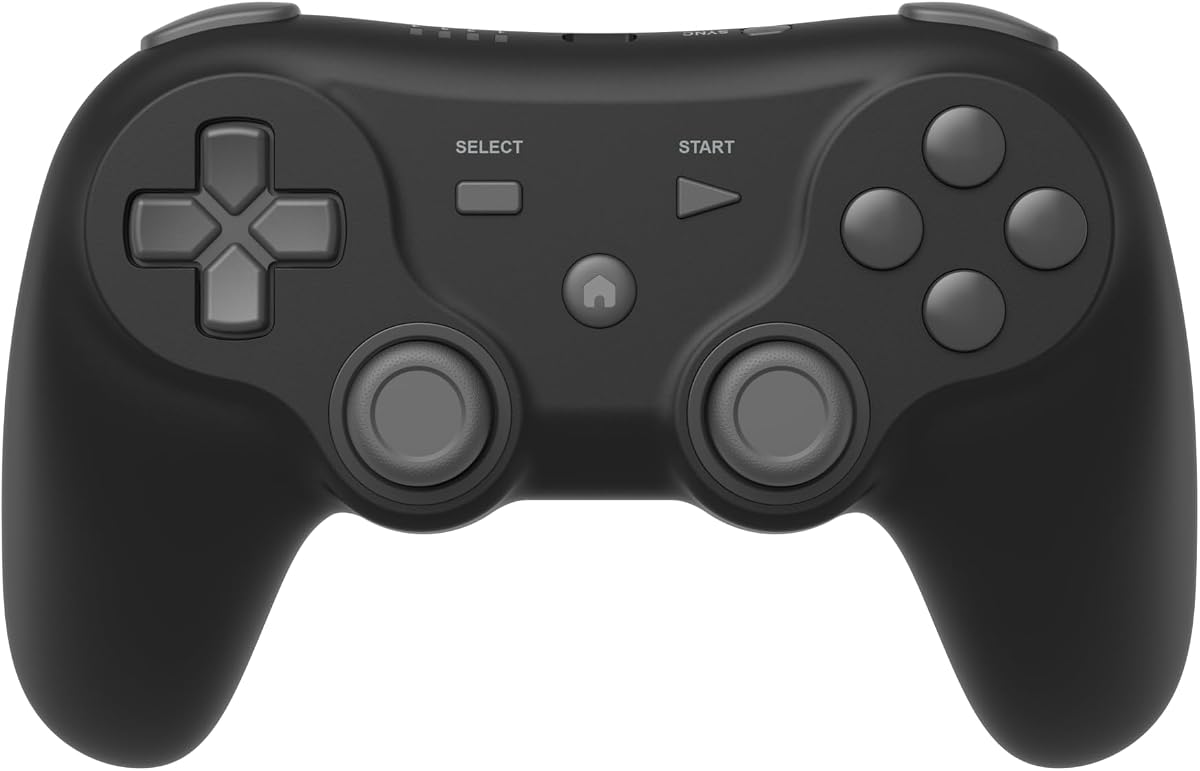
The GameSir Tegenaria Lite combines a retro 1990s-inspired shape with modern input technology and has a 4.3 customer rating. It supports Switch, Android, iOS, PC, and Steam, making it a flexible wired controller for emulators, modern releases, and mobile gaming.
We may earn a commission when you buy through this link, at no additional cost to you.
Its stated 1000Hz polling rate and ultra-low-latency wired connection target quick response. Hall Effect sticks are designed to resist drift and support precise 360-degree control, while cushioned membrane triggers and buttons provide a softer tactile response. Dual asymmetric rumble motors can deliver both stronger and more subtle vibration effects, adding feedback to compatible games without requiring a wireless battery.
Two programmable back buttons allow frequently used actions to be relocated, and the turbo function can be configured across several buttons. That is valuable for retro-style play, although users may want to disable it for titles where repeated input creates an unintended result. The controller does not support a proprietary retro console connection and must be used through compatible USB or platform-specific connections.
This is our budget recommendation for players who want modern specifications at a relatively straightforward entry point. It suits PC, Switch, Steam, and mobile users who prefer reliable wired input and can benefit from remappable controls. Check the connection requirements for the intended device, especially when moving between desktop and mobile play.
A wired connection combined with a stated 1000Hz polling rate targets quick input registration. For fast arcade, fighting, and action games, consistent wired response can be a meaningful advantage over a wireless link.
The programmable back buttons and configurable turbo function add flexibility to a more compact retro-inspired layout. Players can place essential actions closer to the thumb without relying entirely on software remapping.
We may earn a commission when you buy through this link, at no additional cost to you.
The ZAMPAM two-pack provides 2.4GHz wireless controllers for PC, Windows games, Mac, Linux, and Raspberry Pi use, with a 4.0 customer rating. Two controllers make it a practical option for shared emulator sessions, while the rechargeable lithium-ion batteries are advertised to last around 100 hours of play.
We may earn a commission when you buy through this link, at no additional cost to you.
The wireless range reaches up to 10 meters, giving players enough room to sit comfortably away from a screen. A USB wireless adapter is included, and a turbo function allows users to configure a button for rapid repeated presses. The product information recommends downloading joystick-mapping software and configuring keys first when needed, which means setup may require more attention than a standard plug-and-play gamepad.
Compatibility exclusions are important. The controllers are not compatible with the Super Nintendo, Mini NES, NES Classic Edition, and certain other console-specific systems. The broad desktop support does not translate to proprietary console ports or every mobile platform, and accidental turbo activation is possible if the configuration is not reviewed before play.
Choose this set if two-player desktop emulation and an exceptionally long stated battery runtime are the priorities. It is less compelling for a single player, for users who want zero-configuration input, or for anyone expecting Nintendo Switch compatibility. Review the manual and emulator mapping requirements before ordering.
A stated playing time of around 100 hours between charges is a major advantage for long emulation sessions. The rechargeable design avoids recurring disposable-battery purchases and keeps both controllers ready for multiplayer.
The package includes two wireless controllers and USB adapters, providing the basic equipment for a two-player station. It is a straightforward choice for friends or family sharing supported PC and Mac games.
We may earn a commission when you buy through this link, at no additional cost to you.
The Hyperkin Trooper 2 delivers an unmistakable Atari-inspired control scheme for emulation on Windows, macOS, Linux, and Raspberry Pi. Its 4.2 customer rating reflects a distinctive niche design that prioritizes classic arcade movement over the dual-stick layout used by contemporary console controllers.
We may earn a commission when you buy through this link, at no additional cost to you.
The four-way joystick is supported by a soft rubber grommet and quiet movement, with responsive face buttons designed for older arcade, computer, and console games. Chamfered corners on the grips improve comfort during longer sessions, while a solid base and quality materials contribute to a more substantial feel. The included ten-foot cable offers ample room to move away from the display.
Modern additions help compensate for the compact old-school layout. Six buttons are mappable, and an Escape control is included for menu access. However, the single-stick design may be unfamiliar to players accustomed to two analog sticks, and there is no wireless mode, motion support, Hall Effect specification, or modern shoulder-button arrangement.
This controller is best for emulator enthusiasts who specifically want an Atari-like experience and do not mind configuring a classic control scheme. It is a less natural choice for modern console games or users who require analog sticks. Confirm emulator recognition and button mapping before buying.
The four-way stick and traditional button arrangement recreate the control language of early arcade and home-computer games. That specificity can be more satisfying than using a modern dual-stick controller for period-correct titles.
Six mappable buttons and dedicated menu access allow the controller to handle more than a rigid original layout. Players can adapt commands for the requirements of different emulated systems and games.
We may earn a commission when you buy through this link, at no additional cost to you.
The most important decision is whether the controller must connect directly to a specific retro console or can operate through USB, Bluetooth, or a wireless receiver. From there, compare button layouts, analog support, platform limitations, and the kind of games you plan to play.
Begin with the exact hardware in your collection. A controller designed for a 9-pin retro console will not usually work with a modern USB gamepad, while a USB controller may require an adapter or dedicated software before a system recognizes it. The happymaxplus model specifically targets AV 620, HD 621, and HD 821 systems through a DB9 plug. By contrast, the Logitech F310, Retro-Bit Legacy 16, and Hyperkin Trooper 2 are intended for USB-connected desktop environments. Emulator users should also verify the operating system, including whether Windows, macOS, Linux, Raspberry Pi, Android, or another platform is explicitly supported.
Wired controllers are generally the simplest to deploy because they avoid pairing and charging, although a fixed cable can limit seating distance. The Logitech F310 includes a six-foot cord, while the Retro-Bit Legacy 16 and Hyperkin Trooper 2 use longer ten-foot cables. Wireless options such as the SN30 Pro and 8Bitdo 64 use Bluetooth, while the ZAMPAM set and Defender Pro use 2.4GHz receivers, with the latter also supporting Bluetooth. Consider receiver range, platform radio support, battery life, and whether the console accepts third-party wireless controllers before choosing.
A controller does not need to look modern to play modern games well, but its layout must suit the titles in your library. Four-button designs evoke early arcade systems and work well for many classic games. Six-button designs provide more actions for 16-bit titles, while the Legacy 16 includes dedicated ZL and ZR controls. The Tegenaria Lite offers programmable back buttons, and the ZAMPAM controllers use configurable turbo functions. Consider whether the games require an Escape or Home button, how many inputs a fighting game demands, and whether awkward button combinations would affect your preferred genre.
Analog sticks are especially valuable for 3D classics, modern platformers, fighting games, and mixed libraries. The SN30 Pro, Defender Pro, and Tegenaria Lite use Hall Effect sticks, which are designed to resist wear-related drift. Other controllers may use conventional analog components, so check the product listing carefully if reliable 3D movement is important. D-input and S-input modes, such as those offered by the 8Bitdo 64, can also help when adapting a controller to different games. Digital-only pads remain suitable for many 8-bit and arcade titles but offer less flexibility for 3D emulation.
Extra features can make a retro-style controller more useful across a large library. Rumble adds physical feedback to compatible action and racing games, while motion control is useful in games designed around tilting. The SN30 Pro includes both features, and the Tegenaria Lite adds dual asymmetric motors. Turbo allows rapid repeated button input, which is convenient for some arcade and retro titles but can also cause mistakes if activated unintentionally. Review which buttons support each feature and whether behavior varies by platform.
A controller sold in a pair can make multiplayer setup much easier. The happymaxplus set uses wired 9-pin plugs for its specified retro systems, while the Wireless SNES Controller and ZAMPAM sets include receivers and rechargeable batteries. Multiplayer also raises practical concerns: wireless range, interference, independent battery life, and whether the target game supports multiple controllers. A pair with matching receivers or a single system-wide Bluetooth connection will generally be more convenient than unrelated accessories.
Portable retro gaming benefits from compact construction and manageable charging routines. The SN30 Pro is listed at 144 by 63.5 by 32.5 millimeters and offers roughly 18 hours of play after a stated one-to-two-hour charge. The Wireless SNES Controller set advertises a 10-hour runtime, while the ZAMPAM controllers are claimed to deliver around 100 hours. Battery figures can vary with vibration, connection stability, and usage, so treat the stated values as guidance. For stationary setups, a long wired cable may be more convenient than any battery feature.
Retro controllers are often chosen for their tactile feel, so cable flexibility, button travel, joystick movement, and grip shape deserve attention. The Hyperkin Trooper 2 emphasizes an ergonomic body with chamfered grips and a quiet joystick. The Logitech F310 uses a floating D-pad resting on four switches, while the Retro-Bit Legacy 16 offers a long cable and a responsive D-pad. For dedicated 9-pin systems, the connector and casing should match the console rather than merely resemble the original. Always inspect the stated platform exclusions before ordering.
Begin by confirming the controller's supported platform, connection method, and required mode. For a USB model, connect the controller before launching the game or emulator so the software can detect it. Wireless controllers generally need a proper pairing or receiver connection, while 2.4GHz systems require the supplied receiver to be inserted into the correct USB port. On platforms with different control modes, select the appropriate D-input or S-input setting before beginning a game.
Assign the controller in your emulator, game, or system settings and test every button, stick direction, shoulder control, and turbo option. Download the recommended mapping software when a game does not recognize the controller automatically. Keep turbo disabled for games where accidental rapid presses are undesirable, and confirm that rumble, motion, and screenshot features are configured only where the software supports them.
For wired models, route long cables around furniture and avoid sharp bends at the plug. For wireless models, recharge the controllers as recommended, clean the receiver contacts if connectivity becomes unstable, and avoid leaving batteries depleted for extended periods. Keep controllers away from moisture, excessive heat, and dust, and periodically check the plug, buttons, cable, and battery compartment for signs of wear.
The best choice depends on the emulator and operating system, but the Retro-Bit Legacy 16 offers broad USB compatibility and a classic 16-bit appearance. The Logitech F310 is another practical option for a familiar standard layout, while the Hyperkin Trooper 2 suits players who specifically prefer an Atari-style single stick. Confirm emulator recognition and required mappings before buying.
Some USB-based models support contemporary platforms as well as emulation, but they will not normally connect directly to every proprietary retro port. The 8Bitdo SN30 Pro and 8Bitdo 64 cover several modern systems through Bluetooth or USB, with platform-specific modes and limitations. Console-specific 9-pin controllers remain best suited to the retro hardware named in their descriptions.
D-input and S-input are different control configurations used by some Nintendo and retro-style controllers. The exact interpretation and assignment behavior can depend on the platform and game, so the controller's current instructions should be followed. The 8Bitdo 64 supports both modes, which makes it easier to adapt to different game conventions.
Hall Effect sticks can be worthwhile when you play 3D classics or modern games that make heavy use of analog movement. They are designed to resist drift and support long-term precision. Digital-only controllers remain fully suitable for many 2D arcade and 8-bit games, so the feature is most valuable in a mixed or analog-heavy library.
Only if the console has suitable wireless support or if a compatible receiver or adapter is supported by the hardware and controller. A Bluetooth controller cannot simply connect to a traditional 9-pin console port. Wired 9-pin models, such as the happymaxplus controller for specified AV and HD systems, provide a more dependable route for those consoles.
Wired USB controllers generally involve the fewest setup steps because they connect directly without pairing or charging. The Logitech F310 uses a simple USB connection, although its programmable features require software. Some emulator assignments are still necessary, and even plug-and-play controllers should have their buttons tested before a game begins.
A two-controller pack is better when local multiplayer is important, but it is not automatically the right choice for every setup. The Wireless SNES Controller and ZAMPAM sets suit supported desktop emulators, while the happymaxplus pair is made for listed 9-pin retro systems. Check port, receiver, battery, and game compatibility before choosing a pack.
Connect or pair the controller before opening the emulator, then select it from the game's controller settings. Some products recommend a joystick-mapping application when automatic detection is incomplete. Also check the product's excluded-platform list, because a controller may work on Windows while lacking the required configuration for Switch or a specific classic console.
The happymaxplus Retro Classic pair is the most direct choice for its specified 9-pin systems, while the GameSir Tegenaria Lite delivers the strongest budget-focused blend of retro style, low-latency wired input, and modern controls. For a premium, multipurpose experience, the 8Bitdo SN30 Pro stands out with Hall Effect sticks, rechargeable power, motion controls, rumble, and wide platform support.
Prioritize the system you actually own and the games you actually play. A 9-pin plug matters for a compatible retro console, a USB controller is best for most emulator setups, and Bluetooth or 2.4GHz is useful when cable-free multiplayer is important. Analog stick technology, button count, remapping, and rechargeable battery life should follow from your preferred genres rather than becoming standalone priorities.
Finally, check the latest product details, platform exclusions, firmware requirements, and current prices before making a purchase. Controller compatibility can vary with revisions and software updates, and promotional pricing changes frequently. A verified match between the intended system and controller will provide the most dependable retro-gaming experience.