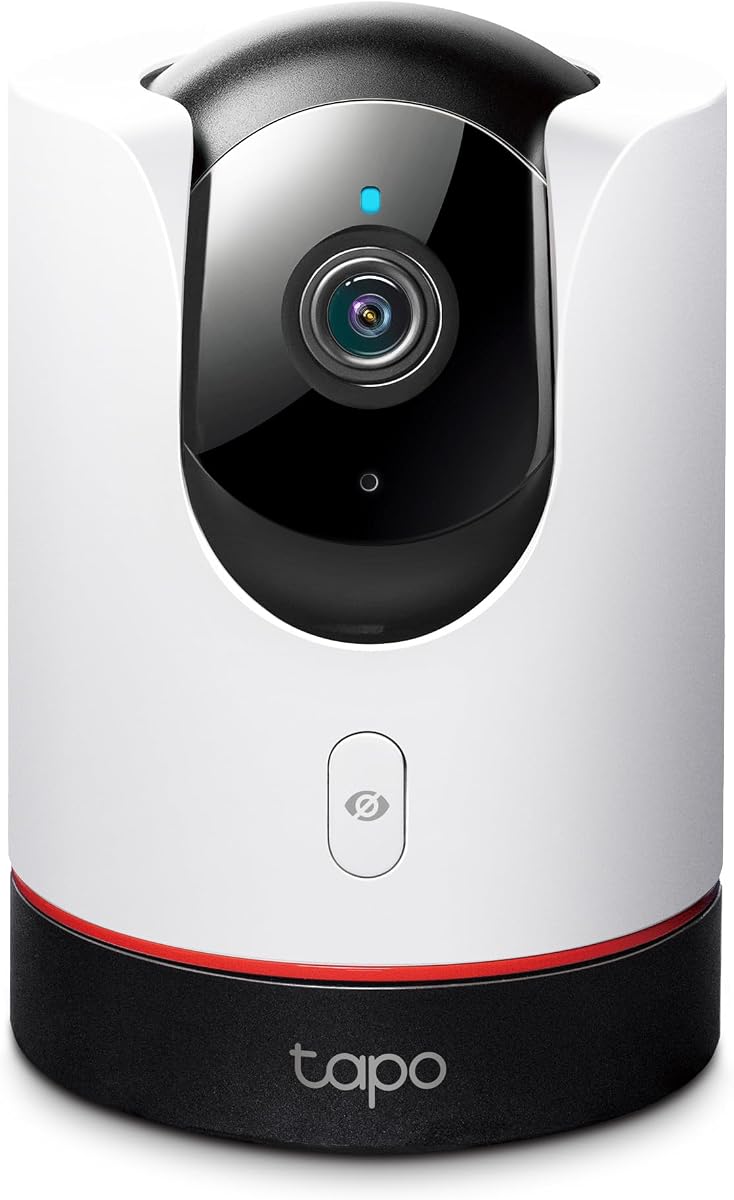
TP-Link Tapo 2K+ Pan/Tilt Security Camera C225
4.5Editor score
2K QHD pan and tilt
Physical lens privacy shutter
Local microSD storage
Our Apple Homekit Security Cameras guide compares ten indoor and outdoor options for image quality, privacy, storage, smart-home features, and ease of use.
Apple HomeKit security cameras are designed for people who want clear home monitoring within a privacy-conscious Apple ecosystem. The best models combine dependable imaging, useful event detection, secure recording, and intuitive control from the Home app, but important differences in placement, resolution, power, and storage make each camera better suited to particular homes.
We compared ten indoor and outdoor cameras using the supplied specifications, ratings, connectivity details, detection features, privacy controls, and storage options. The list covers dedicated HomeKit devices from Eve and Logitech plus multi-ecosystem models from Aqara, TP-Link Tapo, and eufy, including wired, wireless, and Power over Ethernet options.
Each review explains where a camera stands out, where its compromises matter, and which households are most likely to benefit from it. Features such as 2K or 4K sensors, local AI, physical privacy shutters, floodlights, and Matter bridging are not interchangeable, so readers should match the camera to the location and recording system they actually want.
4.5Editor score
4.2Editor score

4.5Editor score
The comparison below highlights each camera's core hardware, placement strengths, detection capabilities, and storage approach. It is intended to make the differences between indoor, outdoor, battery-independent, and wired HomeKit cameras easier to understand before choosing a model.



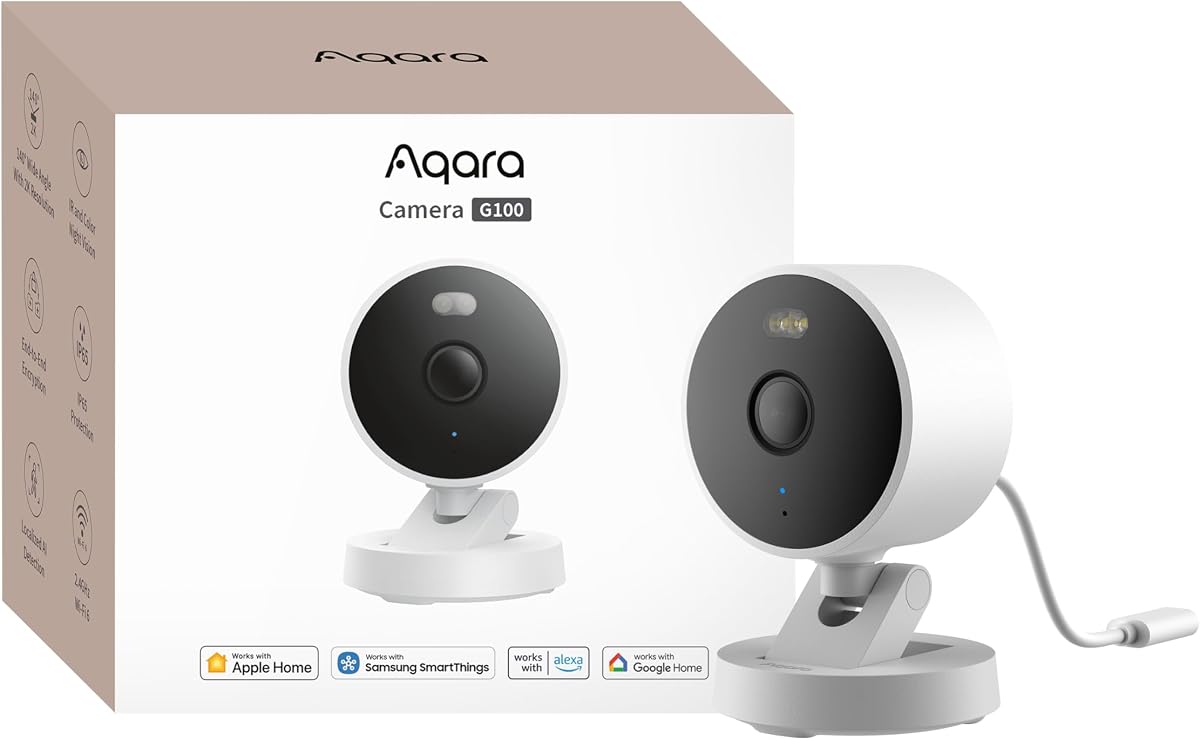
The Aqara G100 receives a 4.2 rating and stands out as the most versatile camera in this guide. Its 2K sensor, wide 140-degree field of view, and IP65 housing let one model cover indoor rooms, entrances, yards, and other exposed locations. That flexibility makes it a strong choice for buyers who want HomeKit Secure Video without locking themselves into a single-camera-purpose product.
We may earn a commission when you buy through this link, at no additional cost to you.
The camera's most impressive features include two manually selected night-vision modes. A spotlight can illuminate outdoor scenes in color, while 940nm infrared light provides covert illumination for darker locations. It also supports local motion and person detection, optional cloud recognition for pets, vehicles, packages, and faces, two-way audio, and automatic event recording when paired with other Aqara equipment.
Storage is similarly flexible. The G100 can record continuously to a microSD card of up to 512GB, save to a compatible NAS, or use encrypted cloud storage through the HomeGuardian subscription. A wired network connection and microSD card are also required for the compressed time-lapse mode. RTSP support opens additional possibilities for Home Assistant and compatible network setups.
The important compromise is HomeKit's 1080p stream limit, which also reduces the view available in the Aqara Home app while the camera remains connected to HomeKit. The camera uses only the 2.4GHz band, requires a 5V/1A adapter that is not included, and its time-lapse feature has extra connection requirements. Even so, few alternatives combine indoor-outdoor durability, flexible recording, smart detection, and broad ecosystem support as effectively.
The G100 is our recommendation for most buyers. Choose it when a single camera needs to work across multiple environments or when you want HomeKit alongside Google, Alexa, Home Assistant, and Aqara-specific functions. It is particularly compelling for a covered porch, garage, driveway, or indoor room in a home that already uses Apple Home.
The IP65 housing and wide field of view make the G100 useful beyond a standard indoor mount. Its two night-vision options also allow owners to choose visible color illumination or covert infrared depending on the location and lighting conditions.
Local microSD, NAS, encrypted cloud, and RTSP options give the G100 several paths for viewing and retaining footage. This makes it easier to adapt the camera as storage preferences or smart-home requirements change.
We may earn a commission when you buy through this link, at no additional cost to you.
The Eve Cam has a 3.6 rating, but its deliberately focused design makes it a natural selection for an Apple household. It is built exclusively for Apple HomeKit Secure Video rather than trying to serve several ecosystems, and the stated privacy approach emphasizes end-to-end encryption and video analysis performed inside the home.
We may earn a commission when you buy through this link, at no additional cost to you.
People and pet recognition can distinguish between activity types, while automatic recording captures detected motion. The camera can also deactivate automatically when someone is home, which helps avoid unnecessary recording in an occupied room. Its local processing and direct communication with Apple devices support a privacy model that does not rely on an Eve cloud or a registration process.
The trade-offs are substantial for anyone outside the Apple ecosystem. A current iPhone or iPad, an Apple Home hub such as HomePod or an Apple TV with tvOS 15, and an iCloud+ plan are required. The Eve Cam is also intended for indoor placement, so it cannot serve as a weatherproof exterior camera.
This model is best for Apple users who prioritize privacy controls, local analysis, and a streamlined Home app experience over cross-platform support or a wider feature set. The ecosystem requirement is a legitimate inconvenience, but for a home already centered on HomeKit, the dedicated integration can feel simpler than managing a multi-platform camera.
The camera performs video analysis locally and supports end-to-end encryption for live and recorded streams. Its ability to deactivate automatically adds another practical layer of privacy for occupied spaces.
Eve Cam avoids the complication of vendor-specific apps and focuses on Apple HomeKit Secure Video. Users can view activity through supported iPhones, iPads, Apple Watches, and the Home app.
We may earn a commission when you buy through this link, at no additional cost to you.
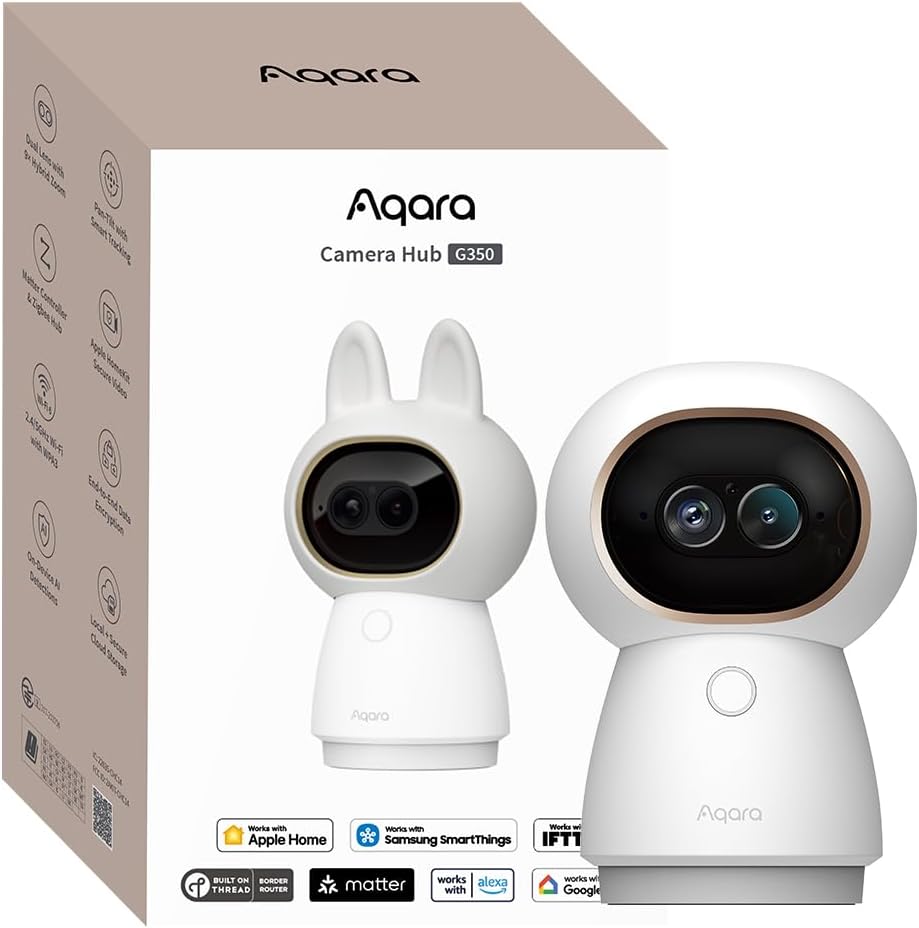
The Aqara G350 carries a 4.3 rating and offers the most advanced indoor imaging system in this roundup. Its dual-camera arrangement combines a 133-degree 4K wide-angle lens with a 2.5K telephoto lens, giving users both broad room coverage and a more detailed view of subjects.
We may earn a commission when you buy through this link, at no additional cost to you.
The nine-times hybrid zoom can be operated through several controls, including a tap shortcut, zoom dial, drag box, or finger spread. AI auto-tracking follows people or pets and slows pan and tilt movement while zooming to create steadier close-ups. Those functions are particularly useful in nurseries, living rooms, pet areas, and other spaces where a subject may move beyond a fixed field.
Local AI detection covers faces, pets, gestures, and six sound categories, including baby crying, coughing, and dog barking. Storage supports microSD cards up to 512GB, NAS backup, or opt-in encrypted cloud service. The physical privacy mode retracts the lens entirely, offering visible reassurance rather than relying only on a software setting.
The camera also functions as a hub for Aqara Zigbee and Thread devices and can bridge compatible Matter accessories. Matter camera support itself remains limited, and third-party Zigbee devices are not supported. Full pan, tilt, zoom, and tracking configuration also depends on the Aqara Home app.
The G350 is an excellent choice for indoor users who want a single camera to provide wide coverage, detailed close-ups, subject tracking, and smart-home hub functionality. It is less suitable for anyone needing a weatherproof model or a simple camera that can be configured entirely inside Apple Home.
The wide and telephoto lenses work together rather than offering separate fixed views. This lets the camera preserve broad room awareness while zooming in on faces, pets, or small objects when a closer look is needed.
Aqara Zigbee and Thread support can reduce the number of separate hubs in a compatible smart home. Matter bridging can also expose supported devices to Apple Home and other Matter-compatible platforms.
We may earn a commission when you buy through this link, at no additional cost to you.
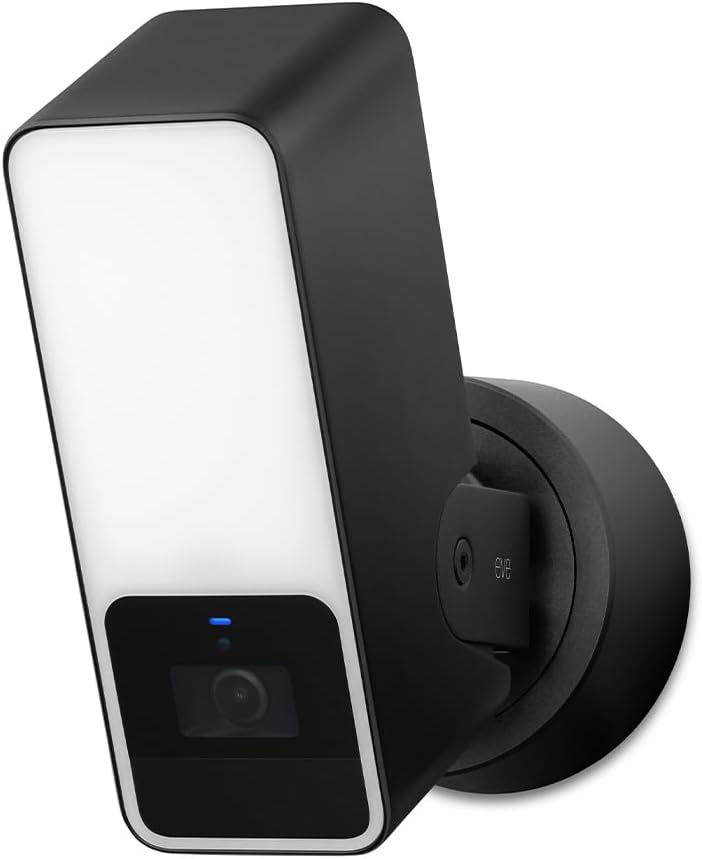
The Eve Outdoor Cam receives a 3.5 rating and distinguishes itself with a built-in, dimmable floodlight, infrared motion sensing, and a 157-degree field of view. It is designed as a complete exterior entry camera rather than a small indoor unit adapted for an outside wall.
We may earn a commission when you buy through this link, at no additional cost to you.
The floodlight includes a light boost, while night vision and infrared motion detection help identify activity in darkness. The camera provides 1080p video at 24fps, two-way communication through a built-in microphone and speaker, and HomeKit Secure Video detection for people, pets, vehicles, and packages. A ten-day recording history is available through the required iCloud+ setup.
Installation is the main limitation. The camera needs both a neutral wire and a proper ground connection, so many owners will need an electrician or an installer comfortable with residential wiring. It also needs a HomePod or qualifying Apple TV and an active iCloud+ plan.
Its privacy architecture is a major strength. Eve states that the camera uses local intelligence, end-to-end encryption, no Eve cloud, no registration, and no tracking, with direct communication among the camera, Apple mobile devices, and the home hub.
Choose the Eve Outdoor Cam when a wall or eave location with accessible wiring is available and the built-in floodlight is central to the setup. It is less suitable for renters or locations where a simpler installation method is required.
The integrated floodlight can brighten an exterior entrance while the infrared motion sensor and night vision support activity recognition. This combination reduces the need for a separate exterior light in some installations.
The camera emphasizes local intelligence and direct device communication without an Eve cloud dependency. End-to-end encryption applies to both live and recorded video within the HomeKit Secure Video environment.
We may earn a commission when you buy through this link, at no additional cost to you.
The Tapo C225 earns a 4.5 rating and represents a well-balanced, budget-conscious indoor option. Its 2K QHD sensor, 360-degree horizontal field of view, and large f/1.6 aperture make it more capable than a basic fixed-angle camera without introducing the complexity of a dual-lens hub.
We may earn a commission when you buy through this link, at no additional cost to you.
AI detection can identify people, pets, and vehicles while also recognizing abnormal sounds such as a baby crying. Users can choose 850nm or 940nm infrared night vision, and the 940nm option is intended to be less disruptive for nighttime monitoring. A starlight sensor is included to improve low-light image quality.
The physical privacy mode is particularly reassuring because the camera housing blocks the lens instead of merely masking the image electronically. Storage can remain local on a compatible microSD card up to 512GB. The optional Tapo Care service adds 30-day cloud history and features such as motion tracking and baby-crying detection.
The camera operates on the 2.4GHz Wi-Fi band, so users must ensure their router supports that network. TP-Link also advises checking its compatibility FAQ before purchasing a microSD card. Some extended cloud features are subscription-based, although the local-storage path avoids that requirement for core continuous recording.
The C225 is a compelling choice for apartments, nurseries, pet rooms, and other indoor spaces where 2K clarity and pan-and-tilt coverage are desired without a premium price. It is the budget pick of the guide and one of the strongest choices for straightforward indoor monitoring.
When privacy mode is activated, the housing closes over the lens. This provides immediate visual confirmation that the camera is not capturing, which is helpful in bedrooms and private living spaces.
Detection covers people, pets, vehicles, and selected abnormal sounds. Users can also choose between visible 850nm infrared and less noticeable 940nm illumination for different nighttime conditions.
We may earn a commission when you buy through this link, at no additional cost to you.
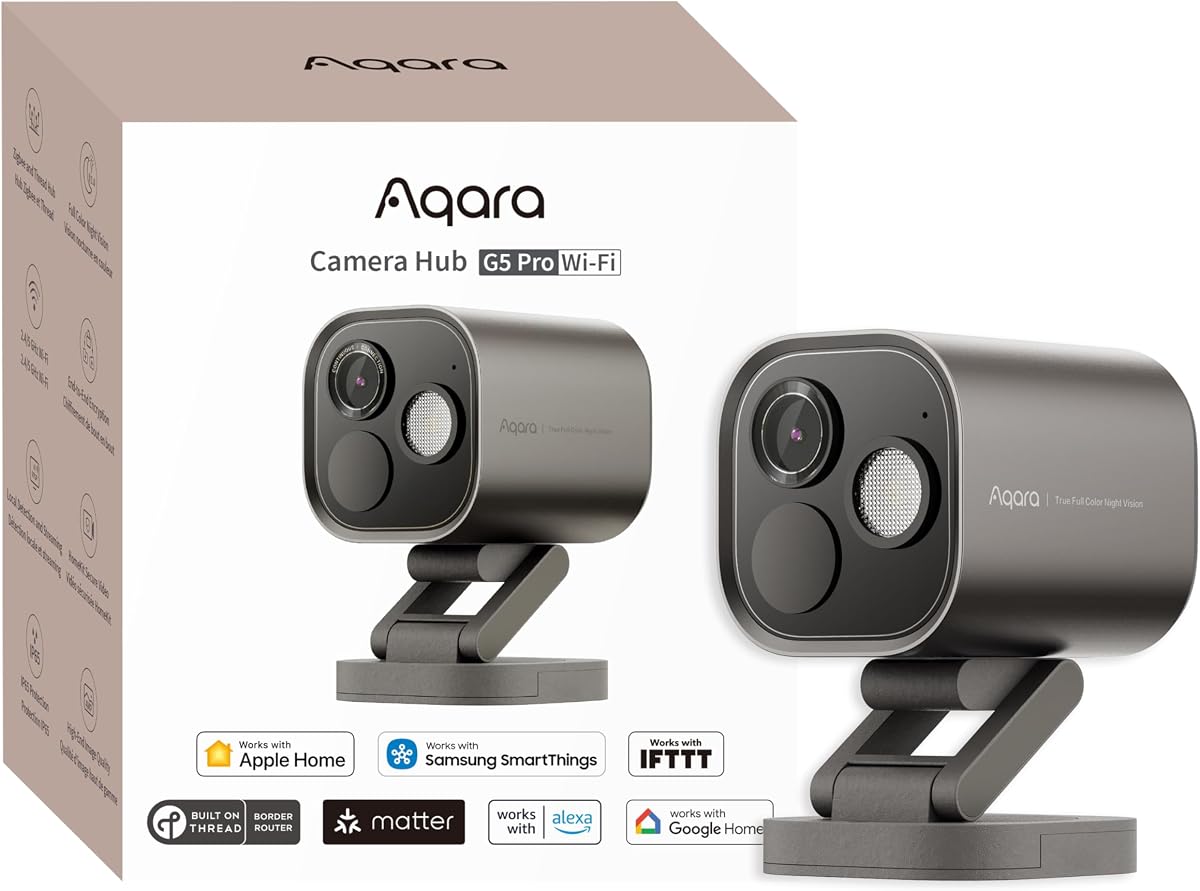
The Aqara G5 Pro WiFi has a 4.3 rating and is built around a 4MP sensor, 133-degree field of view, and a large f/1.0 aperture. Its True Color Night Vision and built-in 3000K dimmable spotlight make it especially appealing for exterior areas where color detail after dark is valuable.
We may earn a commission when you buy through this link, at no additional cost to you.
A local neural processing unit supports visual detection for faces, individual vehicles, animals, people, lingering activity, lens obstruction, and packages. It can also identify baby crying, alarms, barking, and coughing. This local analysis can still record key events and trigger automations during an internet outage, which is a useful resilience feature.
The G5 Pro works as a hub for Aqara Zigbee and Thread accessories and can bridge compatible Matter devices to Apple Home, Alexa, and Google Home. It supports HomeKit Secure Video, encrypted 8GB eMMC storage, Aqara Cloud, and RTSP with end-to-end encryption. Continuous 24-hour recording is available only through RTSP to a local device.
Unlike many night cameras, this model has no infrared light. Its visible spotlight performs that role, which can improve color footage but may be less desirable for certain stealth-oriented placements. The camera also needs continuous power and a 5V/2A USB-C connection.
This is a strong selection for a driveway, side entrance, yard, or other exterior location where low-light color imagery and intelligent detection matter. It is particularly attractive to Aqara and Matter users who want camera, hub, and bridge functions in one enclosure.
The large aperture and True Color Night Vision focus on retaining visible color detail in low light. A dimmable 3000K spotlight can improve visibility and serve as an exterior deterrent.
The built-in NPU handles visual and sound recognition locally. Package, obstruction, lingering-person, vehicle, animal, and abnormal-sound events can support more targeted alerts and automations.
We may earn a commission when you buy through this link, at no additional cost to you.
The Logitech Circle View receives a 3.4 rating and offers a distinctive combination of a 180-degree field of view, weather resistance, and a clean Apple HomeKit-only experience. Its 1080p TrueView output is supported by a high-quality sensor and wide dynamic range for balancing bright and dark areas.
We may earn a commission when you buy through this link, at no additional cost to you.
The camera includes infrared night vision optimized for full-field visibility up to 15 feet. A tilt mechanism and rear on/off control allow the lens to be pointed down or physically disabled for privacy. The included wall bracket and weatherproof IP64 body make it suitable for a wider range of indoor and sheltered exterior positions.
Unlike many modern cameras, Circle View uses motion detection for event-based recording rather than continuous video. This can reduce unnecessary footage, but it may not suit buyers who want a complete record of every moment. The camera was developed specifically for Apple HomeKit and does not work with the Logi Circle app.
Its substantial field of view can reduce the number of cameras needed in open-plan rooms and wider exterior areas. However, it does not offer the high native resolution, dual-lens zoom, local storage, or physical lens retraction found in several newer alternatives.
Circle View makes sense for buyers who prioritize broad coverage, a traditional privacy shutter, and full Apple integration. It is best for a hallway, porch, living room, or sheltered wall where a wide view matters more than maximum resolution or continuous recording.
The 180-degree optics capture an unusually broad area without requiring multiple units. This can be advantageous in open rooms and around exterior approaches where peripheral activity is important.
Tilting the camera down or using the rear on/off button physically prevents normal viewing. The approach gives owners visible assurance that the lens is no longer pointed at a private area.
We may earn a commission when you buy through this link, at no additional cost to you.
The Aqara Camera E1 carries a 4.2 rating and is a versatile indoor camera for privacy-conscious households. Its 2304 by 1296 sensor, wide f/2.0 lens, and 360-degree pan-and-tilt motor offer solid coverage, while 940nm infrared illumination is designed to avoid visible disruption during sleep.
We may earn a commission when you buy through this link, at no additional cost to you.
Privacy controls extend beyond a simple toggle. An automated mode can pivot the lens away and deactivate the camera, and the microphone or audio recording can be disabled manually or through an automation. A built-in NPU supports local motion filtering, person detection, event recording, and automation triggers.
The camera provides local continuous recording to a microSD card up to 512GB, SMB3-compatible NAS backup, and optional end-to-end encrypted HomeGuardian cloud storage. Local detection covers motion, people, crying, alarms, barking, and coughing, while the subscription service adds cloud recognition for pets, vehicles, packages, and faces.
Wi-Fi 6 and WPA3 offer a modern network foundation, but the camera remains limited to the 2.4GHz band. A 5V/2A USB-A power supply is required and not included. Some AI detection features are available only through the Aqara Home app, even though core controls can also be used through HomeKit and supported automation platforms.
The E1 is a good fit for bedrooms, offices, and living areas where a camera should physically turn away when privacy matters. It is also a strong option for owners who want local recording, HomeKit access, and Aqara detection tools without moving to a more complex hub camera.
The camera can rotate its lens away and deactivate instead of merely covering the image digitally. Owners can also disable the microphone or audio recording manually or as part of a routine.
Local person and sound detection can filter events and trigger automations without depending on cloud analysis. MicroSD and NAS options also provide practical ways to retain footage locally.
We may earn a commission when you buy through this link, at no additional cost to you.
The eufy Security E30 earns a 4.5 rating and delivers 4K indoor recording in a pan-and-tilt format. It is designed for family, baby, nanny, and pet monitoring, with two-way audio for real-time communication and a 360-degree panoramic view.
We may earn a commission when you buy through this link, at no additional cost to you.
On-device AI can distinguish people, pets, audio cues, and crying sounds. When a person or pet is detected, the camera automatically tracks the movement. Quick Focus Tap and Panoramic View features let users move directly toward a selected area or shift to a broad overview.
An integrated spotlight allows a choice between color night vision and infrared night vision. It can also serve as a visible deterrent. The camera supports local SD card storage, and the supplied information states that full product functionality is available without a monthly fee, although optional cloud storage or premium features may require a subscription.
Smart-home compatibility includes HomeKit, Alexa, and Google Assistant. HomeKit itself limits the stream to 1080p, so buyers seeking 4K should consider where they will normally view the footage. The E30 is presented as an indoor camera rather than a weatherproof exterior model.
The E30 is an excellent choice for indoor family and pet monitoring when high-resolution detail, subject tracking, and flexible local viewing matter. It is particularly useful for owners who want the broader compatibility of a multi-platform camera without giving up a strong core feature set.
The camera combines 4K recording with on-device recognition and automatic tracking. This helps preserve detail while following a person or pet across a larger room.
A supported SD card enables local recording, while the stated core functionality does not require a monthly subscription. Optional cloud services can be considered separately if remote access or added features are important.
We may earn a commission when you buy through this link, at no additional cost to you.
The Aqara G5 Pro PoE has a 4.5 rating and is the premium choice for an installer-ready exterior camera. It combines a 4MP sensor, 133-degree field of view, f/1.0 aperture, True Color Night Vision, and a dimmable 3000K spotlight in a hub-style enclosure.
We may earn a commission when you buy through this link, at no additional cost to you.
Its defining installation advantage is Power over Ethernet. Video and power travel through one network cable, simplifying wiring and avoiding dependence on a nearby Wi-Fi signal. A PoE switch is required and sold separately, but the camera also includes a 5V/2A USB-C port for non-PoE setups.
The local NPU recognizes faces, individual vehicles, animals, people, lingering activity, packages, lens obstruction, baby crying, alarms, barking, and coughing. It can record events and trigger automations even during an internet outage. As a hub, it supports Aqara Zigbee and Thread and can bridge compatible Matter devices into broader ecosystems.
HomeKit Secure Video is supported, and the camera includes encrypted 8GB eMMC storage. It can also use Aqara Cloud or RTSP with end-to-end encryption. Continuous 24-hour recording is limited to RTSP saved on a local device. As with the Wi-Fi G5 Pro, it has no infrared light; the visible spotlight handles low-light illumination.
The G5 Pro PoE is ideal for a new wired installation, a detached building, or a property where reliable network connectivity and clean cable routing matter. Buyers should choose it for its stronger installation architecture and premium sensor rather than expecting a higher HomeKit stream resolution than its Wi-Fi sibling.
Power over Ethernet carries both network data and power through one cable. This can simplify permanent installations and provide a more dependable connection than Wi-Fi in challenging exterior locations.
The large-aperture 4MP sensor, dimmable spotlight, and local NPU create a strong low-light monitoring package. Detection features can drive recordings and automations without relying entirely on a cloud connection.
We may earn a commission when you buy through this link, at no additional cost to you.
Choosing an Apple HomeKit security camera involves balancing placement, image quality, privacy behavior, connectivity, storage, and smart-home compatibility. The right choice is the one that fits the monitored area and the household's existing Apple infrastructure without creating unexpected installation or subscription requirements.
Begin by identifying whether the camera will live inside, outside, or in a sheltered location such as a covered porch. The Aqara G100 has an IP65 housing for indoor and outdoor use, while the Aqara G5 Pro models are designed around exterior low-light monitoring. The Tapo C225, Aqara G350, Aqara E1, Eve Cam, and eufy E30 are positioned as indoor cameras. Logitech Circle View has an IP64 body, but it is a wired motion-recording model rather than a weatherproof battery-free option.
Check the complete environmental specification, not merely whether the product appears outdoors in the listing. Also consider the available power, network connection, mounting surface, and whether visible light would be intrusive at night. An indoor camera placed beneath an eave may last longer and provide more consistent results than an outdoor model forced into a difficult position.
Resolution determines how much fine detail the sensor can capture, while the field of view determines how much of a room or exterior area appears in one frame. The Aqara G350 pairs 4K wide-angle imaging with a 2.5K telephoto lens and nine-times hybrid zoom, making it the most flexible model for detailed indoor inspection. The eufy E30 records in 4K, while the Aqara G100, G350, Tapo C225, and Aqara E1 use 2K-class sensors.
Remember that HomeKit Secure Video streams are generally limited to 1080p. A higher native resolution still matters when using the manufacturer's own app or recording locally, but it does not increase the resolution delivered through Apple Home. Choose a wide field for open spaces, dual lenses for variable detail, or a narrower, focused view when a camera only needs to cover one doorway or activity zone.
Night performance depends on more than a printed resolution. The Aqara G5 Pro WiFi and PoE use a large f/1.0 aperture, a 1/1.8-inch sensor, True Color Night Vision, and a dimmable 3000K spotlight. The Aqara G100 offers selectable color spotlight and 940nm infrared modes. Logitech Circle View uses infrared illumination with a stated range of 15 feet, while the Tapo C225 lets users select 850nm or 940nm infrared.
Decide whether visible illumination is acceptable. Infrared is less noticeable and often useful for sleeping spaces, while visible color lighting can improve detail and deter visitors but may attract attention from neighbors. The Aqara G5 Pro models do not include infrared light, so their spotlight is central to their nighttime performance and should be considered carefully before installation.
Apple HomeKit Secure Video requires an active iCloud subscription and an Apple Home hub. Compatible hubs include HomePod or an Apple TV running tvOS 15 or later, depending on the camera's requirements. The Eve Cam is built exclusively around Apple HomeKit and is best for households already committed to that ecosystem. Aqara, Tapo, eufy, and Logitech offer different levels of cross-platform support.
Confirm whether features such as person recognition, cloud recording, pan-and-tilt control, zoom, privacy mode, and local recording work in Apple Home or only in the manufacturer's app. Aqara explicitly notes that several AI and full pan-tilt functions require Aqara Home. Buyers should evaluate the entire viewing experience rather than assuming every listed feature is exposed in the Home app.
Storage needs vary according to whether you want continuous recordings, event clips, cloud access, local control, or a combination. Aqara G100, G350, and E1 cameras support microSD storage of up to 512GB and have broader backup or cloud options. Tapo C225 and eufy E30 also support local microSD cards, with Tapo Care and optional eufy cloud plans available separately. The Aqara G5 Pro models include encrypted 8GB eMMC and support additional routes, but their 24-hour recording option requires RTSP to a local device.
Local storage reduces dependence on recurring cloud services and can improve privacy, but it still requires a suitable card, device, or network-attached storage system. Cloud plans may be more convenient for sharing and remote retrieval. Before purchasing a memory card, verify compatibility with the camera manufacturer, and factor in card formatting, replacement intervals, and the amount of footage your household generates.
People detection is common, but some cameras also distinguish pets, vehicles, packages, faces, sound events, and lingering activity. The Aqara G350 performs face, pet, gesture, and sound recognition locally, while the Aqara G5 Pro models recognize a broad set of visual and abnormal-sound events using an onboard NPU. The Aqara G100 and E1 support local motion and person detection with optional cloud recognition through HomeGuardian.
Local AI can make alerts more useful and may continue supporting automations when an internet connection is unavailable. It also places more emphasis on privacy because raw footage does not necessarily need to leave the home for analysis. Compare the exact detection categories, notification behavior, automation support, and subscription boundaries rather than treating the word AI as a uniform feature.
A privacy control is most reassuring when it physically blocks or disables the lens. Tapo C225 closes its housing over the camera, Aqara G350 retracts the lens completely, and Logitech Circle View can tilt down or be switched off. Aqara E1 can pivot the lens away and deactivate itself, while Aqara G100 offers a physical privacy mode. Eve Cam can automatically deactivate when a person is home.
Audio deserves equal attention. The Aqara E1 can disable its microphone or audio recording manually or through an automation. Two-way audio is available on several models, including Aqara G100, Aqara G5 Pro models, Eve Outdoor Cam, and eufy E30. Buyers should understand where a microphone can be muted and how outdoor conversations may be transmitted.
Connectivity can determine reliability more than headline specifications. Aqara G100 and E1 support Wi-Fi 6 but only on 2.4GHz, as does the Tapo C225. Eve Cam supports both 2.4GHz and 5GHz, while the Aqara G5 Pro WiFi and Logitech Circle View support dual-band Wi-Fi. Aqara G5 Pro PoE uses one network cable for data and power, but it requires a compatible PoE switch.
Wired cameras generally suit permanent installations more reliably, while wireless models are easier to reposition. The Eve Outdoor Cam needs neutral and ground wiring, and the Logitech Circle View uses an indoor USB power supply with an outdoor-rated body. Check cable reach, mounting hardware, electrical requirements, and router placement before finalizing a purchase.
Begin by positioning the camera for the intended view rather than simply selecting the nearest outlet. Confirm that the wall or surface can support the weight, the lens faces away from private neighboring areas, and the field covers the main entry or activity zone. For indoor pan-and-tilt models, place the unit on a stable shelf or table where it can rotate without obstruction. Outdoor cameras should be mounted under suitable protection where possible, with cables routed safely and connections kept dry.
Set up the camera through its manufacturer app first if the model offers advanced controls, then add the Apple Home hub, home, room, and individual person access according to the instructions. Configure notification types, recording schedules, privacy automations, camera rotation, spotlight behavior, and storage alerts before treating the system as complete. Test live viewing, event clips, two-way audio, night illumination, reconnections, and shared-user permissions during both daylight and darkness.
For ongoing care, clean the lens gently and keep the housing vents unobstructed. Check that firmware, the manufacturer app, and the Home app are current, and review storage health at regular intervals. Confirm that motion alerts are not being overwhelmed by moving foliage, reflections, or frequent passersby. After any router, hub, network, or camera change, verify that live video, recorded events, automations, and remote access still work as intended.
No. The cameras in this guide that support HomeKit Secure Video require an active iCloud subscription and a compatible Apple Home hub. Depending on the model and current requirements, that hub is generally a HomePod or an Apple TV running tvOS 15 or later. The exact requirements should be confirmed for each camera before installation.
Apple HomeKit Secure Video limits supported camera streams to 1080p. A camera may still capture at a higher native resolution for local recording or use in its manufacturer app. The Aqara G350 and eufy E30, for example, can provide 4K through their own ecosystems even though their HomeKit presentation is capped.
It depends on the model and local storage configuration. Aqara G100, G350, and E1 support continuous recording to a compatible microSD card, while Tapo C225 and eufy E30 also offer local microSD options. The Aqara G5 Pro models restrict 24-hour recording to RTSP saved on a local device. Check each model's supported recording modes and storage limits.
Only select models are designed for exposed outdoor placement. The Aqara G100 has an IP65 housing, the Aqara G5 Pro models target exterior use, and Logitech Circle View has an IP64 weather-resistant body. Indoor cameras such as the Eve Cam, Tapo C225, Aqara G350, Aqara E1, and eufy E30 should not be assumed to tolerate rain, dust, or direct weather exposure.
A physical privacy mode blocks or retracts the lens so it cannot record, while software masking only conceals part of an active video image. Tapo C225 uses a closing housing, Aqara G350 retracts its lens, and Logitech Circle View can tilt down or power off. These visible mechanical protections offer stronger assurance in private spaces.
A camera's local features may still work independently, but the Apple HomeKit Secure Video experience requires an active iCloud subscription. Some models also use cloud recognition or optional cloud storage for additional features. The distinction matters when deciding whether the camera should be used only for local monitoring or as part of an Apple Home security system.
The Eve Cam offers a focused HomeKit-only design, local analysis, end-to-end encryption, and automatic deactivation when someone is home. The Aqara E1 is another strong option because it can rotate the lens away, disable the microphone, and provide local recording. For a physical shutter, the Tapo C225 blocks its lens with its housing.
Yes, a compatible Power over Ethernet switch is required for PoE operation and must be purchased separately. The camera can alternatively use its 5V/2A USB-C power connection in a non-PoE setup. The PoE model is especially useful when a single Ethernet cable can carry both network connectivity and power.
The Aqara G100 is the best overall choice because it works indoors and outdoors while combining 2K imaging, flexible night modes, local detection, broad smart-home compatibility, and several storage paths. The Tapo C225 is the budget selection for indoor monitoring, offering 2K pan-and-tilt coverage, a physical privacy shutter, and local storage at a strong 4.5 rating. For a premium exterior installation, the Aqara G5 Pro PoE combines 4MP low-light imaging, local AI, a smart hub, and a clean single-cable network connection.
Prioritize placement first, then confirm that the camera's power, network, recording, and Apple Home features meet your needs. Privacy controls, local AI, field of view, and nighttime visibility are often more valuable than a headline resolution alone. HomeKit Secure Video also requires an active iCloud subscription and Apple Home hub, while some advanced pan, tilt, zoom, and detection settings remain in the manufacturer's app.
Product availability, promotions, bundle contents, and prices can change, so verify the current listing and included accessories before ordering. In particular, check whether a power adapter, memory card, PoE switch, hub, or iCloud+ plan is required, and confirm the camera's exact weather rating, resolution limits, and subscription-dependent features against the manufacturer's current documentation.