
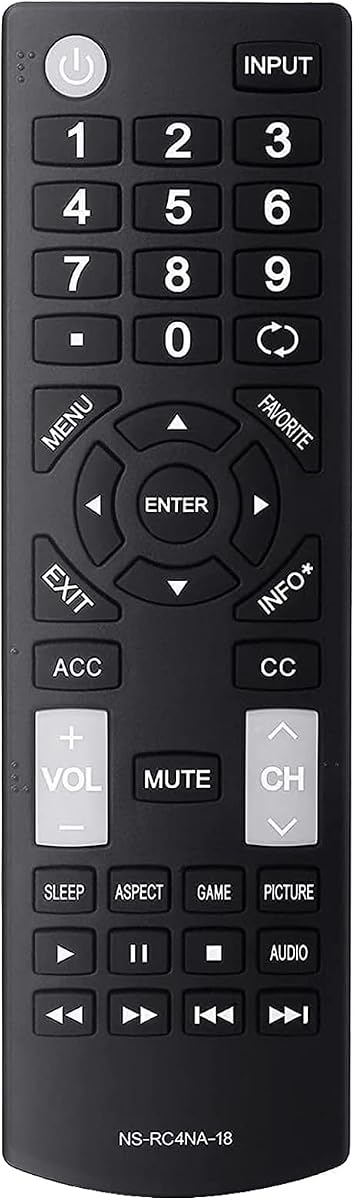
Universal NS-RC4NA-18 Remote
4.6Editor score
Battery-only installation
Works without programming
Compatible with many LED LCD TVs
Discover the best Insignia TV replacement remote options in this expert guide comparing compatibility, setup, voice control, response, durability, and model
Finding a replacement remote for an Insignia television can be surprisingly complicated because Insignia sells several different types of smart TVs with distinct remote platforms. The right choice depends on the TV model, operating system, original remote number, desired features, and whether basic infrared control or voice-enabled Fire TV functions are needed.
This guide compares ten replacement remotes based on verified model compatibility, setup requirements, control technology, response specifications, button durability, voice features, and useful extras. It includes traditional Insignia LED LCD remotes, Fire TV-style voice remotes, and one OEM replacement, helping readers distinguish models that work immediately from those requiring pairing.
Each review explains the strongest reasons to consider the remote while also noting compatibility boundaries and practical trade-offs. The top recommendations cover a model-specific OEM option, a straightforward budget replacement, and a feature-rich Fire TV remote. Product listings, model availability, and current configurations can change, so confirm your television model before buying.
4.6Editor score
4.7Editor score

4.3Editor score
The comparison below highlights the most important differences among the ten remotes, including the TV platform supported, model identifiers, setup method, voice-control support, and notable design or convenience features.


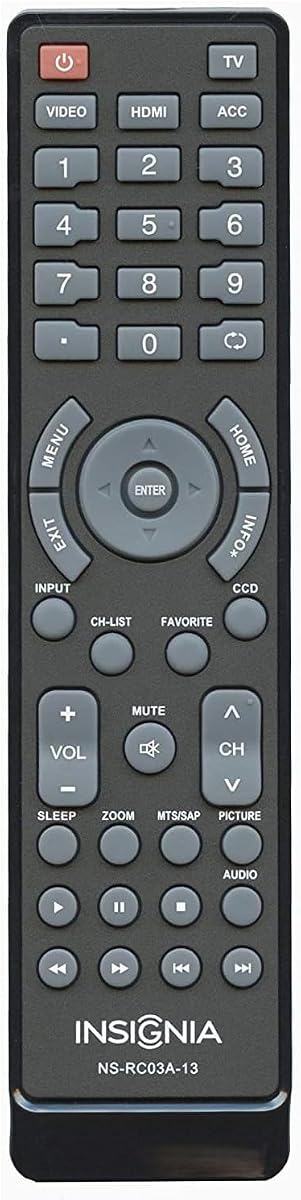
This OEM replacement is built around the Insignia NS-RC03A-13 remote platform and carries a 4.7 rating, the highest among the ten products reviewed. Its defining advantage is an unusually long list of compatible television models, including NS-19E310A13, NS-24E340A13, NS-32E320A13, NS-42E470A13, NS-55E480A13, and numerous other LED LCD sets. That makes it especially useful for owners of older Insignia televisions whose original remote has been lost or damaged.
We may earn a commission when you buy through this link, at no additional cost to you.
Rather than pursuing a one-size-fits-all approach, the product focuses on a specific remote family and the television models built to work with it. The listing identifies replacement part numbers such as NS-RC03A-13, NSRC03A13, 118020397, 601120020A, 601120020B, 158141, 49.31S39.003, and several hardware-related numbers. This level of detail can be more useful than a vague universal claim when you already know the model printed on the back of your television or on the original remote.
The remote also recreates the familiar OEM layout, which reduces the learning curve compared with a generic controller featuring unfamiliar button positions. It does not list a pairing process or code-entry requirement, making it a practical choice for anyone who wants batteries in and immediate use. One small detail is that a protective sticker covers the Insignia logo and must be removed to reveal the branding. That is a minor cosmetic issue rather than a functional limitation.
This is the strongest recommendation for a legacy Insignia LED LCD television when the model number appears in the compatibility list. It is less suitable for a current Fire TV or Roku television because it focuses on the older NS-RC03A-13 family. Before ordering, compare the full television model with the listed models and locate your original remote number. If those details align, this is a dependable, highly rated replacement with a familiar layout and straightforward operation.
The extensive model list provides a concrete way to assess fit. Check the complete model number printed on your television rather than relying only on the screen size, because similarly sized Insignia sets may use different remote families.
Using an OEM-style button arrangement makes the remote easier for household members to relearn. Volume, channel, navigation, and power controls occupy familiar positions, reducing unnecessary confusion after the original remote is lost.
We may earn a commission when you buy through this link, at no additional cost to you.
This straightforward replacement for the NS-RC4NA-18 platform has a 4.6 rating and focuses on the core job of controlling an Insignia television without unnecessary setup. The package includes one remote control, and the stated installation process is refreshingly simple: insert batteries, point the remote at the TV, and begin using it. No programming or complex code-entry sequence is listed.
We may earn a commission when you buy through this link, at no additional cost to you.
Compatibility is stated for a group of well-known Insignia sets, including the NS-32D311NA17, NS-32D311MX17, NS-40D420NA18, NS-49D420NA18, NS-55D420NA18, NS-40D420MX18, NS-55D420MX18, NS-39D310NA17, NS-50D510NA17, and NS-50D510MX17. These are standard LED LCD HDTV models, and the product is specifically identified as the NS-RC4NA-18 remote model.
The appeal of this option lies in its narrow, understandable purpose. It does not attempt to combine voice control, streaming shortcuts, or advanced Fire TV features with conventional Insignia operation. For a user who simply wants to restore power, volume, channel, input, and menu control, that focus can be an advantage because there are fewer variables between installing the batteries and using the remote.
This is a compelling budget-oriented choice for a compatible standard Insignia LED LCD television. It may be especially attractive as a backup remote for a bedroom or guest-room set. Two AAA batteries are required but are not included, so obtain those separately. If your television runs Fire TV or Roku and requires a voice remote or platform-specific functions, choose a remote explicitly designed for that operating system instead.
The lack of required programming keeps setup brief and approachable. This is useful for households with children, older users, or anyone who does not want to navigate a remote-code menu before restoring basic television control.
The specific NS-RC4NA-18 designation gives shoppers a meaningful model reference. Confirm both the television model and original remote number, as compatibility with one Insignia model family does not guarantee support for every platform.
We may earn a commission when you buy through this link, at no additional cost to you.
This upgraded NS-RC4NA-18 replacement earns a 4.4 rating and adds several quantified performance details to the familiar no-programming design. It is positioned for almost all compatible Insignia televisions, including the D311, D420, D310, and D510 model families listed in the product information. Installation requires two AAA batteries, which are not included, but no pairing or programming.
We may earn a commission when you buy through this link, at no additional cost to you.
The listing states a control distance of up to 10 meters, or 33 feet, and a response time of less than 0.3 seconds. Its upgraded smart chips are intended to support precise control across that distance, while the buttons have been tested for more than 160,000 clicks. These specifications make it feel more feature-oriented than a basic replacement while retaining the straightforward appeal of a familiar remote design.
Ergonomics are another selling point. The compact body is described as easy to grip and less likely to slip, which can help during long viewing sessions or when changing channels frequently. Because the button layout is intended as an alternative to the NS-RC4NA-18 family, users of compatible standard Insignia TVs should be able to transition to it without learning a completely unfamiliar arrangement.
This remote is a good middle-ground option when you want stronger stated performance specifications without moving to a Fire TV voice remote. Verify that your television is a compatible non-Fire, non-Roku Insignia model and compare the original remote number before purchasing. The seller also invites customers to contact the support team if problems arise, providing an additional layer of assistance when troubleshooting compatibility or operation.
A sub-0.3-second response target and stated ten-meter range are useful when the television sits across a room. Performance can still vary with obstacles, interference, fresh batteries, and the television's own reception conditions.
The compact, anti-slip design is practical for frequent use. Its tested button construction also addresses a common remote-control problem: keys becoming unresponsive or worn after extended daily operation.
We may earn a commission when you buy through this link, at no additional cost to you.
The Insignia NS-RC03A-13 OEM remote is another appearance of the top-ranked model, carrying a 4.7 rating and a detailed inventory of compatible part numbers. It is designed for the same family of older Insignia LED LCD televisions, including 19-inch through 65-inch models and numerous D, E, and L series combinations.
We may earn a commission when you buy through this link, at no additional cost to you.
Its primary benefit is confidence in matching a genuine remote platform to a television that uses that platform. The listing goes beyond a general brand claim by naming specific model numbers and OEM reference numbers. That makes it easier to check fit and reduces the uncertainty associated with broad universal remotes, provided the buyer takes a few minutes to compare the information before ordering.
The physical design remains important in a replacement. An OEM-style controller should feel more familiar than a newly arranged universal remote, and households that shared the original remote will need less time to adapt. The remote is also simple to operate because the product information does not describe a code list, pairing routine, or device-selection process.
For an owner of a compatible legacy television, this provides a direct and familiar replacement path. It is less relevant to modern Fire TV and Roku owners, since the product does not claim those platform-specific capabilities. Take a photograph of the original remote's model label, locate the full model number on the television, and compare both with the listing. If either reference matches, this is one of the strongest selections in the roundup.
The multiple part numbers provide useful cross-references when packaging or listings use different formatting. Matching a remote number is often more reliable than judging compatibility by television size or brand alone.
An original-style layout helps long-time Insignia owners resume normal viewing without relearning every control. It also helps older users who may already be familiar with this television family.
We may earn a commission when you buy through this link, at no additional cost to you.
This all-model Insignia LED-LCD remote has a 4.3 rating and combines an easy installation process with a relatively extensive set of performance and service claims. It is associated with the NS-RC4NA-18 platform and is intended to cover the functions of the original remote through infrared transmission.
We may earn a commission when you buy through this link, at no additional cost to you.
The remote is ready to use after inserting two AAA batteries, which are not included. It does not require settings or programming, making it a straightforward option for standard Insignia LED LCD televisions. The listed transmission distance exceeds 10 meters, or 33 feet, which can be helpful in a large living room or when the television is positioned at a distance from the seating area.
The button design receives attention beyond basic function. The listing describes soft-touch, anti-dust buttons and a response time of no more than 0.2 seconds. It also states that the buttons support more than 150,000 clicks after testing. These claims make it especially appealing to buyers who want a remote that feels more substantial than a minimal replacement.
After-sale support is another differentiator, with a stated 360-day return service and a customer-service response target of within 12 hours. As always, check the television model and platform before ordering, especially because phrases such as all-model can sound broader than the underlying NS-RC4NA-18 compatibility. This is a strong fit for compatible standard LED LCD sets where fast response and long-distance control are priorities.
The stated range beyond 10 meters is useful for large rooms. The remote generally needs an unobstructed path toward the television, and performance may decline around furniture, windows, or other infrared-reflective surfaces.
A stated return service and prompt customer replies add reassurance when compatibility is uncertain. Keep the model information from your television available if the seller needs help troubleshooting the request.
We may earn a commission when you buy through this link, at no additional cost to you.
This Fire TV-style remote is the most feature-rich option in the roundup, with a 4.3 rating and support for a wide range of Fire TV televisions. It is designed for Insignia Fire TV sets, along with compatible Toshiba, Hisense, TCL, and Pioneer models, plus Amazon streaming devices and several listed series that commonly appear in Fire TV ecosystems.
We may earn a commission when you buy through this link, at no additional cost to you.
Its standout advantage is Alexa voice control. Users can press the voice button, search for content, switch inputs, and navigate without typing or scrolling through menus. The remote also includes dedicated shortcut keys for Prime Video, Netflix, Peacock, and Disney, bringing popular streaming services closer to the user's thumb.
The remote finder is another valuable feature for Fire Smart TVs. An audible locator can help locate a misplaced controller, while the listed auto-sleep function is designed to extend battery life beyond 12 months. The product information also states a 40-foot wireless range, a response time of 0.2 seconds, and button testing for more than 150,000 clicks.
This is the premium recommendation for a compatible Insignia Fire TV owner who values voice navigation and convenient streaming access. Unlike a conventional Insignia LED remote, it requires pairing after two AAA batteries are inserted, although the listing says this can be completed in under a minute without reading a manual. It is not the right choice for a Roku television or a standard Insignia set that only expects basic infrared control.
Voice control can make searching easier for viewers who dislike typing or scrolling. It also opens quick paths to content and settings, provided the television runs a compatible Fire TV platform and recognizes the paired remote.
Four dedicated streaming keys reduce the steps needed to launch common services. The audible locator solves one of the most common household frustrations: not knowing whether the remote is under a cushion, behind furniture, or in another room.
We may earn a commission when you buy through this link, at no additional cost to you.
This NS-RC4NA-18 replacement earns a 4.6 rating and emphasizes durability, quick response, and comfortable handling. It is compatible with a broad group of standard Insignia smart and LED LCD models, including the NS-32D311, NS-39D310, NS-50D510, NS-40D420, NS-49D420, and NS-55D420 families listed in the product description.
We may earn a commission when you buy through this link, at no additional cost to you.
The stated response time is under 0.2 seconds, and the remote is said to operate from up to 10 meters away. Its most notable construction claim is testing for more than 200,000 clicks, the highest button-lifecycle figure stated among these products. That makes it appealing for frequent use, especially in a family room where the same remote may be operated dozens of times each day.
Installation is refreshingly uncomplicated. After adding two AAA batteries, which are not included, the remote can be used without programming or setup. The lightweight body is designed to resist slipping and remains comfortable to hold. Sensitive, well-spaced buttons are intended to preserve a clear operating experience even after extended use.
The remote also comes with a stated support commitment, with the seller promising to respond within 24 hours. This makes it a strong contender for a compatible non-Fire Insignia television where setup simplicity and long-term button durability are priorities. Confirm the exact television model and original remote number first, since the phrase smart TV in the title does not mean it supports Fire TV voice functions or Roku features.
A tested click count above 200,000 is a meaningful selling point for frequently handled remotes. It supports confidence in button responsiveness, although real-world lifespan can also be affected by drops, spills, and battery corrosion.
The low-weight, ergonomic design is intended to reduce hand fatigue and improve control. Its anti-slip qualities are especially useful for users who tend to hold a remote loosely or use it for extended periods.
We may earn a commission when you buy through this link, at no additional cost to you.
This replacement stands out through its luminous power, channel, and volume buttons, which are designed to make the most frequently used controls easier to locate in a dark room. It carries a 4.1 rating and is marketed as a universal alternative for standard Insignia LED LCD televisions.
We may earn a commission when you buy through this link, at no additional cost to you.
The platform boundary is especially important. The product title and feature list clearly state that it is not for Insignia televisions running Roku or Fire TV. Within its intended category, it offers the same general functionality as the NS-RC4NA-18 and is described as an upgraded version of the NS-RC4NA-14, NS-RC4NA-16, and NS-RC4NA-18 remote families.
No pairing or programming is necessary. After inserting two AAA batteries, which are not included, the remote is ready to operate a compatible television. The broad compatibility list includes D311, D420, D310, and D510 model families. A stated one-year after-sale service and a promised reply within 10 hours provide customer-support options when questions arise.
This is most appealing to households that frequently use the television at night and want visible core controls without turning on a lamp. It is also a practical choice for a standard Insignia set in a bedroom or rental property. Verify that the television does not use Fire TV or Roku before buying, because this remote cannot provide those platforms' voice control or app-specific behavior.
Glow-in-the-dark power, channel, and volume keys reduce the need to feel around in darkness. The feature is most useful for late viewing, children's rooms, and anyone who frequently turns the television on or off before bed.
The explicit exclusion of Fire TV and Roku products prevents a costly mismatch. Traditional Insignia buyers gain a simple alternative, while smart-platform owners need a remote designed for their specific operating system.
We may earn a commission when you buy through this link, at no additional cost to you.
This universal replacement has a 4.6 rating and delivers a focused alternative for standard Insignia televisions. Its most useful defining detail is the explicit warning that it does not work with Insignia Fire TV or Roku models, allowing buyers to narrow the field if their television uses a conventional LED LCD platform.
We may earn a commission when you buy through this link, at no additional cost to you.
The product provides the same functions as the original remote without requiring setup or programming. Installation is limited to inserting fresh AAA batteries, which are not included. Compatibility is described as covering almost all Insignia models, and the listing names the NS-32D311NA17, NS-32D311MX17, NS-40D420NA18, NS-49D420NA18, NS-55D420NA18, NS-39D310NA17, NS-40D420MX18, NS-55D420MX18, NS-50D510NA17, NS-24D310NA19, and NS-50D510MX17.
Its no-code design is useful for replacing a lost remote after a move, a renovation, or accidental damage. A backup remote in a guest room or rental property is another practical use. Because the product focuses on conventional functions, it does not need to manage voice assistants, streaming application shortcuts, or a Fire TV pairing process.
For an owner seeking a simple remote for a compatible standard Insignia set, this is a strong and well-rated selection. The main limitation is not performance but platform coverage. If the television's home screen includes Fire TV, Alexa, or Roku branding, move to a remote explicitly designed for that system. Otherwise, the straightforward operation and broad model list make this a dependable everyday replacement.
The product emphasizes parity with original remote functions. That focuses attention on dependable daily control of power, sound, channels, inputs, and menus rather than adding platform-specific features that may never be used.
Having a second compatible remote prevents a lost controller from disabling the entire television. It is particularly helpful in guest rooms, short-term rentals, and homes where multiple family members share one set.
We may earn a commission when you buy through this link, at no additional cost to you.
The final product offers a combination of no-code setup, illuminated core buttons, and an included instruction manual. Its 3.5 rating is the lowest of the ten products, but the rating should be considered alongside the design choices that distinguish it: a slim body, a layout that mirrors the original NS-RC4NA-18, and glow-in-the-dark power, channel, and volume keys.
We may earn a commission when you buy through this link, at no additional cost to you.
The remote is described as suitable for a broad range of Insignia LED, LCD, and smart televisions. Named compatible models include the NS-32D311NA17, NS-32D311MX17, NS-39D310NA17, NS-50D510NA17, NS-50D510MX18, NS-40D420NA18, NS-49D420NA18, NS-55D420NA18, NS-40D420MX18, and NS-55D420MX18. The listing recommends using it as either a primary replacement or a backup controller.
Performance specifications include a response under 0.2 seconds, a range of up to 33 feet, and testing for more than 100,000 button presses. Setup requires two AAA batteries, which are not included, followed by pointing the remote at the television. No codes, pairing, or manual configuration are needed for operation.
The included instruction manual is the differentiating convenience. Although basic operation is straightforward, the guide may be useful for household members who want a visual reference for less familiar functions. This is a reasonable option for nighttime viewing and a backup remote, though buyers with more demanding requirements should weigh the lower rating against the other similarly priced no-setup alternatives.
The physical manual provides a ready reference for household members. It can be especially helpful for children, older adults, or guests who do not routinely use the more specialized functions of the remote.
The power, channel, and volume buttons can be located in low light. This makes the remote especially practical for a bedroom television or households that regularly watch television after dark.
We may earn a commission when you buy through this link, at no additional cost to you.
The right replacement depends most on matching the television's platform and model, then deciding whether you need basic infrared control or advanced Fire TV functions. Reviewing these factors before ordering can prevent pairing failures, missing buttons, and an otherwise frustrating return process.
Start by determining whether the television is a conventional Insignia LED LCD set, a Fire TV, or a Roku TV. A conventional set normally uses an infrared remote based on a physical remote number such as NS-RC4NA-18 or NS-RC03A-13. Fire TV remotes add voice control, streaming shortcuts, a remote finder, and a pairing requirement. Roku televisions use a different platform and should be matched with a Roku-specific controller. A product described as universal for all Insignia TVs is not automatically compatible with every Insignia operating system.
The safest approach is to identify the platform before comparing functions. Check the television's home screen, model label, original remote, and product documentation. Do not rely on screen size, because several remote families can support similar television dimensions.
Insignia model numbers contain a family code and a suffix, and small differences can indicate a different remote platform. Compare the complete model number printed on the television with the compatibility list in the product listing. Pay particular attention to prefixes and suffixes such as NS-32D311NA17, NS-40D420NA18, or NS-50D510MX17 rather than looking only at the first characters.
Also compare the number printed on the original remote if it is still available. Matching both references provides the clearest basis for a purchase and helps distinguish a direct replacement from a broader universal alternative.
Traditional Insignia LED LCD remotes generally use infrared technology and control the television by sending coded signals. These remotes typically need batteries but no pairing, and their range can be affected by obstructions or reflective surfaces. Fire TV remotes communicate through a different wireless approach and add voice-command features. They must be paired with the television to establish access to streaming services and voice functions.
Choose infrared when your priority is straightforward power, volume, channel, and menu control. Choose a voice remote when your Insignia television is a compatible Fire TV model and you want hands-free searching, app shortcuts, or a remote finder.
Most conventional replacements in this roundup require only two AAA batteries and need no programming, making them suitable for easy replacement and use by a wide range of users. The Fire TV voice remote requires pairing, although its listing states that setup can be completed in under a minute. Consider who will use the television: a no-code remote is usually best for children, older adults, guests, and rental properties.
A manual can still be helpful even when programming is unnecessary. One product includes a printed guide, while several offer after-sale support for troubleshooting. Check the package contents and seller policies before ordering so you know what assistance is available if the remote does not behave as expected.
A replacement that resembles the original remote can make the transition nearly seamless. The OEM-style NS-RC03A-13 and several NS-RC4NA-18 alternatives preserve familiar positions for power, volume, channel, navigation, and menu controls. A different layout may still work, but users may need time to relearn it. This is worth considering in homes with several family members or with viewers who have limited familiarity with modern smart-TV interfaces.
Pay attention to button spacing, tactile response, labeling, and grip. A lightweight, anti-slip body can improve handling, while luminous power, volume, and channel buttons are valuable in a dark room. Select added features only when they solve a real household need.
Several listings specify a control range of approximately 10 meters, or 33 feet, while the Fire TV remote claims a 40-foot wireless range. Longer reach can be useful in large rooms, but distance specifications should not be treated as guarantees. Infrared signals may be weakened by furniture, sunlight, glass, or other obstacles, and wireless performance depends on pairing and the television's connection.
Fast response claims of less than 0.3 seconds, under 0.2 seconds, or 0.2 seconds are also listed. These specifications provide useful comparisons, but the strongest practical indicators remain compatibility, correct button behavior, and a responsive manufacturer or seller support policy.
Button longevity matters because power, volume, and channel keys receive the most frequent use. The tested click figures in this roundup range from over 100,000 clicks to more than 200,000 clicks. Higher stated testing can suggest better attention to repeated use, although it does not protect against impacts, moisture, or battery leakage.
Treat click testing as one factor rather than an absolute guarantee. Look for a comfortable shell, responsive keys, and clearly labeled buttons. A remote stored properly, with fresh batteries and contact points kept clean, is more likely to provide dependable service over time.
Fire TV voice features can be worthwhile for users who regularly search for programs, open streaming applications, or lose the remote around the room. Alexa commands, four application shortcut keys, a remote finder, and automatic sleep mode add convenience. These capabilities also make the remote platform-specific, so they should not be purchased for a standard LED LCD or Roku television.
For conventional sets, the relevant extras are simpler: no-code installation, luminous controls, an included manual, long range, and responsive support. Prioritize a platform-compatible remote with a well-known original remote number over one that merely uses the word universal in its title.
Before inserting batteries, compare the replacement's model number and compatibility list with the complete model number on your television. Clean the remote and confirm that its buttons move freely. For a conventional infrared remote, install two fresh AAA batteries with the correct polarity, point it toward the television's sensor, and press the power button. A standard replacement should begin operating without a code-entry or programming process.
For a Fire TV remote, insert two AAA batteries and follow the television's pairing prompt. The remote should be close enough for the television to detect it. Once paired, test the navigation controls, voice button, application shortcuts, and remote finder. If a command is missed, repeat the pairing process or move the remote to another room to confirm that its wireless signal reaches the television.
Keep the remote away from food, moisture, and extreme heat, and remove the batteries if it will remain unused for a long period. Use a soft, dry cloth to clean the surface, avoid spraying liquid directly onto the buttons, and replace batteries promptly if the response weakens. Keeping a second compatible remote in a convenient location also provides a useful backup when the primary controller is misplaced.
Check the full model number printed on a label on the television, usually on the back or in the specification section of the on-screen menu. Compare it with the compatibility list in the remote listing, and also note the original remote number if it is still available. Matching both references is more reliable than using screen size alone, because Insignia makes LED LCD, Fire TV, and Roku televisions with different remote systems.
Most conventional LED LCD replacements in this guide work without programming. You normally insert two AAA batteries, point the remote at the television, and press power. Fire TV-style remotes are different because they must be paired with the television to enable their platform, voice, and streaming functions. Always read the setup instructions included with the specific product.
A conventional infrared replacement may control some basic functions on a compatible Fire TV, but it cannot provide the complete Fire TV experience. A dedicated voice remote includes pairing, voice commands, application shortcuts, and features such as a remote finder. Choose a Fire TV replacement if those functions are important and the television is a compatible Fire TV model.
It should work if your television is a compatible standard Insignia LED LCD model and the listing includes its full model number. The NS-RC4NA-18 family supports several D311, D310, D420, and D510 sets, but it is not a blanket solution for Fire TV or Roku televisions. Verify the model suffix carefully because similar-looking model numbers can require different remote platforms.
The replacement remotes in this roundup use two AAA batteries. Batteries are generally not included, so purchase a fresh pair separately. Using fresh batteries helps with signal strength and response, while removing them from a remote that will be stored for an extended period helps prevent leakage and corrosion.
They are most useful in dark rooms, bedrooms, and late-night viewing situations. The highlighted models illuminate frequently used power, channel, and volume controls, making them easier to locate without turning on a lamp. If you rarely watch in low light, button layout, compatibility, and response may matter more to your buying decision.
Many standard Insignia LED LCD remotes use infrared signals, which travel in a straight line toward the television's receiver. Furniture, windows, and other objects can interrupt or weaken the signal. The Fire TV-style remote uses wireless communication and is less dependent on pointing, but it still needs to be paired correctly and within a reasonable range.
An OEM-style replacement is usually the most reassuring choice when your exact model or original remote number appears in its compatibility list. A universal-style remote can be more convenient when it supports several listed Insignia models and offers useful features such as illumination. In either case, verify the platform and full television model before ordering rather than relying on the word universal alone.
The strongest all-around choice for a compatible legacy television is the NS-RC03A-13 OEM remote, thanks to its 4.7 rating, extensive model list, and original-style layout. The NS-RC4NA-18 universal remote is an excellent simpler option for standard LED LCD models, while the Fire TV voice remote takes the lead for compatible Insignia Fire TV sets that benefit from Alexa, streaming shortcuts, and a remote finder.
The most important buying priority is platform compatibility. Identify whether the television is a standard LED LCD set, Fire TV, or Roku television, then match its complete model number to the listing. Once compatibility is settled, consider setup simplicity, response, range, luminous buttons, included instructions, support, and the features you will genuinely use.
Before placing an order, review the current product listing and manufacturer information once more, because configurations and compatible model details can change. Confirm the required AAA batteries, note any platform exclusions, and keep the television and original remote model numbers nearby. That final check can make the difference between a seamless replacement and another troubleshooting exercise.