
Brother HL-L5210DWT
4.3Editor score
48 ppm monochrome output
Expandable 1,390-sheet capacity
Dual-band wireless networking
Compare the best laser printer for large workgroups, including speed, paper capacity, security, output quality, and essential office features.
A laser printer for large workgroups must handle sustained office demand without slowing down teams, interrupting workflows, or forcing frequent paper and toner changes. The best models balance fast output, expandable paper handling, reliable networking, useful security, and manageable operating requirements across complex business documents.
We compared all ten featured printers using the specifications supplied by their manufacturers and listings, focusing on print speed, paper capacity, scanning capabilities, connectivity, security, toner efficiency, and workflow features. The list includes color and monochrome models, printers only, multifunction devices, and options designed for enterprise-level document finishing.
Each review explains where a printer excels, which organizations are most likely to benefit, and what trade-offs deserve consideration. The selections also highlight important differences between single-function and all-in-one models, while current prices and availability can change and should be verified before purchasing.
4.3Editor score

4.4Editor score

4.4Editor score
The comparison below highlights the principal differences in output speed, paper handling, connectivity, and core functions. It provides a quick way to narrow the field before reading the detailed reviews and individual buying advice.


The Brother MFC-L8930CDW is a well-rounded business color laser all-in-one with a 4.4 rating, and it stands out for combining print, scan, and copy functions without turning the device into an unwieldy office machine. Its 33 ppm print speed, sharp color and black output, duplex capability, and expandable toner options give it a strong foundation for teams producing mixed professional documents.
We may earn a commission when you buy through this link, at no additional cost to you.
Its standout strength is the combination of productivity features. The 80-page automatic document feeder supports two-sided scanning at speeds up to 104 images per minute, while the legal-size glass handles documents that do not feed automatically. A seven-inch color touchscreen provides scan previews and room for up to 64 customized shortcuts, which can reduce repetitive menu navigation for frequently used workflows. Dual-band wireless and Gigabit Ethernet make deployment flexible across different network environments.
Security receives unusually strong attention for a workgroup all-in-one. Triple Layer Security is designed to protect the device, network, and documents in transit, and the integrated NFC card reader supports badge authentication. The device is also EPEAT Gold rated and ENERGY STAR certified. The main trade-off is its color-focused position: monochrome models in this list print faster, and the 100-sheet multipurpose tray is smaller than the dedicated capacity found in higher-volume monochrome units.
This is a particularly strong recommendation for workgroups that need professional color output, convenient scanning, and secure sharing from one device. It is less obvious for a team printing almost exclusively long monochrome reports, where a faster single-function model would be more efficient. Even so, its balanced feature set, manageable design, and advanced workflow tools make it the most versatile choice in this guide.
A print speed of up to 33 ppm gives the MFC-L8930CDW enough pace for busy mixed-document environments without taking on the larger footprint of an enterprise finishing system. Sharp color and black output, duplex printing, and supported high-yield toner cartridges help it balance presentation quality with ongoing operating considerations.
The 80-page automatic document feeder and two-sided scanning at up to 104 ipm are particularly useful for administrative, legal, and records-management teams. A legal-size platen and touchscreen scan previews further improve control when a document must be checked before distribution.
We may earn a commission when you buy through this link, at no additional cost to you.
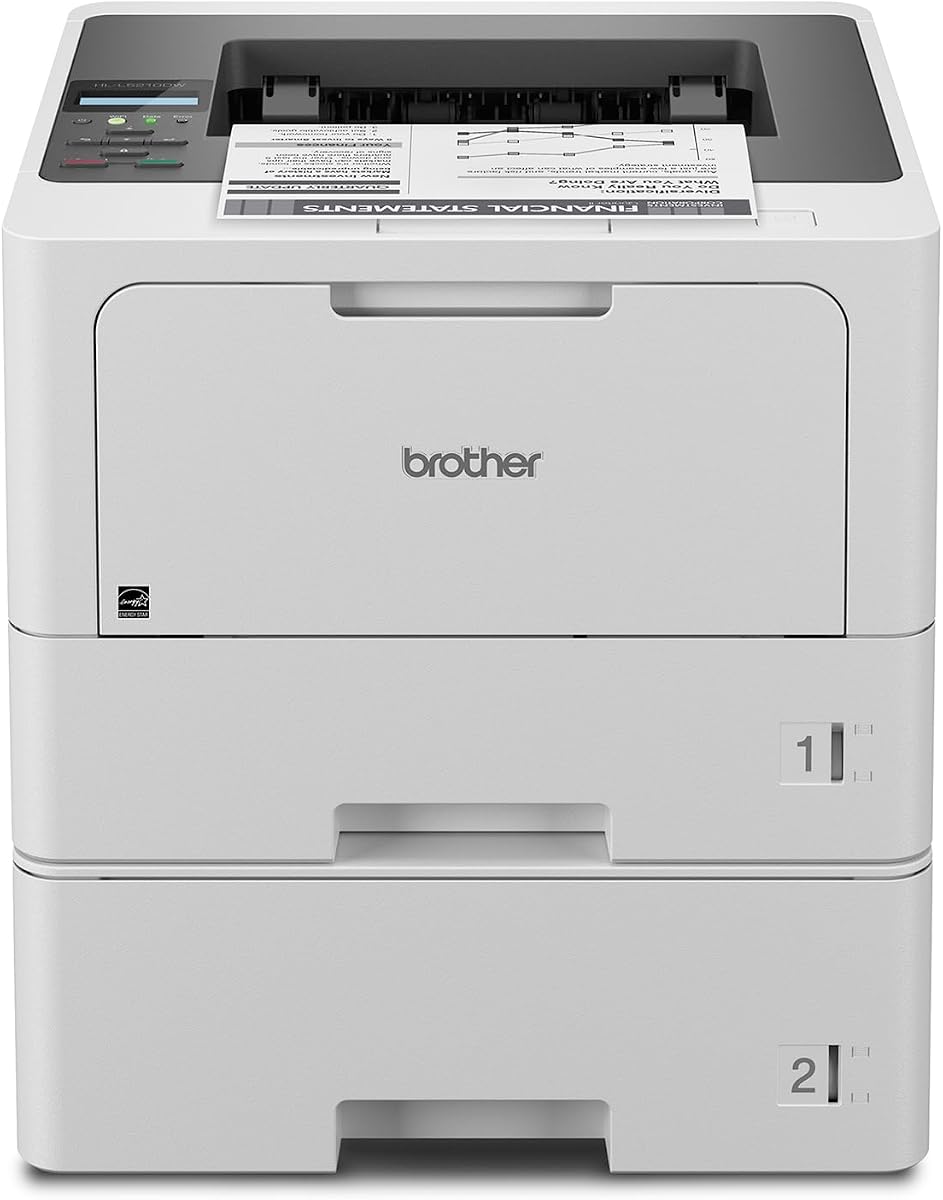
The Brother HL-L5210DWT is a focused monochrome laser printer that earns a 4.3 rating by delivering the essentials for a busy workgroup at a restrained equipment cost. It prints up to 48 ppm, supports automatic duplex printing, and includes both wireless and wired connectivity, making it a practical choice for teams that mainly produce contracts, invoices, forms, and internal reports.
We may earn a commission when you buy through this link, at no additional cost to you.
Paper handling is one of its strongest features. It includes 250-sheet and 520-sheet trays, plus a 100-sheet multipurpose tray for envelopes or custom media. Capacity can expand to 1,390 sheets with an optional tray, reducing interruptions during sustained jobs. The included 3,000-page cartridge can be supplemented with an 11,000-page super high-yield cartridge, while Triple Layer Security helps protect the device, network, and documents.
The limitation is obvious but important: this is a printer only, so there is no integrated scanner or copier. It also produces only black output, so workgroups that regularly create presentations, marketing collateral, or color-coded forms should choose a color laser model instead. These limitations do not weaken its case for teams whose workloads are consistently monochrome and whose priority is efficient document production.
For a large office seeking a straightforward, high-volume monochrome printer without paying for a multifunction device, the HL-L5210DWT is an excellent fit. Its combination of speed, duplex printing, expandable capacity, flexible connectivity, and security features makes it a particularly sensible value-oriented selection.
Two standard paper trays and an optional expansion tray make the HL-L5210DWT well suited to continuous office printing. The multipurpose tray supports envelopes and specialty media, reducing the need to change the main paper stock for less common jobs.
Gigabit Ethernet and dual-band wireless networking support both fixed workstations and flexible office layouts. Mobile printing is also supported, helping employees send common documents directly from compatible devices without routing every job through a workstation.
We may earn a commission when you buy through this link, at no additional cost to you.
The HP LaserJet Enterprise M406dn is an enterprise-oriented monochrome printer with a 4.4 rating and a print speed of up to 42 ppm. Its most compelling feature is not only speed but the combination of dynamic security, direct control from the 2.7-inch color display, support for card readers, and a firmware platform designed to evolve over time.
We may earn a commission when you buy through this link, at no additional cost to you.
Automatic two-sided printing is valuable for a workgroup handling multi-page contracts, reports, and internal procedures. It can reduce paper consumption by producing two-sided documents without manual intervention. The printer also supports HP and third-party solutions, while the HP FutureSmart firmware approach is intended to make security and feature updates available over the life of the device.
Compared with many of the Brother models here, the M406dn is more narrowly focused. The supplied information identifies built-in Ethernet but does not list built-in wireless connectivity, and it provides no scanner or copier. Organizations that require mobile printing or an all-in-one device may need to confirm their deployment requirements or choose another selection. Those constraints are acceptable for centralized fleets that prioritize managed security and straightforward monochrome output.
This printer is best suited to IT-conscious enterprises that want a secure, centrally managed print endpoint without a large finishing system. Its automatic duplexing, security emphasis, support for authentication hardware, and future firmware updates make it a premium choice for offices willing to prioritize fleet management over multifunction convenience.
Dynamic security and HP Wolf Enterprise Security are central to the M406dn's positioning. These defensive features are intended to detect and self-heal from malware, protect business data, and reduce the risk of an unmanaged print device becoming a network vulnerability.
The compact 2.7-inch color display provides access to settings and compatible solutions without introducing the footprint of a large finishing platform. Automatic duplexing and a 42 ppm maximum speed suit centralized office document workflows where consistency and administration matter.
We may earn a commission when you buy through this link, at no additional cost to you.
The Brother MFC-L6810DW is built for mid- to large-sized workgroups that need more than fast printing. With a 4.1 rating, up to 52 ppm print and copy speeds, an 80-page automatic document feeder, and expandable paper capacity reaching 1,660 sheets, it is a convincing high-volume all-in-one option for organizations with substantial document traffic.
We may earn a commission when you buy through this link, at no additional cost to you.
Its 80-page feeder performs single-pass, two-sided scanning at up to 200 images per minute, making it especially useful where staff routinely digitize multipage records. The seven-inch touchscreen can send scans directly to popular cloud destinations, and the document glass accommodates legal-size originals. An 8,000-page toner cartridge is included, with support for an 18,000-page ultra high-yield replacement for sustained use.
The trade-off is that this is a monochrome-only machine, and its paper capacity, feeder, and touchscreen require more space than a conventional desktop printer. It also does not offer color output for mixed professional materials. For offices focused on contracts, invoices, forms, and scanned records, however, those limitations are less important than speed, capacity, and workflow integration.
The MFC-L6810DW is best for high-volume administrative, legal, finance, and operations teams that want printing, copying, and scanning in a single enterprise device. It is a particularly strong recommendation when duplex scanning speed and expandable paper handling are central requirements.
The 80-page feeder scans both sides in a single pass at up to 200 ipm, reducing the handling required for large document sets. Legal-size glass provides a fallback for originals that must be placed manually, while cloud destinations simplify digital distribution.
A 520-sheet main tray, 100-sheet multipurpose tray, and optional expansion to 1,660 sheets help avoid frequent refills. The 250-sheet output tray and high-yield toner support are also well matched to sustained departmental workloads.
We may earn a commission when you buy through this link, at no additional cost to you.
The Brother HL-6210DW is a high-speed monochrome laser printer rated 4.1 by users, with a listed output speed of up to 50 ppm. It targets offices that need substantial daily throughput and fewer paper interruptions but do not require an integrated scanner, copier, or color output.
We may earn a commission when you buy through this link, at no additional cost to you.
Its 520-sheet main tray and 100-sheet multipurpose tray provide a strong starting configuration, while optional trays can expand total capacity to 1,660 sheets. Duplex printing, Gigabit Ethernet, and dual-band wireless make it adaptable to different network structures. Brother Genuine ultra high-yield replacement cartridges are listed at up to 18,000 pages, which can help reduce replenishment frequency in demanding print environments.
Triple Layer Security provides network, device, and document protection features appropriate to business deployment. The trade-offs are the same ones associated with any single-function monochrome printer: no scanning, no copying, and no color output. It also does not offer the touchscreen-guided scan destinations available on multifunction models, so teams that digitize paper records would need a separate scanner.
The HL-6210DW is a strong choice for accounting, logistics, operations, or administrative teams that primarily produce high volumes of black-and-white documents. Its speed and expandable capacity make it a practical middle ground between a smaller office printer and a full enterprise finishing platform.
The combination of a 520-sheet main tray, multipurpose input, and optional expansion to 1,660 sheets is well suited to large recurring print runs. Keeping multiple paper sizes loaded can also reduce interruptions when a department alternates between standard documents and envelopes.
Gigabit Ethernet gives fixed network deployments a reliable wired option, while dual-band wireless supports flexible placement. Mobile printing compatibility allows employees with compatible phones and tablets to send straightforward jobs without first opening a desktop application.
We may earn a commission when you buy through this link, at no additional cost to you.
The Brother MFC-L5915DW is a 4.3-rated business monochrome all-in-one designed for busy offices that need printing, copying, and scanning in one device. Its listed print and copy speed of up to 50 ppm provides ample throughput for internal documents, while automatic two-sided printing supports efficient multipage output.
We may earn a commission when you buy through this link, at no additional cost to you.
The 70-page automatic document feeder handles two-sided scanning at up to 56 images per minute, and a legal-size document glass expands the types of originals that can be processed. Connectivity includes Gigabit Ethernet and dual-band wireless networking, allowing the device to fit into either wired or flexible office layouts. A 3,000-page cartridge is included, with compatibility for an 18,000-page ultra high-yield replacement.
Compared with the MFC-L6810DW, this model offers similar headline print speed and a smaller but still capable document feeder. Its scanning rate is lower, and the supplied specifications do not describe the same 1,660-sheet expandable capacity. Color is another difference: users needing polished color output should look toward the MFC-L8930CDW or HL-L8430CDWT instead.
The MFC-L5915DW is a sensible recommendation for general offices that want a versatile monochrome device without stepping up to the largest enterprise workflow model. It suits teams balancing print, copy, and scan demands while retaining fast output, flexible networking, and high-yield toner flexibility.
Combining printing, copying, and scanning removes the need for separate devices for routine administrative work. The 50 ppm speed and duplex output help this consolidated setup remain productive even during periods of heavier document demand.
Dual-band wireless and Gigabit Ethernet support different network arrangements, while the 70-page feeder reduces the need to supervise multipage scans. Legal-size glass provides additional flexibility for sensitive or oversized originals.
We may earn a commission when you buy through this link, at no additional cost to you.
The HP LaserJet Enterprise M507n is a monochrome enterprise printer with a 4.0 rating and a clear emphasis on centralized administration. Rather than competing primarily on a single speed specification, it targets growing organizations that need a device capable of fitting into a managed corporate print environment.
We may earn a commission when you buy through this link, at no additional cost to you.
Its standout feature is an extensive security framework of more than 200 embedded features intended to protect printer information, thwart malware, and detect and stop attacks. HP Web JetAdmin helps administrators add devices and solutions, update features, and apply policies, while HP JetAdvantage Security Manager supports centralized security configuration. Optional mobile printing gives the device some flexibility for compatible phones and tablets.
The original HP 89A and 89X toner cartridges are positioned around consistent output and reduced reprints, waste, and service calls. As with any enterprise laser printer, actual operating results depend on document complexity, duty cycle, and environmental conditions. The principal drawback is that the supplied listing does not provide a maximum print speed or explicit paper-capacity figures, making direct comparison with several Brother models less transparent.
This M507n is best for enterprises with an established IT management structure and a need for centralized print policies. It may be less attractive to a small workgroup that prioritizes a prominently stated pages-per-minute figure, built-in wireless connectivity, or a large touchscreen. For a centrally governed fleet, however, its security and administration focus is compelling.
HP Web JetAdmin and HP JetAdvantage Security Manager support the kind of device onboarding, policy application, and monitoring normally required by larger offices. Centralized control can simplify consistency across multiple locations or departments without relying on individual users to configure each printer.
The stated collection of more than 200 embedded security features reflects the printer's enterprise positioning. Defensive capabilities are designed to protect device information, resist malware, and identify attacks, all of which matter when a printer is connected to a business network.
We may earn a commission when you buy through this link, at no additional cost to you.
The HP LaserJet Enterprise MFP M634z is the most elaborate workflow machine in this guide, offering print, scan, copy, and fax functions alongside serious document-finishing capability. Its listed 55 ppm print speed is the highest among these selections, while a 150-page automatic document feeder and nine-inch color touchscreen support sophisticated office workflows.
We may earn a commission when you buy through this link, at no additional cost to you.
Paper handling is a defining advantage. Three additional 550-sheet trays and a wheeled stand bring total input capacity to 2,300 sheets, covering sizes from 4 by 6 inches through legal. A 1,000-sheet three-bin stapler and stacker with job offset allows teams to separate, finish, and organize large output runs. A first-page-out time of 5.2 seconds supports the stated emphasis on responsive business performance.
This is not a simple desktop printer, however. Its size, finishing hardware, and enterprise configuration introduce greater deployment demands. The supplied listing also provides no user rating, so there is no numeric customer feedback to weigh alongside the specifications. Security remains a major strength through embedded defensive features designed to protect data, resist malware, and detect attacks.
The M634z is best for enterprise print rooms, legal departments, accounting groups, and other teams that regularly produce finished document sets at substantial volume. It is the natural choice when advanced stapling, stacking, sorting, high-capacity input, and a large control interface outweigh the need for a compact general-purpose printer.
The three-bin stapler and stacker with job offset goes well beyond ordinary output. It can help organize large runs into separate completed sets, reducing manual collation and making complex document workflows easier to manage at central print rooms.
A total input capacity of 2,300 sheets and a 150-page single-pass duplex feeder support workflows where both source documents and finished output are substantial. Legal-size support, multiple paper sizes, and a wheeled stand make the system easier to integrate into a dedicated production area.
We may earn a commission when you buy through this link, at no additional cost to you.
The Brother HL-L8430CDWT carries the highest listed user rating in the group at 4.6, making it a particularly well-regarded option for workgroups that need professional color output. It combines up to 33 ppm printing with vibrant color and sharp black documents, making it appropriate for reports, proposals, internal communications, and other mixed-content work.
We may earn a commission when you buy through this link, at no additional cost to you.
Dual paper trays of 250 and 520 sheets reduce routine reloading, and optional expansion raises total capacity to 1,340 sheets. A 50-sheet multipurpose tray supports envelopes and custom media. The 2.7-inch color touchscreen allows direct navigation and printing from popular business cloud services and mobile devices, while default two-sided printing helps reduce paper use.
The machine includes Triple Layer Security and an NFC card reader for badge authentication. Brother Genuine 3,000-page black and 1,800-page color cartridges are included, with 7,500-page black and 6,500-page color high-yield replacements available. EPEAT Gold, ENERGY STAR, and post-consumer recycled packaging claims add sustainability considerations that can matter to environmentally conscious purchasing teams.
Its key trade-off is the absence of scanning and copying. Workgroups that regularly digitize records or reproduce originals should consider the MFC-L8930CDW instead. For a color printer focused on professional output, secure access, flexible paper handling, and convenient touchscreen controls, though, the HL-L8430CDWT is an excellent recommendation.
The HL-L8430CDWT delivers sharp color and black output at up to 33 ppm without the larger document-finishing system associated with premium enterprise alternatives. It is well suited to departments that need polished reports and proposals but do not require regular high-volume copying or scanning.
Two standard trays, an optional expansion tray, and a multipurpose feed offer useful media flexibility. Triple Layer Security and the integrated NFC card reader add controlled access and document protection for organizations with security requirements.
We may earn a commission when you buy through this link, at no additional cost to you.
The Brother HL-L6310DW is a 4.2-rated enterprise monochrome laser printer built for mid- to large-sized workgroups. Its headline advantage is fast output at up to 52 ppm, paired with a 520-sheet main tray, a 100-sheet multipurpose tray, and the ability to expand total capacity to 1,660 sheets.
We may earn a commission when you buy through this link, at no additional cost to you.
The included 6,000-page toner cartridge and compatibility with an 18,000-page ultra high-yield replacement support efficient long-term operation. Triple Layer Security and an NFC card reader address device, network, and document protection, while device-management tools help administrators distribute configurations, firmware updates, security settings, and task automation across a fleet.
This is a printer-only model, so it does not scan or copy, and it cannot produce color output. A floor-standing configuration can be created with an optional cabinet, which may be useful for offices that want to place the machine securely on a cabinet rather than a standard table. Workgroups that need document capture should consider a Brother MFC model instead.
The HL-L6310DW is a good recommendation for a department that prioritizes monochrome speed, expandable capacity, and centralized administration over multifunction convenience. It is particularly well suited to mid- to large workgroups producing continuous runs of forms, invoices, reports, and internal procedures.
At up to 52 ppm, the HL-L6310DW is among the quickest monochrome machines in the guide. This makes it well matched to teams that routinely print lengthy reports, batch forms, invoices, or operational packets and need short turnaround during busy periods.
The stated management capabilities support mass distribution of device configurations, security settings, firmware updates, and task automation. This administrative focus makes the printer more attractive to IT teams overseeing multiple offices or a growing number of shared endpoints.
We may earn a commission when you buy through this link, at no additional cost to you.
The right workgroup laser printer should match the actual workload rather than simply offer the largest specification sheet. Consider output type, daily volume, paper handling, security, connectivity, and the need for scanning or finishing before making a final selection.
Monochrome laser printers are generally the better fit for invoices, contracts, shipping documents, forms, and long internal reports. Their listed speeds in this guide reach as high as 55 ppm, and they are well suited to uninterrupted high-volume production. Color laser models provide better results for proposals, charts, marketing materials, and color-coded workflows, but they generally print more slowly and use separate toner for each color.
Choose monochrome for the majority of routine documents and color when presentation quality is a recurring requirement. An all-in-one color model can reduce device count, but a monochrome-only unit may offer better throughput and simpler toner management for document-heavy departments.
Pages per minute is most useful when paired with a realistic view of daily volume and the complexity of the documents involved. A 48 to 52 ppm model gives mid- to large-workgroup monochrome tasks additional breathing room, while a 42 to 55 ppm enterprise device suits consolidated print rooms. The listed 33 ppm speeds of the color models remain practical for mixed business output.
Do not rely on speed alone. Duplex printing, toner yield, paper capacity, and whether a queue is served by one device or several can materially affect how work flows. Choose a model that clears the busiest recurring period without requiring constant intervention.
Large workgroups need enough onboard paper capacity to avoid repeated refills. Configurations in this guide range from dual 250- and 520-sheet trays to as much as 2,300 sheets of total input on the HP M634z. A multipurpose tray is important when envelopes, labels, or other custom media appear regularly. Expandability can be valuable if a department expects to add staff or increase document volume.
Compare both input and output capacity, not just total input. A high input figure is less useful if finished documents accumulate faster than staff can remove them. For floors or shared offices, verify that the expanded configuration fits the intended space and remains accessible for paper and toner changes.
Single-function printers provide fast, focused output and can be less complex to deploy. All-in-one models add copying and scanning, which may consolidate several workflows and reduce the need for separate devices. Their document feeders and control screens can also make centralized digitization more convenient. The most advanced enterprise model adds a three-bin stapler and stacker for finished document sets.
Map the decision to actual behavior. A team that occasionally copies may still benefit from an MFC, while a group that regularly scans legal-size originals should prioritize a large feeder and legal-size glass. Do not pay for finishing hardware that will sit unused, but do not overlook paper handling when documents are routinely collated and distributed.
Gigabit Ethernet provides a stable option for a fixed office network, while dual-band wireless gives installation teams more placement flexibility. Several Brother models also support mobile printing, and the HP M406dn and M507n offer solution or mobile-printing options, although their listings do not identify built-in dual-band wireless in the same way. Network topology, wireless coverage, and IT policy should guide the final choice.
For large deployments, confirm how the printer will receive firmware updates, security policies, and configuration settings. A device that is easy to connect but difficult to manage centrally can create more administrative work than a wired enterprise model designed for fleet oversight.
Business printers sit inside trusted networks and may handle contracts, personnel information, invoices, and other sensitive material. Brother Triple Layer Security, NFC badge readers, and HP Wolf Enterprise Security are designed to protect devices, networks, and documents in transit. The M507n goes further in the supplied specifications, citing more than 200 embedded security features and centralized policy management.
Match the security features to organizational requirements. A small team may not need badge authentication, while a legal, medical, finance, or human resources department may consider it essential. Verify compatibility with the organization's directory, authentication, monitoring, and print-management systems before deployment.
Toner page ratings help estimate how often supplies must be replaced, but actual usage varies with page coverage, graphics, duplex settings, and document density. Several Brother models ship with standard cartridges and support ultra high-yield replacements rated from 11,000 to 18,000 pages. High-yield options can reduce replenishment frequency in departments with sustained demand.
Use genuine or explicitly supported supplies when consistent output and predictable device behavior are priorities. Also consider storage, ordering procedures, and whether keeping a spare cartridge on site is practical. A high-yield cartridge is most valuable when the printer will actually reach a high duty cycle.
Touchscreens such as the MFC-L8930CDW's seven-inch display, the MFC-L6810DW's seven-inch display, and the M634z's nine-inch display can make complex workflows easier, while smaller displays keep devices simpler. EPEAT Gold, ENERGY STAR, reduced packaging, and post-consumer recycled materials can support formal sustainability goals. Floor space, noise expectations, and whether an all-in-one is actually needed complete the practical evaluation.
Before buying, create a shortlist based on workload and mandatory features, then verify physical dimensions and connectivity in the intended location. Favor a model your employees and IT team can operate easily; sophisticated hardware offers little value when it is underused or difficult to service.
Install the printer in a level, ventilated location with enough clearance for its trays, output path, document feeder, and optional accessories. Load paper within the manufacturer's recommended ranges, select the correct media type in the printer settings, and use the multipurpose tray for envelopes or specialty stock. Configuring the correct driver and print quality option helps preserve the expected speed and appearance.
Keep the device connected to the intended network and apply the organization's security policies before allowing broad use. If badge authentication is enabled, register authorized users or cards and test access controls. Update firmware through approved management tools, use the appropriate high-yield toner when compatible, and monitor toner and paper levels to prevent avoidable interruptions.
For scanning, clean the platen and feeder rollers with approved materials, place originals carefully, and confirm the correct orientation and page size in the preview. Periodically inspect rollers, guides, vents, and exterior surfaces for dust or paper debris. Address jams by following the device's error guidance, and schedule service or supply replacement when capacity or error patterns indicate that maintenance is needed.
A speed around 40 ppm or higher is useful for busy teams, but document complexity and simultaneous workflows matter more than a single maximum figure. The fastest monochrome selections here reach 48 to 55 ppm, while the featured color models list up to 33 ppm. Choose enough speed to clear recurring peaks without paying for capacity the office will not use.
Choose monochrome when most jobs are forms, invoices, contracts, and text-heavy reports. Choose color when polished presentations, charts, or color-coded documents are part of the regular workflow. A color all-in-one may also help consolidate printing, copying, and scanning, but it will not outperform a dedicated monochrome unit for sustained black-and-white output.
A multifunction printer is useful when employees regularly copy or digitize documents and the organization wants to consolidate those tasks. A single-function model can be easier to deploy and focus all of its capacity on printing. The right choice depends on scan volume, document originals, local versus centralized workflows, and whether staff have separate scanning equipment.
The useful target depends on paper size, volume, and how often staff can refill trays. In this guide, expandable monochrome configurations reach 1,660 sheets, the color printers reach 1,340 to 1,390 sheets, and the enterprise finishing model reaches 2,300 sheets. High capacity helps most when it allows different paper types to remain loaded simultaneously.
Look for network protection, document security, secure management, and firmware update capabilities. Features such as Triple Layer Security, HP Wolf Enterprise Security, NFC badge readers, card-reader support, and centralized configuration tools can be important in sensitive environments. Confirm compatibility with the organization's authentication and print-management systems.
They can be worthwhile when a printer maintains a consistently high duty cycle and the device is compatible with the cartridge. High-yield supplies can reduce replacement frequency in departments that print continuously. In lighter use, standard cartridges may be more practical, so compare expected page consumption with the rated yield of each option.
Not necessarily. Gigabit Ethernet is often preferable for a centrally managed fleet because it provides a stable fixed connection. Wireless can simplify placement and support convenient mobile printing, but it is only one part of the deployment decision. Network policy, coverage, security requirements, and centralized administration should all be considered.
Document finishing is most useful for large batches that need stapling, sorting, or separate output bins. The HP LaserJet Enterprise MFP M634z includes a three-bin stapler and stacker with job offset, making it appropriate for centralized enterprise production. If the office rarely collates or distributes formal document sets, a simpler printer may offer better value.
The Brother MFC-L8930CDW is the strongest all-around choice because it combines capable color output, fast duplex scanning, generous touch controls, and meaningful security in a relatively compact design. The Brother HL-L5210DWT stands out for efficient monochrome value, while the HP LaserJet Enterprise M406dn offers a focused option for organizations prioritizing enterprise security and centralized oversight.
For the heaviest enterprise workflows, compare the Brother MFC-L6810DW with the HP LaserJet Enterprise MFP M634z. The former is well suited to fast printing, copying, and high-speed scanning, while the latter is built for much larger input capacity, a major document feeder, touchscreen control, and professional finishing. Teams prioritizing color should also examine the HL-L8430CDWT and MFC-L8930CDW side by side.
Before purchasing, confirm the required output type, realistic daily volume, paper sizes, security policy, network arrangement, and available space. Review current prices, warranty terms, toner availability, and accessory compatibility at the time of purchase, since pricing and product availability can change independently of the specifications used in this guide.
