
UGREEN Airplane Bluetooth 6.0 Transmitter Receiver
4.1Editor score
Transmitter and receiver modes
3.5mm auxiliary input
Dual headphone support
Ten-meter transmission range
Our Bluetooth Transmitter for iPod Classic guide compares 10 options for fit, codecs, dual streaming, latency, portability, and everyday use.
A Bluetooth transmitter can give an iPod Classic a valuable second life by sending its music wirelessly to modern earbuds, headphones, speakers, and compatible car systems. The right model should match the connector on your player, power itself cleanly, pair without difficult software setup, and deliver stable audio without introducing troublesome delay.
We compared the ten products in this guide across physical connectivity, supported iPod generations, Bluetooth profiles, codec options, dual-streaming ability, controls, power requirements, and intended use. The list includes purpose-built 30-pin adapters as well as 3.5mm and combination transmitters that can serve an iPod Classic through its headphone output.
Each review identifies the product’s strongest benefits and its most important limitations, so the recommendation reflects actual compatibility details rather than marketing alone. Ratings and availability can change, and current prices should be checked before buying, but the core selection criteria should remain useful over time.
4.1Editor score

4.3Editor score
4.0Editor score
The comparison covers connector type, iPod compatibility, audio features, and practical limitations, helping you separate direct 30-pin adapters from universal 3.5mm alternatives.



This 30-pin adapter is one of the most directly relevant options for an iPod Classic, with a rating of 3.4 and a simple approach: plug the connector into a compatible player, pair the adapter with wireless headphones, and listen. Its strongest qualities are convenience, device-powered operation, and support for a wide collection of classic Apple music players.
We may earn a commission when you buy through this link, at no additional cost to you.
The adapter supports Bluetooth headphones, earbuds, speakers, car audio systems, and AirPods-compatible devices. Its upgraded Bluetooth technology is intended to provide quick pairing, low power consumption, stable transmission, and reduced delay. Because it draws power from the iPod, it avoids the charging routine required by battery-powered transmitters, which is especially convenient during commutes and travel.
The compatibility description deserves careful attention. It lists iPod Touch third and fourth generations, iPod Nano first through sixth generations, iPod Video, iPod Mini, and iPod Classic, while excluding the first and second generation iPod Touch and certain models manufactured after 2007. That wording is less precise than a model-by-model chart, so buyers should identify the production year and connector before ordering.
This is the best overall recommendation for someone who wants a dedicated 30-pin adapter and prioritizes simple, cable-free listening without a separate charging routine. It is less attractive for owners seeking selectable codecs, sophisticated dual-stream controls, or a polished set of onboard volume buttons. Confirming compatibility is the most important step before purchase.
The 30-pin plug makes the adapter especially neat at the end of an iPod Classic cable. Since it is powered directly by the player, there is no internal battery to charge before a trip or a long flight.
The listed support covers several generations of iPod Nano and Touch along with Video, Mini, and Classic models. This broad range can also be useful for owners who keep more than one older Apple music player.
We may earn a commission when you buy through this link, at no additional cost to you.
This adapter offers a compact, direct route from a compatible 30-pin iPod to a Bluetooth receiver. Its 3.2 rating reflects mixed experiences, but the fundamental design is appealing for anyone who wants a small plug that draws power from the music player and needs no installed software.
We may earn a commission when you buy through this link, at no additional cost to you.
The transmitter supports A2DP and AVRCP and can send stereo audio to car stereos, Bluetooth headphones, and speakers. Pairing is described as automatic, although the product guidance recommends disconnecting the destination speaker from any phone beforehand. That preparation can prevent the adapter from selecting a previously connected source.
Its most significant weakness is the confusing compatibility statement. Although the first section mentions iPod Classic, the following list expressly excludes the iPod Classic 30GB, 60GB, 80GB, and 160GB models, as well as some Nano and Mini versions. The statement that only original iPods produced after 2007 can connect is similarly difficult to interpret. Volume must also be adjusted on the iPod rather than through the receiving device.
This product is most appropriate for a buyer who can verify the exact hardware connection and accept a basic one-source transmitter with no dedicated volume controls. It may be a practical choice for a compatible newer 30-pin device, but the documentation creates enough uncertainty that a buyer with a classic iPod should proceed only after confirming the model against the manufacturer’s support.
The adapter is designed to pair automatically after the receiver is made available and any competing phone connection is disabled. A remembered connection can make repeated use less demanding.
Compatibility is not universal despite the broad product title. The exclusion of several iPod Classic capacities and other older models means that the exact player version must be checked before purchase.
We may earn a commission when you buy through this link, at no additional cost to you.
The AirFly SE combines the highest rating in this guide with a connector strategy that works with virtually any iPod Classic equipped with a headphone jack. It is a 3.5mm transmitter rather than a 30-pin plug, but that makes it a flexible solution for airplanes, gym equipment, game systems, and other wired audio sources as well.
We may earn a commission when you buy through this link, at no additional cost to you.
Its compact body is designed for travel, and the product description highlights more than 20 hours of operation on a single charge. The included USB-C cable allows use while charging, while built-in buttons provide direct volume adjustment. Pairing is presented as quick and straightforward with AirPods, earbuds, and other Bluetooth headphones.
There is no separate battery to replace, but the AirFly SE does need periodic charging. A short 3.5mm audio cable is also required to link the iPod Classic’s headphone output to the adapter, and that cable must be included in the travel setup. It therefore provides less of the clean, one-piece appearance of a native 30-pin adapter.
This is the best choice for most listeners because it combines a strong rating, broad source compatibility, easy controls, and a generous stated battery life. It is particularly attractive for travel and for owners who want one transmitter to serve multiple wired devices. Just remember that it is an adapter for the iPod’s headphone output rather than a direct 30-pin attachment.
The AirFly SE can connect to in-flight entertainment, gym equipment, gaming devices, and any other source with a 3.5mm audio jack. That versatility makes it more useful than a model dedicated to one Apple connector.
A stated battery life of more than 20 hours supports long travel days, and operation while charging helps prevent an interruption. The built-in volume buttons are also easier to reach than controls located on a phone.
We may earn a commission when you buy through this link, at no additional cost to you.
The i10_Pro is the most feature-rich dedicated 30-pin transmitter in the group, combining a 4.0 rating with direct support for iPod Classic 80GB, 120GB, and 160GB models. It also supports older compatible iPod Touch and Nano generations, making its published 30-pin compatibility notably more specific than some alternatives.
We may earn a commission when you buy through this link, at no additional cost to you.
Its standout feature is a button that cycles among standard aptX, low-latency aptX, FastStream, and SBC. This lets the user balance sound quality and latency according to the receiving equipment and the intended activity. The transmitter can also stream to two Bluetooth headsets, receivers, or speakers at once, including combinations involving AirPods and Bose equipment.
A2DP and AVRCP profiles are implemented, and the remote controls support next, previous, play, and pause functions. Its dimensions of 25 by 14 by 6 millimeters keep it visually and physically discreet. These advanced capabilities are not useful with every receiver, however, because the available codec and multi-streaming support depend on the paired hardware.
This is the best premium recommendation for a buyer who wants direct 30-pin integration, codec selection, and the ability to share music with a second person. It is especially compelling for home listening or travel where low-latency performance matters. Buyers who only need a basic one-to-one adapter can find a simpler and more economical design.
AptX, low-latency aptX, FastStream, and SBC give the user meaningful control over the wireless link. The best setting depends on the receiving headphones, speakers, or car system and whether low delay matters more than other qualities.
Dual-streaming can connect two sets of stereo headphones or receivers to the same iPod. The second device can be paired by pressing the transmitter’s button, making shared listening practical for road trips and quiet travel.
We may earn a commission when you buy through this link, at no additional cost to you.
This 3.5mm transmitter earns a 4.1 rating and provides a wide set of features for connecting an iPod Classic to modern wireless equipment. Because it uses the iPod’s headphone output rather than a 30-pin connector, it also works with older MP3 players, CD players, televisions, consoles, and gym equipment that use a standard audio jack.
We may earn a commission when you buy through this link, at no additional cost to you.
A Qualcomm Bluetooth 5.2 chipset and aptX support are central to the design. The manufacturer also highlights a Texas Instruments digital signal processor for real-time signal refinement and emphasizes low latency for video. Dual Link allows two sets of Bluetooth headphones or earbuds to receive the same source, which is useful during air travel when a seat-back screen has only one wired output.
The wording that the chipset completely eradicates delay is unusually absolute, so buyers should treat the low-latency capability as a comparative benefit rather than a guarantee of perfect lip synchronization. Actual results depend on the source, receiving hardware, codec negotiation, and operating system behavior. The transmitter also requires a physical 3.5mm cable from the iPod Classic.
This is a compelling multi-purpose option for someone who wants a single transmitter for an iPod Classic and many other audio sources. It stands out for dual-device streaming and low-latency orientation, but the 30-pin route remains neater when the iPod will be the only device used. Confirm that the selected AirPods or headphones support the same codec if low latency is essential.
Low-latency aptX support can make the adapter more appropriate for films, games, and other video sources than a basic transmitter. The actual synchronization still depends on the connected receiver and the source device.
Connecting two sets of wireless headphones gives two people access to one audio source. This is particularly useful on aircraft, where passengers often need to share a single entertainment output.
We may earn a commission when you buy through this link, at no additional cost to you.
The UGREEN adapter combines transmitter and receiver modes in a 3.5mm package, giving it more flexibility than a single-purpose device. With a 4.1 rating, it is a strong budget pick for using an iPod Classic with wireless headphones and for sharing one wired source between two listeners.
We may earn a commission when you buy through this link, at no additional cost to you.
Bluetooth 6.0 is used for faster pairing and more stable transmission, while the stated range reaches 10 meters. Battery life is listed at up to 18 hours in receiver mode and 16 hours in transmitter mode. A built-in microphone can also answer calls when the device is connected to a phone for music playback.
The AirPods compatibility statement contains a significant limitation: AirPods Pro 2, AirPods Pro 3, AirPods 4, and AirPods 4 ANC are listed as incompatible. Compatible AirPods or AirPods Pro can still be used, and Bluetooth headphones from other supported brands may offer a broader choice. iPhone users may also need to reconnect manually rather than relying on automatic reconnection.
This is the best budget choice for travel-oriented users who want both sending and receiving functions. It also serves an iPod Classic through its 3.5mm headphone output without requiring a special 30-pin adapter. Buyers using recent AirPods should check the exclusions carefully, while owners of standard or older Bluetooth headphones may find the two-way design especially useful.
In transmitter mode, the adapter sends a wired source to Bluetooth headphones. In receiver mode, it turns a wired car stereo or speaker into a Bluetooth target, giving the device utility beyond the iPod Classic use case.
Support for two AirPods or headphones makes it practical to watch a movie or listen to a playlist together. The exact behavior of individual earbuds in multipoint or shared-listening arrangements can vary, so the receiver models should be checked first.
We may earn a commission when you buy through this link, at no additional cost to you.
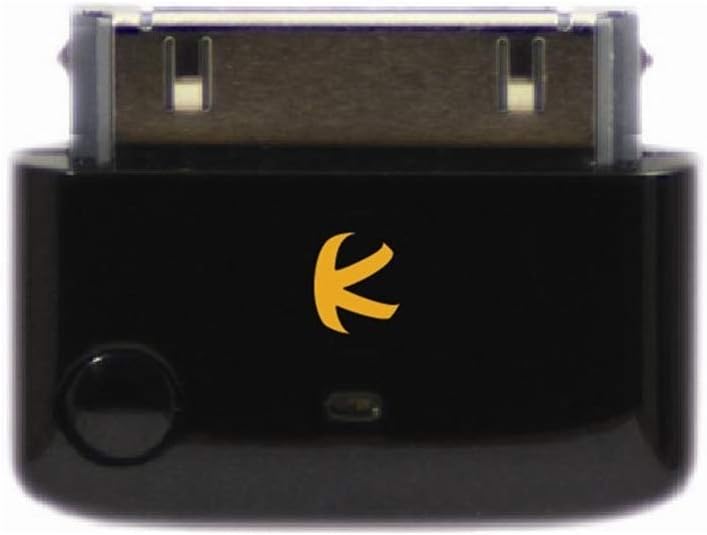
This black 30-pin adapter provides a straightforward way to connect compatible classic Apple players to Bluetooth headphones, speakers, and music receivers. Its 3.6 rating is not among the strongest in the list, but the product describes a familiar combination of direct connection, device-powered operation, automatic pairing, and no software installation.
We may earn a commission when you buy through this link, at no additional cost to you.
A2DP and AVRCP profiles provide standard stereo transmission and remote-control support. The adapter is designed to pair automatically and remember a device after the initial connection, reducing the need to repeat setup. Because the iPod supplies power, the adapter can be ready for use without a separate charging cable.
The compatibility information presents a notable contradiction. The title refers to iPod Classic models manufactured after 2007, while the bullet list says to except iPods made after 2007. It also states that first and second generation iPod Touch models are not supported. Buyers need the exact production year and model rather than relying on a broad category label.
This is a good option for someone who wants a simple 30-pin plug and values remembered automatic pairing over codec controls. It is less suitable for buyers who require detailed model support, dual streaming, or onboard volume adjustment. Confirming the connector and production year before ordering can prevent an otherwise straightforward purchase from becoming disappointing.
After a receiver has been paired, the adapter is intended to remember and reconnect to it. That behavior makes repeated use with the same AirPods, earbuds, or speakers more convenient.
The product descriptions use conflicting wording around models made after 2007. The exact iPod model and production year should therefore be verified rather than relying on the general title.
We may earn a commission when you buy through this link, at no additional cost to you.
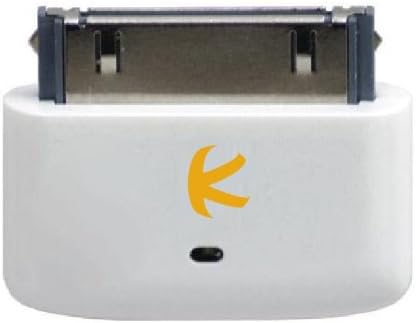
The i10s combines a 3.9 rating with an exceptionally small 30-pin format and a clean white finish. It is built for iPod, iPhone, and iPad devices that use the 30-pin connector, making it a practical choice for an iPod Classic when the exact model supports the connection.
We may earn a commission when you buy through this link, at no additional cost to you.
Pairing is automatic, and the transmitter remembers previously paired devices for easy reconnection. The description also notes compatibility with stereo receivers that use common pairing codes such as 0000, 1111, 1234, or 8888. A high-quality codec and low-power operation are listed as core features, supporting clear stereo sound without making the adapter unnecessarily large.
The deliberate absence of buttons keeps the housing free of gaps where dirt and grime can collect, and it also makes the transmitter operationally simple. The tradeoff is that adjustment must be handled by the source device or receiver rather than through dedicated controls on the transmitter itself. The feature set is modest compared with the i10_Pro.
This is a good recommendation for a minimalist setup where the adapter should disappear at the end of the iPod cable. It works especially well for listeners who already know their preferred wireless headphones and want automatic reconnection. Buyers seeking dual streaming, selectable aptX modes, or built-in buttons should look to a more advanced model.
The button-free housing is smooth, compact, and easy to keep clean. It also avoids accidental presses while the iPod is being carried in a pocket or travel pouch.
Automatic pairing and remembered devices remove much of the repeated setup associated with wireless audio. The streamlined design is most useful when the same receiver is used each day.
We may earn a commission when you buy through this link, at no additional cost to you.
The i10s aptX adds the aptX codec to the compact, button-free i10s design, giving it a 3.7 rating and a clear advantage for owners of compatible wireless receivers. It is intended for iPod, iPhone, iPad, and iPod Touch devices with a 30-pin connector, including the classic generation relevant to many iPod Classic owners.
We may earn a commission when you buy through this link, at no additional cost to you.
When connected to aptX-capable headsets, receivers, or speakers, it is designed to provide cleaner audio and reduced latency compared with standard Bluetooth transmission. That makes it more relevant to video playback on an iPod as well as music, although the benefit can only be realized when the receiving hardware supports aptX.
Bluetooth Enhanced Data Rate support is included, along with the same automatic, remembered pairing concept and low-power emphasis as the standard i10s. The design remains extremely small and free of buttons, which helps with portability and cleaning but leaves volume adjustment to the source or receiver.
This is a worthwhile choice for a listener who already owns aptX headphones and wants a direct 30-pin solution without a larger transmitter. It is not the most flexible pick for mixed ecosystems because the codec advantage varies by receiver. For users with a wider range of Bluetooth equipment, a standard A2DP adapter or the codec-switching i10_Pro may be more accommodating.
AptX support can provide a more efficient and responsive wireless link when both the transmitter and receiver support it. Using a non-aptX receiver removes the main technical advantage over a standard transmitter.
Reduced latency is particularly useful when watching videos on the iPod, where a large gap between picture and sound can be distracting. The receiving headset or speaker remains an important part of the final result.
We may earn a commission when you buy through this link, at no additional cost to you.
The i10 is a compact 30-pin Bluetooth transmitter whose defining feature is multi-stream stereo music. With a 3.8 rating, it offers a straightforward route to sharing one iPod’s audio between two sets of compatible wireless headphones, including two sets of Apple AirPods.
We may earn a commission when you buy through this link, at no additional cost to you.
The direct 30-pin connection keeps the setup visually clean, while the integrated transmitter avoids the need for a separate charging cable. Its small dimensions and black finish suit an older iPod or iPhone particularly well. Multi-streaming turns a private listening device into a compact source for shared music, which can be useful on trips or in a quiet room.
The product information is less detailed than that of the i10_Pro, so buyers should not assume selectable aptX, low-latency aptX, FastStream, advanced remote controls, or a specific transmission range. The practical quality of the shared connection will depend on the paired receivers and their ability to maintain simultaneous streams.
This is a sensible pick for two people who want to listen to the same iPod music on separate AirPods or other compatible headphones. It is less suitable for users who need detailed codec control or advanced source management. Confirm that both receiving devices support the required streaming arrangement before committing to this model.
Multi-streaming allows two compatible headphone sets to receive the same stereo music. This makes the transmitter useful for a shared journey, quiet office session, or other setting where one source should serve two listeners.
The small black enclosure and direct Apple-style connector blend neatly with older iPod hardware. It is easy to carry and avoids the visual bulk of a larger battery-powered travel adapter.
We may earn a commission when you buy through this link, at no additional cost to you.
The most important decision is whether your player and intended receivers align with the adapter’s physical connectors, while codec support, latency, power, and sharing features determine how well it fits daily use.
A native 30-pin transmitter plugs directly into the charging and accessory port of a compatible iPod Classic, providing a neat one-piece setup without a cable between the player and adapter. It also usually draws power from the iPod, eliminating battery charging. A 3.5mm transmitter instead connects to the headphone output, making it more universal across old MP3 players, televisions, gym equipment, and airline entertainment systems, but it requires a cable and adds another object to carry. Verify that your iPod Classic has the expected 30-pin socket or a working headphone jack before choosing the connection style.
Compatibility language can be surprisingly inconsistent among 30-pin adapters. Some products broadly list iPod Classic, Nano, Touch, Mini, and Video, while their exclusions remove particular capacities, generations, or manufacturing years. The iPod Classic 160GB is especially common in the market, but support is not automatically transferable to the 30GB, 60GB, 80GB, or 120GB versions. Touch and Nano support also varies by generation. Before ordering, note the model printed on the back of the player, its storage capacity, and approximate production year, then compare those details with the manufacturer’s stated supported list or contact the seller for confirmation.
A2DP is the standard profile for stereo music transmission, while AVRCP adds remote-control functions such as play, pause, track navigation, and volume commands where the receiver supports them. Codecs determine how audio is compressed and decoded. SBC is broadly supported, while aptX can improve efficiency and reduce latency when both devices support it. Low-latency aptX is more relevant for video, games, or other sources in which synchronization is noticeable. A transmitter cannot create codec support in incompatible headphones, so identify the models you already own and check their supported profiles before paying for advanced codec features.
Bluetooth compression introduces delay, and the amount varies with the codec, source, receiver, and operating environment. Music alone is usually forgiving of a small lag, while video can make the mismatch obvious when dialogue appears before its corresponding lip movement. For an iPod Classic used mainly for albums, standard A2DP performance may be adequate. For films, downloaded videos, or gaming, an adapter with aptX or a clearly stated low-latency mode is preferable. Even then, avoid expecting every transmitter and receiver combination to achieve perfect synchronization, because the complete audio path includes the iPod, cable or connector, adapter, and wireless headphones.
A 30-pin adapter that draws power from the iPod is convenient because it remains ready whenever the player is charged. Battery-powered 3.5mm transmitters are more portable across source devices, but they require regular charging and may run out during a long journey. Review the stated battery life in the relevant operating mode, and note whether the unit can operate while charging. Models with USB-C charging are convenient to top up from modern power banks. If you travel often, carry the appropriate cable and charging equipment, because an adapter cannot provide its intended function when its battery is depleted.
Most basic transmitters send audio to one receiver at a time. Dual-stream products can maintain two headphone connections, allowing two people to listen to the same iPod. This is especially appealing on flights, road trips, and other quiet settings. Pairing a second device usually involves putting it in pairing mode and pressing a button on the transmitter. Confirm whether the advertised dual-streaming applies to AirPods, to two identical headphones, or to a broader mix of receivers. Multistream can also require a recent iPhone, and occasional reconnection or independent volume behavior is possible.
A transmitter that lives in a pocket, bag, or travel case should be small enough not to create extra clutter. Direct 30-pin adapters are naturally compact, while battery-powered 3.5mm units add only a small inline module and cable. Physical volume buttons can be useful when the iPod is not readily accessible, although some minimalist transmitters intentionally have no controls. Button-free housings are easier to keep clean, while multi-button devices provide faster access to pairing, codec, and volume functions. Consider where the adapter will live, how it will be carried, and whether one-button operation is preferable to a more elaborate control set.
The transmitter should be evaluated together with the headphones or speakers it will serve. AirPods variants have changed rapidly, and one product in this group explicitly excludes several newer AirPods and AirPods Pro versions. Other Bluetooth headphones may support aptX, multipoint, or stereo pairing more consistently. Car stereos, speakers, and exercise machines can also behave differently from conventional earbuds, even when they accept the same Bluetooth profile. Check the receiving device’s manual, disconnect it from a phone before pairing when instructed, and avoid assuming that every transmitter can drive two separate AirPods sets without interruption.
Begin by identifying the correct connection method. For a 30-pin model, compare the plug with the iPod Classic’s port and confirm that the player generation is supported. Insert the adapter carefully without forcing it. For a 3.5mm model, connect one end of an audio cable to the iPod’s headphone output and the other to the transmitter, then select the appropriate input mode if the device has one.
Charge a battery-powered transmitter before first use, and put the destination headphones, earbuds, or speakers into pairing mode. Disconnect those receivers from a phone or computer if they are already linked to another source, since some devices resist a new transmitter connection. Pair the transmitter according to its instructions, wait for the successful connection indication, and then play audio from the iPod. Adjust volume on the transmitter when controls are provided, or on the iPod or receiver when they are not.
For a cleaner result, set the iPod volume near its normal output level before adjusting the receiving headphones. Keep the transmitter unobstructed and within the stated range, and avoid using it as a high-output car-audio amplifier. Store battery models in a dry place, clean removable interfaces gently, and keep the 30-pin connector free of lint. If pairing becomes unreliable, forget the receiver on the source device, reset the adapter where the manual allows, and begin the pairing process again.
No. An iPod Classic has a 30-pin port and a 3.5mm headphone output, but the best choice depends on the transmitter’s connector. A compatible 30-pin adapter plugs directly into the player, while a 3.5mm transmitter requires an audio cable and may be more versatile with other equipment. You should also confirm that the specific iPod Classic capacity and generation are supported by the chosen 30-pin product.
The dedicated 30-pin adapters in this guide are designed to work without software installation, drivers, or an application. Pairing takes place between the adapter and the receiving headphones or speakers. You still use the iPod’s own music player and controls, and the transmitter’s own pairing procedure determines how the audio is routed.
A transmitter with aptX or a specifically low-latency mode is a better starting point than a basic A2DP adapter, but no product can guarantee perfect synchronization with every receiver. Delay also depends on the iPod, the receiving headphones, and the source. Test the complete setup and use the transmitter’s lowest-latency supported codec for the most reliable result.
Several dual-stream transmitters can maintain connections to two headphone sets, including compatible AirPods. The two receivers should support the required simultaneous streaming behavior, and some models work more reliably with identical headsets. Multistream support can also depend on the iPhone version and may require manual reconnection. Check both the transmitter and AirPods model before expecting shared audio.
A 30-pin transmitter connects directly to the iPod Classic’s accessory port and is commonly powered by the player. A 3.5mm transmitter plugs into the headphone output, usually requires its own battery, and can work with televisions, gym equipment, airline entertainment, and other MP3 players. The 30-pin route is neater, while the 3.5mm route is usually more flexible.
The receiver may already be connected to a phone, may not support the same Bluetooth profiles, or may require a particular pairing code. Turn off the receiver’s existing Bluetooth link, place it in pairing mode, and reconnect it to the transmitter. If the problem continues, test another set of headphones and confirm that the iPod model and generation are explicitly supported.
Bluetooth can introduce a small delay, but most listeners do not notice it during ordinary music playback. Delay becomes more obvious when watching video because the image and sound can appear out of sync. A receiver and transmitter that both support aptX or a low-latency profile can improve synchronization, although the complete setup still needs testing.
Keep the connector clean and avoid pushing the adapter into the iPod port at an angle. Remove lint with a soft, dry cloth or a suitable electronic-device cleaning method, and do not expose the unit to moisture. For battery-powered models, store the device away from extreme heat and recharge it periodically, especially before a long trip.
The Twelve South AirFly SE stands out as the most versatile choice for many listeners because it combines a strong rating, long stated battery life, physical volume controls, and a 3.5mm connection that suits travel. The UGREEN adapter is a compelling budget option with two-way operation, while the i10_Pro is the premium pick for direct 30-pin use, selectable codecs, and simultaneous streaming to two receivers.
Prioritize the connection that matches your actual setup. Choose a compatible 30-pin model for a clean and player-powered arrangement, or a 3.5mm transmitter if you want one device for the iPod, aircraft entertainment, gym equipment, and other sources. Then match the transmitter’s profiles and codecs to the earbuds or speakers you own, paying particular attention to multipoint, shared-streaming, and low-latency support.
Ratings, model availability, and prices can change, so check the current listing and seller details before ordering. Most importantly, verify the exact capacity and generation of your iPod Classic against the compatibility statement, because a broad product title cannot resolve contradictions in the detailed specifications. With those checks completed, a good transmitter can make the iPod Classic far more convenient in a modern wireless listening setup.