
Dental Photography Fill Light Kit
4.6Editor score
Adjustable LED brightness
Removable handpiece bracket
Works with most smartphones
Discover the best camera for dental photography with 10 expert picks compared for imaging, compatibility, lighting, portability, workflow, and ease of use.
Camera for dental photography is not a one-size-fits-all purchase. A dedicated intraoral camera, a conventional interchangeable-lens camera, and a phone-lighting kit each serve different clinical needs, from chairside documentation to polished treatment presentations and laboratory communication.
This guide compares 10 relevant options using their stated imaging capabilities, resolution, focal behavior, software compatibility, lighting features, portability, and documentation features. It covers dedicated dental systems, Canon and Sony cameras, general-purpose digital cameras, and an assistive lighting solution.
Each pick reveals what type of practice or workflow it best supports, while the ratings, specifications, strengths, and limitations help clarify the trade-offs. Product availability and pricing can change, so readers should confirm current details and compatibility before purchasing.
4.6Editor score
4.4Editor score

4.5Editor score
The table below compares each camera by its primary imaging format, resolution or sensor class, workflow strengths, and key limitations, helping dental professionals identify the option that matches their software, documentation goals, and operating style.


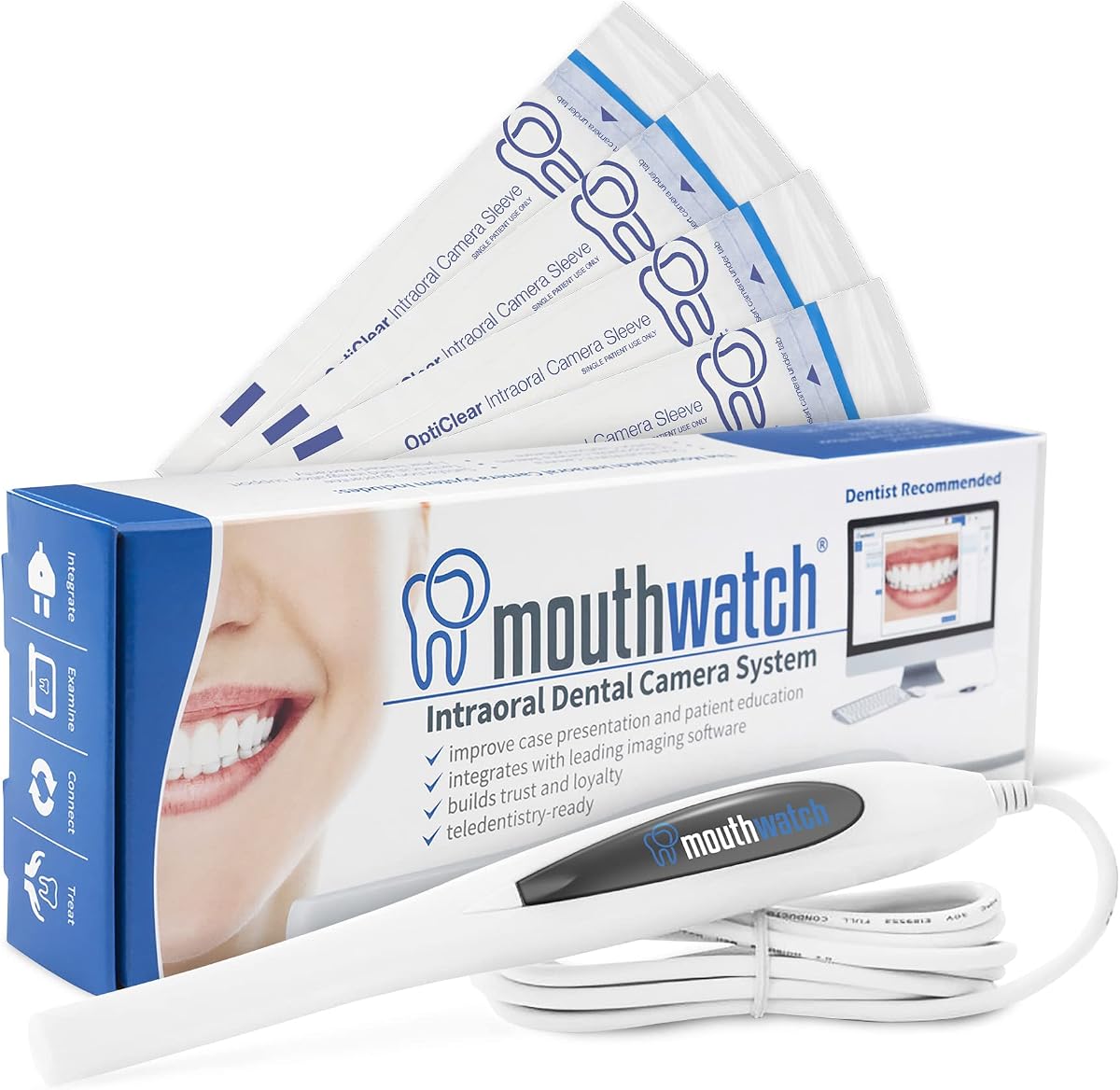
The MouthWatch Intraoral Camera is a purpose-built clinical documentation device with a 4.4 rating, a 31-gram handset, and a workflow centered on fast, one-button image capture. Its defining advantage is not raw versatility but the combination of a lightweight design, well-illuminated images, fixed focus, and direct support for major dental imaging suites.
We may earn a commission when you buy through this link, at no additional cost to you.
The 4mm-45mm fixed focal distance is particularly useful in a busy practice because it removes manual focusing and the delay associated with autofocus hunting. Images can be saved directly to the patient's chart with one press, while the included capture software supports more than 50 integrations, including Eaglesoft, Dexis, Schick, and Apteryx.
There are important boundaries. This is not a general-purpose camera for portraits, laboratory bench photography, or social media content, and its usefulness depends on the practice's existing imaging environment. It also costs more conceptually because it requires software integration rather than simply producing files that can be opened later.
The MouthWatch is best suited to a dental practice that values predictable chairside capture and direct chart integration more than interchangeable lenses or video flexibility. For clinics already using one of the supported systems, it offers the most coherent all-in-one workflow in this guide.
Single-button operation reduces the number of steps between finding a clinical detail and saving it to the chart. That efficiency is especially valuable during examinations, case acceptance conversations, and time-sensitive documentation.
The fixed 4mm-45mm focusing range gives operators a repeatable distance without a focus-control workflow. It also avoids the visual distraction of autofocus changing during a close-up examination.
We may earn a commission when you buy through this link, at no additional cost to you.
The Canon EOS Rebel T7 DSLR Camera EF-S 18-55mm f/3.5-5.6 is II Lens Kit combines a 24.1-megapixel APS-C sensor with a familiar optical-viewfinder design and a versatile 18-55mm lens. Its 4.6 rating reflects a well-regarded general-purpose camera that can document intraoral findings, smiles, practice scenes, and educational content.
We may earn a commission when you buy through this link, at no additional cost to you.
The included zoom lens provides a practical starting point for portraits and close detail, while compatibility with Canon EF and EF-S lenses creates room to add specialized optics later. Built-in Wi-Fi and NFC simplify transfer to compatible mobile devices, and the 9-point autofocus system with AI Servo AF supports conventional still-image workflows.
The camera does not solve clinical illumination or software integration by itself. A dental photographer would still need suitable lighting, infection-control planning, an appropriate positioning workflow, and a method for storing and labeling images. The T7 is therefore less turnkey than a dedicated intraoral camera.
This T7 kit makes the most sense for a dental professional who wants one camera for clinical education, staff portraits, before-and-after galleries, and ordinary practice photography. It offers flexibility and strong resolution without demanding a mirrorless system, although dedicated clinical users should favor an integrated intraoral device.
The 18-55mm range covers portraits, treatment details, and general environmental images, reducing the need for separate equipment when the goal is a mixed dental content library.
The optical viewfinder offers approximately 95% coverage and provides a steady, direct way to frame close subjects without relying entirely on the rear screen.
We may earn a commission when you buy through this link, at no additional cost to you.
The Canon EOS Rebel T7 DSLR Camera with 18-55mm Lens Bundle offers the same core 24.1MP APS-C foundation as the standard kit while adding a battery, charger, eyecup, body cap, neck strap, shoulder bag, and 64GB memory card. For new users, that supporting equipment can make the move from unboxing to practical photography more straightforward.
We may earn a commission when you buy through this link, at no additional cost to you.
The DIGIC 4+ processor supports fast operation, reduced noise, and detailed still images, while automatic settings make the camera approachable for users transitioning from smartphones. Wi-Fi and NFC allow image transfer to compatible devices, and the vari-angle-style everyday usability, bright optical viewfinder, and 3.0-inch LCD support flexible composition.
This is still a conventional camera rather than a complete dental photography system. The bundle does not specify a macro lens, ring flash, diffuser, retractors, or clinical imaging software. Those omissions make it a good starting platform but not a turnkey answer for intraoral image capture.
Choose the bundle when you are starting from no camera and want a broad, capable package. It is especially attractive for producing staff imagery, smile portraits, treatment education, and content around the practice. For chairside documentation that must flow directly into dental records, verify the software workflow before choosing it.
A memory card, rechargeable battery, charger, strap, and carrying bag remove several common first-day obstacles. Users can focus on setup and technique rather than gathering basic equipment separately.
Compatibility with Canon EF and EF-S lenses means a more specialized macro or portrait lens can be added when the practice develops a clearer photographic workflow.
We may earn a commission when you buy through this link, at no additional cost to you.
The Canon EOS R50 Mirrorless Camera RF-S18-45mm kit is the most advanced conventional camera in this roundup, combining a 24.2MP APS-C sensor, Dual Pixel CMOS AF II, and strong video specifications. Its 4.5 rating and feature set make it a premium choice for dental professionals who want polished still images, demonstrations, and patient education in one device.
We may earn a commission when you buy through this link, at no additional cost to you.
Its autofocus system covers 100% of the frame with 651 zones and supports subject detection and tracking. The vari-angle touchscreen helps with low and unusual angles, while 6K oversampled uncropped 4K recording and a close-up demonstration mode can benefit procedure explainers and content intended for larger screens.
Advanced hardware does not automatically produce good clinical images. The included zoom lens is not a dedicated intraoral lens, and the package does not include clinical lighting, retractors, contrastors, or direct integration with practice-management systems. Users still need a deliberate positioning and disinfection routine.
The R50 is best for practices building a professional visual-content program across clinical education, social media, presentations, and video. It is less appropriate when the sole requirement is rapid, one-button image capture saved to a dental chart. In that case, the MouthWatch provides a more direct clinical workflow.
The 651-zone system and subject detection can make live demonstrations more consistent, particularly when a patient or clinician moves during a close framing.
The 6K oversampled 4K mode and Full-HD recording up to 120 fps expand the camera beyond static documentation, supporting educational and presentation-oriented workflows.
We may earn a commission when you buy through this link, at no additional cost to you.
The Sony ZV-1 Camera with 24-70mm Lens Bundle is built around a 20.1MP one-inch stacked Exmor RS CMOS sensor and a fast ZEISS Vario-Sonnar lens. Its 4.3 rating reflects a capable compact camera for practices that emphasize procedure video, quick social content, and attractive environmental images.
We may earn a commission when you buy through this link, at no additional cost to you.
The lens covers a useful 24-70mm range and supports 4K recording, while the vari-angle LCD simplifies filming from different positions. Background defocus and product-showcase controls can help isolate subjects, and the built-in three-capsule microphone system supports clearer spoken explanations.
For dental imaging, several practical constraints remain. The lens and body are designed for creator content rather than intraoral use, and there is no stated direct integration with dental imaging software. Its physical size may still be larger than a dedicated intraoral handset for routine chairside use.
The ZV-1 is most appropriate for a practice producing short demonstrations, staff introductions, treatment explainers, and behind-the-scenes material. Its included card, reader, case, flexible tripod, and cleaning kit also make it approachable for creators. It is a strong visual tool, but not a replacement for a chart-integrated clinical camera.
A body weighing under 300 grams and a flexible LCD make the camera easier to carry between treatment rooms, office areas, and filming locations.
The directional three-capsule microphone system is designed to isolate voices, which is valuable when explaining a procedure in a recording intended for patient education.
We may earn a commission when you buy through this link, at no additional cost to you.
The 88MP Dual-Lens Digital Camera is an accessory-heavy, general-purpose model with an 88-megapixel still-image mode, 8K video, autofocus, Wi-Fi, and a 3.2-inch IPS touchscreen. Its 4.0 rating is the second-lowest among rated products, so buyers should assess the included features against the importance of clinical integration and image consistency.
We may earn a commission when you buy through this link, at no additional cost to you.
The camera includes a lens hood, two batteries, a charging stand, and a 32GB TF card, while a rotating mode dial provides access to settings such as timelapse, portrait, slow motion, and scene modes. Six-axis stabilization and the touchscreen are useful for dynamic or varied shooting situations.
Its specification-heavy naming and broad feature set do not establish suitability for clinical close-up work. The dual-lens arrangement is primarily presented for vlogging, and the supplied information does not identify anti-fog features, a fixed clinical focal range, disinfecting accessories, or dental imaging-software compatibility.
This camera may appeal to a budget-conscious creator who wants many shooting modes and accessories in one package. It is less suitable as a primary intraoral documentation system. Practices prioritizing dependable files, direct chart storage, and known clinical hardware should choose a specialized camera with explicit compatibility.
The rotating dial and touchscreen make common capture settings accessible without navigating a dense menu system, which is useful for users new to dedicated cameras.
Wi-Fi transfer through the iSmart DV2 app can reduce the need for direct cable transfers when images need to reach a compatible mobile device.
We may earn a commission when you buy through this link, at no additional cost to you.
The DY-50 Intraoral Camera is a lightweight USB clinical camera with a 4.5 rating, 1600×1200 image resolution, autofocus, and a 34-gram handset. Its major strength is an extensive stated compatibility list covering Eaglesoft, Dexis, Apteryx, Schick, Dentrix Ascend, Carestream, and many other systems.
We may earn a commission when you buy through this link, at no additional cost to you.
A capture-button driver is included so the physical button can work with supported imaging software. The camera connects directly to a computer by USB and does not require other stated hardware, while the package includes the camera, holder, cable, sheath, and capture software. Its 640×480 video size is more modest than its still-image resolution.
The long compatibility list comes with a clear condition: users should not buy if their software is absent unless they are willing to use the camera's own software. Compatibility can also vary by computer configuration, installed version, and practice workflow, so the seller's current list should be confirmed before purchase.
The DY-50 is a strong option for a clinic using a listed platform and wanting an affordable, portable intraoral device. It provides more integration flexibility than a general camera, but buyers must validate software support carefully and accept a more basic 640×480 video mode.
Direct USB connection keeps the workflow close to the computer and allows supported software to receive images without a separate capture computer or foot pedal.
At 34 grams, the handset is designed to remain manageable during routine imaging, while the upper and lower capture-button arrangement supports different grip positions.
We may earn a commission when you buy through this link, at no additional cost to you.
The DARYOU DY-60 differentiates itself with 720p HD output and 4X zoom, while also offering a capture button and software integration for numerous dental platforms. Its 4.3 rating positions it as a capable clinical camera for practices that need more framing flexibility than a fixed-focus handset.
We may earn a commission when you buy through this link, at no additional cost to you.
Zoom can help operators frame an area without physically moving the tip closer to the patient or changing the distance of the entire system. The included driver is intended to make the capture button function with listed software such as Dexis, Apteryx, Schick, Tracker, Dentrix Ascend, and Carestream.
The product is less attractive when high-resolution moving video is the priority, because 720p is a modest format for modern clinical presentations. Buyers must also confirm that their exact imaging software appears on the current compatibility list and that they are willing to use the supplied software if it does not.
The DY-60 is most useful for a practice already in one of the listed ecosystems and seeking an affordable, zoomable intraoral camera. It is a practical clinical tool rather than a general creative camera, so compatibility should be the first purchasing check and imaging output the second.
The 4X zoom gives operators a way to adjust framing while maintaining a comfortable working distance, which is useful for teeth, mucosa, and localized clinical details.
The included capture-button driver supports a more natural workflow in compatible programs, reducing reliance on a mouse or keyboard during the moment of capture.
We may earn a commission when you buy through this link, at no additional cost to you.
The UNK Kime-X8S Elite Multimedia Intraoral Camera System is an all-in-one package built around a 17-inch touchscreen computer, an HD intraoral camera, and Wi-Fi QR photo transfer. Unlike a simple handheld device, it is designed to function as a self-contained imaging and consultation station.
We may earn a commission when you buy through this link, at no additional cost to you.
Its large display can show full-screen images or a quad-split view, allowing multiple angles or before-and-after images to be reviewed together. The supplied 5mm ultra-slim camera is intended to improve access and workflow efficiency, while QR-based transfer allows photos to reach a compatible device without cables.
The fixed all-in-one design involves trade-offs. A 17-inch screen requires appropriate placement and may be less convenient than a compact laptop or tablet for mobile use. Because the product has no listed customer rating, buyers have less visible feedback with which to assess long-term reliability and support.
The Kime-X8S is best for a treatment room where a permanently stationed consultation display would improve case discussions. It is less suitable for a clinician wanting a lightweight device for travel or a compact operatory. Confirm ports, software requirements, support terms, and infection-control procedures before installation.
Quad-split viewing makes it possible to examine several angles at once, supporting side-by-side conversations about treatment progress and expected outcomes.
Scanning a Wi-Fi QR code can move patient photos to a compatible device, reducing cable handling and helping keep presentation files more accessible.
We may earn a commission when you buy through this link, at no additional cost to you.
The Dental Photography Aid is not a camera but a flexible LED lighting kit designed to improve smartphone photographs of the oral environment. Its 4.6 rating indicates strong reception among buyers looking for an inexpensive way to brighten dental images without replacing a smartphone.
We may earn a commission when you buy through this link, at no additional cost to you.
Each light unit provides adjustable brightness from zero to 100%, allowing the operator to balance illumination with the phone's exposure. A support bar supports omnidirectional shooting, and the removable handpiece-style bracket can be angled for easier positioning around the mouth.
The kit cannot independently capture, store, or integrate images. Results will depend on the phone's camera, application, focus behavior, and operator's positioning. A phone may also provide less control over close-focus distance and color consistency than a purpose-built clinical camera.
This light is a useful supplementary tool for mobile dental photographers, a low-cost way to improve laboratory communication, or a portable addition to a general photography kit. It is not the best stand-alone answer for practices requiring repeatable image resolution, direct chart storage, and dedicated clinical support.
Independent brightness adjustment helps balance the light against ambient conditions, reducing the need for heavy post-processing and improving visibility of oral details.
Compatibility with most cell phones and dental photography equipment makes the kit adaptable to existing equipment rather than requiring a complete camera replacement.
We may earn a commission when you buy through this link, at no additional cost to you.
The best choice depends on whether the priority is direct chart integration, flexible still photography, video production, consultation display, or improved lighting for an existing phone. Review the clinical workflow, image requirements, and practice environment before comparing specifications.
For intraoral cameras, compatibility with the practice's actual imaging platform matters more than many headline specifications. The MouthWatch supports over 50 stated integrations, while the DY-50 and DY-60 list numerous dental programs but require the user to confirm that the exact software appears on the current compatibility list. General Canon, Sony, and other conventional cameras create files that may need manual import into a patient record.
Check the software name, version, computer configuration, capture method, and whether the physical button must control the program. Ask whether the seller provides the necessary driver, and confirm what happens if the practice changes systems later.
Choose based on verified workflow compatibility, not a long or short list alone.
Resolution influences visible detail, but it is only one part of a useful clinical image. The DY-50 states 1600×1200 for images and 640×480 for video, while the DY-60 provides 720p HD video. General-purpose cameras such as the Rebel T7 and EOS R50 use 24.1MP and 24.2MP APS-C sensors, and the Sony ZV-1 uses a 20.1MP one-inch stacked sensor.
Consider how images will be viewed and stored, whether stills or video are the priority, and whether higher resolution offsets limitations in lighting or focus. A well-controlled image is more useful than a high-resolution image affected by glare, motion, or poor positioning.
Match the output format to the clinical task rather than choosing the largest number.
Close-up work benefits from predictable focus. The MouthWatch uses a fixed 4mm-45mm focal distance, eliminating manual focusing and autofocus hunting, while the DY-50 offers autofocus. The DY-60 adds 4X zoom, which can help frame a subject while preserving a comfortable working distance. Conventional cameras can provide precise focus through manual lenses, although they are not packaged here with a dedicated macro lens.
Test focus behavior, magnification, field of view, and the distance at which the tip or lens remains comfortable for patients. A fixed focus is efficient, but a working range that does not match the examination style can limit usability.
Prioritize repeatable focus and a comfortable patient working distance.
Dental photography is difficult because the mouth is a confined, reflective, and moisture-prone environment. Dedicated clinical cameras may include built-in illumination, while conventional cameras and smartphones generally need an external light. The adjustable LED kit offers a low-cost way to improve phone images, and its omnidirectional support bar can assist with positioning.
Look for even illumination, adjustable brightness, good color rendering, and control over reflections. Avoid relying on a single bright source directly in front of the lens, which can create hotspots and obscure surface detail.
Use controlled lighting before relying on software corrections.
A clinical camera should minimize interruption during an examination. The MouthWatch stores images to the chart with one button press, and the DY-50 and DY-60 include capture-button drivers for supported programs. The all-in-one Kime-X8S supports plug-and-play setup and QR transfers, while conventional cameras add menu navigation, card handling, and file-transfer steps.
Map the number of steps required from taking an image to having it safely filed under the correct patient. Physical buttons, direct chart storage, and reliable file naming can matter more than a long list of creative shooting modes.
Count the steps required for every capture.
Chairside devices need to be comfortable and easy to move between rooms. The MouthWatch weighs 31 grams, the DY-50 handset weighs 34 grams, and the Sony ZV-1 bundle weighs under 300 grams. The Kime-X8S includes a large 17-inch display, which is excellent for consultations but requires a fixed position and adequate counter space.
Consider grip shape, cable freedom, handpiece weight, screen visibility, and whether the system must move between operatories. Longer cables can be restrictive, while a large installed display may improve consultations but complicate flexible chairside use.
Choose a form factor that fits the room and handling style.
Video requirements can justify a mirrorless or compact creator camera. The EOS R50 supports 6K oversampled uncropped 4K recording, autofocus subject detection, and a close-up demonstration mode. The Sony ZV-1 provides 4K recording, background defocus, product-showcase controls, a vari-angle screen, and a directional microphone system.
Assess audio, framing, autofocus reliability, wireless transfer, and whether footage must be recorded, edited, and shared. None of these general-purpose cameras is stated to integrate directly with dental charting, so plan that step separately.
Choose video features for the intended content, not simply resolution.
Any device entering the operatory must be handled according to the practice's infection-control policy and the manufacturer's cleaning instructions. Confirm whether a camera, sheath, tip, lens, or accessory can be disinfected or covered appropriately. A phone-based system also introduces questions about screen cleaning, protective barriers, and cross-contamination control.
Look for replaceable sheaths, smooth cleanable surfaces, clear power management, and a storage plan that protects cables and handsets. The DY-50 includes 50 sheaths, while the light kit includes a portable case for organized storage.
Confirm cleaning compatibility before bringing any device into patient care.
Begin by confirming the intended image format, software connection, patient-consent process, and file-storage method. Clean and disinfect the device according to both the practice protocol and the product instructions, then check the camera, tip, lens, light, cable, and power source before the patient is positioned.
For intraoral imaging, explain the procedure to the patient, use appropriate retractors or isolation as required, and work slowly with a consistent viewing angle. Set focus and exposure before moving closer, keep the lens free of moisture and debris, and capture enough context for the clinical record without collecting images unrelated to the patient's care.
Afterward, review each image for focus, glare, bubbles, saliva, and framing errors before saving or presenting it. Transfer or archive the file using the verified workflow, label it correctly, and follow the practice's retention and privacy policy. Disconnect the equipment safely, clean it again, and store it in a way that protects the camera and its accessories.
A dedicated intraoral camera is usually better for routine chart documentation because it may integrate directly with dental imaging software, use a single capture button, and provide a simple close-focus workflow. A DSLR or mirrorless camera offers more control and broader creative applications, but it normally requires separate lighting, manual file management, and additional steps to place images in a patient record.
Yes, a conventional camera can produce detailed dental images, especially when paired with appropriate close-focus optics and controlled lighting. The included 18-55mm lens on the Rebel T7 kits and the RF-S 18-45mm lens on the EOS R50 are general-purpose lenses rather than dedicated intraoral optics, so buyers should consider a suitable macro lens for close clinical work.
Software compatibility, reliable focus, illumination, capture speed, and comfortable handling are the most important factors. Confirm that the exact dental imaging program is supported and that the camera can save images where the practice expects them. Resolution is useful, but a clear, correctly exposed image in the right patient chart is more useful than a larger file stored elsewhere.
A phone-lighting kit can substantially improve close-up phone images because it provides adjustable, directional illumination around the oral cavity. It does not replace a camera's focus control, image resolution, chart integration, or file organization. It is best treated as an affordable supplement for practices already using smartphones for consultations and documentation.
Retractors are often essential for clear intraoral images because they move the lips and cheeks away from the teeth. The product listings reviewed here do not specify that retractors are included with every camera, so practitioners should verify the complete accessory list and choose cleaning-compatible tools for their infection-control process.
Macro photography supports close-focus images with fine surface detail, useful for documenting enamel, restorations, wear, cracks, and other localized findings. A general zoom lens can begin clinical documentation, but a dedicated macro lens may provide better magnification, working distance, and control. Choose the optic according to the type of findings and angle you routinely document.
Use the practice's approved patient-record or encrypted storage system, confirm the correct patient association, and remove images from shared devices when they are no longer needed. Follow consent, retention, access-control, and secure-disposal policies. Any wireless transfer feature should be configured and reviewed under the same privacy standards applied to other patient data.
A versatile camera such as the EOS R50 or Sony ZV-1 can support both still and video content, but a dedicated intraoral camera remains useful for rapid clinical documentation. Many practices benefit from a two-device approach: a chart-integrated intraoral system for records and a higher-end camera for portraits, demonstrations, social media, and case presentations.
The best overall clinical choice in this guide is the MouthWatch because it combines a lightweight 31-gram handset, one-button capture, fixed focus, and broad dental imaging integration. The DY-50 and DY-60 are compelling alternatives for practices using specifically listed software, while the Kime-X8S offers a consultation-focused all-in-one display.
Prioritize the workflow you actually need. Choose direct chart integration for routine records, a conventional Canon or Sony system for mixed still and video content, and the LED kit as a low-cost supplement to smartphone photography. In every case, verify software support, lighting, close-focus capability, infection-control requirements, and patient privacy before deployment.
Product availability, bundle contents, and pricing can change, so check the current listing and manufacturer information before buying. The comparison is designed to narrow the field, but the final choice should reflect your practice's software, clinical procedures, documentation standards, and presentational goals.