
Universal Monitor VESA Mount Adapter
4.4Editor score
Adapts 13–27 inch monitors
Supports up to 24 pounds
Uses 75x75mm VESA pattern
Requires 24-hour adhesive cure
Our Non VESA Monitor Stands guide compares ten stands and adapters for compatibility, stability, adjustment, mounting options, supported displays, and
Non VESA Monitor Stands solve a common workspace problem: a display does not have the four-hole mounting pattern required by a standard arm or stand. The right solution must match the monitor’s dimensions and weight while providing stable positioning, useful adjustment, and a practical way to route cables.
This guide compares ten stands and adapter kits using the information supplied for each product. It covers free-standing bases, desk clamps, grommet mounts, adhesive adapters, screen-size limits, weight capacities, VESA patterns, adjustment ranges, installation requirements, and important restrictions such as portrait-mode limitations.
Each review highlights the strongest use case for that option, from adapting an older display to upgrading a crowded workstation. Ratings and product details reflect the supplied listings, while availability and prices can change. Always verify your monitor’s measurements, weight, rear layout, and mounting needs before buying.
4.4Editor score
3.7Editor score

4.3Editor score
The comparison below distinguishes true non-VESA mounting solutions from conventional VESA monitor stands. Screen size, load rating, installation style, adjustment, and compatibility restrictions are the most important factors when deciding which option fits your display and desk.
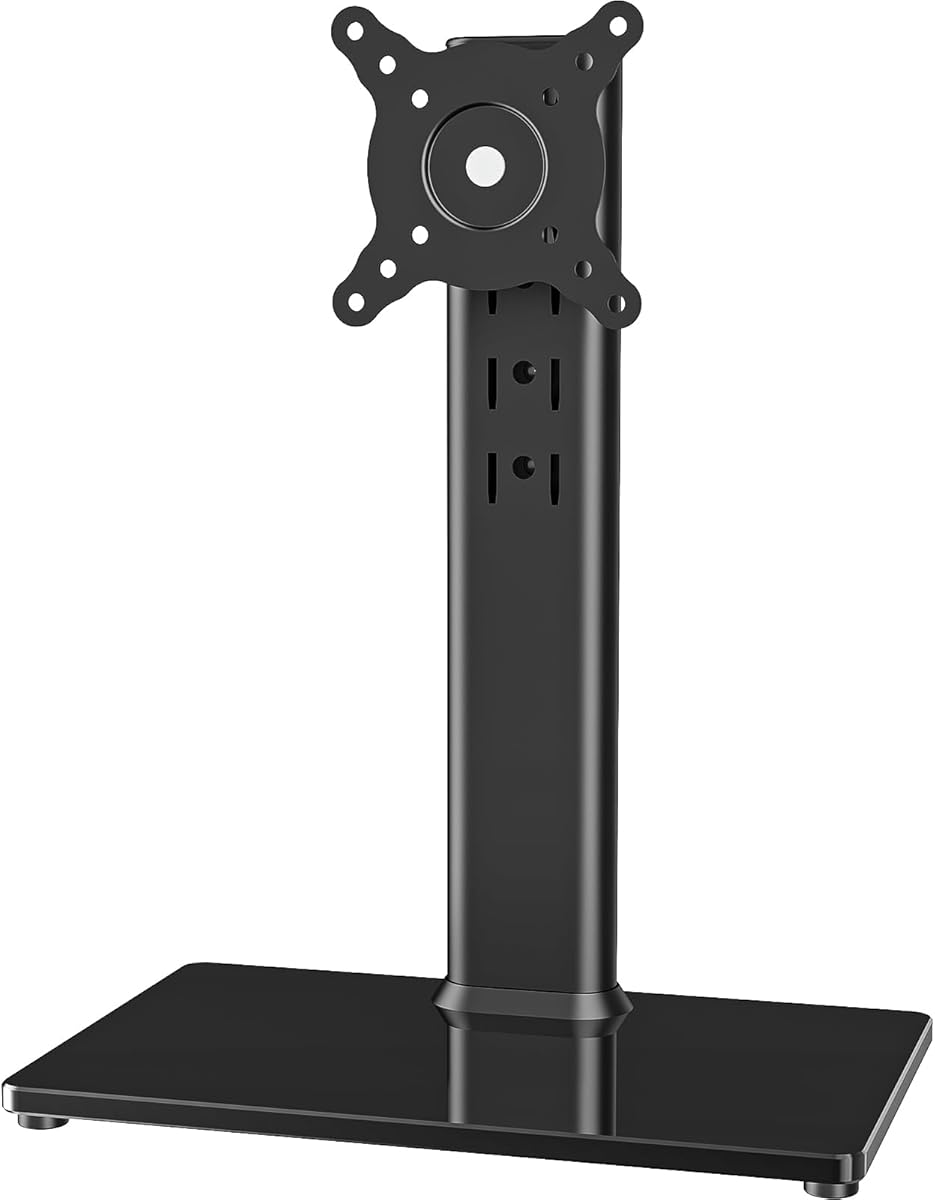


This free-standing monitor stand receives a 4.6 rating and stands out for its unusually high 77-pound capacity, broad 13–32 inch compatibility, and three recognized VESA patterns. It is a strong general-purpose riser for displays that already have compatible 50x50mm, 75x75mm, or 100x100mm mounting holes.
We may earn a commission when you buy through this link, at no additional cost to you.
The tempered-glass base provides a substantial foundation without requiring a clamp or grommet installation. Four height levels raise the screen, while the bracket offers minus 15 to plus 10 degrees of tilt, minus 50 to plus 50 degrees of swivel, and 360-degree rotation. Those movements make it useful for switching between landscape and portrait layouts, subject to the monitor’s own balance.
Its main limitation is important for shoppers searching specifically for a non-VESA solution: the listed compatibility centers on standard rear mounting patterns, and the description does not explicitly promise a non-VESA conversion bracket. It also requires a clear surface because the entire structure stands independently. In exchange, it avoids altering the desk and offers excellent load support.
Choose this stand if your display has compatible rear holes and you want a high-capacity freestanding riser with generous adjustment. Skip it if your monitor has no usable mounting pattern; in that case, a dedicated adapter kit is the more appropriate route.
The steel mounting structure and 77-pound limit distinguish this model from many adjustable stands. Verify both the screen weight and rear pattern before assembly so the display is supported as intended.
Height, swivel, tilt, and rotation controls make the freestanding design more versatile. Its cable-management features also help keep power and video leads gathered behind the column.
We may earn a commission when you buy through this link, at no additional cost to you.
This HUANUO kit has a 4.2 rating and directly addresses the need to convert a non-VESA display for a 75x75mm mount. It is intended for 17–27 inch LCD, LED, and OLED flat-panel monitors, making it a focused solution for users who want to reuse an older or unusual screen.
We may earn a commission when you buy through this link, at no additional cost to you.
The adjustable steel bars can be repositioned to accommodate different monitor shapes and thicknesses. A listed compatible thickness range of 1.18–2.95 inches gives buyers useful installation guidance. Screws, related parts, and a manual are included, while the powder-coated steel construction is intended to resist wear and maintain structural support.
This is an adapter rather than a complete stand, so you need a compatible 75x75mm arm or base. It also does not create a 100x100mm interface. The support range is not stated in the supplied information, so checking the monitor’s weight against any paired mount remains necessary before installation.
This kit is a sensible pick when you already own a reliable VESA stand and want to attach a 17–27 inch display without standard mounting holes. Buy it only after measuring the back of the monitor and confirming that the arm uses a 75x75mm plate.
The adapter transforms a supported non-VESA monitor into one that can attach to a 75x75mm arm or stand. This is especially useful when replacing the display but keeping an existing desk mount.
Movable steel bars provide more placement options than a fixed adapter plate. Measure both the monitor’s rear surface and its depth to ensure the hardware can sit correctly.
We may earn a commission when you buy through this link, at no additional cost to you.
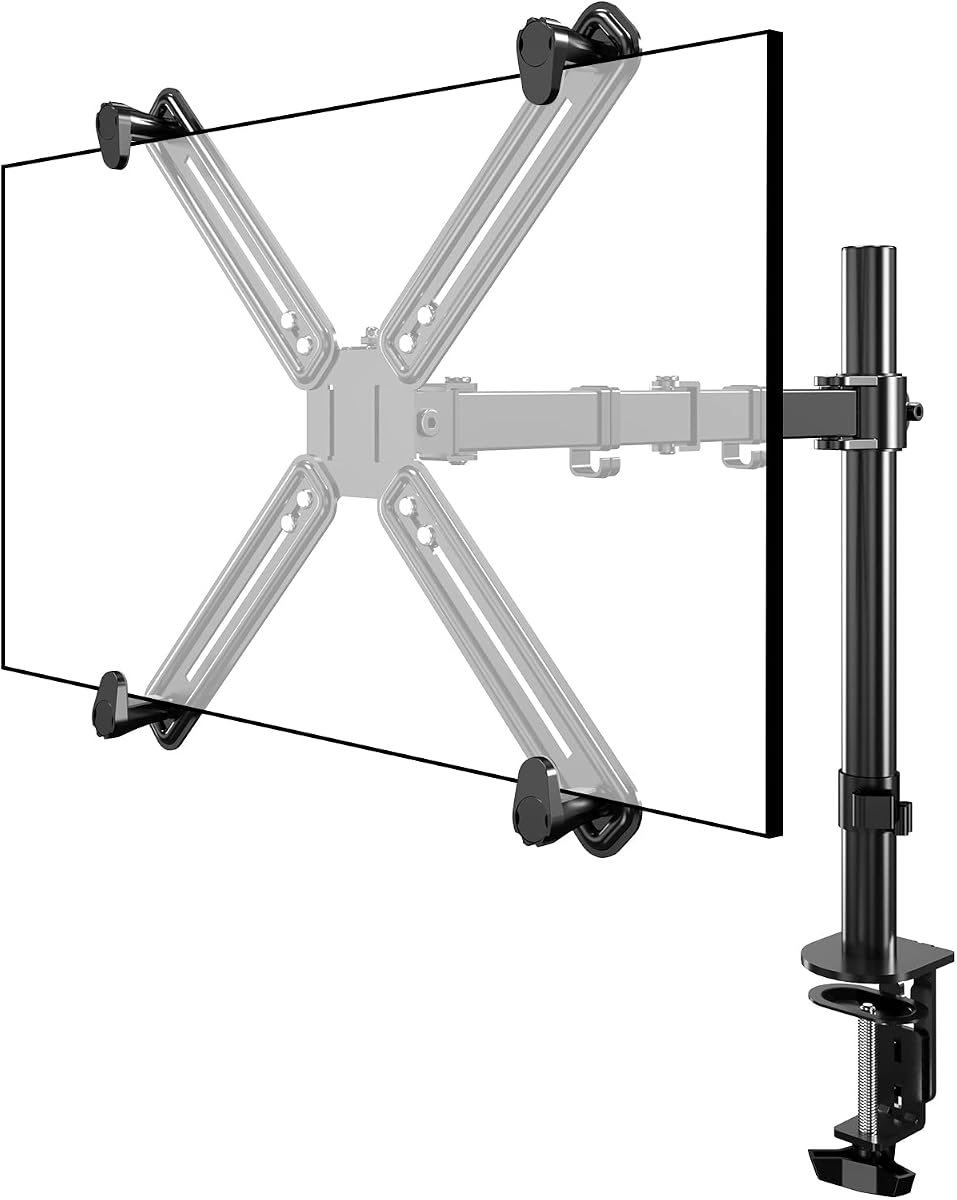
This single monitor arm receives a 3.7 rating and earns a place in the list because it is explicitly designed to accommodate a monitor with no VESA holes. It supports 13–27 inch displays, including curved models, and provides adapter brackets for non-VESA backs.
We may earn a commission when you buy through this link, at no additional cost to you.
The arm offers C-clamp and grommet mounting methods, allowing it to suit more desk constructions than a fixed-base product. Protective pads help protect the desktop, while integrated cable guides organize the display connections. Height, depth, and angle can be adjusted to place the screen nearer eye level and reduce the need to bend forward.
Its 22-pound support limit is adequate for many mainstream monitors but may exclude heavier professional displays. The 3.7 rating is the lowest among these selections, so the listing has less customer feedback backing it than the other options. Desk construction, rear clearance, and the fit of the supplied adapter should be reviewed before ordering.
This is the most complete option for someone who wants a movable arm specifically for a non-VESA display and values installation flexibility. It is a better fit than a bare adapter when desk space, positioning, and cable routing are priorities, provided the display stays within the stated size and weight limits.
The included clamp and grommet options provide useful flexibility across different desk shapes and thicknesses. Check the desk’s edge, underside, and available mounting space before installation.
Moving the display off the desktop creates room for a keyboard, notebook, or docking station. Adjustable height, depth, and angle help create a more comfortable line of sight.
We may earn a commission when you buy through this link, at no additional cost to you.
This freestanding HUANUO stand has a 4.4 rating and combines a 44-pound capacity with compatibility for displays from 13 to 34 inches. Its tall steel column, tempered-glass base, and five height settings create a polished alternative for larger screens that need a substantial desktop riser.
We may earn a commission when you buy through this link, at no additional cost to you.
The stand supports 75x75mm and 100x100mm patterns, with adjustment that includes plus or minus 50 degrees of swivel, plus 10 or minus 15 degrees of tilt, and 360-degree rotation. Anti-slip pads improve grip without scratching the surface, and two cable clips route wiring along the rear pillar.
As a conventional VESA product, it does not directly solve the rear-hole problem associated with non-VESA monitors. The listing also warns that off-center VESA patterns can affect portrait orientation. A freestanding base needs an open, level area, and its 17.24-inch column makes the footprint more substantial than a clamp-mounted arm.
This stand is best for a user with compatible VESA holes who prefers no-drill installation and frequent height changes. It is not the first choice for a display lacking standard mounting points, unless you pair it with a separately verified adapter.
The listed height range extends from 9.27 to 15.26 inches, giving users several positions to approximate eye level. A raised display can reduce the need to hunch over a low screen.
A steel column, tempered-glass base, and 44-pound limit provide a reassuring foundation for larger monitors. Confirm the center of gravity and keep the base on a flat surface.
We may earn a commission when you buy through this link, at no additional cost to you.
This adhesive VESA adapter earns a 4.4 rating and offers one of the simplest ways to turn a non-VESA display into a mountable screen. It supports 13–27 inch monitors with a 6.6 by 5.8 inch flat mounting area and connects to a standard 75x75mm VESA arm or stand.
We may earn a commission when you buy through this link, at no additional cost to you.
Installation requires no drilling: remove the protective film, position the adapter on the clean, flat rear panel, and allow 24 hours for the adhesive to cure before attaching a monitor arm. The stated maximum load is 24 pounds, and the product is also listed for compatible tablets and iPads.
The adhesive method places the burden of long-term security on surface preparation and correct curing. A curved, textured, dusty, or oily back may not bond as reliably as a clean flat panel. Once attached to a VESA mount, the screen and arm may place repeated stress on the adhesive joint, making careful installation important.
Choose this adapter for a lightweight or medium display with a broad, flat rear panel and no desire to drill. It is particularly attractive for tablets and other atypical displays. Do not use it when the rear surface is uneven or when the intended arm exceeds the product’s stated load limit.
The adhesive plate avoids permanent alterations to the monitor or desk. Clean the target area thoroughly and position the plate accurately before allowing the adhesive to cure fully.
A traditional four-hole pattern is not always present on tablets and older monitors. This adapter provides a bridge to standard VESA hardware when the rear surface meets its dimensional requirements.
We may earn a commission when you buy through this link, at no additional cost to you.
This MOUNT PRO adapter has a 4.3 rating and is designed for 19–32 inch non-VESA computer displays weighing up to 17.6 pounds. It accommodates a 75x75mm or 100x100mm VESA plate, making it useful when you want to retain a more substantial existing monitor mount.
We may earn a commission when you buy through this link, at no additional cost to you.
Five height adjustment gears and 12 glue columns let installers tailor the adapter to the display’s thickness and shape. The steel structure receives a rust-proof coating, while a triangular design and anti-slip pad are intended to improve stability. The listing also identifies compatibility with iMac, Acer, LG, HP, Samsung, Dell, ASUS, and ViewSonic displays that lack standard holes.
Portrait orientation is expressly unsupported, which matters for coding, reading long documents, and using tall content windows. The adapter and separate monitor mount are not both included, and the stated 17.6-pound limit is lower than some alternatives. Users must also ensure that the monitor’s dimensions fall within the supplied range.
This is a strong choice for a larger, moderately weighted monitor that needs conversion to an existing VESA arm. It is particularly useful when changing monitor brands or replacing a damaged stand without moving away from standard desk-mount hardware. Avoid it if portrait rotation is essential.
Movable glue columns help bridge differences in screen depth and shape. Confirm the stated bezel-height and screen-thickness ranges before applying any adhesive.
The coated steel frame and triangular geometry are intended to provide a stable connection between the display and VESA hardware. Stable desk-mount installation remains the responsibility of the user.
We may earn a commission when you buy through this link, at no additional cost to you.
This ErGear arm receives a 4.4 rating and stands out for extensive motion, a 19.8-pound capacity, and compatibility with 13–34 inch flat or curved displays. It supports standard 75x75mm and 100x100mm patterns and includes an upgraded VESA head intended to improve stability.
We may earn a commission when you buy through this link, at no additional cost to you.
The arm reaches 18.1 inches, offers 17.5 inches of height adjustment, tilts from plus 80 to minus 50 degrees, swivels plus or minus 90 degrees, and rotates 360 degrees. Its core was tested through more than 20,000 cycles, while tool-free VESA plate installation simplifies the display-to-arm connection.
C-clamp installation accommodates desks from 0.39 to 2.56 inches thick, and the grommet option supports 0.39 to 2.95 inches. However, the arm itself is for standard VESA patterns, so it does not directly support a display without rear mounting holes. A separate compatible adapter would be required.
Choose this arm when you already have a VESA-compatible display and want substantial reach, full-motion positioning, and tool-free plate setup. It may also serve as the mounting endpoint for a properly matched non-VESA adapter, provided that adapter’s load and geometry are compatible.
Large swivel, tilt, reach, and rotation ranges make it easy to reposition a display for focused work, media viewing, or shared screens. Check for ceiling, wall, and neighboring-monitor clearances before extending the arm.
The tool-free mounting plate reduces the work required to attach a compatible display. Once installed, the arm can move smoothly between positions while keeping the screen close to the desk edge.
We may earn a commission when you buy through this link, at no additional cost to you.
This MOUNTUP stand has a 4.5 rating and delivers a balanced set of features for standard VESA displays. It fits 13–32 inch screens, supports up to 17.6 pounds, and works with both 75x75mm and 100x100mm mounting patterns.
We may earn a commission when you buy through this link, at no additional cost to you.
Adjustment includes plus or minus 45 degrees of tilt, plus or minus 25 degrees of swivel, plus or minus 180 degrees of rotation, and height adjustment up to 17.49 inches. Portrait and landscape placement are supported. A heavy, wide steel base provides stability, while a built-in cable clip and wrench storage slot help keep the workstation organized.
The product is freestanding, which avoids modifying the desk but requires sufficient surface area. It does not convert a non-VESA rear panel, and its 17.6-pound limit may not suit heavier large-format displays. The 180-degree rotation specification also does not mean every off-center VESA pattern will behave identically in portrait mode.
This stand is well suited to users with compatible VESA holes who want adjustable positioning without installing a clamp or grommet. It is a practical home-office and productivity option, but buyers facing a true non-VESA mounting problem need an adapter or a stand explicitly designed for that configuration.
The weighted base removes the need to alter the desk edge or drill a grommet. Place the stand on a stable surface and check that the broad base has enough room to operate safely.
The height, swivel, tilt, and rotation controls support both work and viewing needs. A cable clip keeps power wiring gathered, and the tool slot helps avoid loose small parts on the desk.
We may earn a commission when you buy through this link, at no additional cost to you.
This single VESA monitor stand has a 4.0 rating and is narrowly focused on 24–27 inch screens weighing 7.7–11 pounds. Its spring mechanism provides suspended height adjustment from 300 to 410 millimeters, allowing the display to move smoothly rather than relying on fixed stops alone.
We may earn a commission when you buy through this link, at no additional cost to you.
The mounting head offers 45 degrees of left-and-right swivel, plus 10 or minus 20 degrees of tilt, and rotation between portrait and landscape modes. It accepts both 75x75mm and 100x100mm VESA patterns, making it a focused stand for lightweight-to-medium displays in those sizes.
The narrow weight range is the critical limitation: the height-adjustment function only works for the specified 7.7–11 pound range. It also provides no dedicated non-VESA conversion. The result is a specialized product rather than a broadly compatible solution for older, heavier, or unusually mounted monitors.
Choose this stand if your display falls precisely within its size and weight limits and you value a smooth spring action for frequent height changes. If your monitor is outside the stated envelope or lacks VESA holes, choose a broader stand or a purpose-built adapter instead.
The suspended mechanism lets the user reposition the display with minimal friction. Stay within the specified weight range to preserve the intended height-adjustment performance.
The stand concentrates its adjustment range around a common lightweight monitor size. Its swivel, tilt, and rotation make it useful for everyday positioning, media viewing, and video calls.
We may earn a commission when you buy through this link, at no additional cost to you.
The HUANUO FlowLift dual stand receives a 4.6 rating and offers an ambitious two-screen solution for compatible displays. Each arm supports a 13–32 inch monitor weighing 4.4–19.8 pounds and requires 75x75mm or 100x100mm VESA mounting holes.
We may earn a commission when you buy through this link, at no additional cost to you.
Both arms offer plus 85 or minus 50 degrees of tilt, plus or minus 90 degrees of swivel, 360-degree rotation, and up to 15.75 inches of height adjustment. A dual C-clamp design creates a broad connection to the desk, and a grommet option is also available. Built-in guides route cables along the arms and help free space beneath the screens.
The desk restrictions are substantial. The listing recommends wooden desks between 0.59 and 3.54 inches thick, with no cross beams or underside panels interfering with the clamp. Plastic and glass desks are not recommended. The stand also does not directly support non-VESA monitors, so an adapter would need to be verified for both load and geometry.
Choose this product for a dual-monitor home office, gaming setup, or productivity desk with two standard VESA displays. It is less suitable for a single non-VESA monitor, for unsupported desk materials, or for users who require easy relocation between multiple desks.
Each arm can be repositioned independently, allowing one display to remain primary while the second is angled for reference or communication. Adjust the full configuration to prevent screens from colliding.
Two attachment methods support different desk preferences, but both require careful checking of thickness and underside clearance. The broad dual-clamp structure is intended to resist wobble and slipping.
We may earn a commission when you buy through this link, at no additional cost to you.
The right solution depends on whether you need a complete stand, an arm, or a simple adapter, as well as the exact geometry of your display. Prioritize compatibility and load limits before considering height, swivel, portrait rotation, or other convenience features.
A monitor is described as non-VESA when it lacks the standard four-hole mounting pattern. Before selecting an adapter, measure the width and height of the usable flat area on the back, note its texture or curvature, and identify any raised housing. The adhesive model in this guide specifically calls for a 6.6 by 5.8 inch flat area, while other systems may use adjustable bars or separate brackets that attach differently.
Measure the monitor’s overall width, height, depth, and weight as well. A rear plate that fits the available flat area can still interfere with buttons, vents, ports, or a central housing. Accurate measurements prevent an adapter from obstructing controls or creating an uneven mounting surface.
Every product has a more specific size and weight envelope than its general category suggests. The selections cover displays from 13 to 34 inches, but several adapters top out at 27 inches, and one stand supports only 7.7–11 pounds. Conversely, the first freestanding stand carries up to 77 pounds. Screen dimensions alone do not determine safe support.
Weigh the display if its specification is unavailable, and compare that figure with the stand’s stated limit. Also consider the weight of any attached device, such as a streaming stick or tablet, because it may not be included in the monitor’s listed weight. Choose a support margin rather than sitting precisely at the maximum.
A complete stand provides a base, column, and display interface, while a monitor arm usually attaches to a desk and gives greater reach. An adapter is only the bridge between a non-VESA screen and hardware that already accepts a standard VESA pattern. Buying an adapter without a compatible arm means the setup is incomplete.
If you want to eliminate desk clutter, select an arm with a C-clamp or grommet base. If you want to move the entire workstation easily, a freestanding base may be more convenient. If you already own a VESA mount, a dedicated non-VESA adapter is usually the most economical route.
An adapter does not create every mounting standard. The HUANUO Universal Adapter Kit creates a 75x75mm interface, and the adhesive universal adapter also uses 75x75mm holes. The MOUNT PRO adapter can accommodate either 75x75mm or 100x100mm hardware. Connecting one of these to a stand with a different pattern will not work without the right additional hardware.
Check the rear pattern of the destination arm, not merely the size of the screen. If the paired mount has 100x100mm holes, a 75x75mm adapter is not a match unless the product explicitly provides another interface. Also note that many stands offer different levels of portrait support.
Desk installation methods have distinct benefits and limitations. C-clamps provide strong holding power but require a compatible edge and enough clearance underneath. Grommets create a permanent-looking, clean installation but may require drilling. Adhesive adapters avoid both, yet depend on a flat, clean surface and sufficient curing time. Freestanding bases require no desk modification but consume more surface area.
For adhesive systems, follow the stated 24-hour waiting period before attaching an arm. For clamps, measure both desktop thickness and the space below the edge. Wooden desks are recommended for the dual-arm model, and cross beams or panels can prevent proper installation. Choose the method that matches the desk you actually own.
Height adjustment is useful for bringing the top of a display closer to eye level, but the ranges differ significantly among products. Swivel and tilt help align a screen with a chair, window, or second display. Rotation adds portrait support, though off-center VESA patterns can affect balance and the MOUNT PRO adapter expressly prohibits portrait placement.
Write down which movements you regularly use. A frequent video-call user may prioritize tilt and swivel, while a programmer may need reliable portrait rotation. A gamer may value reach and a broad viewing angle. Choosing only the adjustments you will use can prevent paying for a complicated mount that is more difficult to set up.
A monitor arm can improve the workspace only if the display remains stable and the cables do not pull it out of position. Look for integrated guides, clips, or channels that keep power and video leads organized. Protective pads and anti-slip surfaces help protect the desk, while a heavy base or dual-clamp structure helps resist movement.
Check the path from the monitor’s ports to the desk. A tight swivel range may tug on cables if they are routed poorly. Allow enough movement for the intended use, and route excess cable length behind the monitor or along the support where possible.
Even when a product supports 360-degree rotation, an asymmetric mounting pattern can place the display off-center. The MOUNT PRO adapter does not support portrait orientation, and some freestanding stands warn that off-center patterns can affect vertical positioning. These details matter when a tall workspace is central to your setup.
Also use the stated brand examples as guidance rather than a guarantee. Adapter fit depends on dimensions, weight, rear shape, and mounting geometry rather than the logo alone. Check the precise limitations for every model even if it is from a brand named in the product description.
Begin by identifying the display’s size, weight, rear measurements, and mounting needs. Confirm that the chosen stand or adapter falls within every stated limit, then gather the supplied screws, tools, manual, and any separately purchased VESA arm. Assemble the base or clamp on a stable surface before attaching the monitor.
For adhesive adapters, clean the intended flat area, remove the protective film, and press the plate into the correct position. Allow the full 24-hour cure period before connecting it to a VESA arm. For screw-based adapters, align the adjustable bars with the monitor’s rear structure and tighten the hardware evenly without forcing the display.
After attachment, attach the monitor to the VESA interface and tighten the retaining hardware according to the instructions. Route cables through the included guides, set the display to a comfortable height, and test the full adjustment range. Periodically inspect bolts, clamp tension, adhesive joints, and base stability, and avoid exceeding the documented load or rotation restrictions.
A non-VESA monitor lacks one or more of the standard four-hole mounting patterns used by most modern monitor arms. Its rear may instead have a broad flat panel, a proprietary plate, or a different arrangement of fasteners. An adapter can sometimes bridge this difference, but only if the display’s size, weight, and rear geometry match the adapter’s limits.
No. The monitor must meet the adapter’s screen-size and weight limits, and the rear must have a sufficiently flat or attachable area. The adapter must also produce the exact VESA pattern accepted by the arm. A 75x75mm adapter, for example, cannot be connected to a mount designed only around 100x100mm holes.
Safety depends on the adapter’s load rating, the cleanliness of the bonding surface, and the cure time. In this guide, the adhesive adapter supports up to 24 pounds, but the manufacturer also requires a flat 6.6 by 5.8 inch area and a 24-hour wait before mounting. Do not exceed the limit or use the adapter on a curved or uneven rear panel.
It depends on the product. Some complete arms and freestanding stands support 360-degree rotation, while the MOUNT PRO adapter specifically does not allow portrait placement. Even when rotation is supported, an off-center mounting pattern can make portrait positioning awkward. Check the product restrictions and your display’s balance before relying on that mode.
A stand is a complete freestanding support that normally includes a base, column, and mounting head. A monitor arm attaches to a desk and typically provides greater reach and positioning control. An adapter is not a complete support; it converts a compatible non-VESA display so it can attach to separately purchased VESA hardware.
A freestanding stand can be used without modifying the desk, but it needs a flat, stable surface and enough room for the base and moving display. Larger columns and wide bases can occupy valuable workspace. Be especially cautious near desk edges and make sure the monitor’s weight and dimensions are within the stand’s stated range.
Look for four threaded holes arranged in a square on the rear of the display, commonly centered within a square measuring 100 by 100 millimeters or 75 by 75 millimeters. Remove covers or check the manufacturer’s manual if the holes are hidden. If no four-hole pattern exists, measure the available flat rear area for an adapter.
Confirm that both screens meet the size, weight, and VESA-pattern requirements. Then check the desk material, thickness, underside clearance, and available edge space. The dual stand reviewed here recommends wooden desks from 0.59 to 3.54 inches thick and warns that cross beams or panels can interfere with installation.
The strongest complete solution in this group is the explicitly non-VESA single monitor arm, which combines adapter brackets, two desk attachment methods, flexible positioning, and cable management. For buyers already equipped with a 75x75mm mount, the HUANUO Universal Adapter Kit offers a focused screw-based conversion, while the adhesive adapter is convenient when drilling is not desired.
Prioritize exact fit over extra features. Check screen dimensions, weight, rear shape, VESA interface, desk thickness, and underside clearance before selecting a product. Portrait support, cable management, and motion are worthwhile additions, but they cannot compensate for an adapter or stand that does not physically support your monitor.
Product listings, ratings, availability, and prices can change, so review the current details before ordering. Compare the supplied specifications with your display and desk, read the included instructions, and confirm that any paired monitor arm or stand is included or purchased separately.