
Redragon K686 HE Wired Hall-Effect Rapid Trigger Magnetic Gaming Keyboard
4.4Editor score
Adjustable 0.1mm actuation
Rapid trigger and PRCS
Up to 8000Hz polling
This guide compares the best keyboard for Valorant, covering rapid trigger, polling, switch design, layouts, connectivity, build quality, and custom controls.
A keyboard for Valorant must translate movement commands, weapon inputs, and utility selections with consistency under pressure. The most important features include low-latency wired or wireless performance, precise key actuation, durable keycaps, a practical layout, and software that lets players tune movement-related behavior without disrupting matches.
This guide compares ten gaming keyboards using their published specifications, including switch technology, polling rate, rapid trigger support, layout, connectivity, programmability, lighting, and physical construction. It covers magnetic Hall Effect models for competitive tuning, optical and traditional mechanical alternatives, compact FPS layouts, and larger boards for users who value additional functionality.
The ranking places the Corsair Clipper PRO MINI 60 first for its focused competitive feature set, with the Redragon K686 HE and ASUS ROG Strix Scope II 96 representing budget-oriented rapid trigger and premium wireless options. Ratings and specifications can change over time, and current prices vary by seller, promotion, and availability, so shoppers should verify the latest listing before buying.
4.4Editor score

4.4Editor score

4.6Editor score
The comparison below highlights the core differences among the ten shortlisted keyboards, including their switch technology, competitive timing features, physical layout, connectivity, and programmable controls. It is designed to make it easier to identify the model that best matches a Valorant player's preferred movement style and desk setup.






The Corsair Clipper PRO MINI 60 combines a compact 60% footprint with the advanced control options competitive FPS players increasingly expect. Its 4.4 rating is supported by a specification list centered on movement precision: Rapid Trigger, an instant 0.1mm reset, Multi-Action, Smart Tap, Tap Lock, FlashTap SOCD, and CORSAIR AXON processing advertised at up to 8000Hz. That combination makes it a particularly convincing all-around choice for Valorant.
We may earn a commission when you buy through this link, at no additional cost to you.
The Hall Effect switch platform is the central attraction. Its linear switches offer adjustable actuation from 0.2mm to 3.8mm, zero drift is claimed, and durability is listed at 100 million keystrokes. These features allow players to tune how quickly movement keys trigger and reset, which can be especially useful for short, controlled adjustments and quick changes of direction. FlashTap SOCD is intended to make directional inputs cleaner, while the additional action modes provide ways to customize the feel of paired keys.
The practical design also supports a competitive setup. A 60% board occupies less desk space, leaving more room for broad mouse movement and low-sensitivity aiming. Dual-layer sound dampening can reduce distracting keyboard noise, and the PBT double-shot keycaps are designed to resist wear over extended sessions. The IP57 rating adds useful protection against everyday dust and moisture, although the instructions say a submerged keyboard should be allowed up to 72 hours to dry.
This is not the ideal choice for someone who needs arrow keys, a number pad, or a full function row. It is also a wired model, so desk placement is less flexible than with a wireless board. Even so, the Clipper PRO MINI 60 puts more emphasis on Valorant-specific input behavior than many general gaming keyboards, making it the strongest overall recommendation for a player who wants competition-focused tuning in a compact format.
Rapid Trigger, FlashTap SOCD, Multi-Action, Smart Tap, and Tap Lock give players several ways to control how directional keys behave. These options can make quick stops and short movement taps more consistent, provided the settings are adjusted to suit the player's sensitivity and muscle memory.
The 60% design preserves the essential gaming keys while freeing considerable desk space. That makes the keyboard a practical companion for a low-sensitivity Valorant setup, where every additional bit of mouse movement can be useful.
We may earn a commission when you buy through this link, at no additional cost to you.
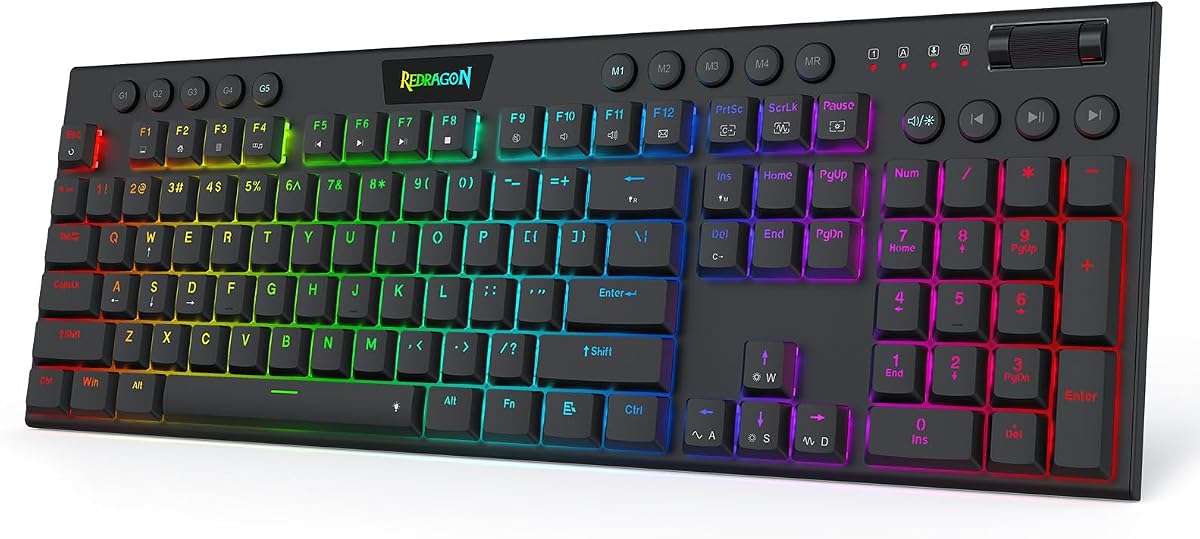
The Redragon K686 HE delivers a broad competitive specification set without moving into the larger-board territory common among premium gaming keyboards. It has a 4.4 rating and uses UltraMag POM Hall Effect magnetic switches, which detect keypresses without physical contact. Its advertised features include Rapid Trigger, PRCS, an 8,000Hz wired polling rate, and adjustable actuation between 0.1mm and 3.4mm.
We may earn a commission when you buy through this link, at no additional cost to you.
Those controls are directly relevant to Valorant. Players can shorten or lengthen activation points, alter reset behavior, and use rapid trigger to reduce unintended repeated input when changing direction. The keyboard also supports multiple saved actuation profiles through a desktop or web-based driver, making it possible to keep separate configurations for Valorant, other shooters, and everyday typing.
Physical construction is another strength. A floating independent switch plate is paired with dampening layers to soften the keyboard's sound and reduce harsh, rigid feedback. A single knob handles both backlight brightness and media playback, so the board has useful physical controls without requiring a stream of key combinations for basic adjustments.
The K686 HE is not as compact as a dedicated 60% model, and its wired design means players must plan around a fixed cable. The dependency on software for deeper configuration may also feel less convenient to someone who wants a simple plug-and-play board. Even with those limitations, the combination of magnetic controls, rapid polling, sound dampening, and profile storage makes it a strong budget recommendation for a dedicated Valorant setup.
Rapid Trigger, PRCS, and the wide 0.1mm-to-3.4mm actuation range provide meaningful control over directional inputs. Players who have struggled with unintentional movement on a standard keyboard may find the configurable behavior worth the extra setup time.
The single knob provides quick access to lighting and media functions. It reduces dependence on layered shortcuts and is particularly handy for adjusting brightness before or between matches.
We may earn a commission when you buy through this link, at no additional cost to you.
The Redragon K673 HE shares much of the competitive technology found in the K686 HE, including UltraMag POM magnetic switches, Rapid Trigger, PRCS, 8,000Hz polling, and a 0.1mm-to-3.4mm actuation range. Its 4.1 rating is the lowest among the ten products here, but the underlying feature set remains well aligned with the needs of a fast-paced tactical shooter such as Valorant.
We may earn a commission when you buy through this link, at no additional cost to you.
The board's most interesting physical feature is its dual-module floating structure. An independent switch plate is intended to reduce wobble, while dampening layers soften the sound and feel of each press. The result is a design that emphasizes a smoother, quieter experience rather than the sharp acoustic character associated with many mechanical gaming keyboards.
Configuration is handled through desktop or web-based software. Players can calibrate the magnetic switches, save multiple actuation profiles, and adapt the board to different games. A physical knob adjusts backlight brightness and media playback, adding convenience for routine changes that would otherwise require navigating software or remembering combinations.
Its 4.1 rating and wired full-size approach prevent it from leading this list, particularly when closely compared with the higher-rated Corsair or the more compact Redragon K618 HE. Nevertheless, the K673 HE is a capable competitive keyboard with meaningful Valorant-oriented controls and a comfortable-looking balance of gaming features and physical refinement.
The independent switch plate and dampening layers work together to reduce wobble and harsh sound. This can make repeated movement inputs feel more consistent while keeping the keyboard less distracting in a shared environment.
Saved actuation profiles allow different activation settings for Valorant, other shooters, and general use. This is convenient for players who do not want to reconfigure the keyboard every time they switch genres.
We may earn a commission when you buy through this link, at no additional cost to you.
The Redragon K618 HE stands out as the lowest-profile option in this guide and carries a 5.0 rating, the highest listed rating among the selected products. It combines short-travel magnetic switches with a 0.1mm-to-2.8mm actuation range, Rapid Trigger, and an advertised 8,000Hz polling rate. The result is a keyboard aimed at players who prefer quick wrist movement and a shorter physical keypress.
We may earn a commission when you buy through this link, at no additional cost to you.
Its dedicated 4-by-5 macro zone is unusual among compact competitive boards. According to the product information, the on-board keys can record combinations and adjust volume or tracks without requiring software installation. That makes the K618 HE appealing for players who want quick access to a spray, agent ability, or other bound command without repeatedly opening a configuration program.
The low-profile structure shortens the distance between the switch and the keycap. That can reduce finger travel and make the board feel lighter during long sessions. The single control scroll wheel manages backlight brightness and media volume, and the magnetic switches can be calibrated through desktop or web-based software with multiple actuation profiles stored for different games.
The macro zone takes up space that a more conventional compact board might use for additional gaming keys, and the maximum listed actuation point of 2.8mm is less broad than the ranges offered by some competitors. Even so, the strong rating, short-travel design, rapid trigger capability, and convenient onboard controls justify its place as one of the more distinctive choices for Valorant.
The low-profile switches and reduced overall height decrease the distance a finger must travel. For players who make frequent directional corrections, that lighter movement can be more noticeable than a small change in static specifications.
The dedicated 4-by-5 macro area can store commands directly on the keyboard. That reduces the need to open driver software during a session and makes frequently used binds quicker to access.
We may earn a commission when you buy through this link, at no additional cost to you.
The Corsair Clipper PRO MINI 60 is built around a simple proposition: put the controls competitive FPS players need into a small, durable board. Its Hall Effect system supports Rapid Trigger with a 0.1mm reset, while Multi-Action, Smart Tap, Tap Lock, and FlashTap SOCD expand the ways movement keys can be configured. The keyboard also uses CORSAIR AXON hyper-processing advertised at up to 8000Hz.
We may earn a commission when you buy through this link, at no additional cost to you.
Its switch specifications are well suited to experimentation. Linear Hall Effect switches have an adjustable 0.2mm-to-3.8mm actuation range, zero drift is claimed, and a 100-million-keystroke durability figure is listed. Players can adjust the point at which a key registers and experiment with reset behavior, although the most useful settings will depend on their sensitivity and existing control habits.
The 60% US QWERTY layout is the strongest physical argument. It preserves the essential alphanumeric and escape clusters while removing the function row, arrow cluster, and navigation keys. That creates more mouse space without abandoning the standard letter arrangement expected in competitive shooters. PBT double-shot keycaps and an IP57 rating further support regular gaming use, while dual-layer dampening helps limit distracting noise.
The compact format is the compromise. Users who rely on arrow keys for menus or need a number pad may prefer a larger board. Because the keyboard is also wired, it cannot be repositioned as freely as a wireless alternative. For a player whose priority is movement precision and mouse space, however, these limitations are reasonable in exchange for the competitive control suite.
A 0.2mm-to-3.8mm range lets players explore dramatically different activation points. The broad span is useful for comparing short-tap precision with earlier input registration, provided changes are made gradually and tested in the game's practice range.
The stated 100-million-keystroke durability and wear-resistant PBT keycaps address common long-term concerns. IP57 protection also gives the board additional protection against common environmental hazards, though the specified drying guidance should be followed after submersion.
We may earn a commission when you buy through this link, at no additional cost to you.
The Razer Huntsman Mini 60% combines a compact form with Razer optical switches and a broad software ecosystem. Its 4.6 rating is among the strongest in this group. Unlike Hall Effect boards, it does not advertise adjustable magnetic actuation, but its optical switches register at a 1.0mm actuation distance and are described as reducing the travel required by many other linear switches.
We may earn a commission when you buy through this link, at no additional cost to you.
Snap Tap is the notable movement-related feature. Through Razer Synapse 4, it prioritizes the latest input between assigned keys, allowing players to create behavior similar to common rapid-trigger workflows on suitable movement bindings. It is turned off by default, which means the user must deliberately configure and enable it. That makes the feature useful for players who understand the behavior but unsuitable for anyone expecting it to work immediately after setup.
The board's physical design is refined. A matte aluminum top frame adds structural rigidity, while oil-resistant double-shot PBT keycaps provide a textured finish and resist long-term grime. Razer Chroma supports 16.8 million colors on individually illuminated keys and synchronization with games, other Razer hardware, Philips Hue, and more than 30 listed partners.
Macro flexibility is another strength because Razer Hypershift can remap all keys and combinations. The principal compromises are the absence of a full rapid-trigger specification, the requirement for Synapse configuration, and a layout that is more compact than a full-size board but less focused than a true 60% design. It is a polished option for a player who values Razer software, lighting, and familiar mechanical construction alongside a space-saving footprint.
Snap Tap prioritizes the latest of two assigned inputs, allowing a short movement press to replace a previous direction. It must be enabled in Synapse, so players should test it in a practice range before relying on it in ranked matches.
Chroma's extensive device and game compatibility makes the Huntsman Mini 60% especially attractive for a polished multi-device setup. Per-key lighting and Hypershift macro remapping add flexibility beyond basic keyboard use.
We may earn a commission when you buy through this link, at no additional cost to you.
The AULA WIN60 HE is a 60% Hall Effect keyboard designed explicitly for fast-paced shooters. Its 4.5 rating is supported by a competitive specification set: magnetic switches, up to 8000Hz polling, a stated 0.02mm rapid trigger step, and adjustable actuation. The board is particularly relevant to Valorant because its controls are intended to support quick peeking and rapid shooting without requiring conventional physical switch contact.
We may earn a commission when you buy through this link, at no additional cost to you.
The physical layout saves space without moving to a 75% or full-size board. That is helpful for competitive mouse aiming because a smaller keyboard can sit farther from the edge of the desk. Lower-positioned lighting illuminates the PBT keycaps, while 16.8 million customizable RGB colors provide extensive visual options without altering the core layout.
One of the board's distinguishing features is its web-based driver. It can be opened from an internet-connected device, allowing users to remap keys, create macros, and customize lighting without installing a conventional desktop application. The driver is described as lightweight and non-memory-intensive, which may appeal to users who dislike large utilities, although web access remains a requirement.
The WIN60 HE is restricted to a wired connection, so it offers no wireless placement flexibility. Its rapid trigger and magnetic-switch benefits also depend on correct configuration and supported software. Even so, the compact 60% layout, fine adjustment range, high polling specification, and browser-based setup make it an appealing option for a player who wants direct FPS control with minimal desk clutter.
The stated 0.02mm rapid trigger step allows especially fine control over how movement keys reset. That can help players minimize unwanted repeated input while retaining a quick initial activation.
The browser-based driver handles key mapping, macros, and lighting without a conventional installation. It is convenient across devices, provided the computer has a dependable internet connection.
We may earn a commission when you buy through this link, at no additional cost to you.
The AULA WIN68 HE uses a 68-key layout that retains arrow keys and basic function access while remaining much smaller than a conventional full-size keyboard. Its 4.5 rating and Hall Effect switch platform place it firmly among the competitive options here. The advertised 8000Hz polling rate, 0.3ms latency, and 0.02mm-to-3.44mm actuation range provide a strong foundation for Valorant movement tuning.
We may earn a commission when you buy through this link, at no additional cost to you.
The web driver can customize RT, SOCD, DKS, MT, and TGL functions, as well as key mapping, macros, and lighting. Individual press and reset sensitivity can be adjusted for different keys, giving players more granular control than a basic keyboard with a single global actuation setting. The driver is stated to support Windows only, an important limitation for Mac users.
The 68-key arrangement is a practical middle ground. Dedicated arrow keys help with menus and general navigation, while the stated ability to save up to 40% of desktop space is beneficial for mouse movement. A detachable USB-C cable and lightweight construction also improve portability, although the keyboard remains a wired-only model.
The board includes 16.8 million-color RGB lighting and 14 preset effects. Function commands can also be accessed through FN combinations, and the backlight can be turned off when a distraction-free setup is preferred. For a Valorant player who wants rapid trigger and multiple movement functions but still values arrow keys, the WIN68 HE offers one of the strongest balances in the shortlist.
Support for RT, SOCD, DKS, MT, and TGL gives the keyboard a broad set of configurable movement behaviors. Each option should be tested carefully because combining unfamiliar functions can change the response a player expects.
Unlike a strict 60% board, the 68-key design preserves separate arrow keys. That makes navigation easier while still freeing substantial desk space for competitive mouse aiming.
We may earn a commission when you buy through this link, at no additional cost to you.
The AULA F75 Pro is the most versatile non-rapid-trigger board in this guide. Its 4.6 rating, 75% layout, hot-swappable sockets, and tri-mode connectivity make it a strong general-purpose gaming keyboard. For Valorant, its pre-lubed Reaper switches offer a smooth mechanical feel, while macro programmability and a dedicated game mode add useful flexibility.
We may earn a commission when you buy through this link, at no additional cost to you.
Connectivity is the defining feature. The board supports Bluetooth 5.0, 2.4GHz wireless, and USB wired connections, with as many as five devices connected at once. Its 4000mAh rechargeable battery is also a generous capacity. This lets a player move the keyboard between a gaming PC, laptop, tablet, phone, or console without reorganizing the desk for every device.
The hot-swappable base accepts both three-pin and five-pin switches, allowing users to change the feel without soldering. Pre-lubed stabilizers, an integrated silicone pad, PCB single-key slotting, and five layers of internal filling are intended to improve stability and reduce cavity sound. The side-printed PBT keycaps use double injection and heat sublimation for a durable, distinctive appearance.
The trade-off is that the F75 Pro does not advertise Hall Effect switches, rapid trigger, or an 8000Hz polling rate. It is also larger than the boards designed specifically around compact FPS layouts. It rewards players who want wireless flexibility, customization, and a complete everyday keyboard more than they value movement-key tuning.
Bluetooth, 2.4GHz, and wired modes allow easy switching among five connected devices. This makes the F75 Pro useful for players who alternate between Valorant on PC and other gaming or productivity tasks without dedicating desk space to a second keyboard.
Three-pin and five-pin hot-swap sockets let users change switches without soldering. The included Reaper switches provide a polished starting point for players who want the freedom to experiment later.
We may earn a commission when you buy through this link, at no additional cost to you.
The ASUS ROG Strix Scope II 96 combines a near-full-size layout with premium construction, wireless connectivity, and extensive customization. Its 4.6 rating reflects a polished general-purpose design, and the included ROG NX Snow linear switches are factory lubricated for a smooth, relatively quiet mechanical feel. It is a strong option for a Valorant player who values a complete desk setup more than compactness or magnetic actuation.
We may earn a commission when you buy through this link, at no additional cost to you.
The 96% layout retains a number pad while measuring only 1cm wider than a standard 80% keyboard, according to the product information. That allows the board to offer more functionality than a TKL without taking up the space of a traditional full-size model. Separate arrow keys remain available, making the layout practical for both gaming and daily productivity.
Tri-mode connectivity includes Bluetooth for up to three devices, low-latency 2.4GHz wireless through ROG SpeedNova, and a reliable wired connection. The advertised battery life reaches up to 1,500 hours in 2.4GHz mode, although real-world results depend on lighting, sleep settings, and usage. Compatibility extends to both PC and Mac, making it one of the broader options in the guide.
Sound-dampening foam and switch pads reduce pinging and echoes, while all keys support per-key RGB and macro programming. Three tilt positions and a detachable wrist rest support extended comfort. The compromises are the relatively large footprint and lack of a rapid trigger or high-polling specification. Even so, its hot-swap sockets, refined acoustics, flexible connectivity, and extensive accessory package make it the premium all-around selection.
Factory-lubricated switches, internal foam, and switch-dampening pads produce a more deliberately finished acoustic profile. The result is suited to long sessions and shared spaces where a sharp, hollow keyboard sound may be distracting.
Bluetooth, 2.4GHz, and wired modes provide flexible placement across computers. The stated support for three Bluetooth devices and PC/Mac compatibility makes this an especially practical premium board for mixed setups.
We may earn a commission when you buy through this link, at no additional cost to you.
The right Valorant keyboard balances fast input processing, dependable key registration, useful movement controls, and a layout that fits your desk and play habits. Rather than treating polling rate as the only measure of performance, consider how the switch system, software, keycaps, connection, and ergonomics work together.
Rapid trigger changes how quickly a key resets after it has been released, which can help prevent a movement key from registering again unintentionally. Hall Effect boards offer adjustable actuation and reset behavior, while optical boards such as the Razer Huntsman Mini 60% use a different approach. Compare the available movement modes, the precision of adjustment, and whether the features are enabled by default. A model with useful controls is more valuable than one with a high headline polling figure but limited configuration.
Choose rapid trigger when precise short taps and quick direction changes are priorities. Otherwise, a reliable mechanical or optical switch can still provide an excellent Valorant experience.
Polling rate indicates how frequently the keyboard reports input to the computer. Several options here claim up to 8000Hz, but actual performance also depends on the game engine, computer, connection quality, and driver behavior. A stable wired connection is often the simplest way to minimize variability, and it is particularly useful for players who want every available timing feature to work without wireless interference or charging management.
Prioritize consistent low-latency behavior over the largest possible number. Treat 8000Hz as one part of a complete setup rather than a guarantee of a visible gameplay advantage.
A 60% keyboard maximizes free mouse space and is common among competitive shooters, although dedicated function and arrow keys are omitted. A 68-key or 75% board offers a more familiar navigation experience, while the 96% layout retains a number pad. Consider your sensitivity, desk dimensions, and whether you use arrow keys during games or only for operating menus and utilities.
For low-sensitivity aiming, a compact board can be helpful. For mixed gaming and office use, a slightly larger layout may be more convenient.
Hall Effect magnetic switches are contact-free and allow software-based actuation changes. Linear mechanical and optical switches provide direct key travel without magnetic adjustment, and they may appeal to players who prefer a familiar feel. PBT keycaps are included on several selections and resist common grime and wear better than many surface-printed alternatives. Switch durability claims are also useful, but tactile preference and build quality should be considered alongside lifespan.
Select magnetic switches for granular control, or mechanical and optical switches for a more conventional feel. The best option is the one whose sound, travel, and response you enjoy during long sessions.
Valorant players may want to adjust movement keys, create macros, manage lighting, or save separate profiles for different games. Redragon models offer desktop or web-based utilities, AULA emphasizes a web driver, and Razer and ASUS provide broader ecosystems for macros and lighting. Check the stated operating-system support, because the AULA WIN68 HE driver is Windows-only. Also consider whether advanced settings are easy to reach without opening several menus.
Look for software that lets you save profiles and control essential functions quickly. A familiar, well-organized interface can be more valuable than a long list of obscure options.
Wired models offer a consistent connection and cannot run out of power, but they constrain desk placement. Wireless boards offer more flexibility and can support several devices, yet battery life and connection stability become additional considerations. The AULA F75 Pro supports Bluetooth, 2.4GHz, and wired modes, while the ASUS ROG Strix Scope II 96 offers a similar tri-mode approach with extensive device compatibility.
Choose wired for maximum predictability or wireless for a cleaner, more flexible desk. Confirm the connection options and battery claims before deciding.
Floating switch plates, aluminum frames, multilayer damping, and PBT keycaps can improve perceived quality. Sound is subjective, however, and a quieter keyboard is not automatically the best for every player. Ergonomic details such as wrist rests, low-profile shapes, adjustable tilt, and keycap travel may influence comfort during long sessions. The Redragon K618 HE is notably low-profile, while the ATTACK SHARK X68 HE RT includes a curved detachable wrist rest.
Prioritize the construction and comfort features you can notice during play. A stable board, suitable key travel, and a layout that feels natural are more valuable than decorative extras.
Begin by installing the required software and connecting the keyboard with its intended wired, 2.4GHz, or Bluetooth mode. Open the configuration utility, update the keyboard firmware if an update is offered, and confirm that the computer recognizes every key. Before changing aggressive settings, set a comfortable actuation point and use the Valorant practice range to learn how the new behavior affects short movement taps, direction changes, and weapon inputs.
Save separate profiles for Valorant and other uses, and label them clearly. If a profile includes rapid trigger, SOCD, or Snap Tap, test it in an unranked environment before relying on it in competitive matches. Keep brightness and lighting effects at levels that remain visible without creating glare, and use the keyboard's function or FN layer only after confirming which secondary commands it contains.
For care, disconnect the cable or switch the keyboard off before cleaning it. Use a soft microfiber cloth, avoid spraying liquid directly onto the keyboard, and gently remove debris between keycaps with a brush. Magnetic-switch boards do not require physical contact for operation, but they should still be protected from impact and excessive moisture. For a board with an IP57 rating, follow the manufacturer's drying guidance after any submersion. Hot-swappable keyboards should be switched off before changing switches, and removable wrist rests or cables should be stored carefully to prevent damage to their connectors.
A Hall Effect keyboard is often well suited to Valorant because it can offer adjustable actuation, rapid trigger, and configurable reset behavior. These features can make short movement taps and quick changes of direction more precise. The actual benefit depends on activation settings, sensitivity, and practice, so a well-configured conventional keyboard can still work very well. A Hall Effect model is best viewed as a more flexible competitive platform rather than an automatic upgrade.
Yes, because 60% keyboards include the core letters, number row, modifiers, and escape key used in a match. Their small footprint leaves more room for mouse movement, which can help low-sensitivity players. The trade-off is the loss of dedicated function, navigation, and arrow keys. Players who regularly use those controls in menus or productivity software may prefer a 68-key, 75%, or 96% layout.
The differences between common polling rates are usually less important than stable software performance and a connection free of interference. All of the selected boards have competitive wired specifications, with several advertising up to 8000Hz. A wired model is a straightforward choice when consistency is the priority. Players should also consider switch behavior, actuation settings, and frame timing rather than expecting a polling number to transform results by itself.
Valorant does not provide a standard keyboard-controlled rapid trigger, but some gaming keyboards use operating-system or firmware-level movement features that can alter input behavior. Players should verify current rules and use only input behavior permitted by the game and anti-cheat systems. A keyboard feature that behaves like prioritizing the latest opposing movement input can also be achieved through standard binds and should be tested carefully before competitive use.
Wired keyboards generally offer the simplest and most consistent connection, while wireless boards provide more freedom to position the keyboard. A good 2.4GHz connection can be suitable for competitive play, but battery level, wireless interference, and sleep settings should be considered. Competitive players who value consistency may prefer wired, whereas users with a multi-device desk setup may appreciate the convenience of tri-mode wireless models.
Macro keys are convenient for bindings such as sprays, agent abilities, or communication commands, but they are not required to play well. A board with standard keys and software remapping can cover the same functions. Physical macro keys save desk space and make frequently used commands easier to reach, yet the 4-by-5 zone on the Redragon K618 HE occupies room that another design could use for conventional gaming keys.
Start with a conservative actuation setting and make only small adjustments while testing in the practice range. Focus on whether short taps release cleanly and whether opposite movement keys behave as expected. Avoid changing several settings simultaneously because it becomes difficult to identify which adjustment improved or disrupted control. Save a known-good profile, and only use movement features permitted under the game's current rules.
PBT keycaps are valued for their texture and resistance to surface grime and wear. They can remain in better condition than many cheaper surface-printed keycaps after years of regular use. The keycap material does not improve reaction time or polling rate, but it contributes to overall feel and longevity. It is particularly relevant to a keyboard that will see frequent Valorant matches and regular desktop use.
The Corsair Clipper PRO MINI 60 is the strongest overall recommendation because it combines a compact 60% layout with Rapid Trigger, Multi-Action, Smart Tap, Tap Lock, FlashTap SOCD, and high-rate input processing. The Redragon K686 HE is a compelling budget choice with broad Hall Effect controls, while the ASUS ROG Strix Scope II 96 stands apart as the premium choice for wireless flexibility, refined construction, and a number pad.
Prioritize the features that affect your actual play. Competitive players focused on movement precision should investigate adjustable Hall Effect boards, while fans of a conventional feel may prefer the Razer Huntsman Mini 60%, the AULA F75 Pro, or the ASUS ROG board. Your sensitivity, desk size, preferred key travel, operating system, and need for arrow or number pad keys should guide the final decision more than any single headline specification.
Current prices, availability, ratings, software compatibility, and firmware behavior can change, so check the latest product listing and the manufacturer's support information before purchasing. Compare the live listing with the features discussed in this guide, read recent user feedback, and make sure your chosen settings comply with current Valorant rules. With that final check, you can select a keyboard that suits both your movement style and the rest of your gaming setup.