
Asiahorse Aurora Pro
4.5Editor score
108 addressable RGB LEDs
Sixty frames-per-second effects
Ten brightness adjustment levels
Light Up Cables for PC options vary, so our guide compares ten ARGB extension kits and sleeves for lighting, compatibility, installation, durability, and fit.
Light up cables for PC are more than decorative accessories: they can organize dense power wiring, add synchronized color to a build, and make ordinary motherboard and GPU connections look deliberate. The right option depends on connector coverage, ARGB synchronization, cable dimensions, case layout, and whether you want a sleeve or a complete illuminated extension.
We compared ten illuminated cable products across ten practical dimensions, including supported connectors, LED density, lighting control, bendability, material, installation method, and intended motherboard or GPU coverage. The list includes flexible sleeve kits, integrated power extensions, a wireless motherboard cable, and options designed for compact or tempered-glass cases.
Each review explains where the product stands out, where its design creates trade-offs, and which builders it is likely to suit. Product details can change, and current prices and availability vary, so readers should confirm fit, power requirements, and software compatibility before purchasing.
4.5Editor score

4.8Editor score
4.6Editor score
This side-by-side comparison highlights connector coverage, ARGB control, lighting design, construction, and practical trade-offs. It includes both simple illuminated sleeves and full power-cable solutions for motherboard and GPU power.


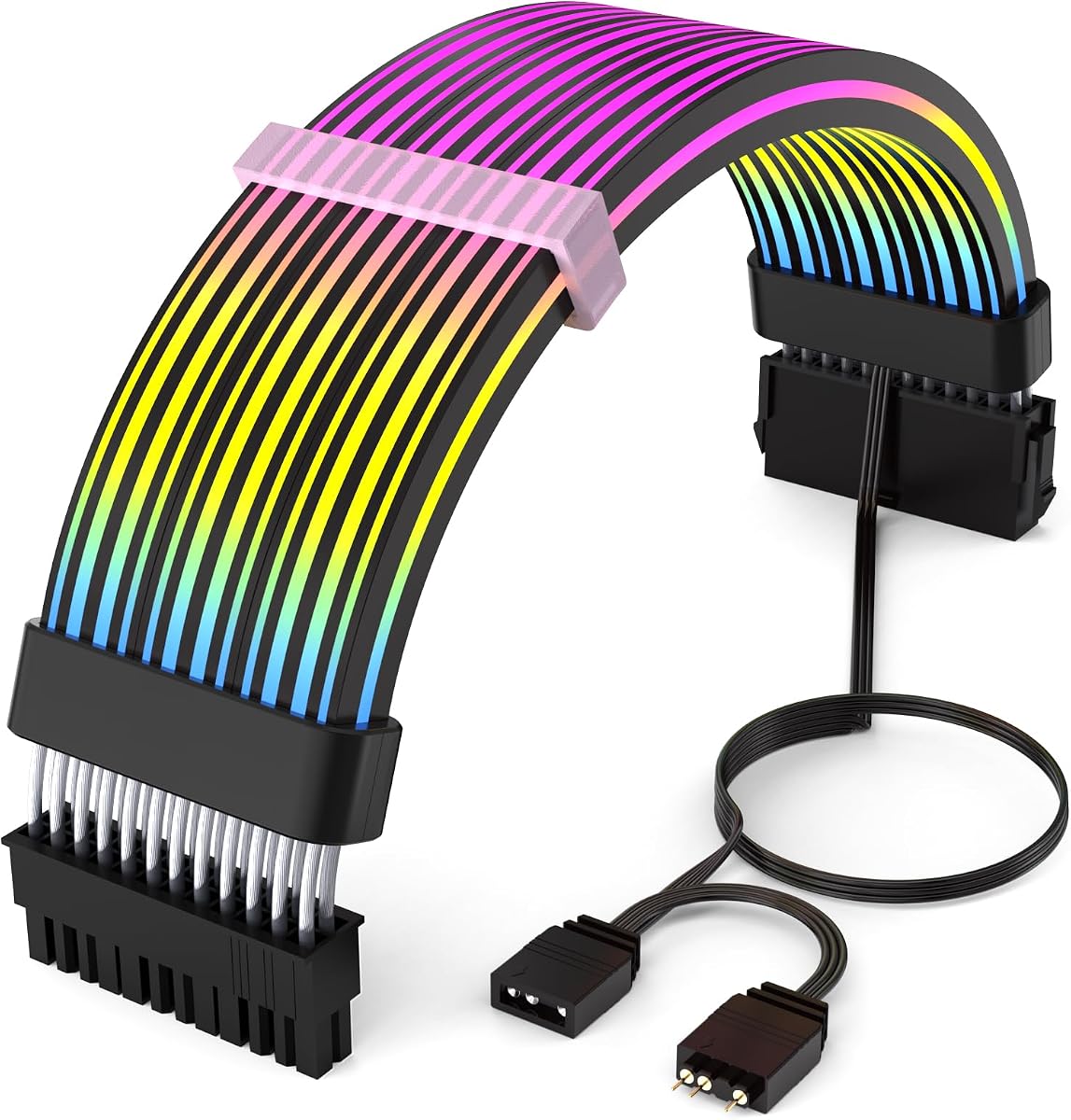

The TECWARE Flex RGB Cable Cover Kit is a 4.4-rated lighting-and-management solution for builders who want to illuminate both motherboard and GPU power connections without replacing their entire PSU wiring. It combines a 24-pin cover, an 8-pin/16-pin cover, and an ARGB connection system in a flexible silicone format. Its standout quality is the combination of broad connector coverage and a clean, diffused appearance.
We may earn a commission when you buy through this link, at no additional cost to you.
Up to 81 LEDs on each covered cable produce a bright, consistent stream of light, while the flexible construction follows the natural path of power leads rather than forcing rigid corners. The kit connects through male and female 5V 3-pin ARGB connectors and supports common motherboard lighting software, allowing its colors and effects to join the rest of a synchronized system. Twelve cable braces help maintain a deliberate appearance after installation.
The main limitation is that the individual LEDs cannot be controlled independently. That means the cover behaves more like a coordinated zone than a precisely addressable lighting path, which may disappoint builders seeking highly specific gradients or point-by-point effects. Also, the power cables themselves are not included, so the kit functions as an illuminated cover set rather than a complete replacement wiring package.
This is a strong choice for a build with a conventional 24-pin motherboard connection and an 8-pin or 16-pin GPU lead, especially when the goal is soft, uniform color and tidy routing. It is less appropriate for a builder who needs independent LED control or wants one purchase to supply all required power cables. For those priorities, the flexible format and included braces make it a practical, versatile option.
The silicone sleeves bend in any direction, making them easier to route around a side-mounted reservoir, a compact power-supply chamber, or the rear cable channel. The material also helps the illuminated surface follow the existing bundle rather than creating a bulky artificial outline.
The 5V 3-pin connection and software support suit builders who want their cable lighting to follow broad motherboard themes. The limitation is that it does not provide the individual addressability offered by products built with individually controllable LEDs.
We may earn a commission when you buy through this link, at no additional cost to you.
This 4.5-rated RGB Cable Extension Kit is designed around the practical needs of compact PC builders who want illuminated sleeves for standard motherboard and GPU cables. The package supports 24-pin motherboard wiring and 8-pin or 16-pin graphics-card power, while soft silicone construction allows the covers to bend freely. It is particularly relevant to tempered-glass builds where visible cable routing is central to the presentation.
We may earn a commission when you buy through this link, at no additional cost to you.
The high-density LED arrangement is intended to reduce shadows and isolated bright spots, producing smoother transitions than a sparse strip. A stated 20,000-hour lifespan supports long-term use, and the 5V 3-pin ARGB connector lets users select colors and preset effects through compatible motherboard software. Its 360-degree flexibility is valuable when the power supply or graphics card sits at an awkward angle.
The product does not claim the same broad power-delivery specifications as a complete extension cable, and its most clearly stated coverage centers on 24-pin and 8-pin or 16-pin connections. Builders using a 12VHPWR-style GPU lead should verify physical dimensions and connector shape before ordering rather than assuming that all modern high-power cables are interchangeable.
This kit is a good match for builders who want a simple visual upgrade over existing PSU cables and value flexible routing in a compact or compact-looking chassis. It may be less suitable for a wireless-control ecosystem or for anyone requiring finely addressable lighting. Subject to connector fit, it delivers a polished combination of dense illumination and adaptable installation.
Closely spaced LEDs help the sleeve present as a continuous ribbon of light. The result is especially useful behind glass, where a single visible gap can interrupt an otherwise smooth color transition.
Soft silicone and ultra-flexible strips accommodate tight bends and different chassis dimensions. This makes the kit useful in small cases where a rigid cover could create excess strain or an awkward protrusion.
We may earn a commission when you buy through this link, at no additional cost to you.
The AsiaHorse ARGB PSU Cables Cover Kit is a 4.5-rated modular solution that combines addressable lighting with coverage for 24-pin, 8-pin, and 12+4-pin connections. Its ability to work with ASUS, MSI, Gigabyte, and ASRock ecosystems through a 5V 3-pin interface makes it appealing to builders who want their cable lighting to follow motherboard software. The kit also adds visual structure around some of the most visible power connections.
We may earn a commission when you buy through this link, at no additional cost to you.
High-density LEDs are positioned on the 24-pin and two 8-pin light strips, with front and side illumination intended to produce a three-dimensional effect. The product advertises a 20,000-hour lifespan, and the separate strip and wiring design allows it to conceal clutter while maintaining a secure visual presentation. Addressable control can provide more detailed transitions than simple fixed-color lighting.
There is an important scope limitation: the power cord is not included. The set is therefore a lighting-cover and extension system rather than a complete PSU cable replacement. It also relies on a compatible 5V 3-pin ARGB source, so builders with only basic RGB headers should not assume it can connect directly.
The kit is a strong fit for a modern gaming PC using a 12+4-pin GPU cable and a 24-pin ATX motherboard connector, particularly when synchronized software lighting matters. It is less suitable for a builder seeking a self-contained wiring kit or a product with a wireless controller. The broad connector support and addressable effects make it one of the more versatile sleeve systems in this roundup.
The 5V 3-pin interface allows the covers to participate in a larger ARGB ecosystem. Builders can select detailed color transitions and synchronize the cable lighting with compatible fans, memory, and cooling hardware.
Front and side light placement gives the sleeves more depth than a single illuminated face. That distinction can be noticeable in a tempered-glass case where the power bundle is visible from both the side and below.
We may earn a commission when you buy through this link, at no additional cost to you.
The Sirlyr White ARGB Sleeves are a 4.5-rated choice for white-themed systems that need more than neutral-colored cable organization. They cover standard ATX 24-pin power and GPU connections, including 12VHPWR, and combine separate high-density light strips with a 5V 3-pin ARGB connection. Their white finish is the defining visual feature, while the included combs improve the appearance of the underlying bundle.
We may earn a commission when you buy through this link, at no additional cost to you.
The motherboard and GPU light strips contain 80-plus-81 LEDs, supporting smooth color transitions with fewer visible shadows. Soft silicone and a flexible LED-strip design allow the sleeves to follow tight routes, including in compact builds. Three comb sizes are included for 24-pin ATX and GPU cables, and the sleeves are compatible with original PSU cables, extensions, and sleeved, silicone, PVC, or braided wires.
The primary limitation is aesthetic rather than functional. White sleeves can look deliberate in a coordinated case but visually isolated in an otherwise black build. The lighting also needs a compatible standard 5V 3-pin ARGB header, and software features depend on the motherboard ecosystem or another ARGB controller.
This set is best for builders with a white, silver, or light-gray theme who also want 12VHPWR coverage. The combination of dense lighting and multiple comb sizes makes it a tidier all-in-one option than a simple loose sleeve. For darker builds, the TECWARE or black AsiaHorse alternatives may integrate more naturally.
The white sleeve finish and matching cable combs create a more consistent visual line than exposed multicolored wires. This is particularly useful in all-white builds where a conventional black bundle would interrupt the design.
Compatibility with original PSU leads, aftermarket extensions, and several cable coverings broadens the practical use. The three comb sizes help builders create a tighter bundle without assuming every PSU uses identical wire dimensions.
We may earn a commission when you buy through this link, at no additional cost to you.
The Lian Li Strimer Wireless is a 4.8-rated illuminated 24-pin motherboard cable and the most refined control-oriented option in this guide. Unlike conventional 5V 3-pin sleeves, it uses a 2.4 GHz wireless signal and the included controller. The result is a clean motherboard connection without a lighting cable running from the header area, while L-Connect 3 provides a familiar software environment.
We may earn a commission when you buy through this link, at no additional cost to you.
The controller also operates compatible Lian Li wireless fans and Hydroshift II devices, which gives the product a broader role than a standalone cable accessory. Its light strips extend around the sides, making the 24-pin area appear more dimensional from a typical tempered-glass viewing angle. That placement is especially effective when the cable is visible beside a large motherboard or illuminated cooling hardware.
Its scope is narrower than the multi-piece kits. It is designed around ATX, mATX, and ITX motherboards with standard 24-pin headers and does not provide a matching illuminated GPU extension. Buyers also need the included wireless controller, and L-Connect 3 compatibility matters if they want integrated control rather than a basic static display.
For a builder seeking a polished motherboard connection with minimal visible synchronization wiring, this is the standout recommendation. It is less appropriate for a mixed-cable upgrade that must cover 8-pin, 12VHPWR, or multiple GPU connectors. Its rating, wireless design, ecosystem integration, and side illumination make it the most complete premium lighting solution here.
The 2.4 GHz connection removes the need for a physical ARGB lead between the 24-pin cable and controller. That can reduce visible clutter around the motherboard header and make the installation look more deliberate.
The included controller can also manage compatible Lian Li wireless fans and cooling devices. L-Connect 3 adds monitoring dashboards and fan controls, giving the cable a role in a broader hardware-management setup.
We may earn a commission when you buy through this link, at no additional cost to you.
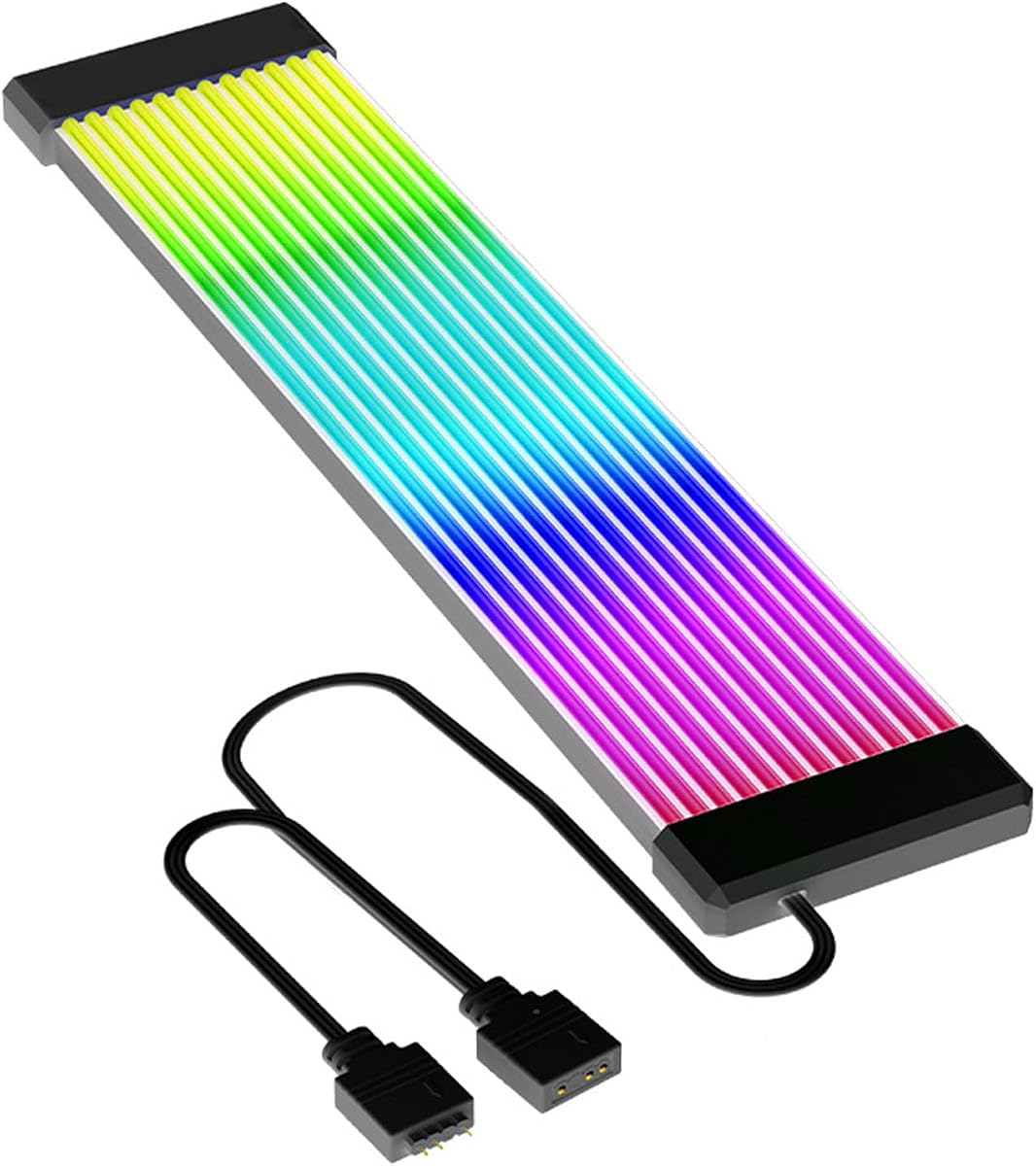
The Asiahorse Aurora Pro is a 4.5-rated premium cable cover built around 108 individually addressable LEDs. It supports 12+4-pin, 8-pin, and 24-pin power cables, and its 5V 3-pin interface can synchronize with major motherboard brands such as ASUS, MSI, Gigabyte, and ASRock. The emphasis is not simply on adding color but on producing fine-grained effects across a larger lighting surface.
We may earn a commission when you buy through this link, at no additional cost to you.
The listed lighting specification includes smooth effects up to 60 frames per second, more than 124 preset effects, and ten brightness levels. A stated 20,000-hour LED lifespan and high-density placement are intended to maintain vivid, even color. The soft silicone modular design also serves a practical cable-management purpose, concealing clutter while adapting to different power-lead shapes.
Installation is based on three clear steps: securing the cable to the strip, fitting transparent plastic clips, and connecting the ARGB interface before adjusting software or an RGB controller. Users need to align the light strip correctly for the best result, and the available effects depend on the connected control software. Its listed size is 260 by 56 by 21 millimeters, so builders should also check case clearance.
This is a strong recommendation for a builder who values detailed lighting control and already uses a compatible ARGB ecosystem. It is less attractive for a simple static-color setup or a very constrained case where the illuminated coverage cannot fit. The combination of addressable resolution, effect selection, and brightness control makes it a feature-rich premium choice.
With 108 controllable LEDs, the cover can display more nuanced movement and color variation than a broad, non-addressable strip. The feature is most useful when the cable is paired with other synchronized lighting elements.
More than 124 presets and ten brightness levels offer a wide visual range, from a subdued accent to a prominent animated display. Software and controller support determine exactly which controls are available.
We may earn a commission when you buy through this link, at no additional cost to you.
The Wide ARGB Power Extension is a 4.6-rated decorative power cable for builders who want a dense, colorful appearance without moving to the most premium illuminated ecosystem. Its title identifies 24-pin or 3×8-pin wide configurations, while 120 LED beads and 12 light-guiding strips create an expansive illuminated surface. It is designed for motherboard, CPU-area, GPU, and general PC-case decoration.
We may earn a commission when you buy through this link, at no additional cost to you.
Male and female 5V 3-pin connectors provide flexible installation and expansion options. Compatibility is listed for Aura Sync, RGB Fusion, Mystic Light, and standard addressable ARGB interfaces, allowing the extension to follow familiar motherboard software. Silicone construction gives the cable enough flexibility to bend and route without making the illuminated section look rigid.
The important caveat is connector selection. The product title points to an X12 wide format for 24-pin or 3×8-pin arrangements, so buyers should compare the connector and cable dimensions with their actual motherboard and GPU rather than relying on a generic PC power-cable description. The full range of displayed effects also depends on the software and controller available in the build.
This is the value-focused pick for someone who wants many LEDs, broad decorative coverage, and standard ARGB synchronization. It is less suitable for a builder requiring a comprehensive set of covers for every connector type or a tightly integrated wireless lighting system. For a compatible wiring configuration, it provides an eye-catching, flexible solution.
The combination of 120 LED beads and 12 guiding strips creates a broad glow across the power area. Flexible silicone allows the cable to follow the chassis while retaining a smooth illuminated shape.
Support for major synchronization ecosystems means the extension can join an existing lighting theme. Buyers should still confirm the exact connector type and ensure their motherboard software exposes the expected addressable controls.
We may earn a commission when you buy through this link, at no additional cost to you.
The Sirlyr Black 24Pin RGB extension is a 4.5-rated integrated cable aimed at builders who want the motherboard power connection to glow from several directions. It combines 120 LED beads with a four-sided lighting design, allowing the cable to remain visible from the front, side, and rear of the connection. A mini controller is included, and the unit can also work with standard motherboard ARGB software.
We may earn a commission when you buy through this link, at no additional cost to you.
Its TPE and silicone construction supports flexible bending and routing, while the integrated extension-and-light-strip design conceals more of the wire than a loose cover. Compatibility is listed with ASUS Aura, Mystic Light, Gigabyte RGB Fusion 2.0, ASRock RGB Sync, and other 5V 3-pin systems. The black finish is particularly well suited to dark tempered-glass cases and all-black builds.
The product is larger than a normal 24-pin extension, and the manufacturer specifically recommends a mid-tower or full-tower chassis. That makes case clearance a meaningful purchase consideration. If a LED does not illuminate, the stated causes include too many RGB devices on one controller or a controller with a limited bead capacity, so the overall RGB device count should be considered.
This extension is best for a larger gaming chassis where the 24-pin connection is a focal point and the installer has room for the thicker cable. It is less practical for compact builds or users who need a matching illuminated GPU lead. Its four-sided output, integrated hiding, and bundled controller make it a strong single-purpose motherboard option.
Four-sided illumination keeps the cable visually active even when it is viewed from a less direct angle. This is particularly useful in a dark case where a traditional illuminated face would disappear into the background.
Combining the extension and light strip creates a more unified appearance. The black materials also blend with dark cable-management areas, reducing the visual separation often seen between conventional extensions and decorative covers.
We may earn a commission when you buy through this link, at no additional cost to you.
The Sirlyr Black RGB PCIe 8Pin extension is a 4.6-rated option for builders who want to illuminate the GPU power connection rather than replace every visible power lead. Its integrated design combines the extension and light strip, while 27 LEDs provide a four-sided glow. The result is a focused accent around a high-visibility section of the graphics card.
We may earn a commission when you buy through this link, at no additional cost to you.
The cable targets graphics cards with 8-pin power connectors, including examples such as RTX 4060, RTX 4070, and Radeon RX 6600 series models. Silicone construction makes it easy to bend and route, and the stated silver-plated wire cores are designed to maintain stable current transfer. The black cable, connector, and light-strip finish suit dark glass-side-panel cases.
The package contains one RGB 8-pin GPU extension and a mini controller powered by SATA. The controller allows operation even when the motherboard does not expose ARGB, while daisy-chaining with a motherboard 3-pin port or other 5V 3-pin lighting can produce synchronized effects. It does not include a full set of GPU cables, and a single 8-pin lead may not suit graphics cards requiring multiple connectors or a different power standard.
This is an excellent pick for a build that already has a satisfactory motherboard cable treatment but needs a coordinated GPU accent. It is less suitable for newer graphics cards using only a 12VHPWR connector or for users wanting a complete illuminated power bundle. Its focused design, broad viewing angles, and included controller make it a practical one-cable upgrade.
Instead of forcing one sleeve design onto every connector, the product concentrates on the most visible GPU power area. That makes it a sensible way to add color without changing the entire power-management system.
The included SATA-powered mini controller supports use even without motherboard ARGB. Users with compatible software can also daisy-chain the extension into a broader 5V 3-pin lighting system.
We may earn a commission when you buy through this link, at no additional cost to you.
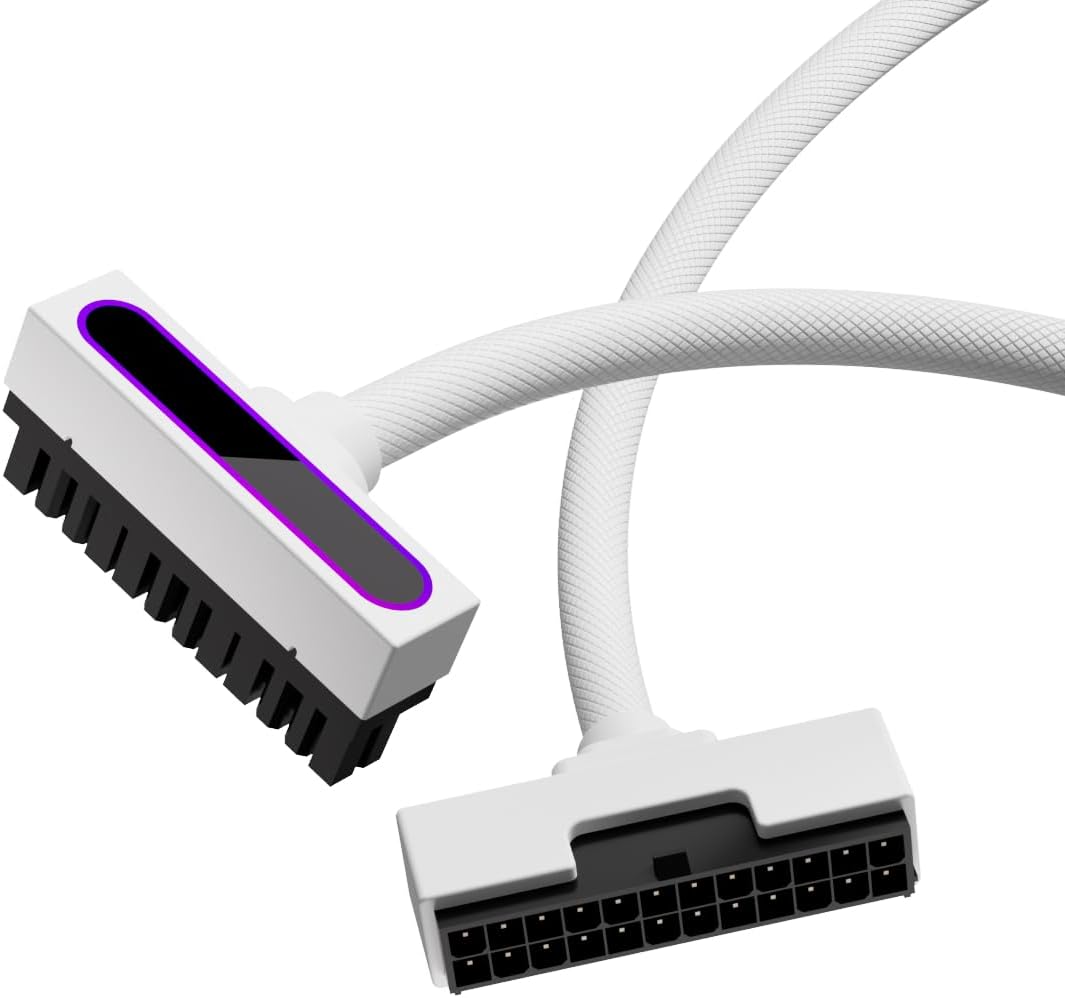
The AIJS White 24-Pin PSU Extension is a 4.6-rated cable for builders who prioritize compact routing alongside illumination. Its 90-degree right-angle connector is the central feature, allowing the extension to turn away from the motherboard header rather than projecting straight into the case. At 30 centimeters long, it is designed to bridge the small distance between a PSU and a 24-pin header without excess cable.
We may earn a commission when you buy through this link, at no additional cost to you.
The cable uses 18 AWG construction and soldered, high-conductivity terminals, with listed support of up to 900 watts for a single wire and 2,500 watts for the complete set. It also includes ARGB lighting with a 16.8-million-color spectrum and 12 dynamic modes. The white matte PVC exterior and diamond-pattern finish coordinate with light-colored cases while resisting visible scratches.
This is a single 24-pin extension rather than a multi-piece sleeve kit, so it does not illuminate GPU cables or organize the entire PSU harness. The right-angle geometry can also restrict where the connector can physically sit, especially if the case's motherboard tray or header clearance is tight. The manufacturer emphasizes fully inserting the interface to avoid improper operation.
The extension is a good choice for a white or compact build where cable direction and visible excess length are the main concerns. It is less useful for someone seeking complete illuminated coverage or individual LED control beyond the advertised modes. Its right-angle fit, short length, and understated finish make it a focused alternative to the larger multi-cable kits.
A 90-degree connector can reduce the depth occupied by the cable at the motherboard header. This is especially helpful when side fans, a radiator, or the case frame sit close to the 24-pin area.
The 30-centimeter length suits direct PSU-to-motherboard routing and limits the loose excess often visible behind a power-supply chamber. Flexible PVC allows the cable to be shaped while retaining a clean white exterior.
We may earn a commission when you buy through this link, at no additional cost to you.
The right illuminated cable depends on the connectors in your PC, the case's available space, and how you want to control the lighting. Use the following factors to narrow the field before checking current listings and compatibility details.
Begin by identifying every power connection you want to illuminate. Common motherboard power uses a 24-pin ATX connector, while graphics cards may require one or more 8-pin connectors, a 12+4-pin 12VHPWR lead, or both. Some kits include separate covers, some provide integrated extension cables, and others cover only one connection. A product advertised for 8-pin and 16-pin GPU cables is not automatically suitable for every 12VHPWR installation, particularly when the cable width or connector shape differs. Check the motherboard header, PSU lead, and GPU socket rather than relying only on the broad PC power-cable label.
Prioritize exact connector and cable-size compatibility over cosmetic features.
Most products in this guide use a standard 5V 3-pin ARGB connection, but that does not guarantee identical software behavior. The most common approach is to connect the cable to a motherboard 5V header and use the manufacturer's RGB utility. The Lian Li Strimer takes a different route with 2.4 GHz wireless control, while some products include a mini controller for systems without a suitable header. Confirm the required connection, supported motherboard software, and available lighting modes before ordering.
Choose a control method that matches the RGB ecosystem already in your PC.
LED count influences how continuous the illumination appears, while addressability determines how precisely colors can move along the cable. A non-addressable sleeve can still provide a smooth synchronized glow, but it cannot independently control each LED. Addressable products are better for detailed gradients, directional effects, and finely coordinated animations. They may also depend more heavily on compatible control software. Balance density against the visibility of the cable: a tightly spaced strip can look smooth in a large case yet unnecessary in a small build where only a short section is visible.
Prioritize smooth density for a uniform glow and addressability for complex effects.
Illuminated cables and integrated extensions are often larger than conventional power leads. The Sirlyr 24-pin product explicitly recommends a mid-tower or full-tower chassis, while the AIJS extension uses a short 30-centimeter length and a right-angle connector for tighter routing. Measure the distance from the PSU to the motherboard header, inspect the space around the connector, and consider fan or radiator clearance before purchasing. A compact sleeve can also strain or snag if it is bent beyond its intended range.
Measure connector clearance and routing distance before choosing a cable size.
An illuminated extension is still an electrical component, so conductor size, terminal quality, and connector fit matter. The AIJS model specifies 18 AWG wiring, soldered terminals, and stated power limits, while several sleeve products cover existing cables rather than supplying electrical extensions. The latter can simplify installation, but they may add thickness and stress points around a bend. Review wattage requirements for the GPU and CPU, avoid improvised adapters, and confirm that any extension meets the power supply and graphics-card manufacturer requirements.
Treat electrical ratings and connector quality as essential, not optional.
Soft silicone is common because it bends smoothly and holds a clean route around a PSU, motherboard, or GPU. TPE and flexible PVC are also used in integrated cables. The best material for a build is the one that maintains the intended shape without creating a tight radius, visible wrinkles, or pressure against moving components. Flexible sleeves are especially useful in compact or tempered-glass cases where the exact cable path is visible. Builders should also consider the finish: black blends into dark systems, while white is more noticeable and often more effective in a coordinated light theme.
Select flexible material and a finish that blend with the case interior.
Some products illuminate on one face, while others add side-facing or four-sided light. The distinction matters in glass-side-panel cases, where a cable may be seen from the side, front, and below. Multi-sided designs create a fuller appearance but are bulkier and may require more room around the connector. Single-face or low-profile products can be easier to conceal but less dramatic. Consider where the PSU, GPU, and motherboard power area will be visible after the glass panel, fans, reservoir, and other components are installed.
Match the number of illuminated sides to how clearly the cable will be seen.
Sleeve kits often include cable braces or combs, while integrated extensions may include a mini RGB controller. Braces improve the finished appearance after routing, and a controller can provide lighting control when a motherboard header is unavailable or already occupied. Check the package contents carefully: several products explicitly do not include the underlying power cables or a power cord. Confirm that the supplied accessories match the size and shape of the existing cables, especially when a GPU uses a proprietary multi-wire arrangement.
Confirm all included parts and whether existing power cables are required.
Install the lighting system with the PC powered off and disconnected from its power source. Route the motherboard and GPU cables into their final positions first, checking clearance around fans, radiators, reservoirs, drive cages, and the tempered-glass panel. If using a sleeve kit, place each sleeve over its corresponding cable and secure it with the supplied braces, combs, or clips without compressing the conductors or bending the LED strip beyond its intended range.
Connect the lighting end using the specified method. A 5V 3-pin ARGB cable should be attached to a matching 5V 3-pin header or compatible controller, while the Lian Li Strimer Wireless requires its included 2.4 GHz controller. Make sure every plug is fully seated, route the lighting lead away from sharp edges, and avoid forcing a right-angle connector into a position that loads the socket. Then turn on the system and use the appropriate motherboard software, RGB controller, or L-Connect 3 interface to select effects and brightness.
For ongoing care, keep the cables dry and free of dust, and inspect the connections if the lighting flickers or a section stops responding. Do not repeatedly plug or unplug illuminated cables while the system is running, and do not route a power extension through a fan or a moving part. When cleaning the case, use a soft dry cloth or gentle compressed air around the sleeves. Addressable systems can also become limited when too many devices share one controller, so remove or reduce other RGB loads if synchronization becomes inconsistent.
No. Standard RGB lighting generally provides a limited color signal, while ARGB can send data to individually addressable LEDs. That distinction allows more precise gradients, directional movement, and per-LED effects. Compatibility depends on the 5V 3-pin ARGB connection and the control software used by the motherboard or an external controller.
Yes, many products in this guide are sleeves intended to fit over existing 24-pin or GPU power cables. You must confirm the sleeve's width, shape, and material compatibility with the wires in your system. Integrated extension products, by contrast, require you to replace specific existing power leads rather than simply cover them.
No. A GPU cable must match the connector and power requirements of the graphics card. Some products support 8-pin connections, while others accommodate 12+4-pin 12VHPWR, and some kits cover both. Also consider whether the card requires multiple cable runs, as a product containing one single 8-pin extension will not satisfy every high-end graphics-card configuration.
The lighting draws a small amount of power, but an electrical extension also has to carry the full load placed on the associated CPU or GPU connection. This is why conductor size, terminals, and wattage ratings deserve attention. Never assume a decorative cable is appropriate for a high-power GPU solely because it fits physically.
It depends on the product. The Lian Li Strimer Wireless uses its included wireless controller and L-Connect 3, while certain Sirlyr products include mini controllers that can operate when motherboard ARGB is unavailable. Standard 5V 3-pin sleeves generally need a compatible motherboard header and RGB utility. Always check the included control options and required software before installation.
They can be, although the white sleeve and connector will stand out more strongly than black components against a dark interior. Color choice is primarily aesthetic, but the illuminated result can be less visually integrated if bright white hardware contrasts with otherwise subdued components. Black versions are generally easier to blend into dark builds.
A loose connector, insufficient power, an unsupported control channel, or too many RGB devices on one controller can cause unstable lighting. A mismatch between 3-pin and 4-pin RGB headers is another common issue, and these two connector types should not be treated as interchangeable. Check the manual, reseat the plug, reduce controller load, and confirm software support before assuming the cable has failed.
They can improve the appearance of a managed bundle, but illumination does not replace correct routing. Sleeves, combs, and braces can keep wires aligned and reduce visual clutter, while flexible designs make it easier to follow case contours. The builder should still avoid tight bends, crowding, and contact with sharp edges or moving components.
The Lian Li Strimer Wireless is the most polished overall choice for a premium motherboard-focused build, combining a 4.8 rating, wireless 2.4 GHz control, L-Connect 3 integration, and extended side illumination. The Asiahorse Aurora Pro is the strongest premium option for detailed addressable effects, while the Wide ARGB Power Extension delivers a high LED count and flexible decoration at a more value-oriented level. Together, they represent three distinct approaches rather than interchangeable versions of the same accessory.
Prioritize exact connector and cable-size compatibility before choosing a lighting effect. Check the PSU lead, motherboard header, and graphics-card socket, then consider case clearance, control software, bendability, and whether the product is a sleeve or a complete extension. White finishes suit coordinated light builds, black finishes blend into darker cases, and a right-angle design may be the most practical option where header space is limited.
Current prices, stock, and product details can change, so confirm the latest listing before buying. Also verify that a bundled controller, combs, clips, or power cables are included if your build depends on them. With the right connection coverage and a clean installation, light up cables for PC can transform a power area that normally looks cluttered into one of the build's most coordinated visual features.