
JSAUX 90 Degree USB C to USB C Adapter 2-Pack
4.7Editor score
Up to 100W Power Delivery
Up to 40Gbps data transfer
4K@60Hz video output
Compare the best right angle USB C adapters for charging, data transfer, video output, portability, and device compatibility in this practical buying guide.
Right angle USB C adapters redirect charging and data cables away from a device's port, reducing awkward bends while making desk, travel, and handheld-gaming setups easier to manage. The best choice depends on connector direction, charging capacity, data speed, video support, case clearance, and compatibility with the devices you use most often.
This guide compares ten right angle USB C adapters according to the specifications and feature information supplied for each product. It covers USB4 and USB4 V2.0 models, 40Gbps and 80Gbps data options, charging capabilities from 100W to 240W, display support, directional designs, pack quantities, materials, and important fit considerations.
Each review identifies the strongest use case and trade-offs for its adapter, while the top picks highlight the most balanced, budget-conscious, and premium options. Product specifications and availability can change, so readers should confirm current device compatibility and compare current prices before making a purchase.
4.7Editor score

4.6Editor score

4.7Editor score
The table below compares all ten adapters by their principal technical features, including supported charging power, maximum data rate, display capabilities, and directional design. Because every device, cable, charger, and monitor must support the relevant protocol, the published maximum is a hardware capability rather than a guarantee of every possible setup.


The UGREEN 90 Degree USB C Adapter 3 Pack earns a 4.6 rating and stands out as the most complete general-purpose option in this guide. It combines a space-saving right angle connector with up to 240W USB-C Power Delivery, 40Gbps USB4 data transfer, and display output up to 8K@60Hz. That combination makes it more versatile than an adapter designed only to reduce cable bending.
We may earn a commission when you buy through this link, at no additional cost to you.
Its main benefit is the balance between physical design and technical capability. The angled connector helps reduce strain at the device port and can keep a cable from projecting directly outward from a laptop or handheld. Meanwhile, USB4 and Thunderbolt compatibility allow the adapter to handle high-speed storage transfers, large backups, and compatible display configurations. The aluminum alloy housing is also intended to improve heat dissipation and resist scratches.
There are some qualifications to keep in mind. The listed 240W charging and 40Gbps transfer figures are maximum capabilities that require compatible chargers, cables, hosts, and peripherals. A device with a thick protective case may also prevent the adapter from seating fully, and the 8K output depends on the capabilities of the connected display and USB-C port. The three-piece bundle may also be more than a buyer with one recurring need requires.
This is an excellent recommendation for users who want one adapter to cover high-power charging, fast data, and external-display needs. It is particularly suitable for USB4 laptops, compatible gaming handhelds, and modern phones or tablets used with space-constrained charging stations. For a single-purpose setup, a lower-power model could be sufficient, but the UGREEN offers the broadest balanced feature set here.
The 90-degree form redirects a connected cable away from the direct line of pull created by many straight connectors. That is useful beside a desk, against a wall, or while a handheld gaming device rests on a surface.
Support for up to 240W charging and 40Gbps USB4 transfer allows one adapter to serve demanding laptops, external SSDs, docks, and compatible high-resolution displays. The host device and attached cable must support the same protocol to realize those maximums.
We may earn a commission when you buy through this link, at no additional cost to you.
This Silkland two-pack carries a 4.7 rating and offers an impressive mix of charging, transfer speed, and compact construction. Its right-angle design redirects the cable to reduce unnecessary bending, while the supplied specifications list support for USB4 at up to 40Gbps, 8K video, and USB PD 3.1 Extended Power Range charging up to 240W.
We may earn a commission when you buy through this link, at no additional cost to you.
A slim aluminum alloy body distinguishes it from bulky adapters that can make it difficult to reach another port on a laptop. The design is intended to resist wear, dissipate heat, and provide a secure grip during insertion and removal. Compatibility is broad across USB-C and Thunderbolt 3 or 4 equipment, including many popular laptops, phones, tablets, gaming handhelds, and VR devices.
The main limitation is physical clearance. Silkland specifically advises that the USB-C port should be fully exposed, so a thick or bulky case may prevent a complete connection. Buyers should also remember that high charging and display figures are conditional: the charger, cable, source device, and display must all support the selected feature and mode.
The adapter is a strong fit for people who want more capability than a simple charging elbow but do not need the very latest USB4 V2.0 platform. It suits desks where a low-profile connector is valuable, travel kits that need two flexible adapters, and owners of compatible USB4 laptops or handhelds. Its 4.7 rating and balanced specifications make it an especially convincing value choice.
Including two adapters makes it easier to keep one at home and another in a bag or at a second workstation. The compact form is also designed not to block an adjacent USB-C port on many devices.
Rather than serving only as a cable redirector, this model combines charging, data transfer, and video output. That makes it useful for compatible laptops that connect to docks, external drives, or monitors through USB-C.
We may earn a commission when you buy through this link, at no additional cost to you.
The Basesailor 3Pack has a 4.6 rating and takes a practical approach by supplying three right-angle configurations for different physical setups. Instead of giving every adapter the same orientation, the set is intended to handle walls, desk edges, sofas, and bedside tables. That variety can be more useful than several identical elbows when cable routing changes from one location to another.
We may earn a commission when you buy through this link, at no additional cost to you.
The adapters support Power Delivery charging up to 100W, data transfer up to 40Gbps on compatible USB4 or Thunderbolt 3 and 4 systems, and video output up to 4K@60Hz. The supplied information is appropriately clear that full data speed depends on both the source device and cable. Actual charging output likewise depends on the connected charger, cable, and device.
Compared with premium 240W alternatives, the charging ceiling is lower and the maximum listed display mode is 4K@60Hz rather than 8K. Those limits are unlikely to matter for many phones, tablets, handhelds, and moderately equipped laptops, but they could be relevant for a high-wattage workstation or an 8K display workflow. The aluminum shell and compact proportions are positive for portability and heat management.
This three-pack is a good choice for users who move between several charging locations or want a solution for awkward furniture arrangements. It is especially relevant for compatible Steam Deck, ROG Ally, Switch, MacBook, iPad, and USB-C phone setups. Buyers needing very high laptop charging or 8K output should choose a more capable model, while everyone else may appreciate the convenient mix of directions.
The different orientations make it easier to find a route that keeps the cable away from a wall, desk edge, or armrest. This is a practical advantage when one fixed right-angle direction would still create an awkward bend.
Up to 100W charging, 40Gbps data on compatible systems, and 4K@60Hz video cover many common charging, storage, and display requirements. The included devices and cables must support each mode for full performance.
We may earn a commission when you buy through this link, at no additional cost to you.
The UGREEN 40Gbps Right Angle USB C Adapter Combo has a 4.6 rating and solves a common problem with a two-direction bundle. It includes top or bottom and left or right 90-degree adapters, allowing the cable to approach a device from whichever side is more convenient. This is useful for both a laptop at a desk and a handheld console positioned in a more confined space.
We may earn a commission when you buy through this link, at no additional cost to you.
The technical specification is ambitious for a right-angle adapter. It supports USB4 and Thunderbolt 4 for data transfer up to 40Gbps, display output up to 8K, and USB-C Power Delivery charging up to 240W. That range makes it appropriate for fast external storage, professional file transfers, compatible high-resolution displays, and power-hungry laptops when the rest of the chain is equally capable.
The trade-off is that physical direction and maximum specifications do not guarantee the same experience on every setup. Some displays, hosts, or cables may support only lower video modes, and a protective case could obstruct the connector. The bundle also contains only two pieces, so users who need several differently oriented adapters may find the three-direction Basesailor set more accommodating.
Overall, this is a well-balanced choice for a workspace where a fixed left or right angle is not always ideal. It gives a MacBook, iPad, iPhone, Steam Deck, ROG Ally, or other compatible USB-C device a cleaner cable route while preserving advanced charging and data options. It is particularly appealing to users who want one compact adapter for a laptop and one for a second device.
The mixed-direction set lets users match the connector to the physical location of the port. That reduces the chance that a right-angle plug will still pull sideways against a desk edge or neighboring accessory.
Up to 240W charging, 40Gbps data, and 8K output address several demanding categories in a single compact adapter. Compatible source hardware, cables, and displays are still necessary for each maximum specification.
We may earn a commission when you buy through this link, at no additional cost to you.
The second Silkland option in this guide also holds a 4.7 rating, delivering a compact USB4 adapter with up to 240W charging and 40Gbps data transfer. Its list price points toward a strong value, and the supplied features emphasize a slim profile, aluminum alloy construction, and a non-slip shape that makes the adapter easier to insert and remove.
We may earn a commission when you buy through this link, at no additional cost to you.
The right-angle connector can help protect both the cable and device port by changing the cable's exit direction. The package includes two adapters, making it convenient to maintain a second unit in a travel bag or at another workstation. Its compatibility list covers numerous USB-C and Thunderbolt 3 or 4 devices, including popular gaming handhelds, laptops, phones, tablets, and a VR headset.
Its limitations are familiar but important. The USB-C port must be fully exposed for a reliable fit, and the maximum 240W charging, 40Gbps transfer, and 8K video figures are dependent on the connected equipment. Users with older or more limited USB-C implementations will still benefit from the physical cable-routing improvement, but they may not access the headline specifications.
This is a compelling pick for anyone seeking a slender, capable adapter without moving to the newest USB4 V2.0 standard. It handles demanding charging and transfer tasks better than many 100W alternatives while remaining straightforward to carry. The two-pack format is especially useful for owners of more than one USB-C device or for keeping a replacement close at hand.
The small body is designed to avoid blocking the port next to the connection. That consideration matters on slim laptops and tablets where every millimeter of edge space can affect another accessory or hand clearance.
Support for USB PD 3.1 Extended Power Range, including 140W, 180W, and 240W modes, makes this suitable for compatible high-power laptops. The charger, cable, and device must collectively support the selected level.
We may earn a commission when you buy through this link, at no additional cost to you.
The Silkland 80Gbps USB4 V2.0 adapter is the premium selection in this roundup, earning a 4.7 rating for its combination of the newest protocol generation and a practical right-angle form. It supports up to 80Gbps data transfer, 240W charging, and video configurations that include 16K, dual 8K or 6K, and triple 4K displays on compatible equipment.
We may earn a commission when you buy through this link, at no additional cost to you.
USB4 V2.0 also provides up to 120Gbps dynamic bandwidth for display transmission, a separate figure from the adapter's 80Gbps data-transfer ceiling. That distinction matters for buyers creating advanced workstation displays or transferring large media files. Compatibility extends to Thunderbolt 5, 4, and 3 hardware, along with modern laptops, tablets, phones, gaming handhelds, docks, monitors, and VR devices.
The premium capabilities also create a higher hardware bar. A standard USB4 or Thunderbolt 3/4 host will not automatically gain 80Gbps transfer or 16K output. Display mode requires DP Alt Mode, while the source, cable, dock, and monitor must all be compatible. A bulky case may also interfere with the fit, making port clearance worth checking before ordering.
This adapter is best for owners of current-generation, high-end USB-C equipment who regularly move large files or operate sophisticated displays. It is less compelling for ordinary charging, where a 100W or standard 40Gbps adapter may meet all requirements. For a compatible Thunderbolt 5 or USB4 V2.0 workflow, however, it offers the strongest feature set in the guide and earns the premium recommendation.
The 80Gbps ceiling is intended for large media libraries, complex project files, external drives, and other high-capacity transfers. Real-world speed still depends on the host, cable, storage device, and file system.
Support for 16K, dual 8K or 6K, and triple 4K configurations can suit advanced creative and professional desks. The exact mode is determined by device, cable, and monitor capabilities rather than the adapter alone.
We may earn a commission when you buy through this link, at no additional cost to you.
The Vanjua 4 Pack has a 4.4 rating and stands out mainly for offering four adapters, the largest bundle in the comparison. It provides a right-angle connection for USB-C devices, with support for up to 100W charging, 40Gbps data transfer, and 8K@60Hz video output on compatible USB4 or Thunderbolt systems.
We may earn a commission when you buy through this link, at no additional cost to you.
The package is especially convenient for households or users with several USB-C devices. Four adapters can be distributed among a laptop, gaming handheld, tablet, and phone or kept in different work locations. The aluminum shell, lightweight form, and stated testing of more than 10,000 plug cycles reinforce its positioning as a durable everyday accessory.
The principal drawback is the explicit warning that the adapter is not suitable when protective cases, covers, or skins remain installed. This is a meaningful limitation for many handheld users whose cases are integral to daily protection. Its 4.4 rating is also the lowest among the ten products, although it still reflects a generally favorable user response.
This set is most useful for people who want multiple inexpensive right-angle adapters or who regularly switch among many devices. It covers most standard USB-C charging and data tasks and can handle advanced transfers and displays when the rest of the equipment supports them. Buyers should verify case clearance first, while those seeking 240W charging may prefer a higher-power alternative.
Four pieces make it easier to keep multiple USB-C devices connected without repeatedly removing and reinstalling a single adapter. They can also be distributed between home, office, and travel locations.
The product information states that protective covers and skins can prevent proper use. Removing a case solely for charging may reduce convenience, so buyers with enclosed handheld designs should verify the fit carefully.
We may earn a commission when you buy through this link, at no additional cost to you.
The JSAUX 90 Degree USB C to USB C Adapter 2-Pack carries a 4.7 rating and delivers a focused combination of useful charging, data, and display features. Its 100W Power Delivery capacity is enough for many phones, tablets, handhelds, and laptops, while the adapter can also support 40Gbps transfers on compatible USB4 or Thunderbolt setups.
We may earn a commission when you buy through this link, at no additional cost to you.
Its right-angle shape helps route the cable in a more natural direction around a device, reducing strain on the port and connector. The adapter also supports 4K@60Hz video output, making it suitable for many external monitors, docks, and televisions. Compatibility spans modern USB-C phones, tablets, laptops, Steam Deck, ROG Ally, and Nintendo Switch models.
The technical ceiling is lower than that of the 240W alternatives, and maximum video output is listed at 4K@60Hz rather than 8K. Neither limitation is a problem for many common setups, but users with very high-wattage laptops or 8K displays should choose accordingly. Actual charging and transfer performance still depends on the attached charger, cable, source, and peripherals.
This is an attractive budget pick for users who want dependable right-angle routing without paying for premium 240W or 16K capabilities. The two-piece bundle provides a spare or a second placement option, and the 4.7 rating is among the strongest in the group. It is a well-rounded choice for charging, storage, and standard-resolution display setups.
Up to 100W is suitable for a broad range of modern USB-C devices, including many phones, tablets, handhelds, and laptops. The connected charger, cable, and device determine the final charging rate.
The redirected cable can reduce awkward sideways force at the device port. It is especially handy beside a desk or when connecting a compatible device to a monitor or dock.
We may earn a commission when you buy through this link, at no additional cost to you.
The JSAUX Left and Right 90 Degree adapter set earns a 4.7 rating and offers a more directional solution than a bundle of identical right-angle connectors. One adapter routes left and the other routes right, allowing users to select the side that produces the most natural cable path around a laptop, dock, handheld, or monitor.
We may earn a commission when you buy through this link, at no additional cost to you.
Each adapter supports up to 100W charging, 40Gbps data transfer, and 4K@60Hz video and audio on compatible systems. These specifications cover fast external SSD transfers, common display connections, and charging for a wide selection of phones, tablets, laptops, gaming handhelds, and other USB-C products. Plug-and-play operation means no drivers or software are required.
Like the other JSAUX option, this set does not offer the 240W charging capacity found among the premium models. Its maximum data and video capabilities also require compatible host devices, cables, docks, and screens. Since the two pieces point in opposite directions, this set is particularly useful for users who need both left- and right-side access rather than several units of one orientation.
This is a good recommendation for people who know their device is frequently accessed from the side and want to avoid forcing a straight cable outward. It is particularly attractive for shared desks, laptop users, and compatible gaming handhelds. Those with higher charging needs should look toward 240W models, while standard high-speed users get a capable and well-rated alternative here.
Including both left- and right-facing adapters makes it possible to match the connector to the device's position. That is more adaptable than carrying multiple adapters that all redirect the cable in the same direction.
Up to 40Gbps transfer and 4K@60Hz video and audio pass-through suit compatible external storage, monitors, TVs, and VR accessories. The source device and intermediary cable must support the selected function.
We may earn a commission when you buy through this link, at no additional cost to you.
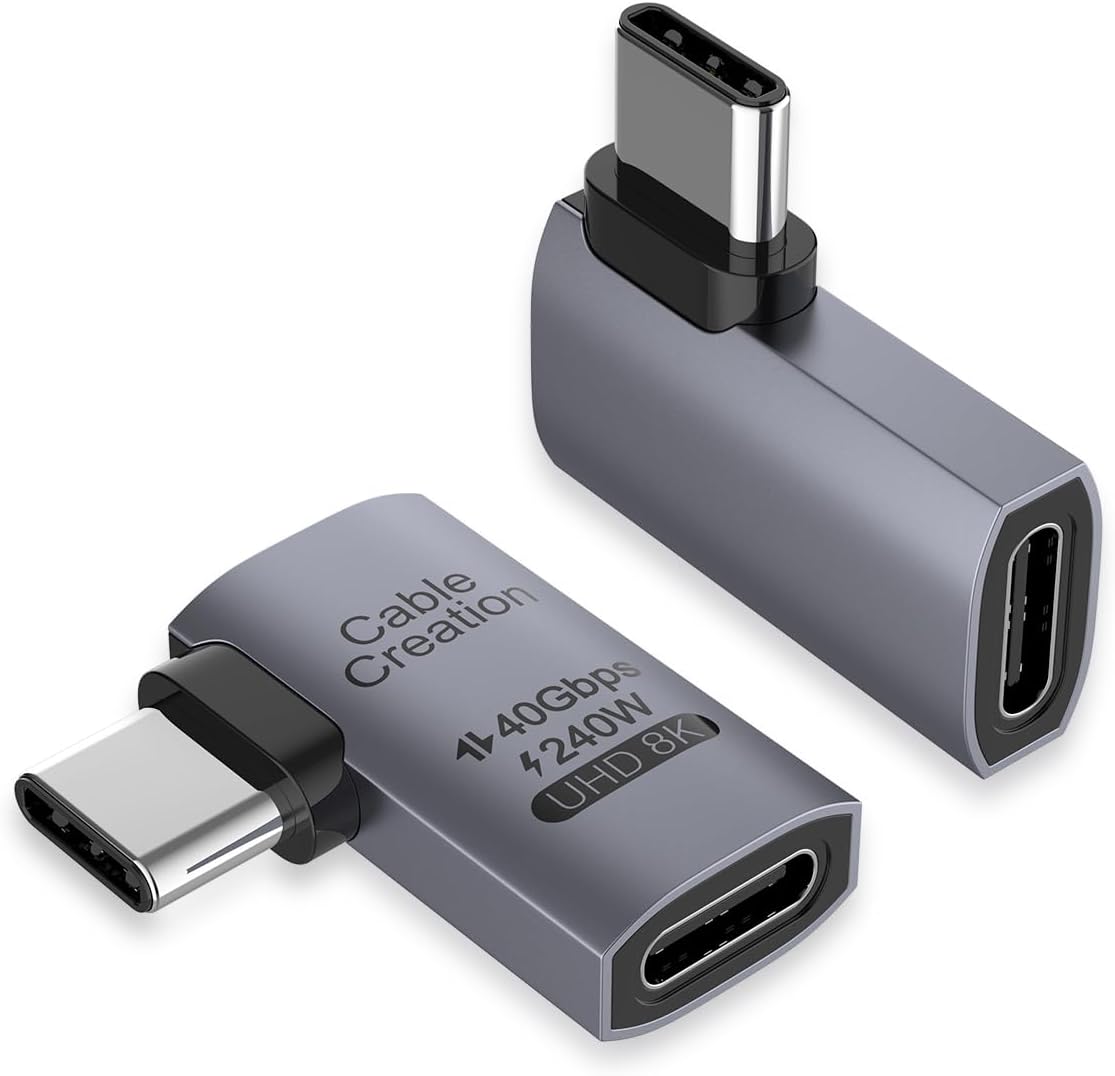
The CableCreation Right Angle USB C Adapter 2-Pack has a 4.6 rating and combines broad charging capability with a compact, travel-friendly form. It supports up to 240W charging, up to 40Gbps data transfer, and video output as high as 8K@60Hz, making it suitable for demanding compatible laptops and USB4 accessories.
We may earn a commission when you buy through this link, at no additional cost to you.
The listed display support includes single 8K@60Hz, 5K@60Hz, and dual 4K@60Hz configurations. That range is useful for users connecting a USB-C laptop to one or two monitors. Its right-angle connector changes the cable direction to reduce wear on the cable and device input, while the lightweight body is easy to carry in a pocket, backpack, or laptop sleeve.
Maximum performance requires a full chain of compatible equipment. A USB-C port without USB4 or Thunderbolt capabilities, a limited cable, or an unsupported display can reduce charging, transfer, or video performance. The included two adapters are also less generous than the four-piece Vanjua or three-piece UGREEN and Basesailor bundles, although they cover several common travel and desk locations.
CableCreation is a strong all-around recommendation for owners of USB4 laptops who need flexible cable direction, substantial charging, fast storage access, and advanced monitor support. It also includes a 24-month product warranty and lifetime technical support according to the supplied information. Those extras add confidence, while the compact two-pack format is convenient for travel.
Support for up to 240W and backward-compatible lower levels makes the adapter suitable for devices with widely varying power requirements. A compatible charger and cable are required to reach the stated maximum.
The listed 8K@60Hz, 5K@60Hz, and dual 4K@60Hz modes are useful for compatible laptop-and-monitor workstations. The selected resolution depends on the source device, adapter, cable, dock, and display.
We may earn a commission when you buy through this link, at no additional cost to you.
The most useful right angle USB C adapter is not necessarily the one with the highest specification. Start with your device and cable requirements, then prioritize direction, charging power, data protocol, display support, physical clearance, and the number of adapters you expect to use.
Charging capacity is one of the clearest ways to separate these adapters. Models supporting up to 100W are suitable for many phones, tablets, gaming handhelds, and a large selection of laptops. Adapters that support up to 240W USB PD 3.1 provide more headroom for high-power notebooks and future-oriented setups, but the connected charger, cable, and device must all support the higher level. A higher maximum does not automatically mean a smaller device will charge faster or that every device will accept the full wattage.
The 40Gbps models use USB4 or compatible Thunderbolt 3 and 4 equipment for high-speed file transfers, external SSDs, docks, and backups. The premium 80Gbps option uses USB4 V2.0 and can handle even larger workflows with compatible Thunderbolt 5 hardware. The source port, cable, adapter, and storage device must form a compatible chain. If any component falls back to a slower USB-C mode, the transfer rate will be lower than the headline specification.
Video needs range from 4K@60Hz on several 100W models to 8K@60Hz on certain 240W USB4 adapters. The newest USB4 V2.0 option goes further, with listed support for 16K, dual 8K or 6K displays, and triple 4K configurations. Display support also depends on DP Alt Mode, the host device, the cable, any intermediate dock, and the monitor itself. Buyers should identify the resolution and refresh rate they actually need instead of assuming every compatible USB-C port can drive every advertised mode.
A right-angle adapter can make a cable sit more comfortably beside a laptop, above a handheld console, or near a wall, but the wrong orientation can still create an awkward bend. A left-and-right set gives more placement flexibility, while a multi-angle bundle helps with different furniture and workspaces. Consider where the port sits, how the device is held, which direction the cable can travel, and whether neighboring ports or accessories remain accessible.
The male connector must be able to enter the USB-C port fully, and a case can materially affect that fit. Some product information explicitly warns against thick or bulky cases, while other adapters emphasize an ultra-thin body that fits beside neighboring ports. A low-profile design can also make a handheld more comfortable during play, but the right angle itself is not enough if the case surrounds the opening. Check the device manufacturer's case design and the adapter's clearance guidance before ordering.
Aluminum alloy housings are common in this category and can offer useful resistance to scratches, wear, and heat. Durable connectors and a non-slip exterior also matter because repeated insertion and removal often create more wear than static cable use. Some products report cycle testing, while others emphasize a compact metal frame. While these construction details can indicate attention to longevity, buyers should also consider whether the adapter becomes warm during sustained high-power charging or maximum-speed transfers.
Two-, three-, and four-piece bundles offer different levels of convenience. A two-pack is generally enough for separate laptop and mobile-device use. Three or four adapters can cover travel, office, and home locations or provide several directional choices. The tradeoff is bulk: every extra adapter needs storage, and a larger set may be unnecessary if only one device is regularly connected. Also consider whether the housing blocks another port, which can matter on laptops with closely spaced USB-C connectors.
The listed device names provide a useful starting point, but protocol support is the more important consideration. USB-C devices can support charging, data, video, or only some of those functions. Thunderbolt 3 and 4 systems, USB4 devices, and USB4 V2.0 hardware have different capabilities, and features such as 240W charging, 40Gbps data, 8K video, or 16K output require corresponding support throughout the connection. Check the specifications of the exact device and cable before purchasing.
Before connecting the adapter, inspect the male plug, device port, and cable for debris, bent contacts, or visible damage. Confirm that the USB-C opening is fully accessible and that any protective case does not obstruct the connector. Attach the adapter directly to the device first, then connect the charging cable or peripheral cable to the female end. This sequence makes it easier to confirm that each part is fully seated without applying unnecessary force.
For the best results, use a USB-C cable and charger that support the mode you expect. A 240W charging rating requires compatible high-wattage equipment, while 40Gbps or 80Gbps transfers require USB4 or appropriate Thunderbolt support on the source device, intermediary cable, and peripheral. For display use, check the adapter, host port, cable, dock, and monitor together, since a capable adapter cannot compensate for an unsupported link elsewhere in the chain.
Remove the adapter by holding its housing rather than pulling on the attached cable. Keep the connection aligned during insertion and removal, avoid sharply twisting the right-angle joint, and do not use the adapter as a handle for lifting a device. Store it in a pocket or pouch where the plug cannot collect grit, and periodically check for heat, discoloration, looseness, or unusual resistance. A damaged adapter or cable should be replaced rather than used to continue a high-power connection.
A right angle USB C adapter changes the direction in which a cable leaves a device, which can reduce sharp bends, sideways pull, and cable strain. It is especially helpful beside a desk, against a wall, or when a gaming handheld rests on a surface. Depending on the model, it may also support charging, data transfer, display output, or all three functions.
They can reduce wear by preventing the cable from being forced directly outward from the port. The improvement depends on using the correct angle for the device's position. A poorly oriented right-angle adapter can still create a tight bend, so buyers should consider left, right, and other available directions before choosing.
Normally, the device and charger negotiate an appropriate power level, but compatibility still depends on the entire cable and charging chain. The adapter's 240W rating is a maximum capability rather than a requirement. Use a reputable charger and cable that support the device and confirm that no unusual behavior occurs during charging.
Only when the host device, cable, adapter, and peripheral all support the relevant USB4 or Thunderbolt mode. If any component is limited, the connection will operate at a lower speed. A 40Gbps adapter also cannot turn a non-USB4 host into an 80Gbps system, and the 80Gbps option requires a compatible newer platform.
Many models support display output, commonly up to 4K@60Hz or 8K@60Hz, while the newest USB4 V2.0 option lists even higher configurations. The source USB-C port must support display functionality, and the cable, dock, and monitor must support the selected resolution and refresh rate. Verify these details before purchasing.
That depends on the case and adapter. Some slim adapters are designed to fit around many cases, while others explicitly warn that thick, bulky, or enclosed cases may prevent a full connection. The product should be able to seat fully without force. If your case surrounds the port opening, check the manufacturer's compatibility information before ordering.
They can be, provided the connector fits around the handheld's case and the device supports the desired charging or data function. Steam Deck, ROG Ally, Switch, and other compatible gaming devices are listed among the supported ecosystems for several products. A lower-profile connector can also make a handheld more comfortable while it is resting on a surface.
The featured adapters are described as plug-and-play devices and do not require additional drivers or software for normal operation. Functions such as data transfer and video still require compatible hardware and cables. If a connected feature does not work, check protocol support, cable specifications, display settings, and source-device limitations.
The UGREEN 90 Degree USB C Adapter 3 Pack is the most balanced overall recommendation, combining up to 240W charging, 40Gbps USB4 transfer, 8K@60Hz output, and three adapters. The JSAUX 2-Pack is a budget-friendly choice for common charging, storage, and 4K display tasks, while the Silkland 80Gbps USB4 V2.0 set is the premium option for owners of compatible high-end hardware.
Prioritize the requirements that affect daily use rather than selecting solely by the largest printed number. Check the connector direction, case clearance, charging standard, source-device protocols, cable capabilities, and display requirements. A lower-wattage adapter can be entirely adequate for a phone or handheld, while a high-power workstation may justify the newest USB4 V2.0 specification and multi-display support.
Specifications and availability can change over time, and current prices should be compared before purchase. Read the latest product listing, verify compatibility with the exact device and cable, and consider whether a multi-adapter bundle offers enough flexibility for your home, office, and travel setups.